Sample cashout calculations
The Sample Cashout Calculations screen is used to calculate, preview, and analyze cashout charges for retail end users based on usage, nominations, and contract quantities for a selected billing cycle. This screen helps users validate cashout logic and amounts before billing, ensuring transparency and accuracy in settlement calculations.
It provides a detailed, day-level breakdown of usage versus contract quantities and shows how cashout volumes and charges are derived.
Prerequisites
Before working with the Sample Cashout Calculations screen, ensure the following prerequisites are met:
- The user has permission to calculate and view cashout data.
- The LDC is configured and active.
- End users, facilities, and contracts are configured.
- Usage, nominations, and contract quantities exist for the selected cycle.
- Applicable cashout rules and prices are configured.
Procedure to calculate sample cashouts
Step 1: Navigate to the Sample Cashout Calculations screen
- Log in to the nGenue application.
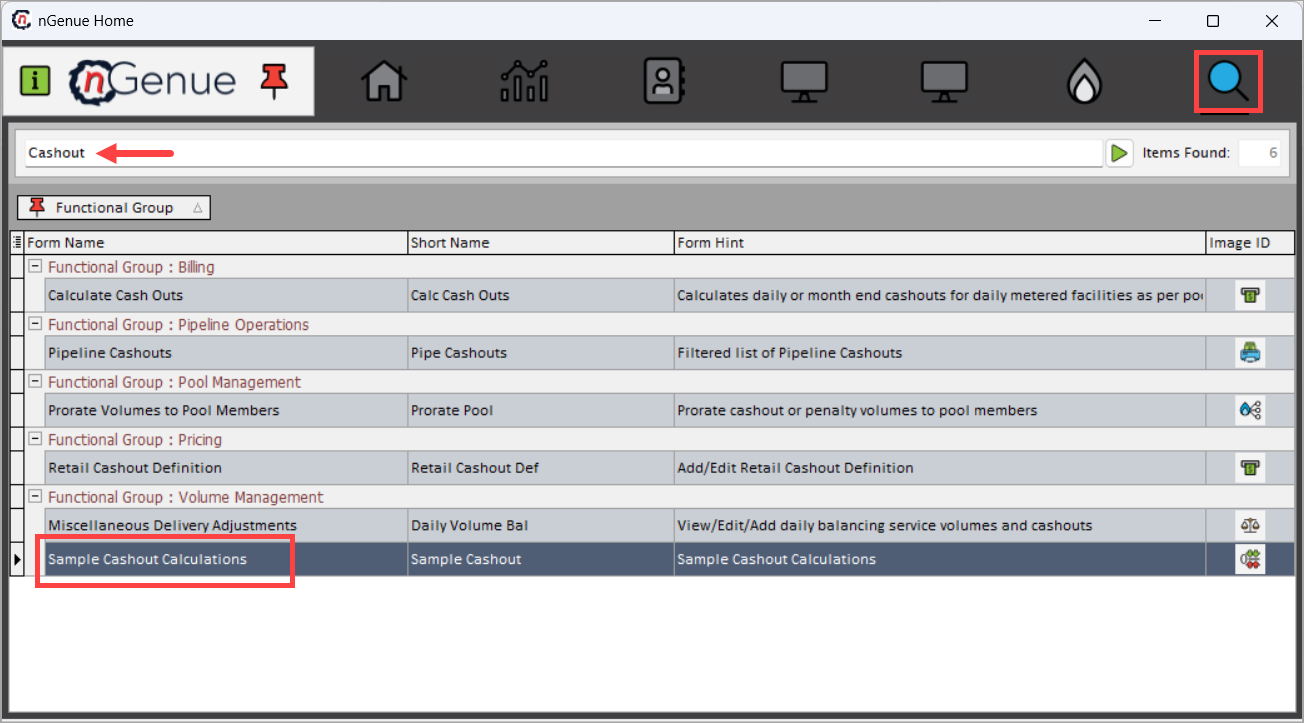
- Use the Search icon and enter Cashout in the search bar.
-
Double-click Sample Cashout Calculations to open the Sample Cashout Calculations (Volume Management) screen.
-
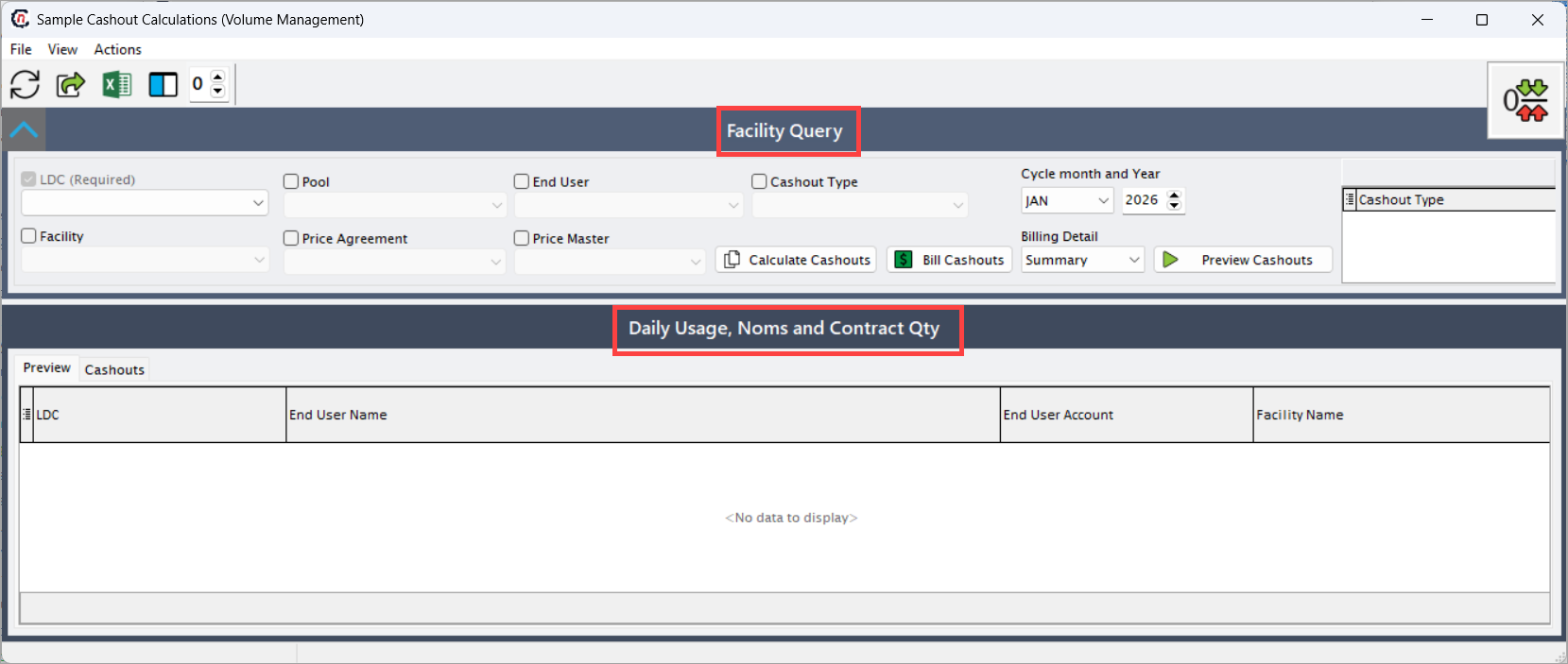
The screen is divided into two main sections:
- Facility Query – Used to define cashout calculation criteria.
- Daily Usage, Noms and Contract Qty – Displays calculated cashout results.
Step 2: Define facility query criteria
Use the Facility Query section to control the scope of the cashout calculation.
| Fields | Description |
|---|---|
| LDC (Required) | Select the Local Distribution Company for which cashouts are calculated. |
| Pool | Filters cashout calculations by pool. |
| Facility | Filters results for a specific facility. |
| End User | Filters cashout calculations for a selected end user. |
| Price Agreement | Filters based on the applicable price agreement. |
| Price Master | Filters cashouts using a selected price master. |
| Cashout Type | Filters calculations by specific cashout types, if required. |
| Cycle Month | Select the billing cycle month for the cashout calculation. |
| Year | Select the corresponding billing year. |
| Billing Detail | Determines whether cashouts are calculated at a summary or more detailed level. |
The right-hand panel displays the cashout types associated with the selected end user, providing visibility into which cashout rules will be applied.
Step 3: Calculate or preview cashouts
The following actions are available:
- Calculate Cashouts – Calculates cashout volumes and charges based on the selected criteria.
- Preview Cashouts – Generates a preview of cashout results without committing them for billing.
- Bill Cashouts – Makes the calculated cashouts available for downstream billing processes.

Step 4: Review daily usage, nominations, and contract quantities
The Daily Usage, Noms and Contract Qty section displays a detailed, row-level breakdown of cashout calculations.
Users can switch between:
- Preview – Displays calculated cashouts for review.
- Cashouts – Displays finalized cashout records.
Common data attributes displayed
| Fields | Description |
|---|---|
| LDC | LDC associated with the cashout record. |
| End User Name | Name of the end user subject to the cashout. |
| End User Account | Account number of the end user. |
| Facility Name | Facility associated with the cashout calculation. |
| Facility Account | Facility account identifier. |
| Cashout | Cashout code applied to the record (for example, ULC-OFO). |
| Cashout Name | Description of the cashout rule applied (for example, Usage Less Contract Quantity). |
| Total Cashout Volume | Total volume subject to cashout for the day. |
| Tier | Cashout tier applied based on configured thresholds. |
| Tier Volume | Volume applicable to the selected tier. |
| Cashout Price | Price applied to the cashout volume. |
| Cashout Amount | Calculated cashout charge amount. |
| Cashout Date | Gas day for which the cashout is calculated. |
| Usage | Actual usage volume for the day. |
| Contract Qty | Contracted quantity for the day. |
| Nomination | Nominated quantity for the day. |
| CQ to Bill | Contract quantity considered for billing. |
| Out of Balance | Difference between usage and contract or nominated quantities. |
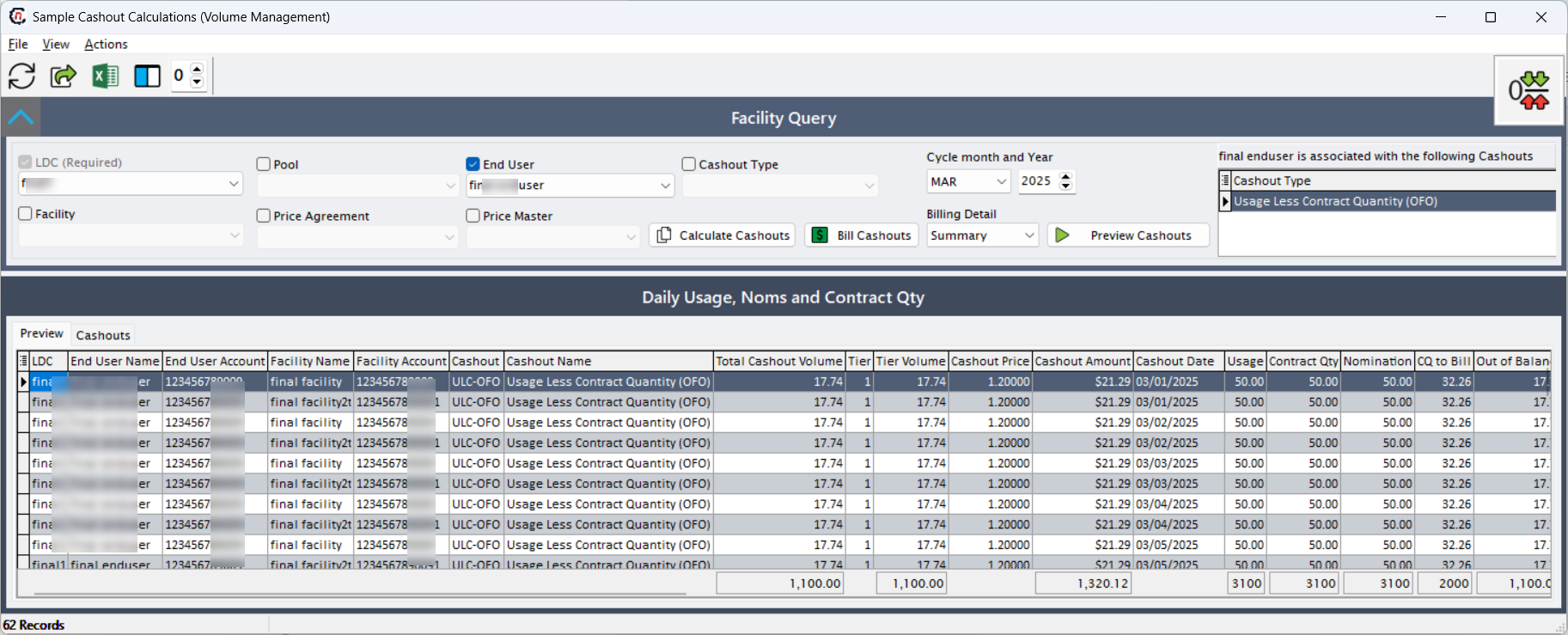
The grid provides a transparent view into how each daily cashout amount is derived, supporting audit and validation activities.
Key points
- Sample cashout calculations allow validation before billing.
- Cashouts are calculated at a daily level using usage, nominations, and contract quantities.
- Previewing cashouts helps identify discrepancies prior to billing.
- Cashout prices and tiers are driven by configured rules.
- This screen plays a critical role in settlement accuracy and dispute prevention.
Summary
The Sample Cashout Calculations (Volume Management) screen provides a detailed and auditable mechanism to calculate and review cashout charges before billing. By combining configurable query criteria with day-level calculation transparency, this screen ensures accurate application of cashout rules and supports reliable billing and settlement workflows within nGenue.