Managing LDC bill ready projections
This article provides a detailed overview of the LDC bill ready projections screen in nGenue. This screen enables billing analysts to compare, validate, and reconcile LDC provided billing projections against internally generated invoices before the final billing confirmation process. It ensures that both LDC-generated and nGenue-generated invoices align in terms of total billed amounts, customer-level data, and billing accuracy.
Prerequisites
Before using the LDC bill ready projections screen, ensure the following prerequisites are met:
- The user have the add or modify permissions for the LDC bill ready projections screen.
- The relevant LDC configuration is complete and active.
- The invoice generation process for the selected LDC is completed for the desired billing period.
- All related entities such as End users, Facilities, and Contracts are active and properly configured.
Procedure to manage LDC bill ready projections
Step 1: Navigate to the LDC bill ready projections screen
- Log in to the nGenue application.
-
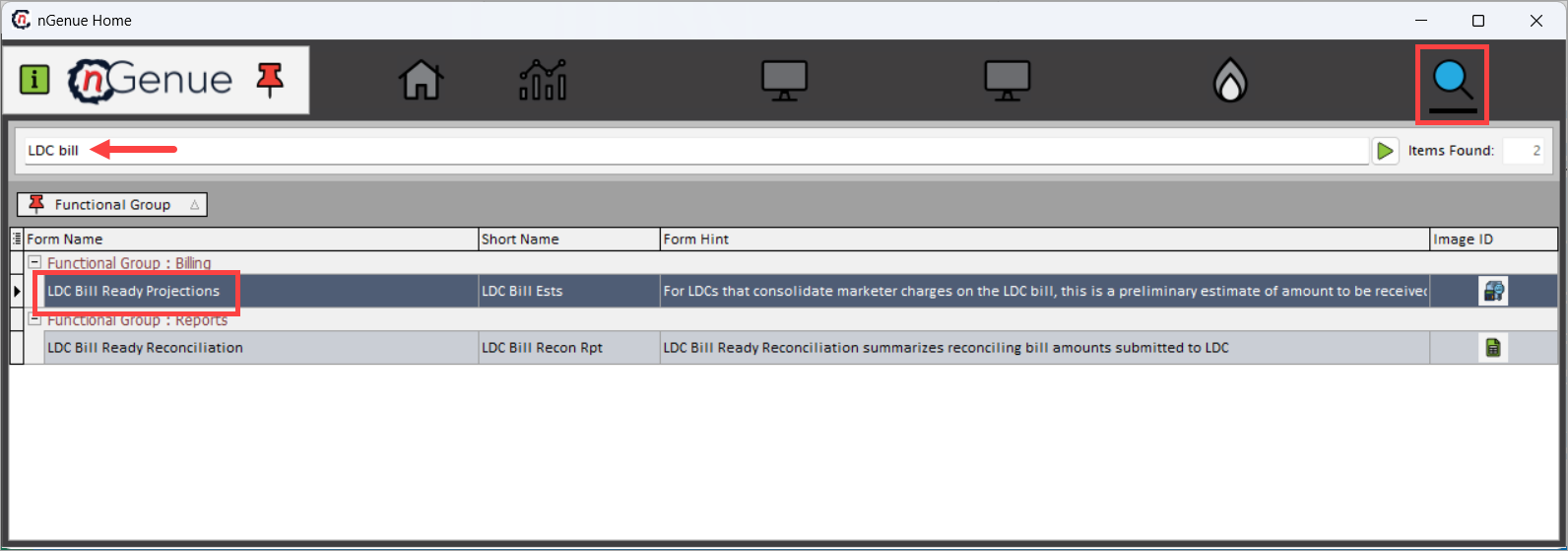
Click Search and enter LDC bill in the search bar.
-
Double-click LDC bill ready projections to open the LDC bill ready projections (billing) screen.
-
The screen is divided into two sections:
- Invoice selection section
- LDC billing confirmations section
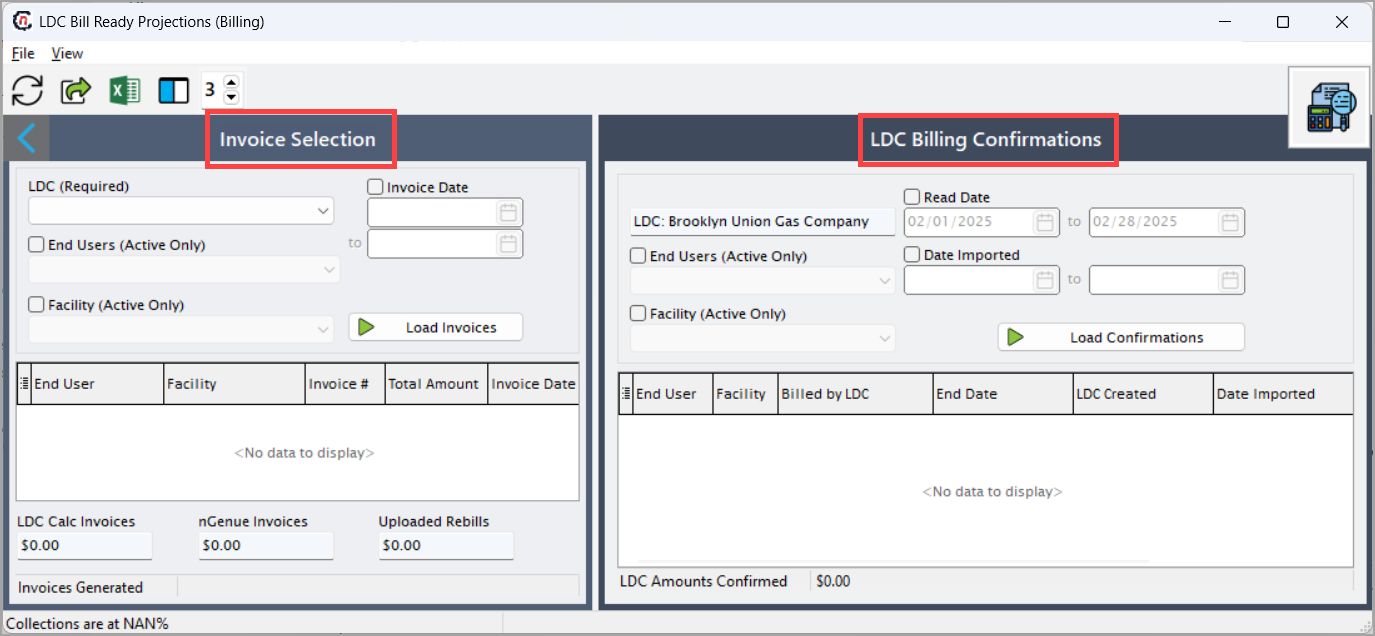
This provides a consolidated view of generated invoices and their corresponding LDC confirmations.
Invoice selection section
The Invoice selection section allows the user to filter and view all internally generated invoices for a particular LDC, filtered by delivery month or invoice date. It lists all invoices pending or available for reconciliation.
Fields Description LDC (required) Select the LDC from the dropdown. Only one LDC can be selected per session. Invoice date Filters invoices generated within a specific date range. Analysts can narrow the view to one billing cycle or compare multiple cycles. End users (active only) Displays invoices for active customers only. Helps avoid processing inactive or terminated accounts. Facility (active only) Filters invoices to a specific facility. Useful when analyzing billing projections for a particular service location. Load invoices Executes the search and populates the invoice grid based on selected filters. 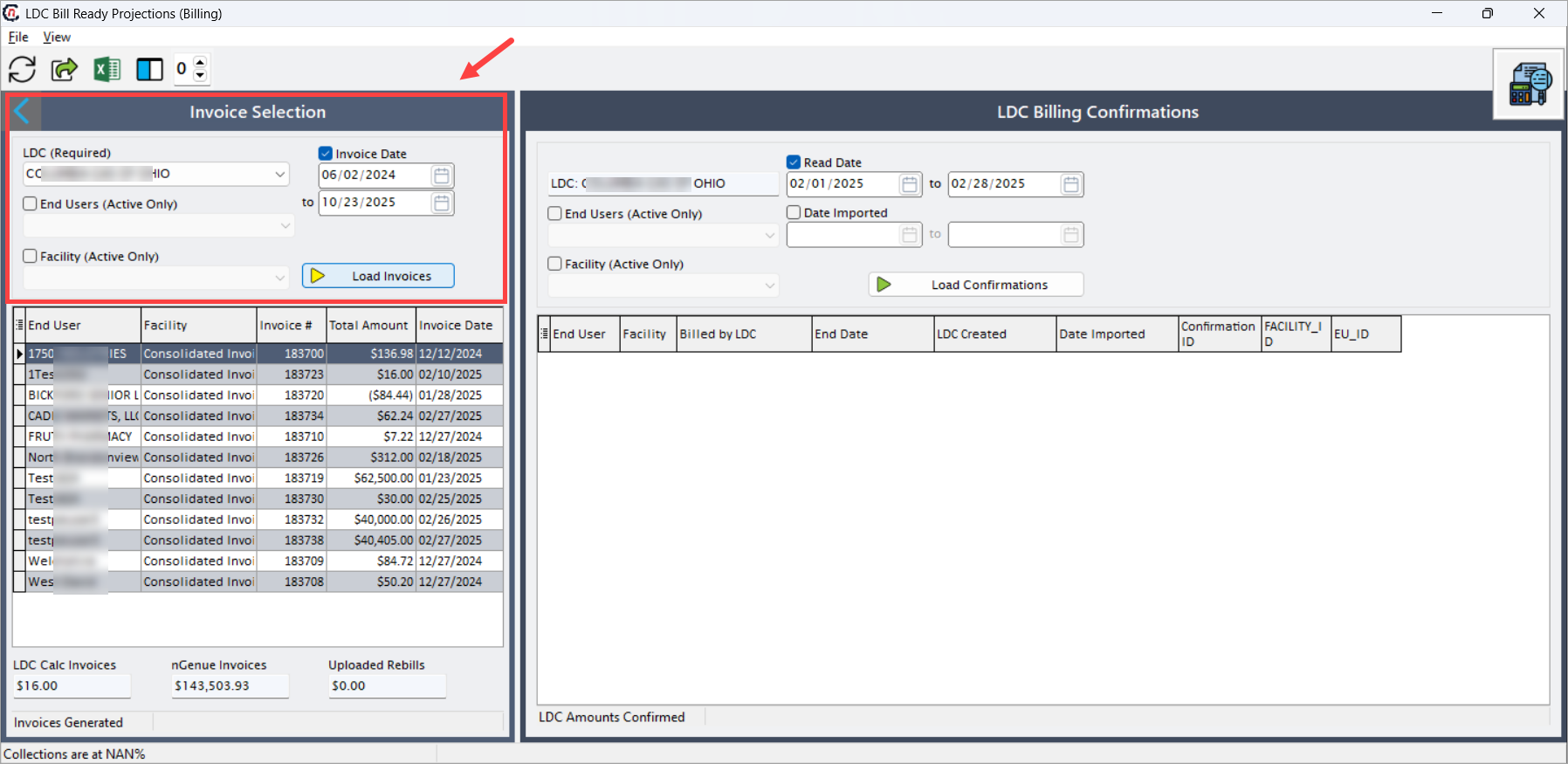
Once loaded, the following columns are displayed in the Invoice selection grid:
Fields Description End user Displays the customer name or business entity receiving the invoice. Facility Indicates whether the invoice is consolidated or facility-specific. Invoice # Unique identifier for each generated invoice. Total amount The total value of the invoice (charges + taxes + fees). Invoice date The date when the invoice was generated. Confirmed status Indicates whether the invoice has been confirmed or still pending reconciliation. 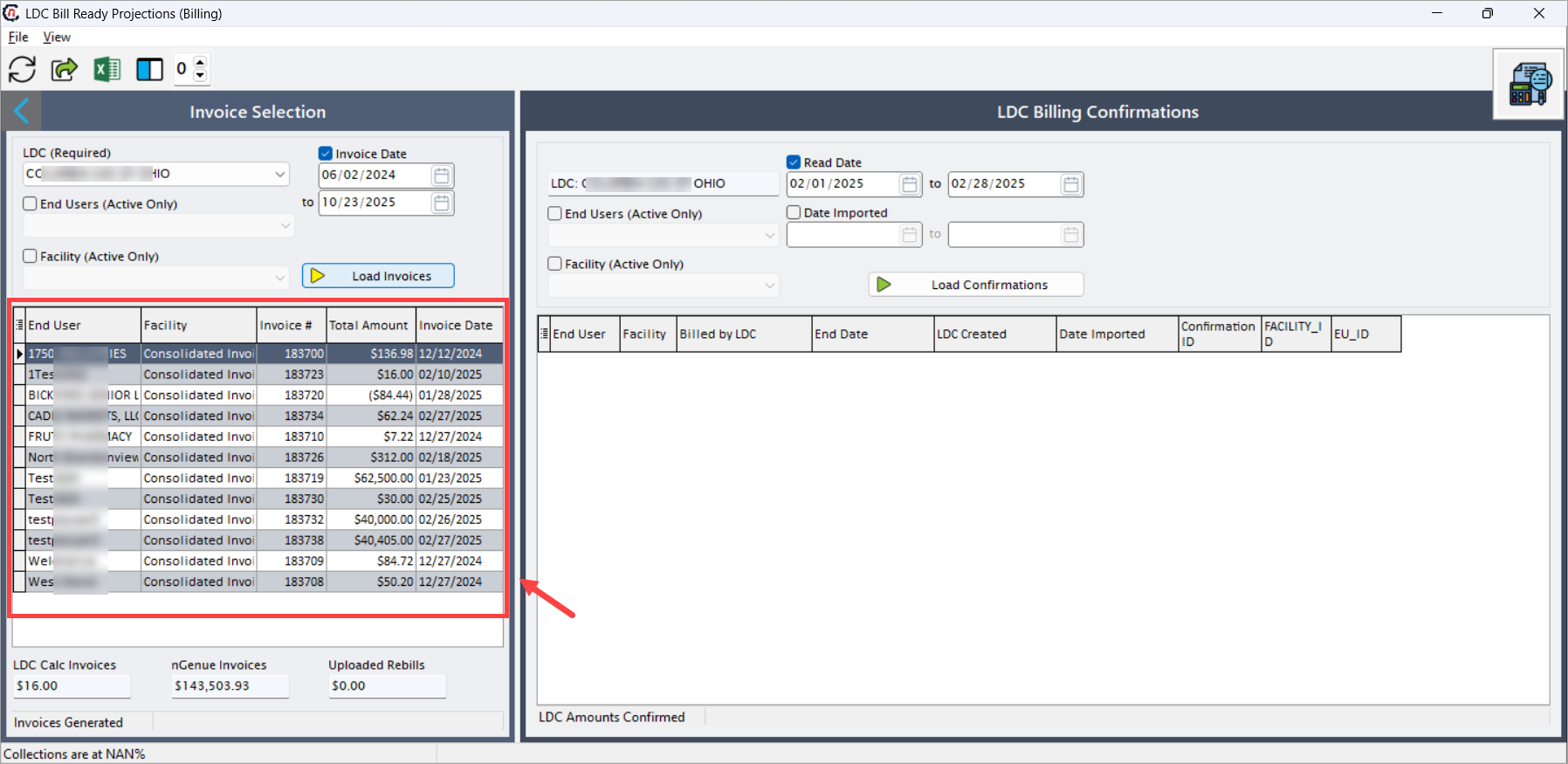
At the bottom of this section, cumulative billing metrics are shown:
Fields Description LDC calc invoices Displays the number of invoices calculated or projected by the LDC. nGenue invoices Shows the total value of invoices generated by nGenue. Uploaded rebills Reflects the total value of any rebilled items uploaded into the system. Invoices generated Indicates the completion status of invoice generation. 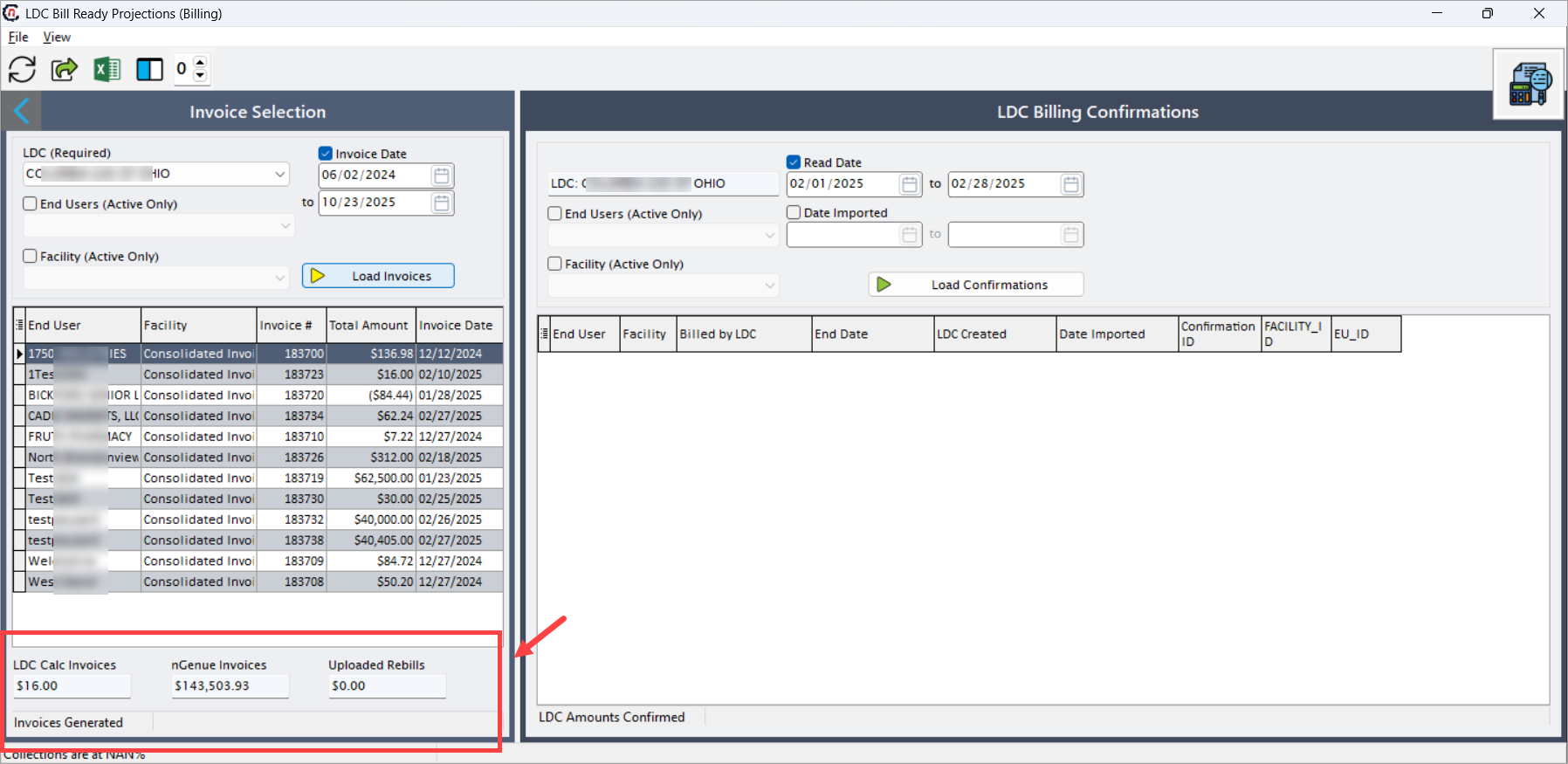
LDC billing confirmations section
The LDC billing confirmations section allows users to load, review, and validate confirmation data provided by the LDC. The data includes details on billing dates, amounts, and confirmation IDs. Analysts can load confirmations by applying date filters, ensuring accurate side-by-side validation.
Fields Description LDC Automatically populated based on the selection in the left panel. Displays the LDC whose confirmation data will be reviewed. Read date Filters confirmation records by the LDC-provided read dates. Typically corresponds to billing period start and end dates. End users (active only) Restricts the confirmation results to active customers. Date imported Filters confirmation records based on when the data was imported into nGenue. Facility (active only) Filters results for a specific facility under the selected LDC. Load confirmations Executes the query and displays all matching LDC confirmation records in the grid below. 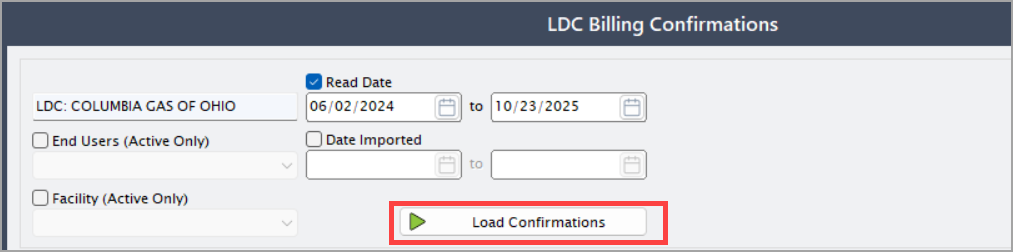
Once loaded, the following columns are displayed in the LDC billing confirmations grid:
Fields Description End user Customer or account name as provided by the LDC. Facility Identifies the physical service location associated with the billing confirmation. Billed by LDC Indicates whether the charge was billed directly by the LDC. Helps determine responsibility for invoice distribution. End date The service period end date for the billing record. LDC created The date when the LDC created or finalized the billing confirmation. Date imported The date the confirmation file was uploaded into nGenue. Confirmation ID Unique identifier for the confirmation record from the LDC. Facility_ID Internal reference ID for the facility. Used for cross-validation and troubleshooting. EU_ID Internal end-user ID linked to the confirmation record. Used for database and audit tracking.
Step 2: Verify the LDC amount with the generate invoice
At the bottom of the LDC billing confirmations section, displays the total confirmed billing amount based on LDC data. Analysts use this to reconcile against nGenue totals in the left panel.
Example scenario
A billing analyst, Sarah, needs to verify billing projections for the LDC ABC Gas for February 2025.
- Sarah selects ABC Gas from the LDC (required) field.
- She applies a date range of 02/01/2025 – 02/28/2025 under the Invoice date filter.
- She clicks Load invoices, which populates all invoices generated for that period.
- In the LDC billing confirmations section, Sarah applies the same date range under Read date and clicks Load confirmations.
- The system displays the LDC’s confirmation data side-by-side with the nGenue-generated invoices.
- Sarah compares totals, identifies discrepancies, and flags any mismatches for correction before the final billing reconciliation.
This process ensures that both systems reflect identical amounts before finalizing the billing cycle.
What’s next
After reviewing and validating billing projections:
- Proceed to the Generate billing items screen to finalize matched entries.
- Generate the LDC bill ready reconciliation report to document differences between nGenue and LDC totals.
- Confirm all validated invoices and post them to the billing ledger.
Summary
The LDC bill ready projections (billing) screen provides an essential control point in the billing cycle, bridging LDC-provided data and nGenue’s internal billing system. It ensures consistency, accuracy, and transparency in revenue recognition by offering a single interface to:
- Load and compare invoices generated by both systems.
- Detect mismatched billing amounts before confirmation.
- Maintain audit trails for every reconciliation cycle.
- Improve financial accuracy and compliance with utility billing requirements.
By using this feature, billing teams can confidently finalize invoices, ensuring both internal and external records remain synchronized.