Configuring LDC storage types
The LDC storage types screen is used to define and configure different storage type calculations for each Local Distribution Company (LDC). These configurations determine how storage-related calculations, such as peak-off peak limits, critical day limits, and storage factors, are computed at the end user or LDC pool level.
Through this screen, users can create, update, and maintain storage type definitions associated with a specific LDC. The system applies these configurations to ensure accurate storage calculations during allocation and billing processes.
Prerequisites
Before configuring LDC storage types, ensure the following prerequisites are met:
- The user role includes permissions to access and modify configurations in the LDC storage types screen.
- The required LDC is already created and active in the system through the LDC configuration screen.
- Any prerequisite master data (for example, pools, end users, facilities) is already configured.
Procedure to configure the LDC storage type
Step 1: Navigate to the LDC storage types screen
- Log in to the nGenue application.
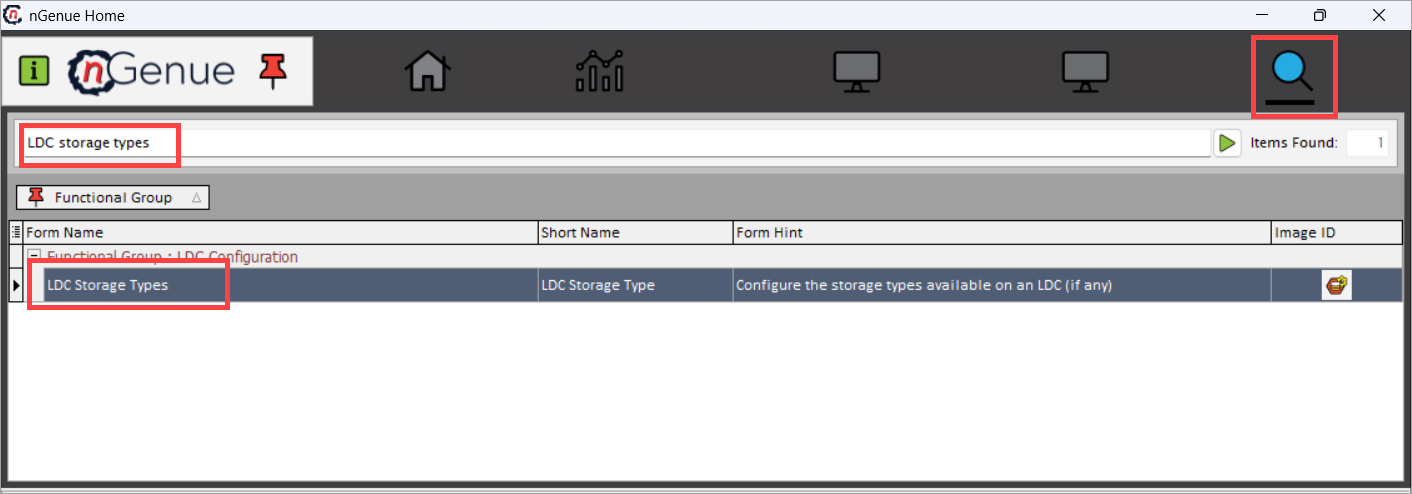
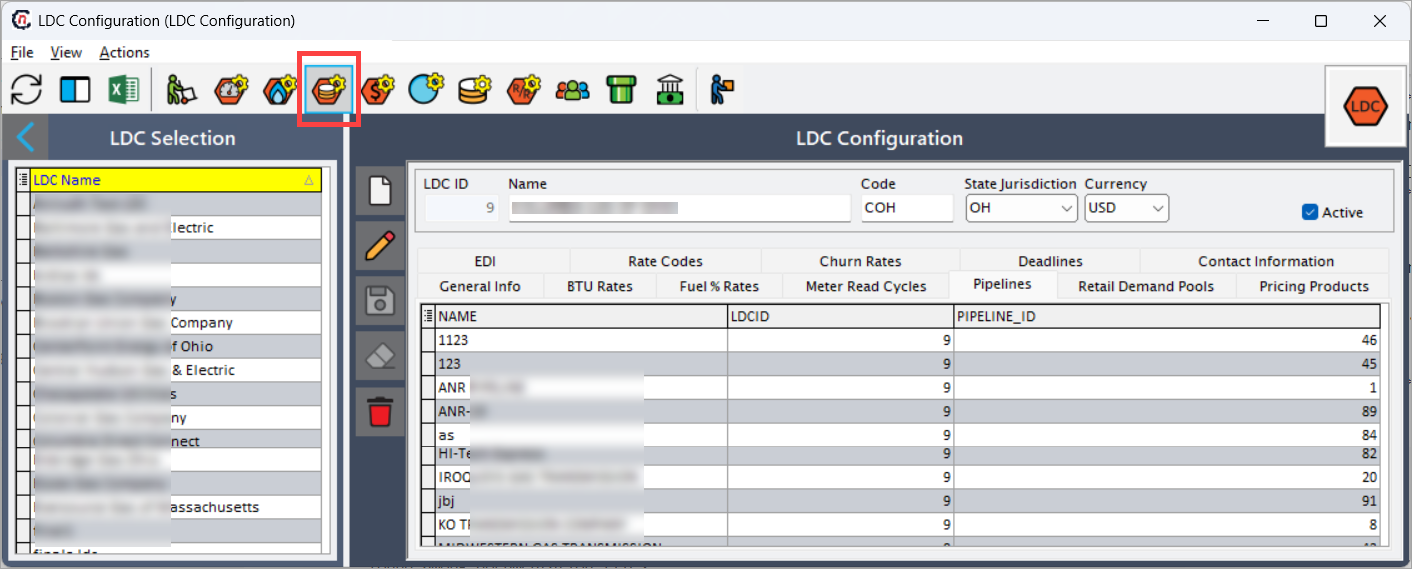
- Search for LDC storage types in the search bar or navigate via LDC Configuration screen > Open storage type definitions icon.
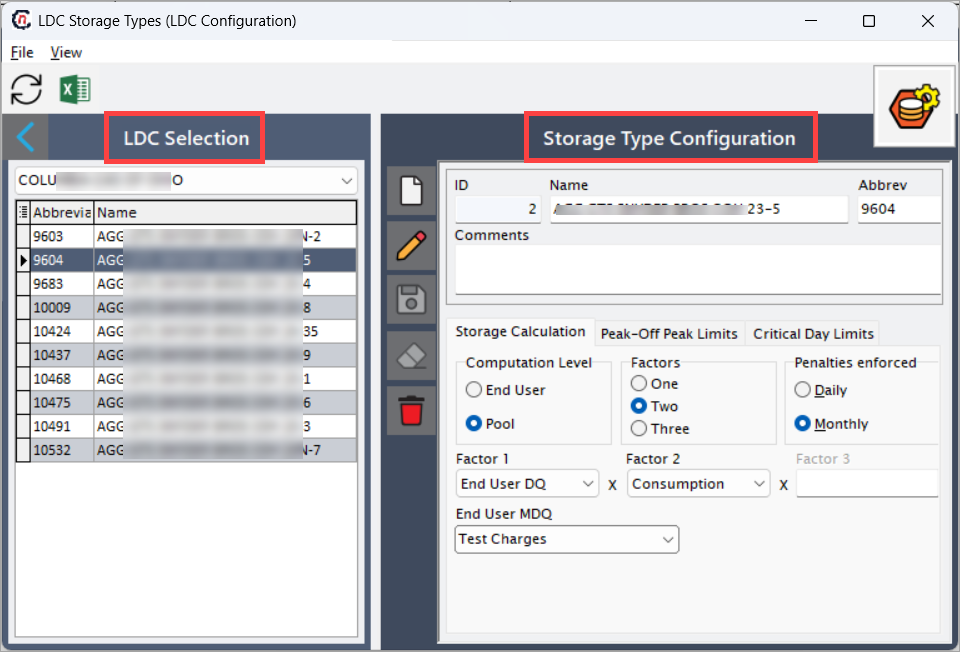
- The LDC storage types screen is divided into two sections:
- LDC selection: Lists all available LDC with their configured storage types.
- Storage type configuration: Displays the detailed configuration fields for the selected LDC storage type.
Step 2: Configure storage type details
- Select the desired LDC from the LDC selection dropdown.
- From the list of existing storage types, either select a record to edit or click the Add (
 ) icon to create a new one.
 -
Enter or update the required details in the Storage type configuration section. The table below provides detailed descriptions of all fields available on this screen:
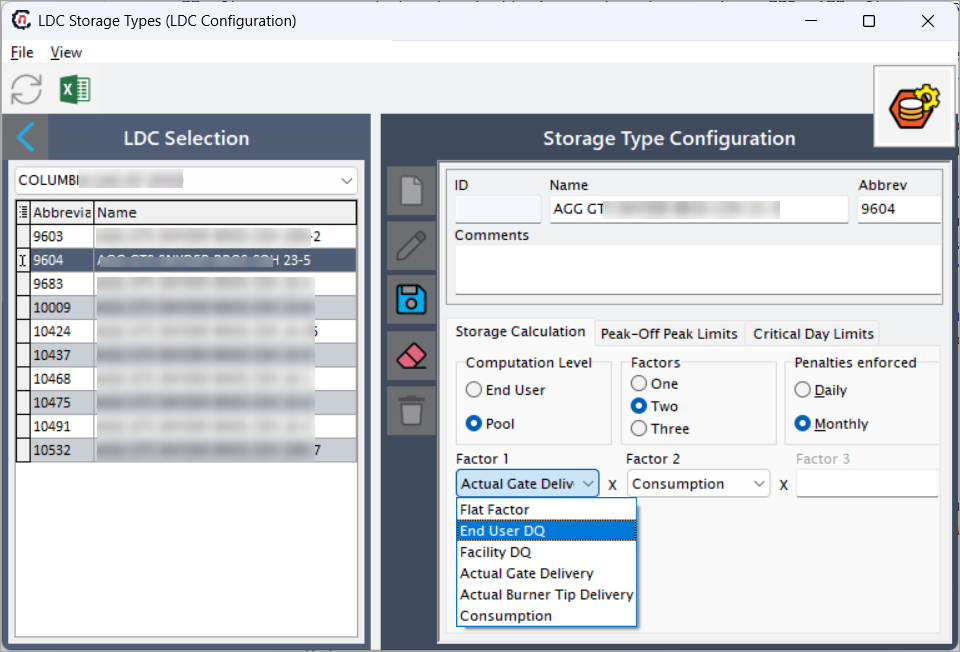
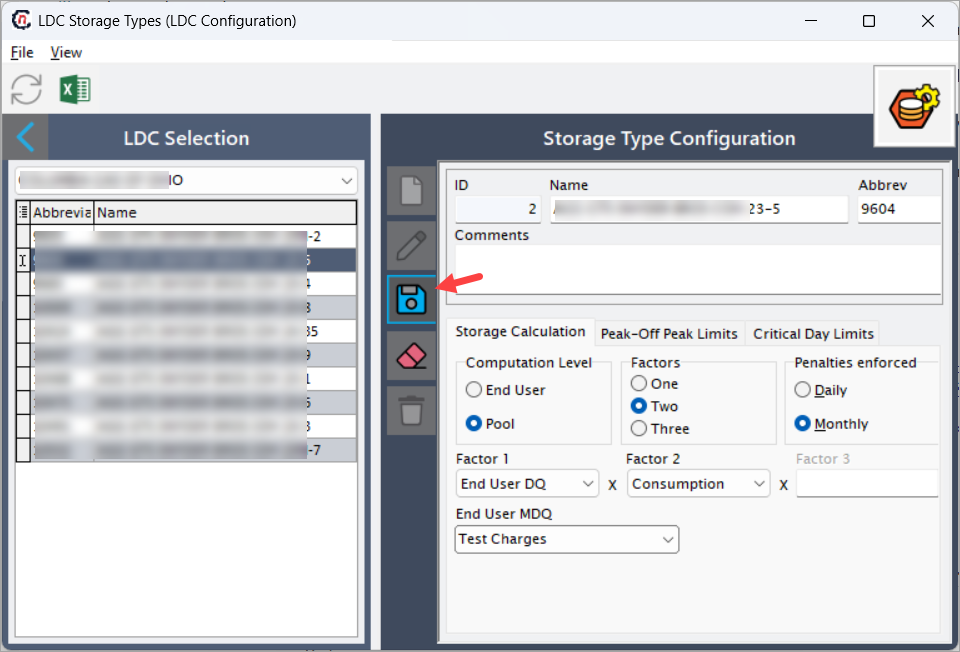
Fields Description ID Displays the unique system-generated identifier for the storage type record. The system auto-generates this ID after you configure and save a new storage type record. Name Enter the descriptive name of the storage type. Typically follows a naming convention that identifies the LDC and specific storage category (example, XYZ storage). Abbrev Enter a short abbreviation useful for quick reference of the storage type within the system. Comments Free-text field for adding notes or remarks related to the storage type configuration. Computation level Define the level at which the storage calculation is applied. The options include:
• End user: Storage is computed individually for each end user.
• Pool: Storage is computed collectively for all end users under a pool.Factors Specify how many calculation factors are used in the storage formula. The options include:
• One: Only one factor used.
• Two: Two factors multiplied to determine storage.
• Three: Three factors multiplied for complex calculation needs.Factor 1 Define the first factor used in the calculation formula. The dropdown options include:
• Flat factor: Applies a fixed value.
• End user DQ: Uses end user daily quantity as the base.
Note: When Factor 1 is set to End user DQ, another field, End User MDQ, appears. The user can select an MDQ already configured in the End user MDQ screen.
• Facility DQ: Uses facility daily quantity.
• Actual gate delivery: Uses actual delivered volume at the gate.
• Actual burner tip delivery: Uses the volume measured at the burner tip.
• Consumption: Uses total consumption volume.Factor 2 The second factor in the calculation formula (available only if Factors = Two or Three). The options are the same as Factor 1. Factor 3 The third factor in the calculation formula (available if Factors = Three). Penalties enforced Define the penalty frequency applicable for the configured storage type:
• Daily: Penalty calculations performed daily.
• Monthly: Penalty applied on a monthly basis.
Step 3: Configure peak–off peak limits
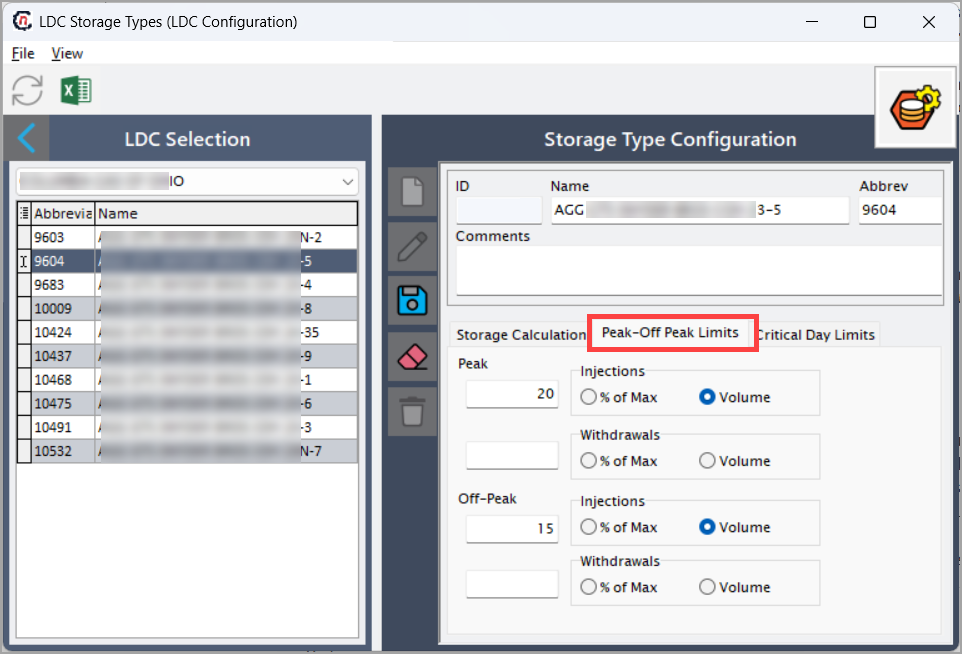
The Peak–off peak limits tab allows users to define storage limits during peak and off-peak periods. These limits determine how much storage can be injected or withdrawn during these operational windows.
| Fields | Description |
|---|---|
| Peak – injections | Specify the limit for storage injections during peak periods. The user can define the limit as either: • % of max: Percentage of maximum storage capacity. • Volume: Fixed volume value. |
| Peak – withdrawals | Specify the limit for withdrawals during peak periods. Define as % of max or Volume. |
| Off-peak - injections | Specify the limit for storage injections during off-peak periods. Define as % of max or Volume. |
| Off-peak – withdrawals | Specify the limit for storage withdrawals during off-peak periods. Define as % of max or Volume. |
Tip
Use % of max when you want dynamic limits based on total capacity. Use Volume when fixed thresholds are preferred.
Step 4: Configure critical day limits
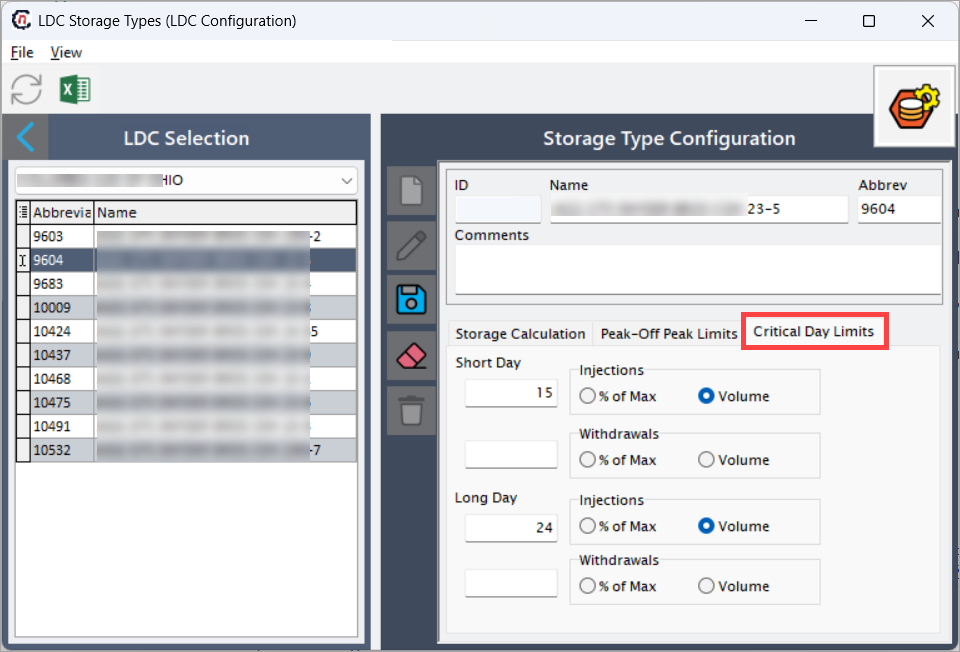
Select the Critical day limits tab to define storage limits during short day and long day conditions. These limits are applied to critical operation days defined by the LDC.
| Fields | Description |
|---|---|
| Short Day – injections | The user can define the injection limit for short critical days as % of max or Volume. |
| Short Day – withdrawals | The user can define the withdrawal limit for short critical days as % of max or Volume. |
| Long Day – injections | The user can define the injection limit for long critical days as % of max or Volume. |
| Long Day – withdrawals | The user can define the withdrawal limit for long critical days as % of max or Volume. |
Step 5: Save the configuration
- After entering all details, click the Save icon to store the configuration.
- To make changes to an existing configuration, use the Edit (
 ) icon. To remove an unwanted configuration, click the Delete (
 ) icon.
 - Click Cancel changes (
 ) to reload data if necessary.
Example scenario
If an LDC named XYZ uses pool-level storage calculations based on actual gate delivery multiplied by consumption, the user would configure:
- Computation level = Pool
- Factors = Two
- Factor 1 = Actual gate delivery
- Factor 2 = Consumption
- Penalties enforced = Monthly
This setup ensures that storage is calculated monthly for each pool using the actual delivered quantity and total consumption.
What’s next
After saving the LDC storage type configuration:
- The defined storage type will be used in various storage allocation and billing processes.
- It will automatically reflect in dependent screens where storage computations are required (example, LDC pool management, End user configuration).
Summary
The LDC storage types screen allows users to define detailed storage calculation logic for each LDC. Once configured, these parameters ensure accurate and automated computation of storage-related charges and limits during operational and billing cycles.