Configure Reinstatement transactions (814)
The Reinstatement transactions (814) is configured when a cancel pending drop request is submitted to prevent the termination of a scheduled service drop through the EDI system. A valid account number, price agreement, and rate code are required for the reinstatement process. Once processed, the request notifies the utility to restore service under the existing agreement. The system tracks the request through outbound submission and inbound utility confirmation, ensuring timely status updates and audit logging.
Submitting a cancel pending drop request
Follow the below steps to manually initiate and submit a reinstatement request:
- Log in to the nGenue application.
- Click Search icon, enter End user in the search bar.
- Double-click End user.
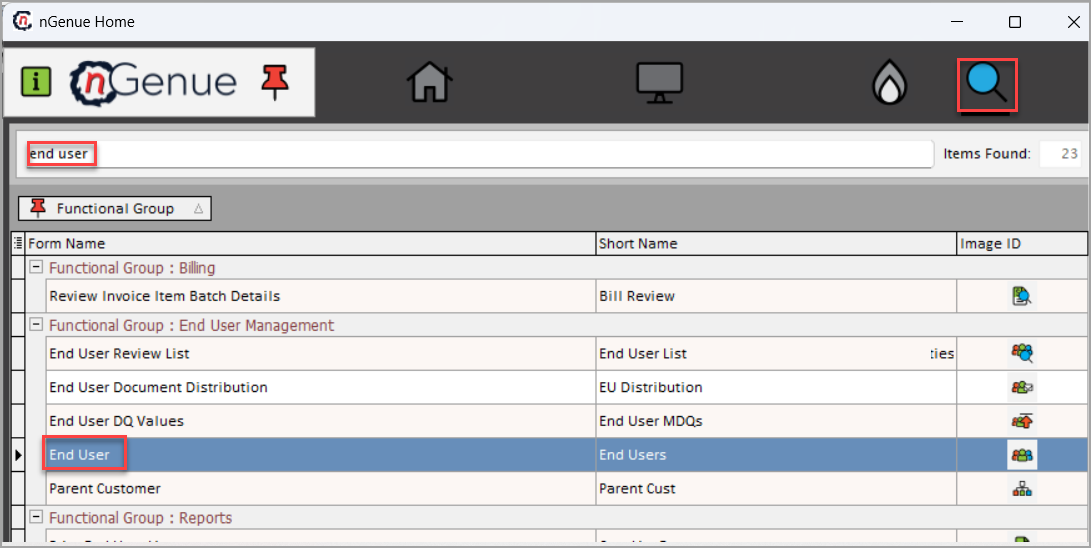
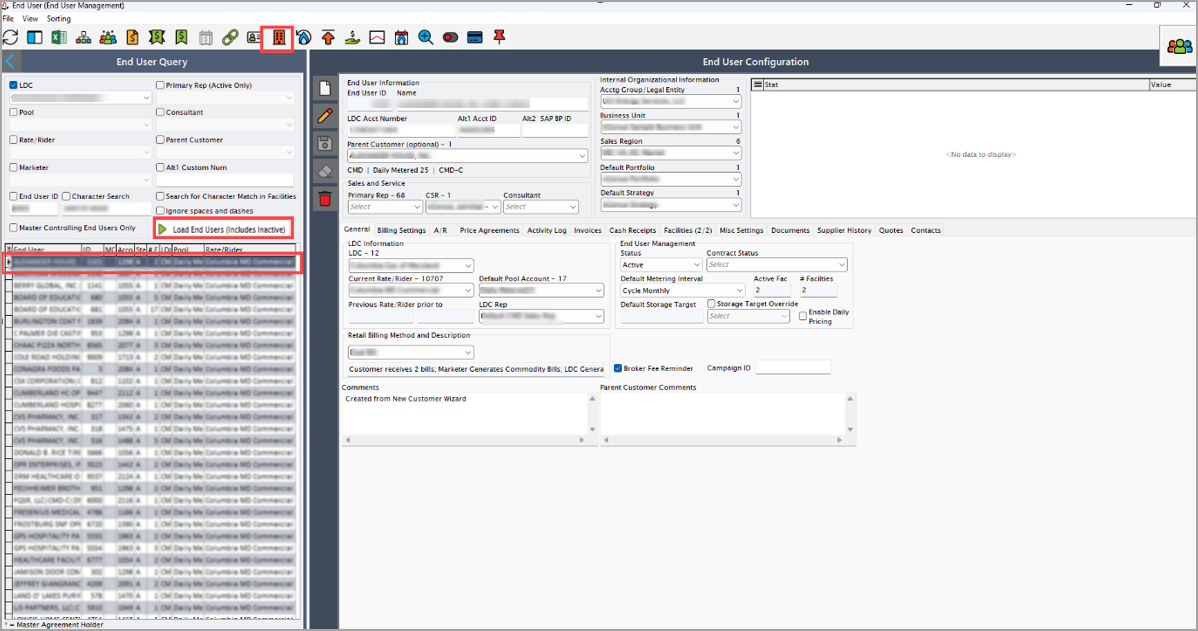
- In the End user screen, select LDC and click on the Load end users button.
- Choose the facility from the loaded results.
- Click on the Facility icon to open the Facility screen.
-
In the Facility screen, go to the Facility details section and locate Pending EDI actions.
-
Right-click anywhere on the Pending EDI actions section and choose Add new EDI action for this facility.
- Select Cancel pending drop request from the dropdown.
- Choose Price agreement, Cancellation reason and Schedule action date if applicable.
- Click Accept.
-
After submission, the request enters the workflow:
- EDI service processes the request as per the scheduled date.
- An outbound file is generated and transmitted to the utility.
- The Facility screen shows status as Awaiting response in the EDI Activity log.
Post-submission of a pending request
Outbound process (Supplier to utility)
- Request is logged into EDI schedule.
- EDI service processes the request at the scheduled time.
- An outbound file with customer details will be generated.
- Files are processed by 15:00 and transmitted to the utility by 16:00 through FTP and web portal and can be tracked in Activity log of EDI schedule.
- Transaction will be displayed in Pending EDI actions and Activity log tab of the EDI schedule.
Inbound process (Utility to supplier)
- Utility sends a Drop response file to the Marketer FTP.
- EDI server processes the inbound file.
- File will be decrypted and validated and drop status will be updated.
-
System retrieves file from FTP location which will be decrypted and validated.
-
If the response is accepted:
- Cancellation will be logged in the Activity log.
- Cancellation date will be recorded and displayed.
- In the Facility screen, status will be updated to Cancel pending drop accepted.
-
If the response is rejected:
- Rejection will be recorded in the Activity log.
- A review task will be created.
- File will be archived for the records.
Note
- Processing times and validations vary based on utility requirements.
- Rejected requests require manual review and corrective action before reprocessing.
- All transactions are logged in the activity log for record keeping.
-
On submitting the cancel pending drop request, the request will be logged and processed and the reactivation of previously cancelled services will be implemented as scheduled. It helps maintain seamless operations by ensuring the services is restored correctly and without delay.