Print retail volume summary
The Print Retail Volume Summary screen is used to generate and print a summarized view of retail gas volumes for a selected billing cycle, LDC, and pool. This report provides a consolidated snapshot of retail volumes and is commonly used for operational review, billing validation, and audit purposes.
The screen allows users to configure report parameters and output the report using print, print preview, or print setup options.
Prerequisites
Before generating the Retail Volume Summary report, ensure the following prerequisites are met:
- The user has permission to access and print retail volume reports.
- The selected cycle month and year are available for reporting.
- The LDC and Pool are configured and active in nGenue.
- Retail volume data exists for the selected criteria.
Procedure to generate the retail volume summary report
Step 1: Navigate to the Print Retail Volume Summary screen
- Log in to the nGenue application.
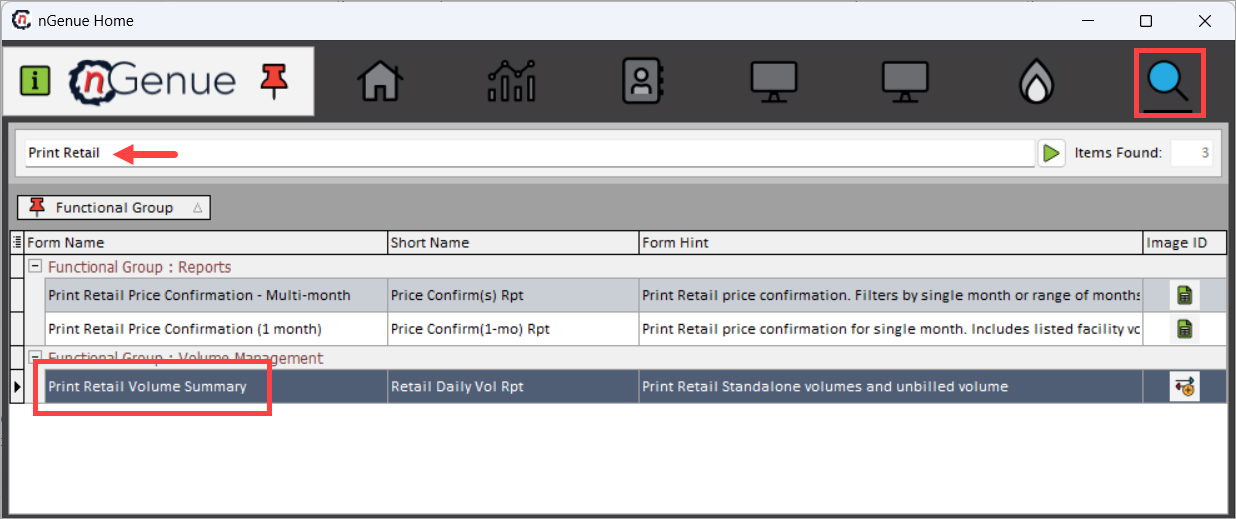
- Use the Search icon and enter Print Retail Volume.
-
Double-click Print Retail Volume Summary to open the respective screen.
-
The screen displays the Report Options section, which is used to define report parameters before printing.
Step 2: Define report options
Use the Report Options section to specify the scope of the report.
| Fields | Description |
|---|---|
| Printer (Default) | Displays the default printer configured on the user’s system (for example, Microsoft Print to PDF). |
| Cycle Month | Select the billing or reporting month for which the retail volume summary is generated. |
| Year | Select the corresponding year for the selected cycle month. |
| LDC | Select the Local Distribution Company for which the report is generated. |
| Pool | Select the pool associated with the selected LDC. |
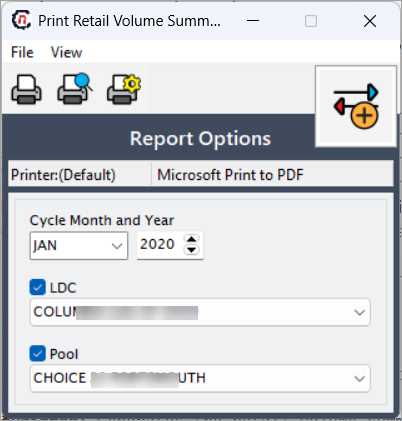
These selections control the data included in the generated retail volume summary.
Step 3: Generate the report
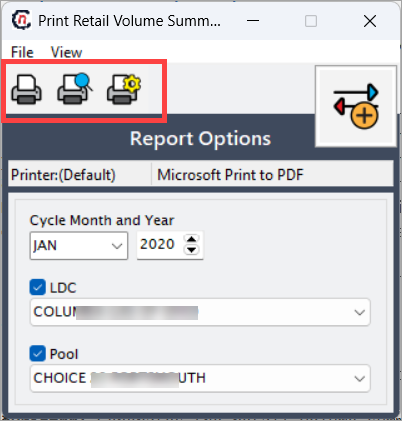
The following actions are available on the screen:
-
Print: Generates the retail volume summary report and opens it in a new tab for printing.
-
Print Preview: Opens the retail volume summary report in a new tab, allowing users to review the report layout and content before printing.
-
Print Setup: Allows users to configure printer-related settings such as printer selection and page setup prior to generating the report.
Note
When Print or Print Preview is selected, the report is rendered in a new tab, from where it can be printed or saved, depending on the printer configuration.
Key points
- The report output is controlled entirely by the selected cycle month, year, LDC, and pool.
- Print and Print Preview both open the report in a new tab for printing or review.
- Print Setup does not generate the report but prepares printer configuration settings.
- The report provides a summarized, read-only view of retail volume data.
Summary
The Print Retail Volume Summary screen provides a simple and controlled way to generate printable retail volume reports for a specific billing cycle. By allowing users to preview, configure, and print reports in a new tab, this screen supports operational review, billing validation, and audit activities within nGenue.