Reviewing total entitlements balance
The Total entitlements balance (credit and risk) screen provides a consolidated view of contractual entitlements, exercised volumes, and remaining capacities under each deal. It helps monitor capacity utilization, ensuring compliance with contractual limits and supporting effective credit and risk management. This functionality offers clear visibility into entitlement usage across contracts, enabling accurate reconciliation and proactive management of operational and financial exposure.
Reviewing total entitlements balance is typically required:
- At the end of each gas day to validate entitlement usage versus exercised volumes.
- Before generating daily nominations to confirm available capacity.
- When approaching MDQ or contractual limits to prevent overuse.
- During credit and risk analysis to assess entitlement utilization and potential exposure.
Prerequisites
Before working on the Total entitlements balance screen, ensure the following prerequisites are met:
- Ensure the nGenue application is installed and use valid login credentials to log into the application.
- User permissions: Configure the user permissions including User type, Security user, Security group, Security assign user, and Security assign permissions in their respective screens to enable access to the Total entitlements balance screen.
- Ensure the Deal management and Pipeline are properly configured.
Procedure to review total entitlements balance
Step 1: Navigate to the Total entitlements balance screen
- Log in to the nGenue application.
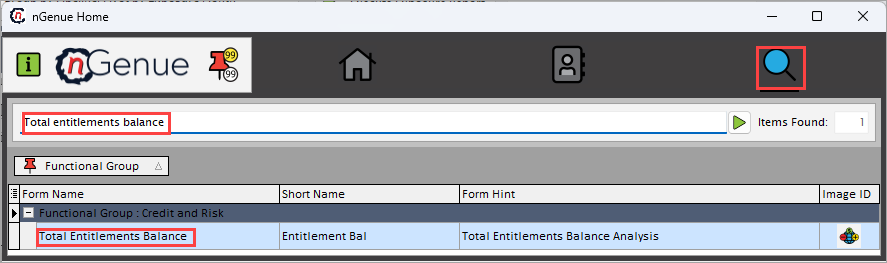
- Click the Search icon and enter Total entitlements balance in the search bar.
-
Double-click Total entitlements balance to open the respective screen.
-
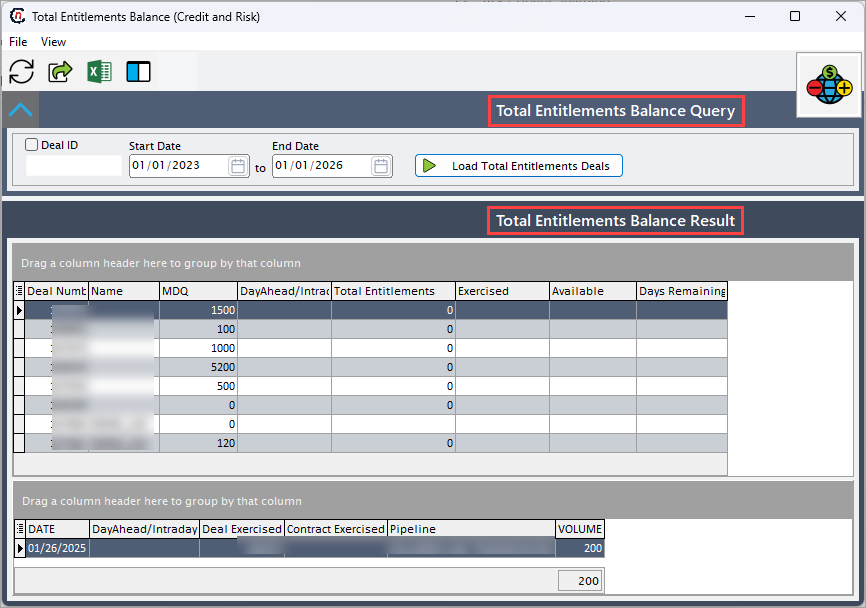
In the Total entitlements balance (credit and risk) screen has two sections:
- Total entitlements balance query: This section provides filters that defines the parameters to fetch the total entitlements deal records.
-
Total entitlements balance result: This section displays the entitlement balances and related deal-level details.
Step 2: Execute total entitlements balance query
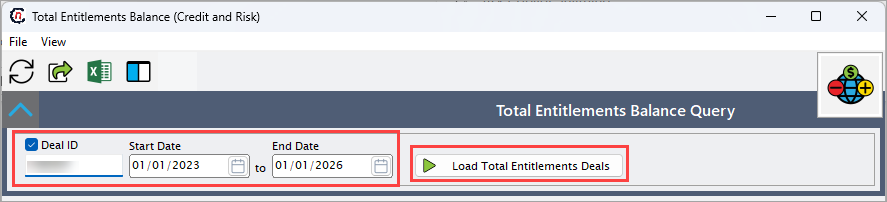
- Provide Deal ID and select the Start date and End date to load related total entitlements deals within that specified period. Deal ID identifies the specific contract or deal to review and date range defines the reporting period for entitlement balances.
-
Click Load total entitlements deals to display the total entitlement balance results.
Step 3: Review total entitlements balance results
-
Upon executing the query, the Total entitlements balance result section displays the following fields for each record which are provided in the table below. These data fields can be rearranged dynamically using drag-and-drop functionality to organize the view.
Fields Description Deal number Specifies the reference number assigned to a specific deal associated with total entitlement record. Dayahead/intraday Indicates whether the entitlement applies to day ahead or intraday operations, clarifies the usage timing. Name Specifies the name of the entity associated with the entitlement. Total entitlement Indicates the total allocated entitlement volume available for the specified deal. Exercised Indicates the entitlement volume already used. Helps track the usage. Available Indicates the remaining entitlement volume available for use. This highlights the unused allocation that can still be utilized within limits. Days remaining Indicates the number of days left within the reporting period of the entitlement. 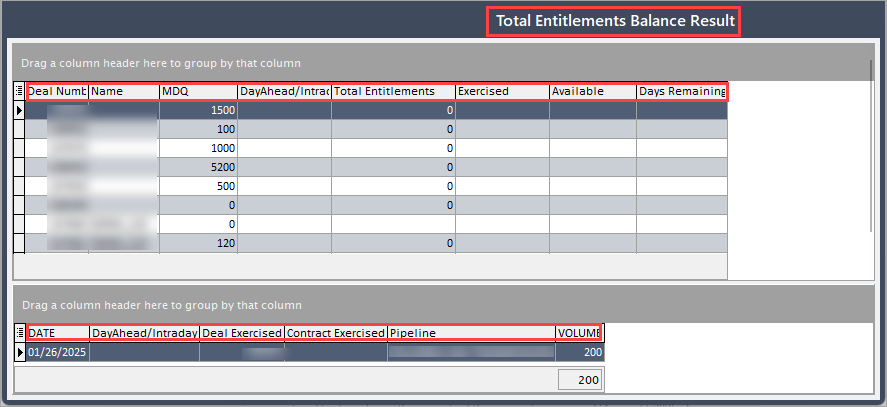
-
Select a record to view its corresponding details. You can also adjust column configurations to refine or expand the displayed data in the grid.
Fields Description Date Specifies the date of the entitlement record or update. Dayahead/intraday Indicates whether the entitlement applies to day ahead or intraday operations. Deal exercised Displays the cumulative volume exercised for specific deal. Contract exercised Indicates the total contractual volume exercised across multiple entitlements within the same contract. Pipeline Displays the associated pipeline for which the entitlement applies. Volume Represents the total daily or cumulative gas volume transacted for the entitlement. Helps in verifying actual flow versus contractual limits.
Summary
The Total entitlements balance screen enables monitoring and validation of contractual entitlements against exercised volumes. It helps maintain compliance with MDQ and contract limits, reduces imbalance risks, and strengthens credit oversight. By providing accurate entitlement visibility, it supports reliable operational planning and informed credit decisions.