Configuring Prior Period Adjustments (PPA)
Prior Period Adjustments (PPA) are billing corrections that occur when a Local Distribution Company (LDC) or internal review identifies updated data such as revised usage, rate corrections, or tax changes, after an invoice has already been generated.
The Retail PPA Staged screen helps users ensure that these retroactive adjustments are captured, reviewed, and processed accurately, maintaining billing integrity and financial transparency.
By managing PPAs through this centralized screen, billing teams can:
- Review all pending prior period billing adjustments before they are posted.
- Verify adjustment accuracy across pools, facilities, and end users.
- Prevent duplication or omission of prior corrections.
- Ensure compliance with audit and reporting standards.
Prerequisites
Before working with the Retail PPA Staged screen, ensure that the following prerequisites are met:
- The user has the add or modify permissions for the Retail PPA Staged (Billing) screen.
- The End user, Facility, and LDC are properly configured and active.
- All related rate configurations and LDC charge definitions have been validated.
- Required source data (such as meter reads, rate tables, or previous invoices) has been reconciled before generating PPA records.
- Any dependent adjustments (like storage or imbalance corrections) are finalized to prevent duplicate corrections.
Procedure to manage PPA
Step 1: Navigate to the Retail PPA Staged screen
- Log in to the nGenue application.
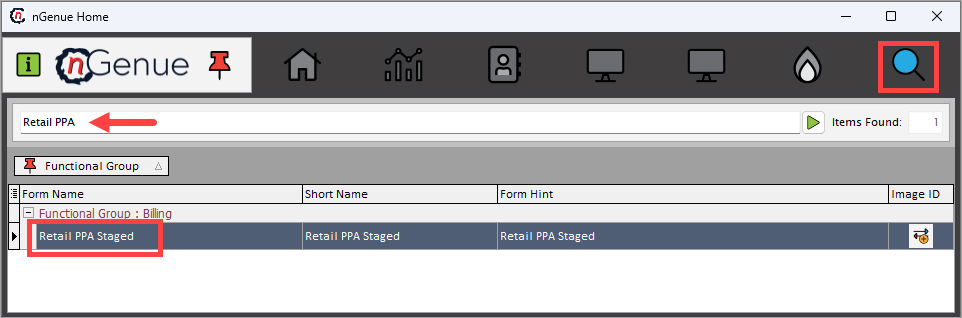
- Click Search and type Retail PPA in the search bar.
-
Double-click Retail PPA Staged to open the Retail PPA Staged (Billing) screen.
-
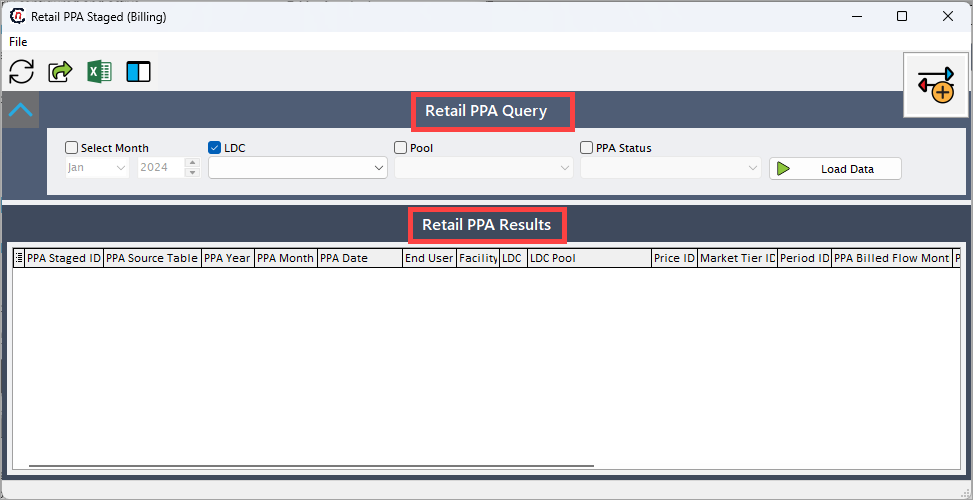
The screen is divided into two sections:
- Retail PPA Query section
- Retail PPA Results section
Retail PPA Query section
The Retail PPA Query section allows users to retrieve and filter staged PPA records based on selected criteria. This helps in isolating adjustments by time period, pool, or LDC for validation. The following are the filters available:
- Select Month: Allows the user to select the month for which prior period adjustments should be retrieved. Selecting a specific month helps narrow down data to a single billing cycle.
- LDC: Displays the list of available Local Distribution Company. Selecting an LDC filters PPA data specific to that distributor.
- Pool: Filters the records by pool. Pools represent groupings of accounts or delivery points under a single balancing or pricing arrangement.
-
PPA Status: Allows the user to filter records based on processing status. The available dropdowns are:
- PPA Was Staged: This status indicates that the PPA has been prepared and staged in the system but has not yet been processed for billing.
- PPA Was Ignored: This status means that the system intentionally skipped or excluded the PPA from further processing due to certain conditions or business rules.
- PPA Was Staged to Bill: This status indicates that the PPA has successfully passed the staging review and has been moved into the billing queue.
- PPA Was Billed: This status means that the billing process for the PPA has been completed successfully.
-
Load Data: Executes the query using the filters above and displays matching records in the Retail PPA Results grid.
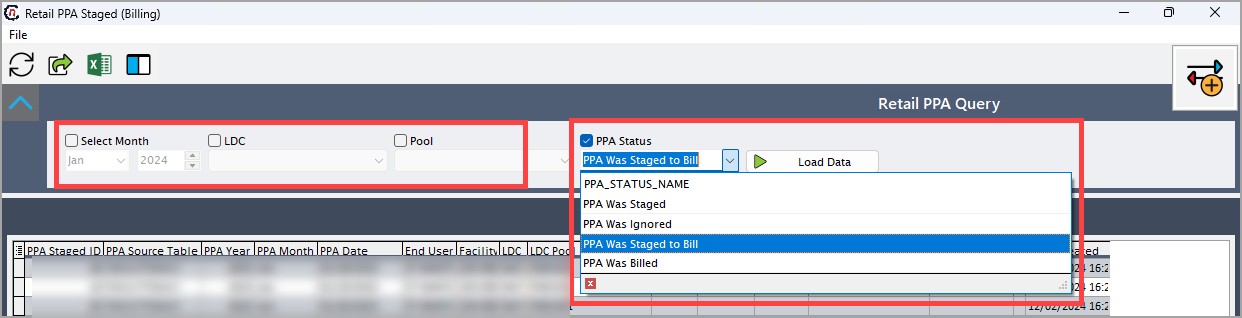
Once the query is executed, the system fetches all relevant PPA records for review and analysis.
Retail PPA Results section
The Retail PPA Results section displays the queried data in a tabular grid. Each record corresponds to a prior period adjustment entry that can be reviewed before being finalized.
Analysts use this section to review key billing attributes such as the end user, facility, LDC, price identifiers, and adjustment values. This ensures all corrections are valid and align with upstream or LDC-provided data.
Fields Description PPA Staged ID A unique identifier assigned to each staged PPA record for reference and audit tracking. PPA Source Table Identifies the database table or data source from which the PPA originated (for example, Invoice Details, Meter Reads, or Rate Adjustments). PPA Year Indicates the year for which the adjustment applies. PPA Month Indicates the month for which the adjustment applies. Used to align the correction with the affected billing period. PPA Date The date on which the adjustment record was created or staged. End User Displays the name of the customer or account associated with the adjustment. Facility Identifies the physical facility or service location to which the PPA relates. LDC The Local Distribution Company responsible for gas delivery and source of the revised billing information. LDC Pool Displays the LDC pool under which the customer or facility is grouped. Price ID Refers to the pricing configuration or rate plan that applies to this adjustment. Useful for rate validation. Market Tier ID Identifies the market tier (for example, Residential, Commercial, or Industrial) used for rate calculation. Period ID The internal billing period reference to which the adjustment belongs. PPA Billed Flow Month The original billing month during which the corrected flow or volume was billed. PPA Billed Flow Year The year corresponding to the billed flow month. PPA Amount Displays the adjustment amount (positive for charges, negative for credits). PPA Status Shows the processing stage of the PPA record (for example, Staged, Approved, or Billed). 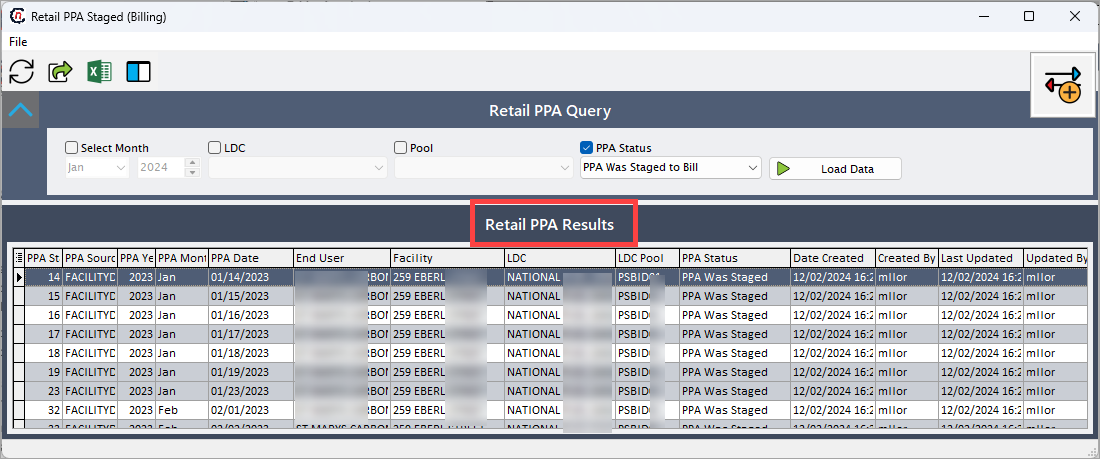
Example scenario
A billing analyst identifies that the LDC ABC Gas has provided revised usage data for January 2024 after meter recalibration. To ensure accurate billing, the analyst performs the following steps:
- Opens the Retail PPA Staged (Billing) screen.
-
Selects:
- Select Month: January 2024
- LDC: ABC Gas
- PPA Status: PPA Was Staged to Bill
-
Clicks Load Data to retrieve all pending adjustments.
- Reviews the Retail PPA Results grid to verify each record’s facility, billed flow month, and adjustment amount.
- Once validated, marks the records for approval and proceeds to process them into the billing system.
This ensures all historical corrections are accurately reflected in future billing cycles and financial reports.