Configuring end user document distribution
The End user document distribution screen allows users to configure and distribute required reports to end users. It provides filtering options to locate specific end users and flexible settings to schedule and automate the delivery of selected reports.
Prerequisites
Before configuring with the End user document distribution, ensure the following prerequisites are met:
- User permissions: You must configure the security settings including User type, Security user, Security group, Security assign user, and Security assign permissions in their respective screens to ensure you have the required access and permissions for End user document distribution screen actions.
- LDC: The relevant LDC must exist in the application.
- LDC pool: An LDC pool must be configured to classify customers for efficient billing and distribution.
- LDC rate configuration: An LDC rate class must be defined to categorize customers and establish delivery terms.
- End user: Configure the end user in the system before creating end user document distribution records.
- End user must be present in the system and required reports available.
Procedure to configure end user document distribution
Step 1: Navigate to the End user document distribution screen
- Log in to the nGenue application.
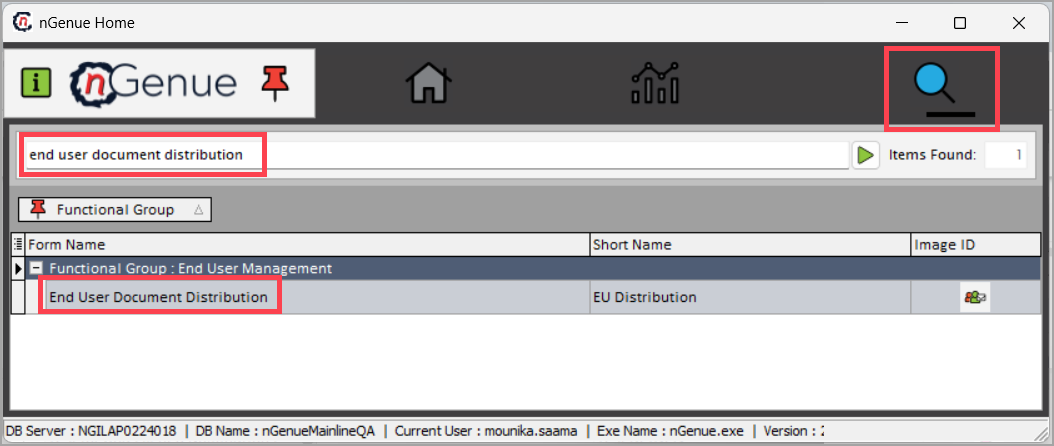
- Click the Search icon and enter end user document distribution in the search bar.
-
Double-click End user document distribution to open the screen.
-
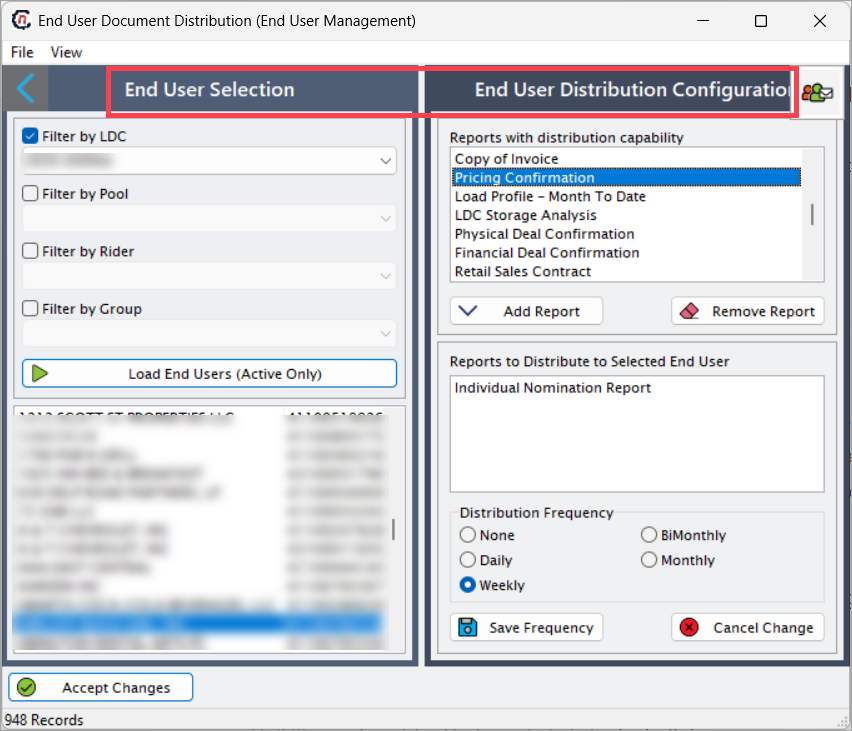
The screen consists of two sections:
- End user selection: Use this section to filter and select specific end users.
-
End user distribution configuration: Use this section to assign reports, define frequency, and save distribution settings.
End user selection
Use the following filters to display specific end users:
| Fields | Description |
|---|---|
| LDC | Filter records by LDC. |
| Rider | Filter records by LDC rate rider. |
| Pool | Filter records by LDC pool. |
| Group | filter records by group. |
Click Load end user(Active only) to display a list of active end user records.

End user distribution configuration
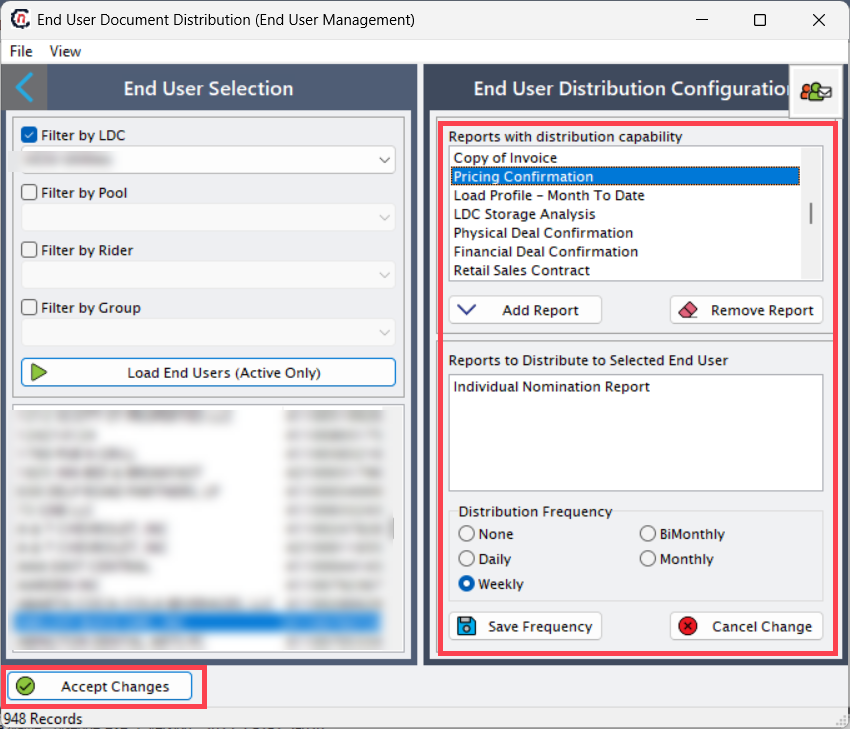
The End user distribution configuration section allows users to manage how reports are delivered to selected end users. user can assign one or more reports, set the frequency of distribution, and save the configuration. Once configured, the system automatically delivers the assigned reports according to the defined schedule, ensuring accuracy and consistency in report sharing.
Step 2: Add report to the end user
- From the Reports with distribution capability list, select the report user want to share with the end user.
- Click Add report to include the selected report for the end user.
- To remove a report, select it and click Remove report.
- The Reports to distribute to selected end user field displays all reports assigned to the chosen end user.
- In the Distribution frequency section, select how often the report should be delivered:
- None: The report is assigned but will not be automatically sent. The end user can run it on-demand.
- Daily: The report is automatically generated and delivered every business day.
- Weekly: The report is automatically sent to the end user once per week.
- Bimonthly: The report is automatically sent twice a month (for example, on the 1st and 15th).
- Monthly: The report is automatically sent to the end user once per month.
- Click Save frequency to confirm the frequency settings.
-
Click Accept changes to finalize and save the overall configuration.
Summary
The End user document distribution screen simplifies the process of delivering important reports to customers. By configuring filters, assigning reports, and setting distribution frequencies, users can automate report sharing and ensure end users receive accurate and timely documentation.