Viewing daily usage and receipts
The Usage and receipts screen displays detailed information about actual gas usage, scheduled volumes, and imbalances at the pool level. It helps users analyze daily gas activity by marketer and pool, ensuring that scheduled and actual quantities align. Users can apply filters to refine results and focus on specific pipelines, marketers, and pools.
Viewing daily usage and receipts refers to the process of monitoring and analyzing day-to-day gas consumption and receipts within the nGenue application. It enables users to validate whether the actual gas used aligns with the scheduled volumes for each marketer and pool.
The Usage and receipts screen aggregates usage, receipt, and imbalance data from multiple entities, helping users identify discrepancies and ensure balanced gas allocation across Local Distribution Company (LDC), pools, and marketers.
This document outlines the purpose, prerequisites, and step-by-step procedure for accessing and using the Usage and receipts screen in nGenue, including detailed field descriptions for accurate data interpretation and reporting.
Prerequisites
Before working on the Usage and receipts screen, ensure the following prerequisites are met:
- Ensure the nGenue application is installed and use valid login credentials to log into the application.
- User permissions: Must configure the security settings including User type, Security user, Security group, Security assign user, and Security assign permissions in their respective screens to ensure the required access and permissions for Usage and receipts screen actions.
- LDC: Must be configured to define LDC details required for pool and marketer associations.
- LDC pool: Must be established to define the relationship between pools and LDC for tracking gas movement.
- LDC rate configuration: Must be set up to define rate classes and pricing parameters used in reporting
- End user: Must be created to represent the consumer entity for which usage data is recorded.
- Facility: Must be configured to capture the physical and operational details linked to the end user.
Procedure to view daily usage and receipts
Step 1: Navigate to the Usage and receipts screen
- Log in to the nGenue application.
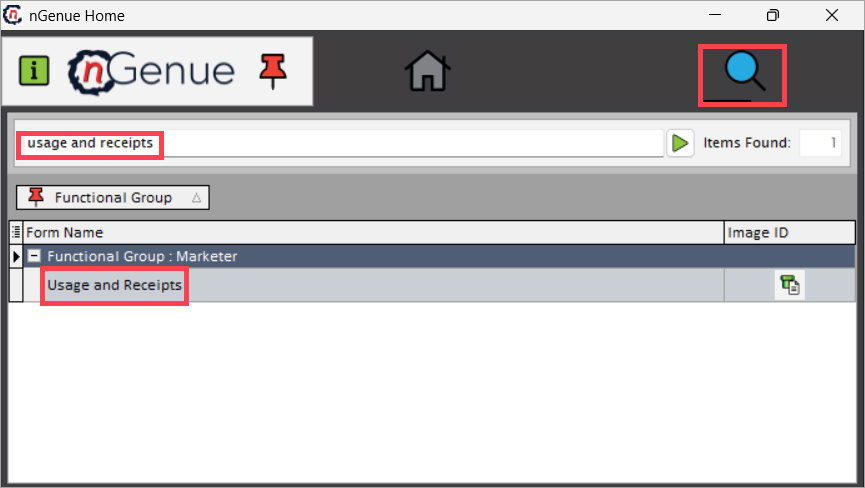
- Click the Search icon and enter usage and receipts in the search bar.
-
Double-click Usage and receipts to open the screen.
-
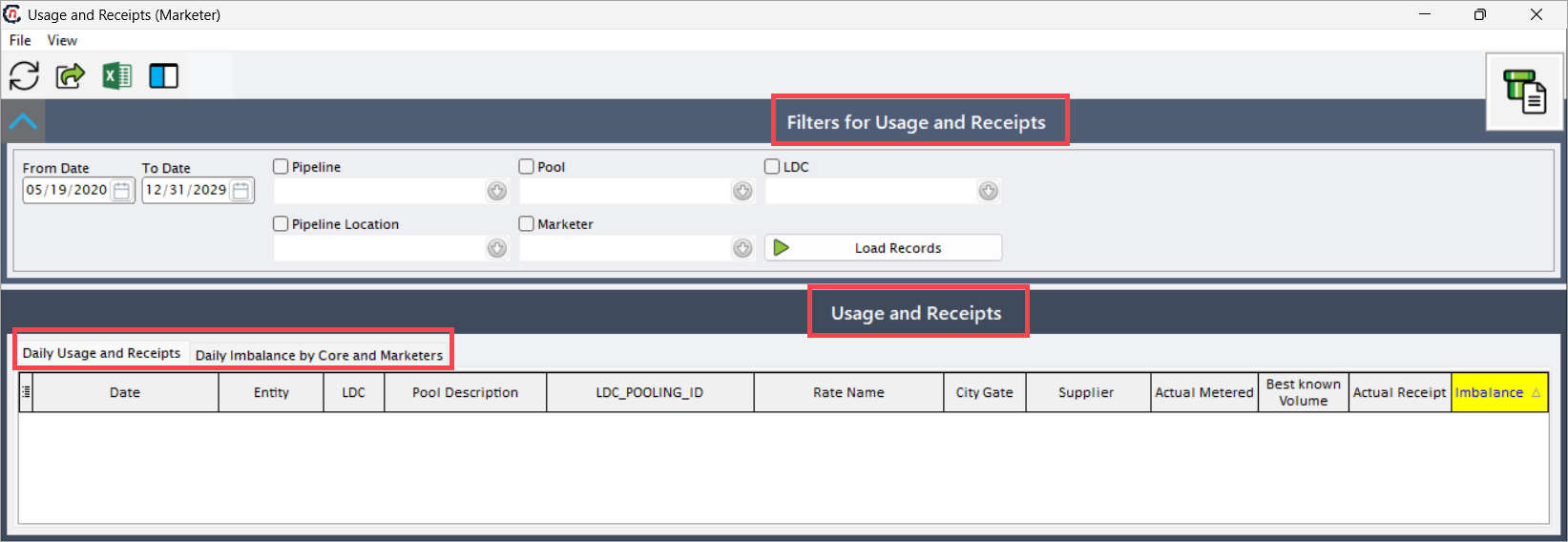
The screen consists of two sections:
- Filter for usage and receipts: Enables to refine and customize the displayed data based on various criteria such as LDC, pool, marketer, pipeline, and date range. This section helps narrow down large datasets to focus on specific records relevant to the analysis, ensuring quick and efficient data retrieval.
- Usage and receipts: Displays the results based on the selected filters and provides a comprehensive view of gas usage and receipt details. This section is divided into two main tabs:
- Daily usage and receipts: Displays detailed daily usage data for each marketer and LDC pool. It includes information such as actual metered volumes, projected demand, best-known volumes, and imbalances, helping users validate and reconcile gas consumption against scheduled receipts.
-
Daily imbalance by core and marketers: Summarizes daily usage, receipts, and imbalances categorized by marketer and core pool. It provides a consolidated view to identify trends, monitor cumulative imbalances, and detect supply-demand mismatches across multiple marketers and LDC.
Step 2: Execute daily usage and receipts
-
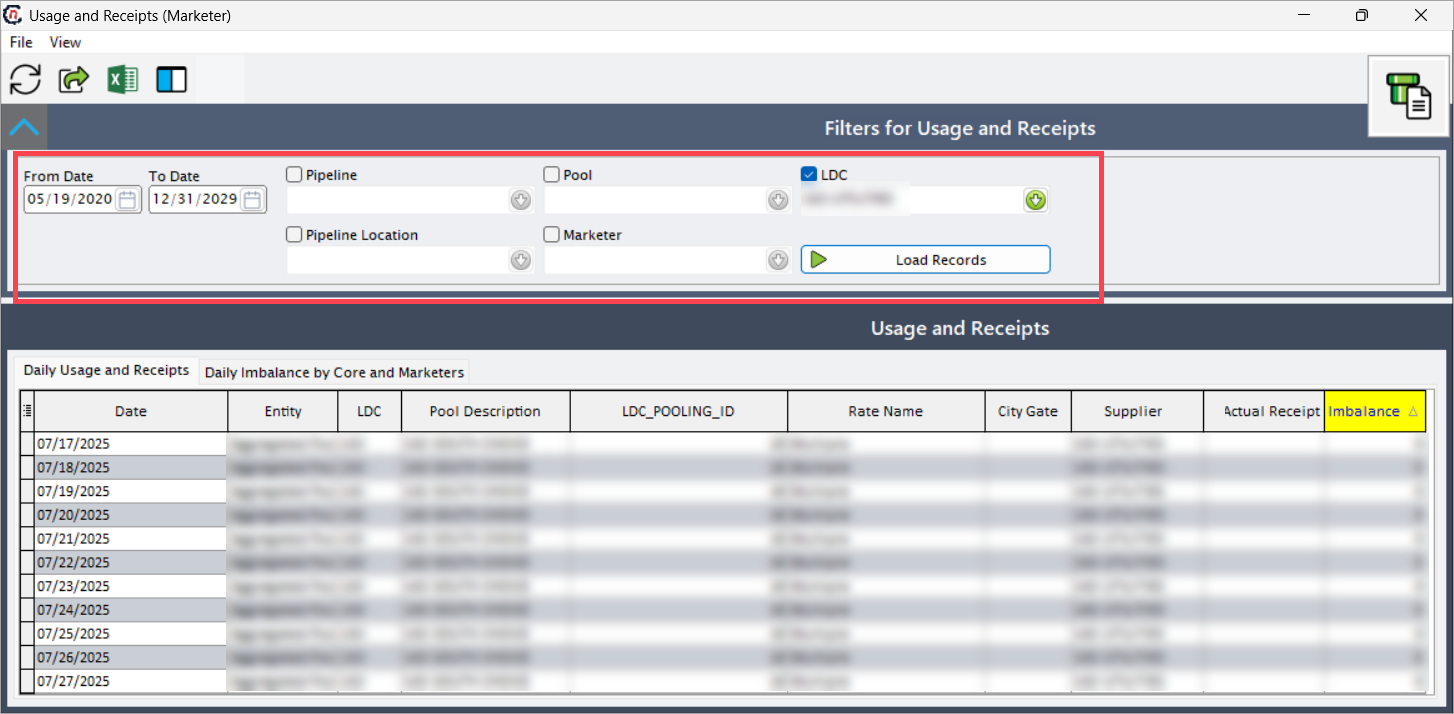
Select the following filters to define the data range and scope for retrieval:
Fields Description LDC Filters records by the selected LDC. Once selected, only pools associated with that LDC are available in the Pool dropdown. Pool Filters data by the selected pool. The system retrieves usage and receipt records linked to the selected pool under the chosen LDC. Pipeline Filters records by the selected pipeline. This ensures that only data transmitted through the chosen pipeline is displayed. Pipeline location Filters results by pipeline location. This field narrows the search to a specific delivery or receipt point on the pipeline. Marketer Filters results by the selected marketer. The system retrieves all pools and transactions associated with that marketer. From date Defines the start date of the reporting range. The system loads records from this date onward. To date Defines the end date of the reporting range. The system retrieves records up to this date. -
After selecting the filters, click the Load records.
-
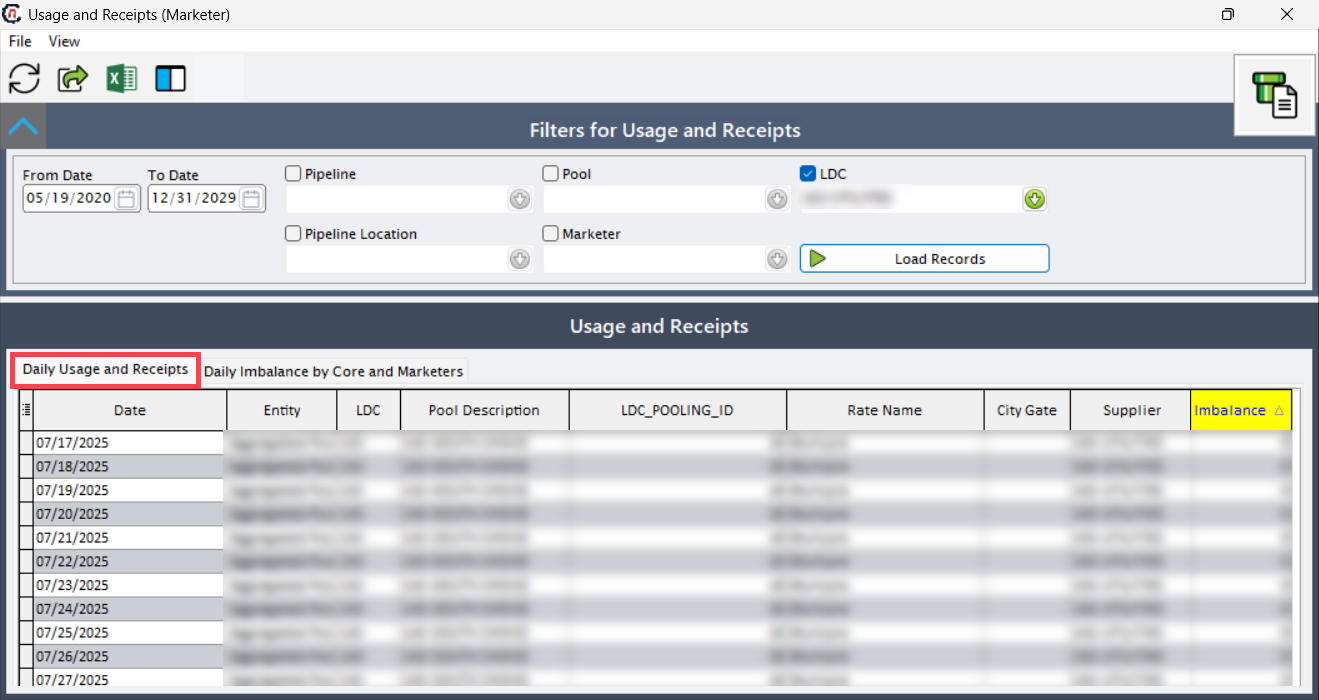
The system retrieves data based on the filter criteria and displays it in the Daily usage and receipts and Daily imbalance by core and marketers tabs.
Daily usage and receipts tab
The Daily usage and receipts tab displays the following information:
| Fields | Description |
|---|---|
| Date | Displays the specific date for which the gas usage and receipt data are recorded. Each row represents one day of data. |
| Entity | Displays the facility name associated with the selected pool. The facility identifies the physical site consuming the gas. |
| LDC | Displays the LDC ID linked to the record. This helps identify which LDC governs the reported transaction. |
| Pool description | Displays the descriptive name of the pool where the gas was supplied. The pool groups related customers under one marketer or rate structure. |
| LDC pool ID | Displays the unique system-generated ID for the LDC pool. This ID ensures traceability between usage, receipts, and pool configurations. |
| Rate name | Displays the rate class name configured under the LDC rate setup. This determines billing or rate calculations for the pool. |
| City gate | Displays the city gate name or delivery point where gas enters the LDC system. It indicates the physical location of gas transfer. |
| Supplier | Displays the marketer or supplier delivering gas to the pool. This information links the supply source to the consumption data. |
| Owner | Displays the account owner responsible for the gas supply or billing under the selected pool. |
| Projected demand | Displays the system-estimated gas volume required for the selected date. This projection helps with scheduling and nominations. |
| Actual metered | Displays the actual metered volume of gas consumed at the pool level. This data is imported from the metering system. |
| Best known volume | Displays the best estimated gas volume available when actual metered data is not yet finalized. This value updates automatically when final readings are received. |
| Actual receipt | Displays the scheduled or confirmed gas receipt volume delivered to the pool. This reflects the confirmed supply from the marketer. |
| Imbalance | Displays the calculated difference between the scheduled volume (actual receipt) and the consumed volume (actual metered). A positive imbalance indicates over-supply, while a negative imbalance indicates under-supply. |
Daily imbalance by core and marketers tab
In the Daily imbalance by core and marketers tab, the following fields appear:
| Field | Description |
|---|---|
| Date and day | Displays the transaction date and corresponding day for easy tracking of daily variations. |
| Usage | Displays the total daily usage volume for the selected marketer and LDC pool. |
| Receipts | Displays the total daily gas receipts recorded against the marketer and pool. |
| Imbalance | Displays the difference between total daily usage and receipts. This helps identify supply-demand discrepancies. |
| Cumulative | Displays the running total of daily imbalances over the selected period. It helps track ongoing overages or shortages in gas volumes. |
Summary
The Usage and receipts screen provides a complete view of daily gas activity at the pool level. It enables users to monitor actual usage, scheduled receipts, and imbalances across marketers and LDC. By applying filters and reviewing detailed data, users can validate scheduling accuracy, identify operational discrepancies, and maintain balanced gas flow management.