Configure and manage sales commissions
A sales commission represents the incentive paid to traders or sales representatives for securing deals such as gas supply contracts, capacity agreements, or spot transactions. While the end user (for example, a utility, industrial buyer, or large commercial consumer) is not directly billed for this commission, it is linked to specific customers or counterparties for revenue attribution.
System configuration automates multi-contract commission calculations, ensures accurate profit and loss (P&L) integration, and provides transparent, auditable records for compliance. This approach minimizes manual effort while maintaining consistent payout rules across all sales and trading activities.
Add a sales commission
Step 1: Add sales commission record
Adding a sales commission involves linking the commission details to an end user and configuring the rules for how payouts will be calculated. These rules ensure accurate application of commissions across contracts, agreements, and transactions.
Follow the steps below to add a sales commission record:
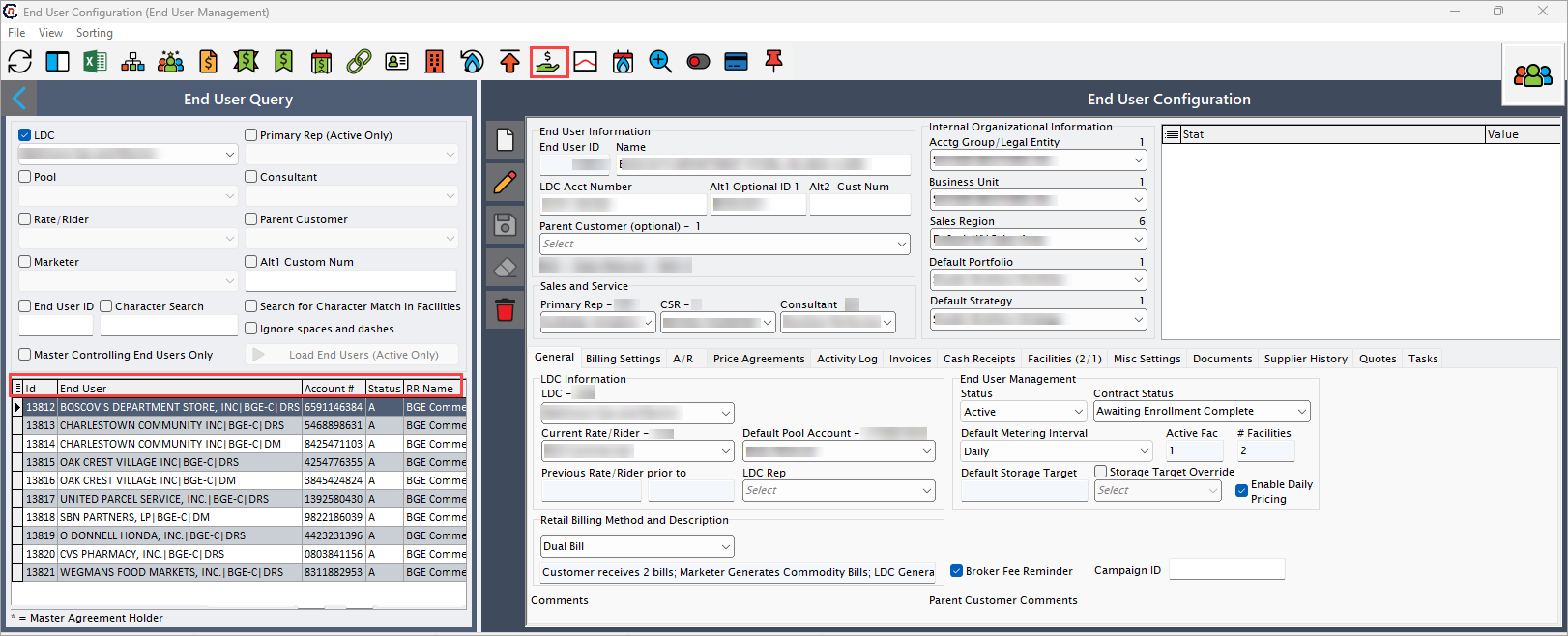
- Navigate to the End user screen and select the end user to which you want to add a sales commission.
-
Click the Sales commission icon in the top header to open the corresponding screen.
-
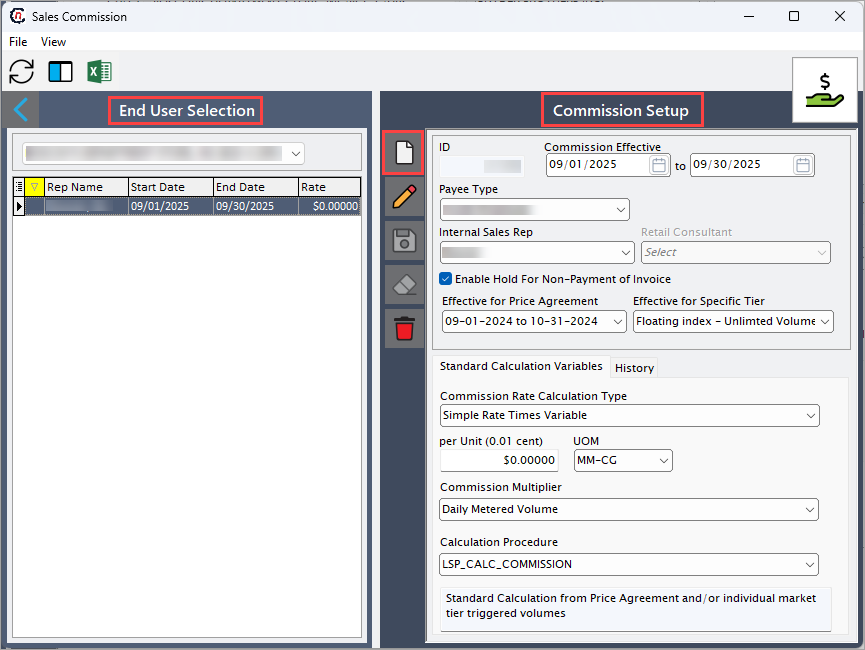
You will be navigated to the Sales commission screen, which is divided into two sections:
- End user selection, where you can select an end user from the dropdown and view all commission details related to that user. This includes OV, sales representative details, commission rates, and effective dates.
- Commission setup, where you can add, modify, or delete sales commission records. This section captures the terms that drive commission calculations, ensuring they are systematically applied across transactions.
-
Click the Add a sales commission record icon to create a new record.
-
Complete the required fields available in the Commission setup section to add a sales commission record.
Fields Description ID It is a unique identifier automatically assigned to each sales commission record. Commission effective (from and to) Specify the start and end date and the duration till the sales commission is valid. Payee type Select the recipient type for commission such as inside employee or outside consultant. Sales channel Select the sales channel through which the deal was closed, such as direct sales, or consultant. Internal sales representative Select the internal sales representative eligible to receive the commission. Retail consultant Select the external consultant eligible to receive the commission. Enable hold for non-payment of invoice Select this checkbox to keep the commission payment on hold if the customer invoice remains unpaid. Effective for price agreement Select the effective for price agreement to ensure the commission applies only when a specific price agreement is active. Effective for specific tier Select the effective for specific tier to ensure the commission applies only to transactions within a designated pricing or volume tier. -
In the Standard calculation variables tab, you will define how the commission amount is computed. These options allow organizations to support different sales structures and business models. The following table outlines each standard calculation variable along with a brief description of its purpose and usage.
Fields Description Commission rate calculation type Select rate calculation type to define how the commission is calculated, such as flat monthly amount, simple rate times variable, percentage of variable, tier level instructions. Per unit (0.01 cent) Specify a per-unit commission rate which is expressed in hundredths of a cent (for example, $0.0001) per defined unit of measure. UOM Select the unit of measure such as MM-CG, therm-CG, MCF-CG, CCF-CG, therm-BT, MM-BT are used to calculate per-unit commissions. Margin rate Specify the margin rate to apply commission based on the profit margin rate, typically expressed as a percentage of gross margin. Commission % Specify the percentage of the qualifying transaction amount or margin that is paid as commission. Commission multiplier Select the commission multiplier which is a factor applied to the base commission rate to adjust the final payout. Options may include not applicable, daily metered volume, cycle read volume, actual billed commodity, actual billed commodity plus fuel, daily nominations, daily original nominations, contract quantity, markup/adder, sales price less transfer price. Calculation procedure Choose the calculation method, which helps in calculating volumes from price agreement and market-tier triggers based on selected method. Options may include LSP_commission_calc_UGI or LSP_commission_calc_synder. -
Once you finish configuring the sales commission record, click the Save changes to current sales commission icon.
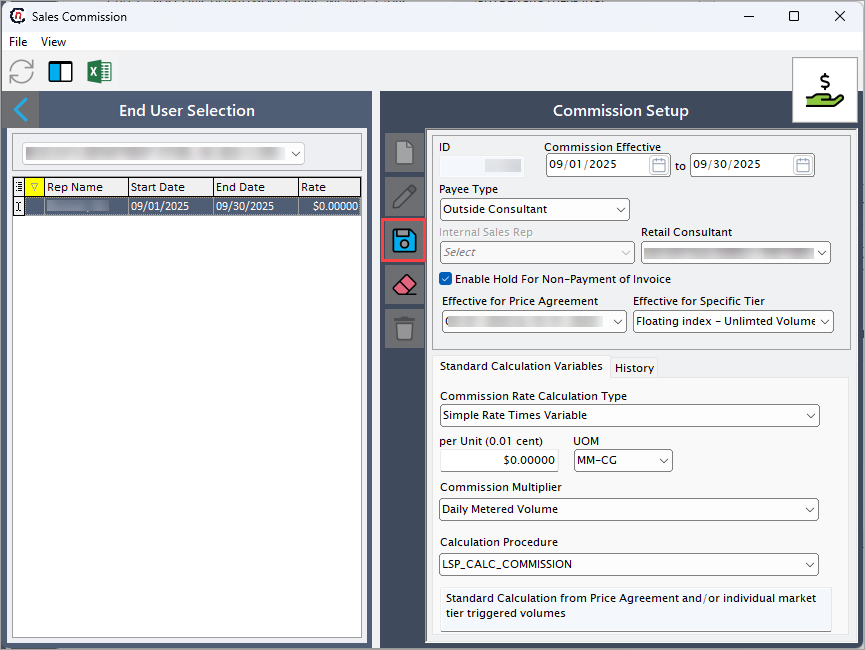
After saving, the commission setup is automatically applied to all eligible trades for the selected end user and date range. The calculated commission values are integrated into invoice generation, trade settlements, P&L reports, and accounting exports.
Step 2: Review the sales commission details
The History tab provides visibility into previously calculated commission records by capturing the detailed attributes of each calculation. Below are the information captured in the History tab:
| Fields | Description |
|---|---|
| Commission ID | Indicates a unique identifier for the individual sales commission record. |
| Mo | Specifies the numeric month representing when the commission applies. |
| Year | Specifies the four-digit year indicating the commission period. |
| Amount | Specifies the monetary value of the calculated commission for the specified month and year. |
| Description | Provides additional details or notes about the commission record. |
| Year_Mo_Str | Specifies the concatenated string of year and month (for example, 2025-09) used for reporting. |
| Representative ID | It is a unique identifier of the sales representative earning the commission. |
| Volume | Indicates total quantity of natural gas tied to the commission calculation. |
| Sales price | Specifies the unit selling price of the natural gas used to compute revenue and commission. |
| Cost | Specifies the unit acquisition or supply cost of the natural gas for margin calculations. |
| Commission rate | Specifies the rate or percentage applied to margin, sales price, or volume to determine commission. |
| Calculation type | Defines method used to compute the commission, such as per unit, percentage of sales, or margin-based. |
| End user (EU) ID | It is a identifier for the end user associated with the commissionable transaction. |
| Commission setup ID | It is a identifier that links transaction to the commission setup record that determines its applicable rates, rules, and calculation parameters. |
| Calculation notes | Provides information regarding special considerations or adjustments in the calculation. |
| Date calculated | Specifies the date on which the commission was computed. |
| Price ID | It is a unique identifier for the price agreement referenced in the commission calculation. |
| Market tier ID | It is a unique identifier for the market tier that influences commission rules. |
| Exported | Indicates whether the commission record has been exported to an external accounting or reporting system. |
| Exported date | Specifies the date on which the commission record was successfully exported. |
By configuring and managing sales commissions, organizations ensure that incentives are consistently applied across contracts and transactions. Once the setup is complete, the configured commissions are automatically included in settlements and financial reports.