Review daily imbalances
A Daily imbalance represents the difference between the volume of natural gas that was scheduled or nominated and the volume that was actually received or delivered for a pipeline, pool, storage facility, interconnect, or downstream delivery point on a given gas day.
Daily imbalances arise because natural gas operations are dynamic. Actual flows rarely match scheduled volumes exactly due to changing system conditions and operational constraints. Daily imbalances are tracked to ensure system integrity, support operational decision-making, and form the basis for monthly imbalance resolution, cash-out, and settlement.
Prerequisites
Before working on the Daily imbalances (Pipeline operations) screen, ensure the following prerequisites are met:
- Ensure the nGenue application is installed and use valid login credentials to log into the application.
- Configure the user permissions including User type, Security user, Security group, Security assign user, and Security assign permissions in their respective screens to enable access to the Daily imbalances (Pipeline operations) screen.
- Ensure that Pipeline transport agreements, Storage contracts, Pools, Meters, and Nominations are configured.
- Ensure that actual flow, meter, and scheduling data is available for the selected gas days.
Procedure to review daily imbalances
Step 1: Navigate to the Daily imbalances screen:
- Log in to nGenue application.
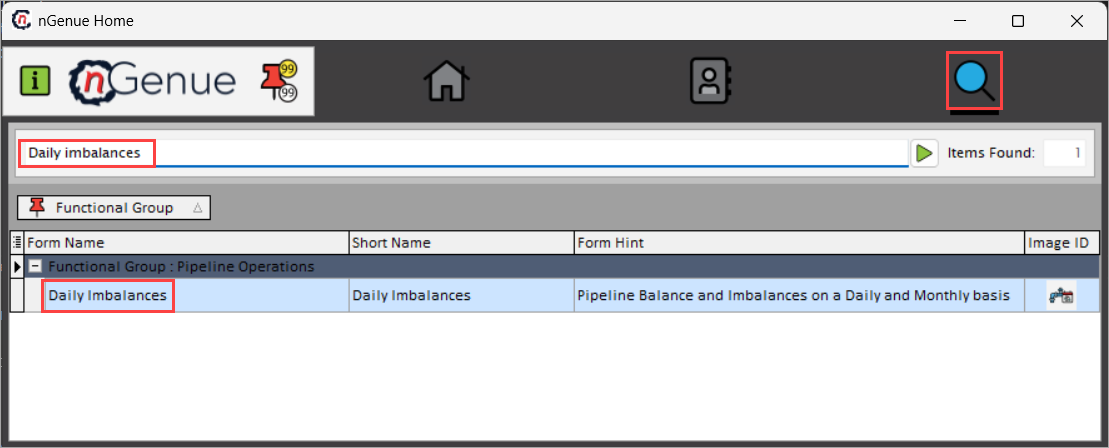
- Click Search icon and enter Daily imbalances in the search bar.
-
Double-click Daily imbalances to open the respective screen.
-
In Daily imbalances (Pipeline operations) screen, contains two sections
-
Imbalance query: This section defines which pipelines, contracts, and time period are evaluated.
- Imbalance results: This section displays calculated imbalances across transport, storage, pooling, and delivery points.

Step 2: Execute the query
-
Complete the necessary fields available in the Imbalance query section to retrieve the imbalances data.
Fields Description Pipeline Select the pipeline for which scheduled, delivered, and imbalance volumes are evaluated. Pipeline transport agreement Select the transportation agreement included in the imbalance calculation. Pipeline storage contract Select the storage contract from the available dropdown options to include storage activity in the imbalance calculation. From (To) Specify the date range for the imbalance review. Grouped drop-down Select how daily imbalance results are grouped and displayed in the results grid (for example, by transport contracts, storage contracts, pooling, interconnects, deals, or retail demand). Layout name Provide the name of a saved layout that defines which columns are displayed and how the results grid is arranged. Public/private Specify whether the selected layout is shared across users either to be Public or Private. Select layout Select the layout to refresh the imbalance results grid with chosen column configuration. -
Click Execute report to load the data of daily imbalances based on the selected criteria.
Step 3: Review imbalances
Once the report runs, imbalance data is displayed in the Imbalance results section. These results show how gas moved through the system and where mismatches occurred. Data fields provided in the following table can be rearranged dynamically using drag-and-drop functionality to organize the view.
Transport activity
This tab displays imbalances associated with pipeline transportation activity.
| Fields | Description |
|---|---|
| Up contract | Specifies the upstream transportation agreement associated with the flow. |
| Down contract | Specifies the downstream transportation agreement associated with the flow. |
| Month_year | Specifies the gas month corresponding to the gas day. |
| Date | Specifies the gas day for which the imbalance is calculated. |
| Agmt # | Specifies the identifier of the transportation agreement. |
| Grand total | Indicates the net imbalance volume for the selected grouping. |
Storage activity
This tab displays imbalances related to storage injections and withdrawals.
| Fields | Description |
|---|---|
| Contract-location | Specifies the storage contract and associated location. |
| Month_year | Specifies the gas month of the storage activity. |
| Date | Specifies the gas day being evaluated. |
| Grand total | Indicates the net storage related imbalance volume. |
Receipt vs Delivery
This tab displays differences between receipt and delivery volumes across contracts and locations.
| Fields | Description |
|---|---|
| Up contract | Specifies the contract associated with receipt activity. |
| Down contract | Specifies the contract associated with delivery activity. |
| Month_year | Specifies the gas month for the imbalance. |
| Date | Specifies the gas day evaluated. |
| Agmt # | Specifies the agreement number contributing to the imbalance. |
| Grand total | Indicates the net receipt and delivery imbalance. |
Pooling
This tab displays imbalances at pooling locations.
| Fields | Description |
|---|---|
| Up contract | Specifies the contract contributing gas into the pool. |
| Down contract | Specifies the contract taking gas out of the pool. |
| Month_year | Specifies the gas month for the pool imbalance. |
| Date | Specifies the gas day being evaluated. |
| Pool location | Specifies the pool location identifier. |
| Grand total | Indicates the net pool imbalance volume. |
Interconnect
This tab displays imbalances at interconnect and meter locations.
| Fields | Description |
|---|---|
| Interconnect name | Specifies the name of the interconnect location. |
| Imbalance type | Indicates imbalance type either receipt or delivery. |
| Rec/Del | Identifies receipt or delivery direction. |
| Date | Specifies the gas day being evaluated. |
| Transp Agmt name | Specifies the transportation agreement associated with the flow. |
| Pipe | Specifies the pipeline associated with the interconnect. |
| Location | Specifies the location identifier. |
| Meter # | Specifies the meter identifier. |
| Location name | Specifies the descriptive name of the location. |
| Receipt_point_ID | Specifies the identifier of the receipt point. |
| Pipeline_storage_contract_ID | Indicates the identifier of the pipeline storage contract. |
| Nomination_ID | Indicates the ID assigned to the nomination contributing to the imbalance. |
| Delivery_point_ID | Indicates the delivery point identifier. |
| Grand total | Indicates the net imbalance volume. |
Under/overscheduled deals
This tab displays differences between planned, scheduled, and actual deal volumes.
| Fields | Description |
|---|---|
| Abbreviation | Specifies the location or deal abbreviation. |
| Loc_name | Specifies the location name. |
| Loc_abbrev | Specifies the location abbreviation. |
| MeterID | Specifies the meter identifier. |
| Volume_state | Indicates actual, scheduled, or planned volume. |
| Planned | Indicates planned retail demand volume. |
| Over scheduled | Indicates the volume exceeding scheduled demand. |
| Under scheduled | Indicates the volume below scheduled demand. |
| Deal # | Indicates the associated deal identifier. |
| Period | Specifies the gas period. |
| Date | Specifies the gas day being evaluated. |
| Buy_sell | Indicates the buy or sell deal. |
| Grand total | Indicates the net deal imbalance volume. |
Retail demand
This tab displays imbalances associated with downstream retail or distribution demand.
| Fields | Description |
|---|---|
| Abbreviation | Specifies the retail location abbreviation. |
| Name | Specifies the retail location name. |
| Loc_name | Specifies the location name. |
| Loc_abbrv | Specifies the location abbreviation. |
| MeterID | Specifies the meter identifier. |
| Volume_state | Indicates actual, scheduled, or planned volume. |
| Planned | Indicates planned retail demand volume. |
| Over scheduled | Indicates the volume exceeding scheduled demand. |
| Under scheduled | Indicates the volume below scheduled demand. |
| Deal # | Indicates the associated deal identifier. |
| Period | Specifies the gas period. |
| Date | Specifies the gas day being evaluated. |
| LDC_pool | Indicates the pool associated with retail demand. |
| Grand total | Indicates the net retail imbalance volume. |
Select a record to view its corresponding details. You can also adjust column configurations to refine or expand the displayed imbalances data in the data grid.
Summary
The Daily imbalances screen provides a detailed, gas-day-level view of how scheduled volumes compare to actual system activity. Regular review of daily imbalances helps ensure pipeline system balance, contractual compliance, and accurate financial settlement.