LDC charges management and summary report
This article provides a comprehensive guide to the LDC charges (LDC Configuration) screen. It covers all relevant fields, their descriptions, prerequisites, and recommended next steps to ensure accurate charge management. Users will gain a clear understanding of how to query, view, and analyze Local Distribution Company (LDC) charges effectively, supporting both operational and financial reporting needs.
The guide is designed for:
- Finance and billing personnel responsible for reviewing LDC charges.
- Operational staff managing pooling configurations and rate riders.
- Analysts preparing regulatory or management reports based on LDC charges.
By following this guide, users will be able to:
- Filter and query charges accurately using various criteria such as month, LDC, pool, or predefined charge definitions.
- Review detailed charge information, including invoices, facility and end user details, rate riders, and charge amounts.
- Validate, adjust, and integrate charge data into billing processes.
- Generate accurate reports for management, regulatory compliance, and internal analysis.
This article also includes a structured workflow for navigating the screen, executing queries, interpreting results, and performing post-query actions to maintain accurate and reliable LDC charge records.
Prerequisites
Before using the LDC charges screen, ensure the following prerequisites are met:
- You must have the add or modify permissions for the LDC charges screen.
- LDC, pool, and end user data must be configured in the system.
- Users should have knowledge of billing cycles, rate riders, and pooling fees.
Procedure to filter or view LDC charges summary
Step 1: Navigate to the LDC charges screen
- Log in to the nGenue application.
- Click the Search icon and enter LDC charges in the search bar.
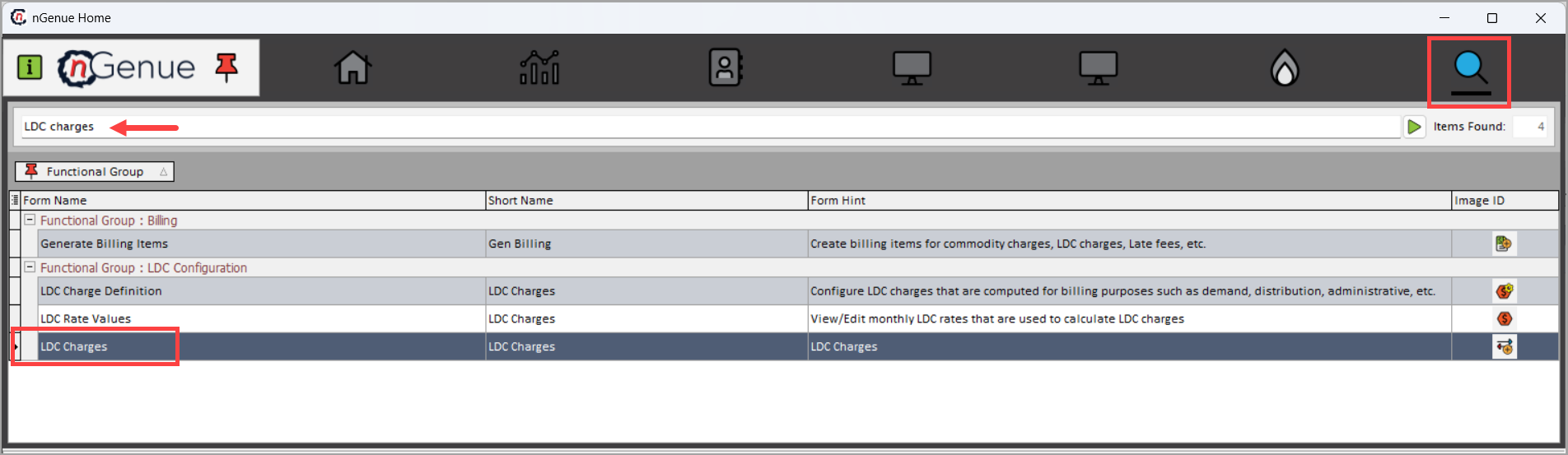
- Double-click LDC charges to open the respective screen.
- The LDC charges (LDC configuration) screen is divided into two main sections: LDC charge def query and LDC charge def.
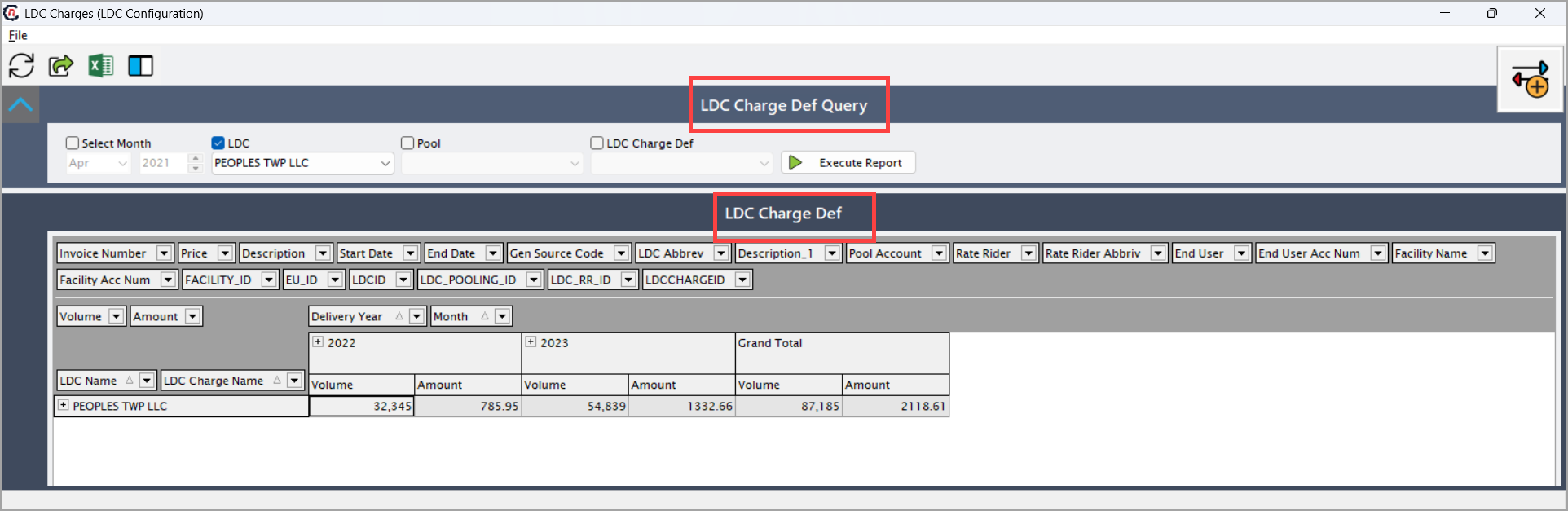
LDC charge def query section
This section allows users to query and filter LDC charges based on different criteria. Each field plays a specific role in refining the results for accurate reporting and analysis.
| Fields | Description |
|---|---|
| Select month | Allows the user to filter LDC charges for a specific month and year. This is particularly useful for generating monthly reports, comparing charges across different months, and performing period-based analyses. Users typically select the month from a dropdown calendar or a list of months and years. |
| LDC | Enables selection of the Local Distribution Company for which charges need to be viewed or configured. Only one LDC can be selected at a time. This ensures that reports or configurations are specific to a single LDC, avoiding confusion when multiple LDCs exist in the system. |
| Pool | If pooling is implemented, this field allows filtering of charges by a specific pool. Pools can represent grouped facilities, regions, or cost centers. Filtering by pool helps in analyzing charges at a more granular level and comparing costs between different pools. |
| LDC charge def | Provides a list of predefined LDC charge definitions. Selecting one of these definitions limits the report to only those charges that match the selected definition. This is useful for focusing on specific types of charges (e.g., transportation fees, delivery charges, storage fees) without including unrelated charges in the results. |
| Execute report | Triggers the system to run the query using the selected filters. Once executed, the relevant LDC charges are displayed in the LDC charge def section below. Users can then review, export, or take action on the filtered charge data. |

LDC charge def section
This section displays detailed charge information based on the executed query. Each column and field provides specific information that helps in tracking, analyzing, and reporting LDC charges.
| Fields | Description |
|---|---|
| Invoice number | Unique identifier for each invoice. It is essential for tracking, reconciling, and referencing specific charges in accounting and audit processes. |
| Price | The unit price of the charge. This can be multiplied by the volume to calculate the total charge for a specific line item. Useful for understanding rate components. |
| Description | Short description of the charge (e.g., Pooling Fee). Helps users quickly identify the type or nature of the charge. |
| Start date | The date from which the charge becomes applicable. This is used to determine the billing period and eligibility of the charge. |
| End date | The date until which the charge is applicable. Helps in filtering charges within a specific period and managing expirations. |
| Gen source code | Indicates the source system or code that generated the charge (e.g., internal system, external import). Useful for tracking data origin and troubleshooting discrepancies. |
| LDC abbrev | Abbreviated form of the Local Distribution Company. Provides a concise reference in reports where space is limited. |
| Description_1 | Additional description for the charge or pool (e.g., “NP1 Pool w/Pooling Fee”). Provides more context about the charge. |
| Pool account | The financial account associated with the pool. Important for accounting, reporting, and linking charges to the correct cost center. |
| Rate rider | Category of the rate rider (e.g., Commercial, Industrial). Helps in identifying the pricing structure applied to the charge. |
| Rate rider abbrv | Abbreviated form of the rate rider for concise reporting. |
| End user | Name of the end user receiving the service. Essential for customer-specific reporting and reconciliation. |
| End user acc num | Unique account number assigned to the end user. Helps in identifying and linking charges to the correct end user. |
| Facility name | Name of the facility where the service or delivery is applicable. Important for site-specific reporting. |
| Facility acc num | Account number of the facility, used for financial tracking and reporting at the facility level. |
| Facility_ID | System-generated unique ID for the facility. Useful for internal system linking and avoiding ambiguity between facilities with similar names. |
| EU_ID | System-generated unique ID for the end user. Helps ensure consistency in reports and prevents duplicate entries. |
| LDCID | Internal system ID for the LDC. Used for database references and internal linking. |
| LDC_POOLING_ID | Identifier representing the pooling configuration. Useful for tracking pooled charges across multiple facilities or accounts. |
| LDC_RR_ID | Identifier associated with the rate rider applied. Helps in linking charges to specific rate structures. |
| LDCHARGEID | Unique ID for the LDC charge record. Critical for system-level tracking and audit purposes. |
| Volume | Quantity, usage, or units associated with the charge (e.g., gas units). Important for calculating total amounts and analyzing consumption patterns. |
| Amount | Total monetary value of the charge, often calculated as Price x Volume. Key for billing, reporting, and financial reconciliation. |
| Delivery year | The year in which the charge is applicable. Useful for period-based analysis and reporting. |
| Month | The month in which the charge applies. Combined with delivery year, helps in generating accurate monthly reports. |
| LDC name | Full name of the Local Distribution Company. Provides clarity when multiple LDCs are in the system. |
| LDC charge name | Name of the specific charge (e.g., Pooling Fee). Helps users identify and differentiate between various charges applied by the LDC. |
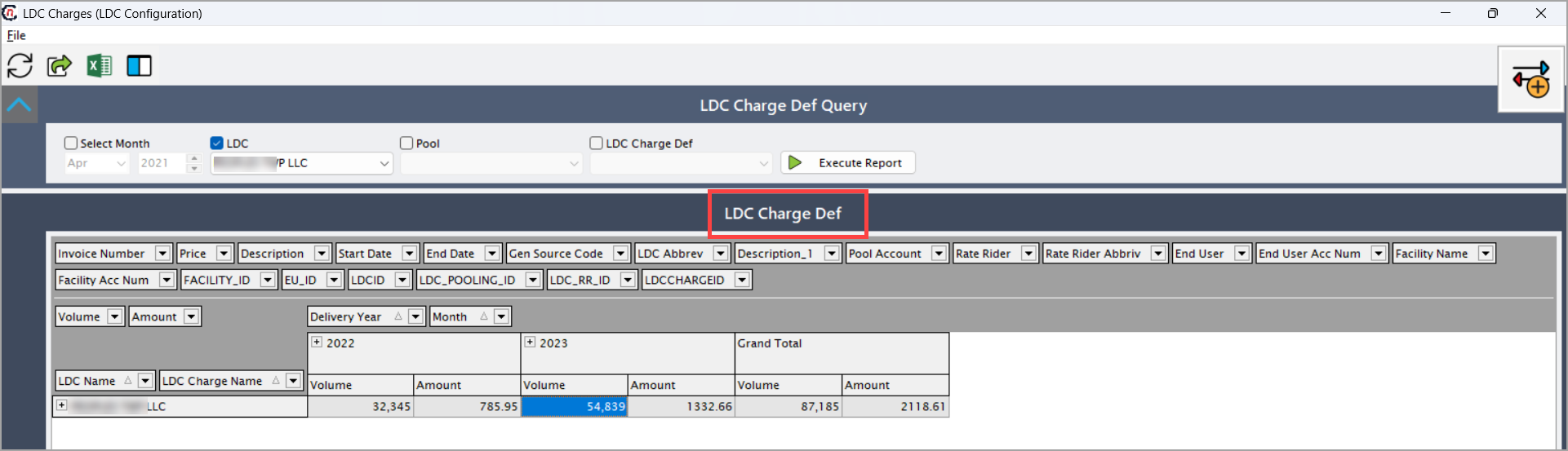
Step 2: Filter the LDC record
- Select the desired month, LDC, pool from the LDC charge def query section.
- Click Execute report to display results in the LDC charge section.
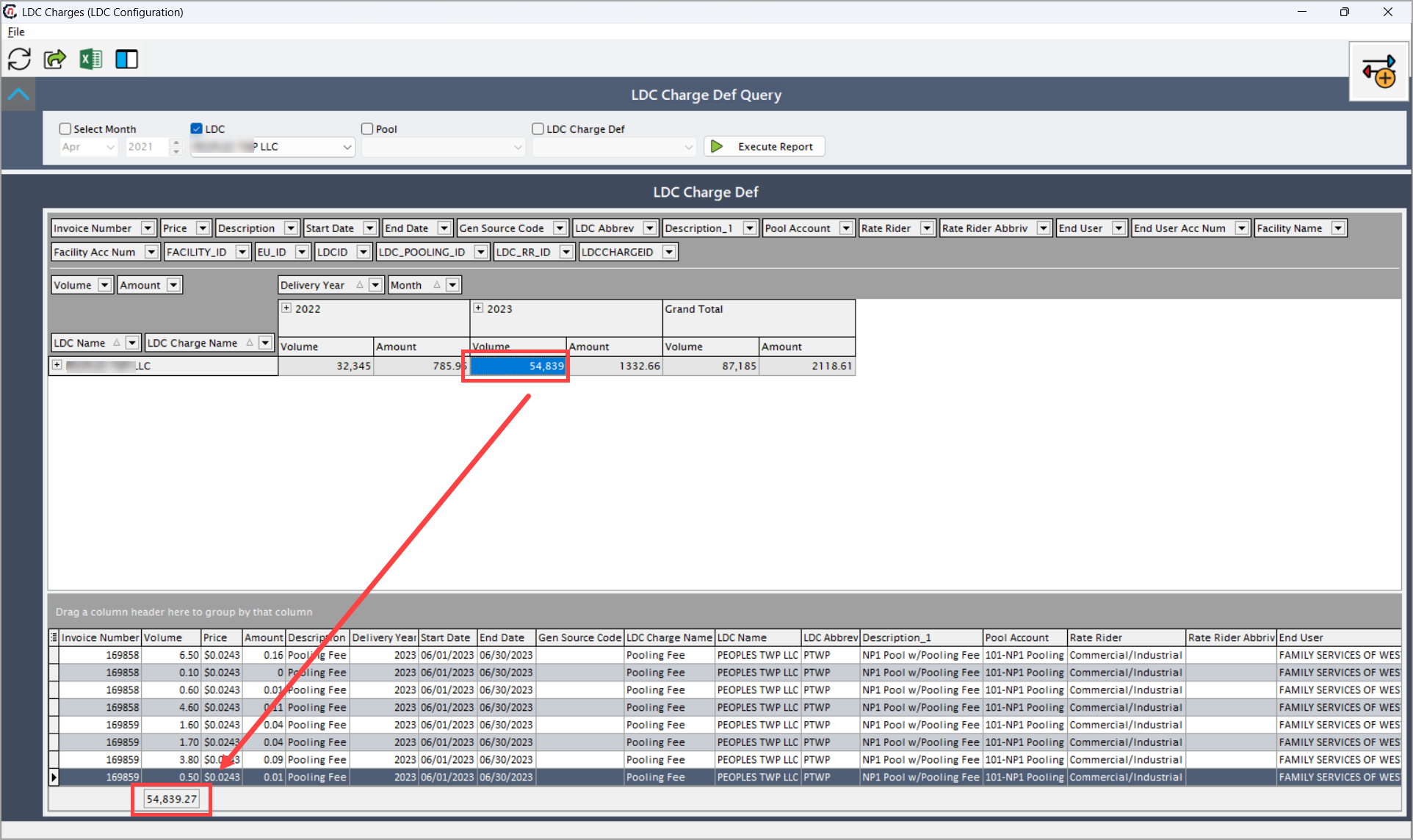
- Use the grid section to view detailed information for each invoice, including volume, amount, and related LDC charge information.
- Use the Excel icon to export the displayed data for external reporting or reconciliation.
- Review and verify to ensure that the charges match the expected volumes and amounts for each LDC, pool, and end user.
What’s next
After querying and reviewing LDC charges, the following steps help ensure data accuracy, proper configuration, and seamless integration with downstream processes:
-
Validate charges:
Carefully review the charges displayed in the LDC charge def grid against the applicable contracts, pooling agreements, or historical data. Check for anomalies in price, volume, or rate riders. Validation helps prevent billing errors, avoids disputes with end users, and ensures compliance with regulatory requirements. -
Adjust configurations:
If any discrepancies or errors are identified during validation, update the relevant LDC charge definitions, rate riders, or pool assignments. This may include modifying start/end dates, correcting rates, or adjusting charge applicability. Accurate configuration ensures that future charges are calculated correctly and consistently. -
Integrate with billing:
Once charges are validated and configured, verify that the charge data flows correctly into the billing system. This ensures invoices reflect accurate charges and reduces manual intervention. Check mappings to end user accounts, facilities, and pools to prevent misbilling. -
Reporting:
Export the validated LDC charge data to generate management reports, regulatory filings, or internal summaries. Use the reporting data to monitor charge trends, analyze costs by LDC or pool, and support decision-making. This step helps maintain transparency and provides insights for operational or financial planning.
Summary
This guide ensures a comprehensive understanding of each field and process in the LDC charges configuration. Following these steps allows users to manage charges accurately, maintain consistent records, and support reliable billing and reporting across the organization.