Reviewing settlements
A settlement represents the final stage of a transaction, where financial obligations between counterparties are reconciled and closed based on agreed-upon deal terms, quantities, and prices. Settlement review allows to validate calculated amounts, review supporting deal data, apply adjustments if necessary, and ensure accounting accuracy before finalizing payments or invoices. The Settlement review screen in nGenue serves as the central workspace for verifying and auditing settlement results prior to approval or posting.
Prerequisites
Before working on the Settlement review screen, ensure the following prerequisites are met:
- Ensure the nGenue application is installed and use valid login credentials to log into the application.
- Configure the user permissions including User type, Security user, Security group, Security assign user, and Security assign permissions in their respective screens to enable access to the Settlement review screen.
- Ensure the Deal management, Pipeline, Counterparty and Chart of accounts are properly configured and active.
- Ensure the required settlement statuses and rate schedules are defined.
- Ensure related billing and pricing data has been finalized.
Procedure to review settlements
Step 1: Navigate to Settlement review screen
- Log in to the nGenue application.
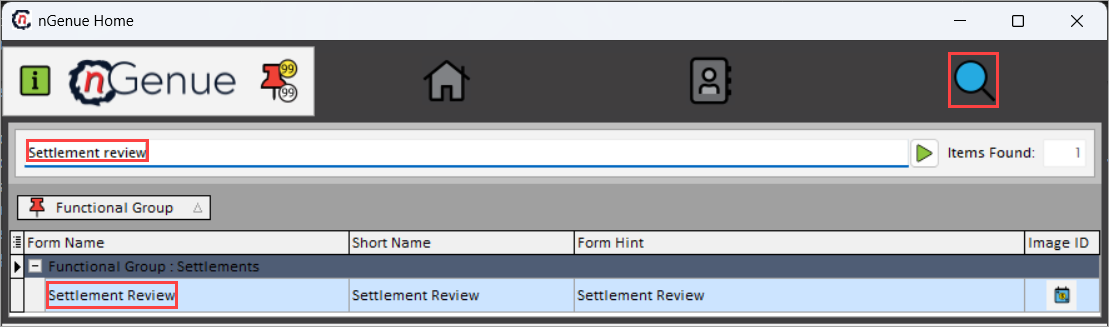
- Click the Search icon and enter Settlement review in the search bar.
-
Double-click Settlement review to open the respective screen.
-
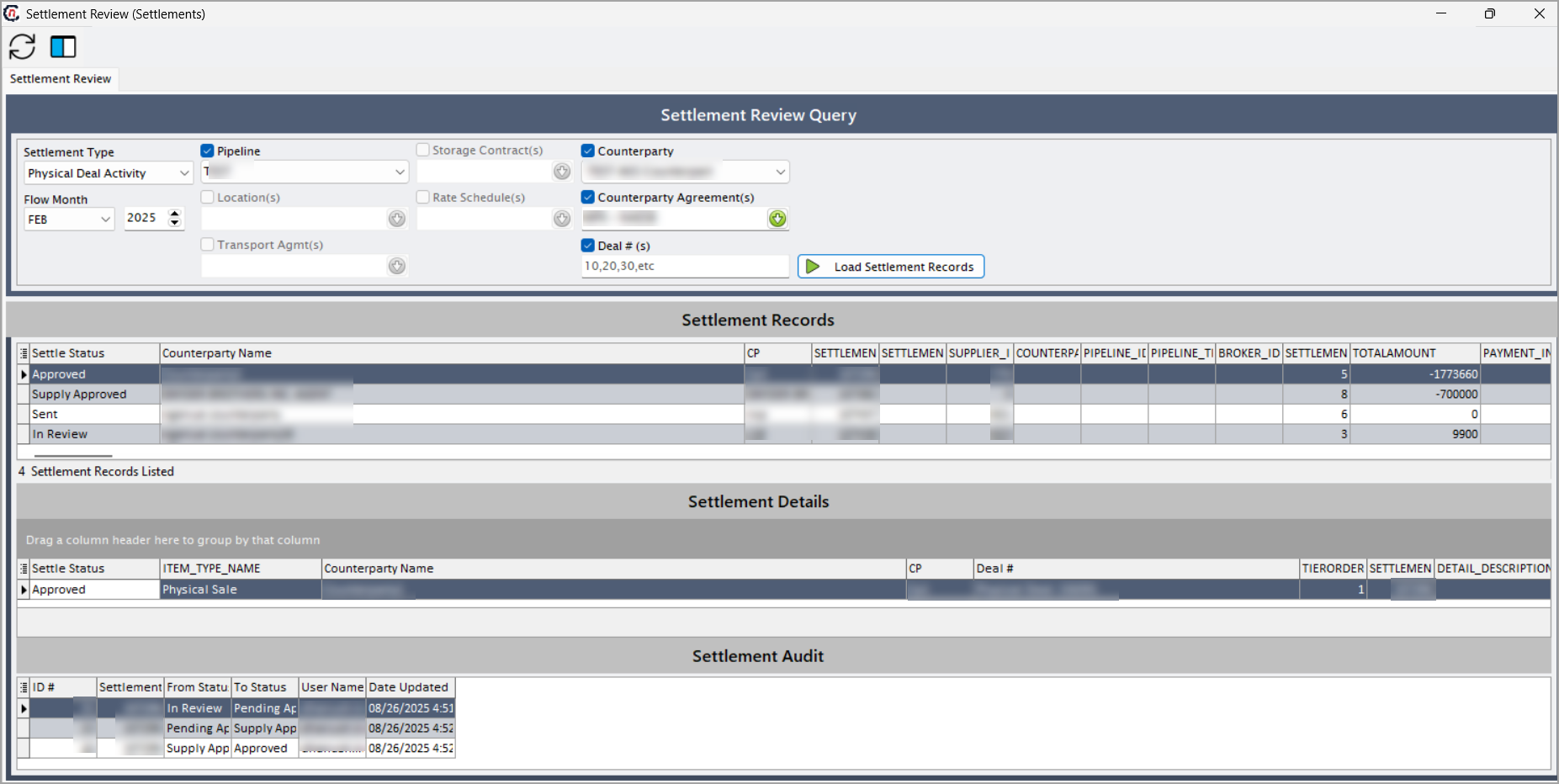
Settlement review (Settlements) screen has four sections:
- Settlement review query
- Settlement records
- Settlement details
-
Settlement audit
Step 2: Load settlement records
-
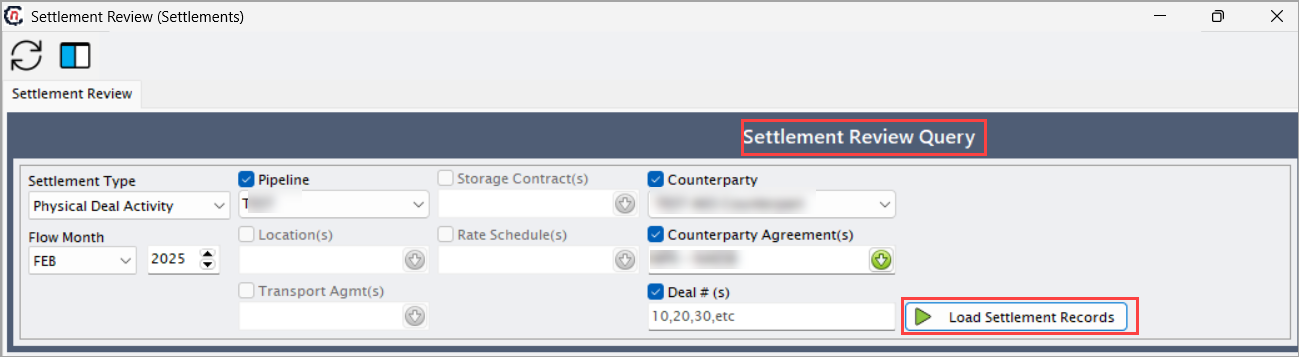
Enable and select the required fields mentioned in the below table before loading the settlement records.
Fields Description Settlement type Select the category of settlement to be processed. Options include physical deal activity, pipeline activity, financial deal activity, broker fee, production deal activity or physical NG - option. The selected type determines how the transaction is processed and posted within the system. Flow month Select the month and year for which the settlement applies. Pipeline Select the pipeline associated with the deal. Location Choose the physical or contractual delivery location associated with the settlement. This identifies where the gas was delivered, received, or measured for the transaction. Transport agreement(s) Select the associated transport contract. These agreements define the transportation terms, capacities, and rates applicable to the settlement. Storage contract Select the storage agreement related to the transaction, if applicable. This links the settlement to gas stored or withdrawn under specific contractual conditions. Rate schedule Specify the rate schedule applied to the settlement. It determines the pricing, tariff, or rate structure used for calculating charges or payments associated with the transaction. Counterparty Select the counterparty involved in the transaction. The counterparty represents the entity with whom the settlement and financial reconciliation occur. Counterparty agreement(s) Links the settlement to one or more counterparty agreements that define commercial and financial terms such as pricing, credit conditions, and payment terms between the entities. Deal #(s) Provide the deal number of a specific deal associated with the settlement. -
Click Load settlement records to fetch the settlement records based on selected criteria.
Step 3: Review settlement records
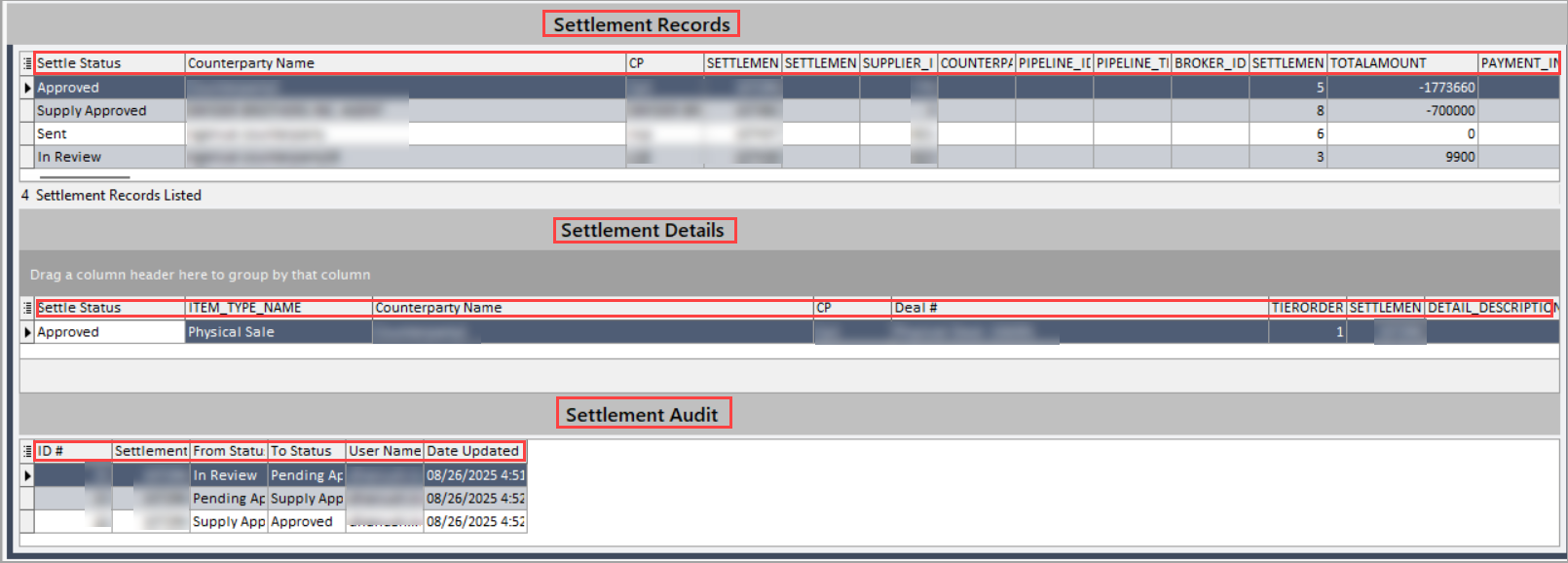
Once the settlement records are loaded, the details can be reviewed and analyzed across three main sections of the screen.
Settlement records
The Settlement records section displays all settlement entries that match the selected query criteria. Each record represents an individual line-level settlement instance and includes detailed information such as deal data, counterparty details, and accounting attributes. These records can be reviewed to confirm settlement status, amounts, payment details, and related reference identifiers before approval or further processing.
The table below describes each field displayed for settlement records:
| Field name | Description |
|---|---|
| Settle status | Displays the current processing status of the settlement. |
| Counterparty name | Specifies the name of the counterparty associated with the settlement. |
| Cp | Represents a short code or abbreviation representing the counterparty. |
| Settlement id | It is a unique system-generated identifier for each settlement record. |
| Settlement suffix | Reference suffix used to distinguish between multiple settlements under the same ID. |
| Supplier id | Identifier linking the settlement to the associated supplier entity. |
| Counterparty contract id | Internal reference ID for the contract governing transactions with the counterparty. |
| Pipeline id | Identifier of the pipeline associated with the settlement transaction. |
| Pipeline transport agmt id | ID of the transport agreement used to move the product or service being settled. |
| Broker id | Identifier for the broker involved in facilitating the deal, if applicable. |
| Settlement status id | System-level ID that maps to the configured settlement status definition. |
| Totalamount | Total calculated amount for the settlement, inclusive of all charges and adjustments. |
| Payment info | Displays notes or details regarding the payment method or terms for the settlement. |
| Recipient address | The mailing or physical address where settlement documents or payments are sent. |
| Ponumber | Purchase Order number associated with the settlement, if applicable. |
| Paidamount | Amount that has been paid against the total settlement value. |
| Duedate | The due date for payment or settlement completion. |
| Paiddate | The actual date when payment for the settlement was made. |
| Dt created | Timestamp indicating when the settlement record was initially created. |
| Created by | Username or ID of the user who created the settlement record. |
| Sent date | The date when the settlement was sent or transmitted to the counterparty. |
| Eft account id | Identifier for the Electronic Funds Transfer (EFT) account used to process the settlement payment. |
| Document path | File path or link to the settlement document or invoice stored in the system. |
| Gl month | General Ledger posting month for accounting purposes. |
| Gl year | General Ledger posting year for accounting purposes. |
| Marketer id | Identifier for the marketer or internal account responsible for the deal. |
| Settlement source | Source module or process that generated the settlement. |
| Pipeline storage contract id | Reference ID for any storage contract linked to the pipeline settlement. |
| Pipeline rate schedule id | ID corresponding to the rate schedule used to calculate settlement charges. |
| Employeeid | Identifier of the employee managing or responsible for the settlement. |
| Outside consultant id | Identifier for any external consultant involved in the settlement process. |
| Settlement date | The effective date on which the settlement is recognized or executed. |
| Trx type | Type of transaction, such as Buy, Sell, Fee, or Adjustment. |
| Settlement group | Categorization or grouping of settlements for batch processing or reporting. |
| Pipeline id 1 | Secondary pipeline reference if multiple pipelines are involved in the transaction. |
| Name | Descriptive name or title associated with the settlement record. |
Settlement details
The Settlement details section presents line-level information for each settlement record listed in the Settlement Records section. Each line item corresponds to a specific settlement component such as a charge, adjustment, or volume-price calculation that contributes to the overall settlement amount. This section allows detailed verification of pricing, volumes, calculation logic, and any manual adjustments impacting the final settlement value.
The following table lists and describes each field displayed in the Settlement details section:
| Field name | Description |
|---|---|
| Settle status | Displays the current processing status of the settlement. |
| Item type name | Describes the classification of the settlement item. |
| Counterparty name | The name of the counterparty associated with the deal or settlement line. |
| Cp | Represents a short code or abbreviation representing the counterparty. |
| Deal # | The unique identifier for the deal tied to this settlement entry. |
| Tierorder | Represents the pricing or volume tier sequence applicable for this settlement calculation. |
| Settlement id | System-generated unique identifier linking the line item to its parent settlement record. |
| Detail description | Provides a detailed description of the settlement item or charge. |
| Volume | Indicates the Quantity or volume associated with this settlement item |
| Price | The rate or unit price applied to the volume to calculate the settlement amount. |
| Amount | he total monetary value for the settlement item, typically calculated as Volume × Price. |
| Volume calc desc | Textual description of how the volume was determined or adjusted. |
| Price component description | Explains individual components or factors that contributed to the final price. |
| Price calc desc | Notes or explanation of how the final price was calculated. |
| Other calc desc | Captures any other manual or automated calculation notes affecting this line item. |
| Del year | Delivery year for which the transaction applies. |
| Del month | Delivery month associated with the settlement transaction. |
| Gl year | The General Ledger accounting year for posting. |
| Gl month | The General Ledger accounting month for posting. |
| Dt created | Timestamp of when the settlement detail record was created. |
| Created by | The username or ID of the user who created the settlement detail. |
| Is manual entry | Indicates whether this record was entered manually or generated automatically. |
| Manual entry note | Notes entered by the user when a manual adjustment or override was made. |
| Supplier id | Identifier for the supplier linked to the settlement item. |
| Counterparty contract id | Contract reference ID for the counterparty associated with this detail. |
| Nom settled pipe charge ppa id | Reference to the nomination or PPA record used in calculating the pipeline charge. |
| Supply deal id | Internal ID linking to the related supply deal. |
| Supplydeal ppa id | Identifier for the Prior Period Adjustment (PPA) associated with the supply deal. |
| Pipeline charge def id | Identifier for the pipeline charge definition applied in this settlement. |
| Nomination id | Reference to the nomination record tied to this settlement. |
| Pipeline transport agmt id | ID of the transport agreement used for settlement calculations. |
| Settlement item type id | System ID for the settlement item type configured in setup. |
| Settlement detail id | Unique ID for the settlement detail line itself. |
| Pipeline storage contract id | Identifier for any storage contract tied to this settlement. |
| Pipeline rate schedule id | ID corresponding to the rate schedule determining the settlement’s rate structure. |
| Settlement source | Origin of the settlement detail, such as Wholesale, Retail, or Brokerage. |
| Parent deal id | ID of the parent deal, if the settlement detail is linked to a hierarchical deal structure. |
| Parent detail date | Date corresponding to the parent detail record. |
| Supplytierid | Identifier for the tier within the supply contract structure used in pricing. |
| Sub detail id | Identifier for any sub-detail record related to this settlement line. |
| Sub detail table | Database or system table reference where the sub-detail is stored. |
| Supplyexpenseid | Identifier linking to a supply expense record associated with the settlement. |
| Supplydeal trigger id | Identifier for a trigger condition or event that caused this settlement entry to be generated. |
| Swap id | ID linking the settlement detail to an associated swap transaction. |
| Futuresid | Identifier linking to a futures contract related to this settlement. |
| Pipeline charge id | Reference to the specific pipeline charge instance applied. |
| Settlement group | Category or grouping identifier for reporting or batch processing. |
| Pipeline id | Identifier of the pipeline relevant to this settlement detail. |
| Name | Descriptive label or title of the settlement line item. |
Settlement audit
The Settlement audit section provides a historical log of all settlement status changes and approval actions performed within the system. It is used for tracking, validation, and compliance purposes, ensuring that all settlement approvals, rejections, or updates are fully traceable to the responsible user and timestamp. This audit trail helps maintain transparency and accountability in the wholesale settlement review and approval process.
The following table lists and describes each field displayed in the Settlement audit section:
| Fields | Description |
|---|---|
| Settlement_status_approval_audit | A unique audit record identifier used to track each approval or status update related to a settlement. |
| Settlement ID | References the corresponding settlement record for which the audit entry was created. |
| From_status_ID | Indicates the original settlement status before the change. |
| To_status_ID | Displays the new settlement status after the update or approval action. |
| Employee ID | Identifies the employee or user who performed the approval, rejection, or modification action. |
| Date updated | Captures the exact date and timestamp when the settlement status was modified. |
Summary
The settlement review process ensures that all settlement data including amounts, adjustments, and audit trails is accurate and verified before financial posting or invoice distribution. By systematically reviewing, validating, and auditing each record, users can maintain data integrity, minimize reconciliation errors, and ensure compliance with contractual and accounting requirements.