Configure facility document distribution
In natural gas operations, a wide range of documents such as invoices, confirmations, nominations, contracts, and operational reports, must be delivered to the right stakeholders at the right time. These documents are often required by facilities, legal entities, marketers, and operational teams to support billing, compliance, forecasting, and decision-making. When document distribution is inconsistent or manually managed, it can lead to missed communications, audit gaps, and operational confusion.
The Facility Document Distribution screen provides a centralized and controlled way to define which reports are distributed to specific facilities and how frequently they are delivered. By configuring distribution rules at the facility level, this screen ensures that documents are sent consistently, automatically, and in alignment with operational and billing cycles, reducing manual effort and improving reliability.
Prerequisites
Before working on the Facility Document Distribution screen, ensure the following prerequisites are met:
- The user has add or modify permissions for the Facility Document Distribution screen.
- The LDC, Pools, Rate Riders, and Legal Entities are configured and active.
- Facilities exist and are active.
- Reports intended for distribution are enabled for document delivery.
- Faxing or delivery mechanisms are configured, if applicable.
Procedure to configure facility document distribution
Step 1: Navigate to the Facility Document Distribution screen
- Log in to the nGenue application.
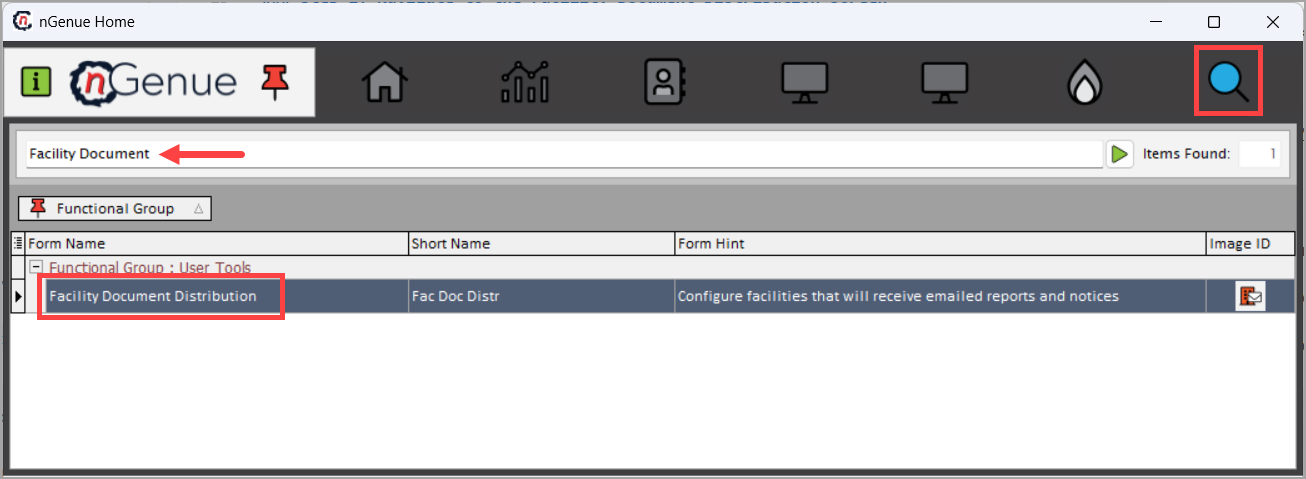
- Click the Search icon and enter Facility Document in the search bar.
- Double-click Facility Document Distribution to open the Facility Document Distribution (User Tools) screen.
Step 2: Define filter criteria
In the Facility Level Document Distribution Definitions screen, use the left panel to filter and identify the facilities for which document distribution rules will be configured.
| Fields | Description |
|---|---|
| Filter by LDC | Selects the Local Distribution Company to limit facilities and reports to a specific LDC context. |
| Filter by Pool | Optionally narrows facilities based on pool assignment. |
| Filter by Rider | Filters facilities based on the applicable rate rider (for example, Residential or Commercial). |
| Filter by Group | Filters facilities associated with a specific legal entity or customer group. |
| Load End Users (Active Only) | Loads facilities associated with the selected filters. Only active facilities are displayed. |
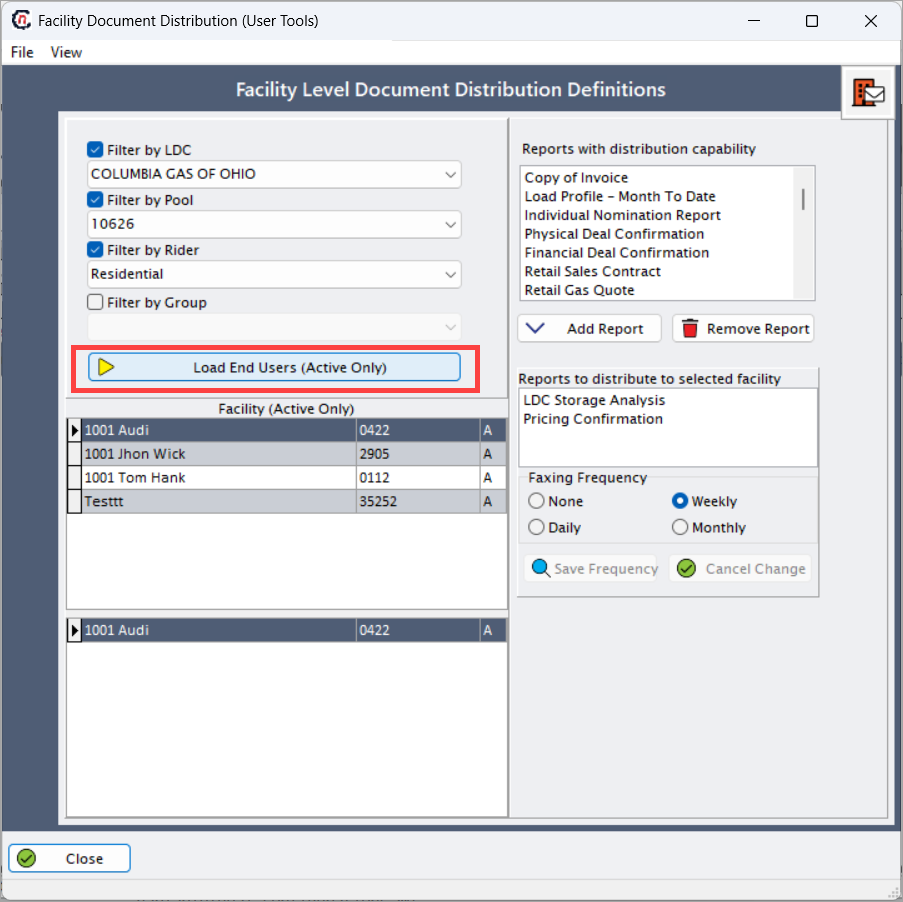
These filters help users target the correct population of facilities without configuring each one manually.
Step 3: Select facility
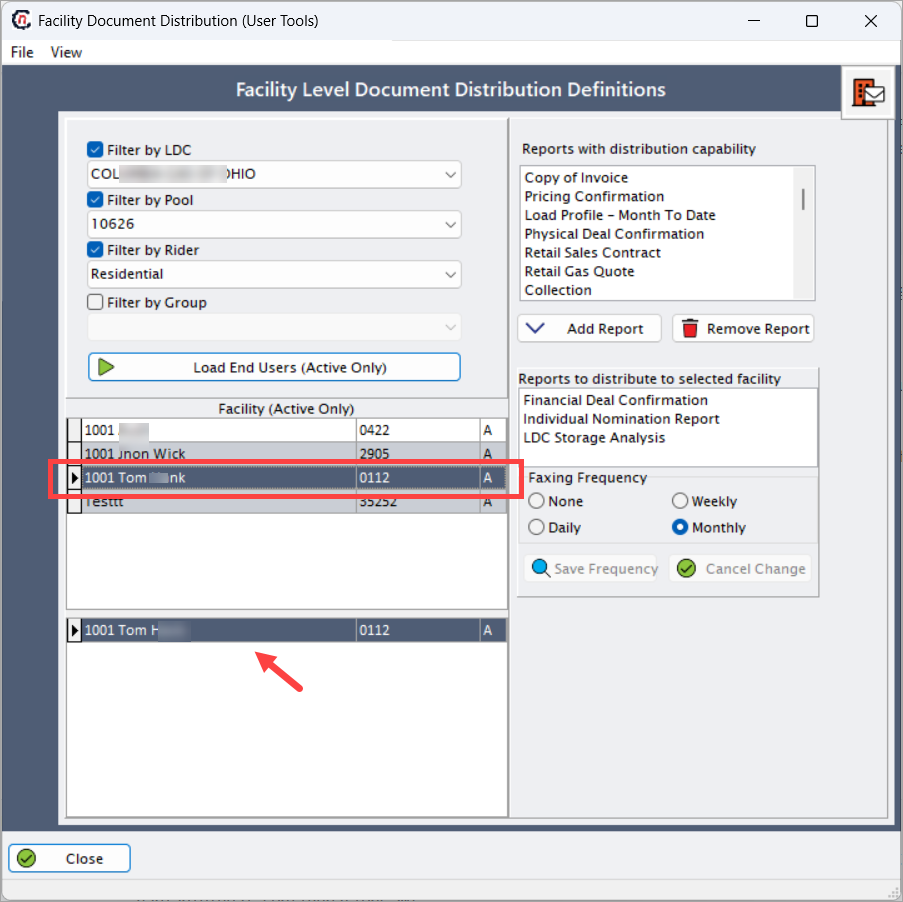
Use the Facility (Active Only) grid to select the facility for which distribution rules will be applied.
- Each row represents an active facility.
- Selecting a facility loads its current distribution configuration on the right side of the screen.
- Facility status is displayed for reference.
Step 4: Configure report distribution
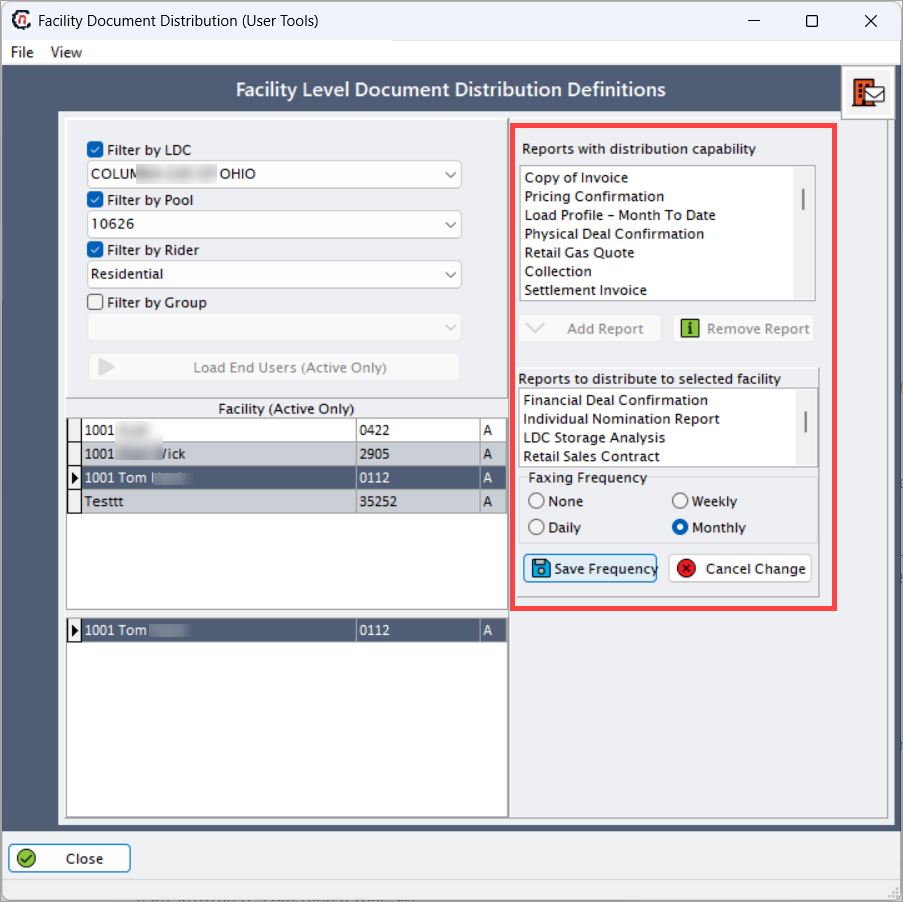
Use the right panel to manage which reports are distributed to the selected facility.
Reports with distribution capability
This list displays all reports that are eligible for distribution, such as:
- Copy of Invoice
- Pricing Confirmation
- Load Profile – Month to Date
- Physical Deal Confirmation
- Retail Sales Contract
- Retail Gas Quote
- Collection
Users can select reports from this list and add them to the facility’s distribution configuration.
Reports to distribute to selected facility
This list displays the reports that are currently configured to be distributed to the selected facility.
| Actions | Description |
|---|---|
| Add Report | Adds the selected report from the available list to the facility’s distribution list. |
| Remove Report | Removes a report from the facility’s distribution configuration. |
This setup determines which documents the facility will receive automatically.
Step 5: Define distribution frequency
Use the Faxing Frequency section to control how often the selected reports are distributed.
| Options | Description |
|---|---|
| None | No automated distribution is performed. |
| Daily | Reports are distributed every day. |
| Weekly | Reports are distributed once per week. |
| Monthly | Reports are distributed once per month, typically aligned with billing cycles. |
- Click Save Frequency to apply the selected distribution schedule.
- Click Cancel Change to discard any uncommitted changes.
Key points
- Document distribution is configured at the facility level.
- Only reports enabled for distribution appear in the available list.
- Distribution frequency controls how often documents are automatically sent.
- Monthly distribution is commonly aligned with billing cycles.
- Proper configuration reduces manual document handling and audit risk.
Summary
The Facility Document Distribution screen provides a structured and reliable way to control how operational and billing documents are delivered to facilities. By allowing users to select applicable reports, define delivery frequency, and manage configurations centrally, this feature ensures consistent communication, supports compliance, and reduces operational overhead across nGenue.