Generate daily nominations
Daily nominations are generated to allocate and communicate the quantity of gas scheduled for delivery to or from specific facility on a given day. This process ensure accurate gas scheduling for daily metered facilities based on real-time data consumption data.
Daily nominations help maintain compliance with Local Distribution Company (LDC) requirements and manage contractual Maximum Daily Quantities (MDQ), and automate the daily operational workflow for supply management. They also enable proactive adjustments for changes in usage patterns, weather conditions, or market fluctuations.
Prerequisites
Before generating daily nominations, ensure the following prerequisites are met:
- User permissions: Configure the user permissions including User type, Security user, Security group, Security assign user, and Security assign permissions in their respective screens to enable access to the Generate daily nominations screen.
- LDC set up: Ensure the LDC and LDC pool, rate/rider are properly configured for gas scheduling.
- End user set up: Ensure the End user is fully configured.
- Contract setup: Ensure end user Maximum Daily Quantity (MDQ) values and contract quantities are defined and configured to support accurate nomination generation.
Procedure to generate daily nominations
- Log in to nGenue application.
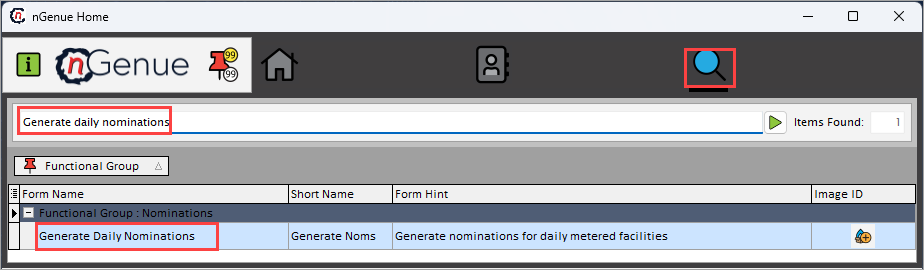
- Click Search icon and enter Generate daily nominations in the search bar.
-
Double-click Generate daily nominations to open the respective screen.
-
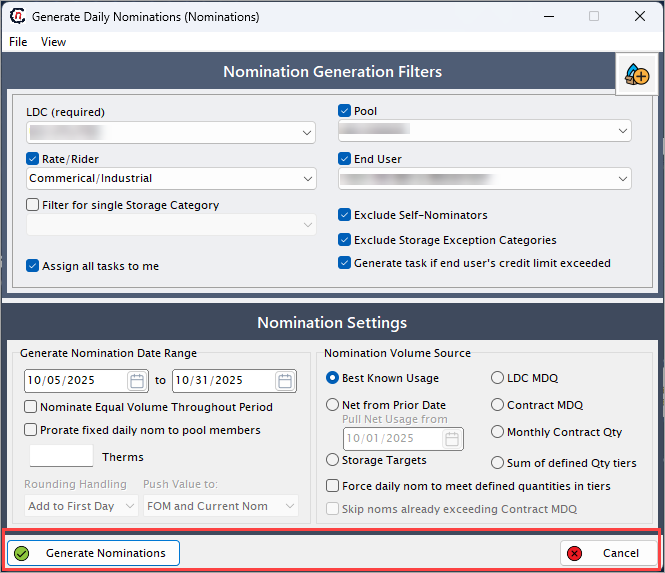
In Generate daily nominations (Nominations) screen, there are two sections
- Nomination generation filters: This section provides filterable fields necessary to specify for generating nominations
-
Nomination settings: This section provides fields that determines the basis of nominations and related specifications.
-
Complete the required fields listed in the table below, along with their brief description. Ensure these fields are enabled before selecting options.
Nomination generation filters
Fields Description LDC (required) Select the LDC associated with nomination process. Pool Select the pool associated under the chosen LDC. Rate/rider Select rate/rider to apply for nominations. End user Select the end user for whom the nomination are being generated. Filter for single storage category Select a storage category to restrict the nomination to that specific storage category. If this option is selected, Exclude storage exception categories will be automatically deselected. Exclude self-nominator's Select this checkbox to omit nominations submitted by the same user or account. Exclude storage exception categories Select this checkbox to ignore categories that are flagged as storage exceptions. Selecting this will automatically deselect Filter for single storage category. Generate task if end user's credit limit exceeded Select this checkbox to automatically create a task if the end user’s credit limit is surpassed. Assign all tasks to me Select this checkbox to assign generated tasks to the current logged-in user. Nomination settings
Generate nomination
Fields Description Generate nomination date range (to) Specify the date range for which nominations are to be generated. Nominate equal volumes throughout period Select this checkbox to distribute nomination volumes evenly across the period. Prorate fixed daily nom to pool members (therms) Select this checkbox to allocate fixed daily nominations proportionally among pool members. Round handling Select the rounding method to apply for nomination volumes. Options include Ignore, Add to first day, Add to last day. Push value to Specify where the generated nomination values will be applied. Options include FOM and current Nom, Current Nom only, FOM Nom only. Nomination basis
Fields Description Best known usage Select this checkbox to base nominations on historical usage data. Net from prior date (pull net usage from) Select this checkbox to calculate net usage starting from a specified prior date. Storage targets Select this checkbox to include storage targets in nomination calculation. LDC MDQ Select this to apply the MDQ defined in the LDC contract. Contract MDQ Select this to apply the MDQ defined as per the contract. Monthly contract quantity Select this checkbox to include monthly contract quantity for nominations. Sum of defined qty tiers Select this checkbox to sum defined quantity tiers when generating nominations. Force daily nom to meet defined quantities in tiers Select this checkbox to ensure daily nominations meet the defined tier quantities. Skip noms already exceeding contract MDQ Select this checkbox to ignore nominations that already exceed the contract MDQ. -
Click Generate to create the nominations, or click Cancel to exit without saving changes.
Summary
Generating daily nominations automates the allocation and communication of scheduled gas volumes for daily metered facilities. It helps maintain compliance with LDC rules and contract limits while ensuring accurate, efficient gas supply management.