Print daily facility volumes
A Daily facility volumes report provides a detailed, day-by-day view of gas volumes delivered to or consumed by individual facilities over a selected period. It captures daily volume activity by facility, end user, pool, rate, and LDC, offering granular insight into operational gas usage.
This report is used to monitor daily gas flow, validate scheduled versus actual volumes, support billing accuracy, and assist with operational planning and reconciliation. It is especially useful for operations, billing, and risk teams to identify volume variances, track facility performance, and respond to customer or LDC inquiries.
The report includes daily volume details by facility, optional summaries by end user, and graphical representations when selected. It can be previewed, printed, or exported to PDF directly from the nGenue application for operational review, billing validation, and reporting purposes.
Prerequisites
Before working on the Print daily facility volumes (Reports) screen, ensure the following prerequisites are met:
- Ensure the nGenue application is installed and use valid login credentials to log into the application.
- Configure the user permissions including User type, Security user, Security group, Security assign user, and Security assign permissions in their respective screens to enable access to the Print daily facility volumes (Reports) screen.
Procedure to print daily facility volumes report
- Log in to the nGenue application.
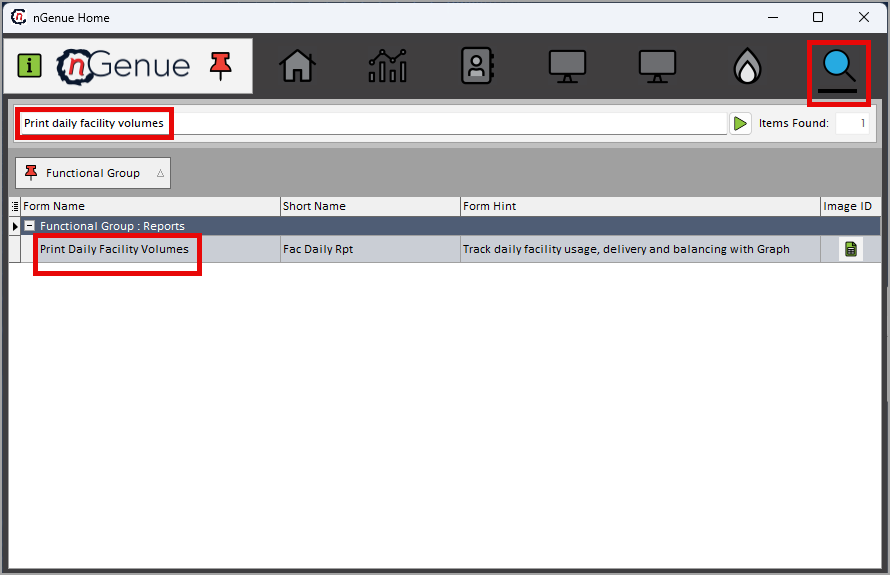
- Click the Search icon and enter Print daily facility volumes in the search bar.
-
Double-click the Print daily facility volumes from the search results to open respective screen.
-
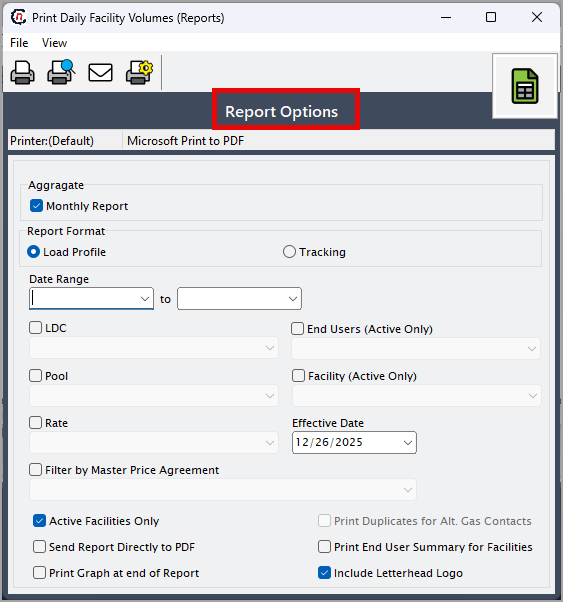
In Print daily facility volumes (Reports), the Report options section allows to specify report filters, delivery period, and output preferences.
-
Complete the required fields available in the Report options section as listed in the table below:
Fields Description Monthly report Select this option to generate a report summarized by month instead of individual days. Report format Select the desired report format for output and layout. Date range (to) Specify the start and end dates for which daily facility volumes should be reported. LDC Select the Local Distribution Company to limit the report to facilities associated with the selected LDC.. Pool Select the pool to filter facilities and volumes included in the report. Rate Select the applicable rate to restrict the report to facilities billed under that rate End users (Active only) Select this option to include only active end users during the reporting period. Facility (Active only) Select specific facilities or restrict the report to active facilities only. Effective date Specify the effective date used to evaluate applicable agreements and facility relationships. Filter by master price agreement Enable this option to filter volume data based on the selected master price agreement. Active facilities only Select this checkbox to include only facilities marked as active. Send report directly to PDF Select this option to generate and save the report directly as a PDF file. Print graph at end of report Select this option to include a graphical summary of daily volumes at the end of the report. Print duplicates for alt. gas contacts Select this option to print duplicate copies for alternate gas contacts. Print end user summary for facilities Select this option to include a summarized view of volumes by end user. Include letterhead logo Select this checkbox to include the organization’s letterhead logo on the printed or PDF report. -
Select any of the printing options available in the top header as described in the table below:
Icons Icon name Description 
Print Click Print icon to print the aging detail report. 
Print preview Click Print preview icon to view the aging detail report. 
Printer setup Click Printer setup icon to configure printing settings. -
Click Printer setup to configure print settings such as printer name, paper size, orientation, properties, and network.
- Click Ok to save the configuration.
- Click Cancel to discard changes.
-
Click Print preview to review the report and make any necessary adjustments.
- Click Print to generate the daily facility volumes report based on the selected criteria.
Summary
The daily facility volumes report delivers detailed, day-level visibility into gas volume activity by facility and end user. It supports operational monitoring, billing validation, and volume reconciliation by ensuring accurate tracking of delivered or consumed volumes. This report is essential for maintaining transparency, resolving discrepancies, and supporting both operational and financial decision-making.