View master end user data
In gas operations, having a single, reliable source of truth for end user information is critical. End user master data drives almost every downstream process, pricing, billing, volume calculations, settlements, reporting, and audits. When this data is fragmented or difficult to validate, it becomes challenging for operational, billing, and regulatory teams to trust system outputs.
The Master Data – End User screen addresses this need by providing a centralized, query-driven view of end user master data. It allows users to quickly retrieve and review end user attributes, unit of measure settings, and associated price agreements over a defined time range. This screen is primarily used for data validation, troubleshooting, audit support, and operational review, ensuring transparency and consistency across the system.
Prerequisites
Before using the Master Data – End User screen, ensure the following prerequisites are met:
- The user has add or modify permissions for the Master Data – End User screen.
- The end user exist and is active.
- Price agreements exist for the selected end users, if applicable.
- The selected date range aligns with configured agreement periods.
Procedure to view master end user data
Step 1: Navigate to the Master Data screen
- Log in to the nGenue application.
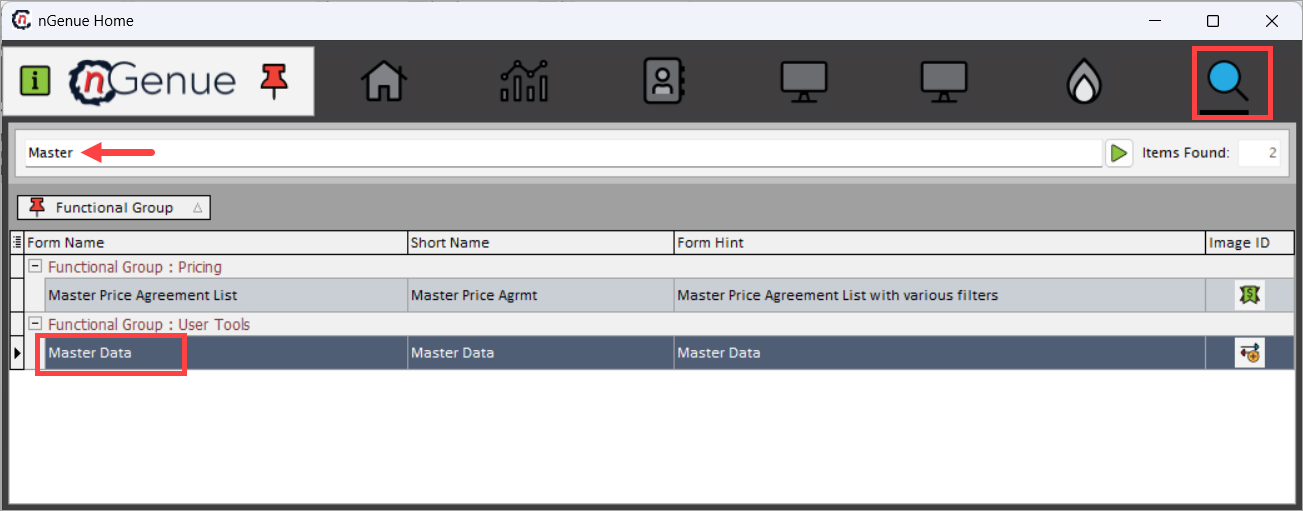
- Click the Search icon and enter Master in the search bar.
-
Double-click Master Data to open the Master Data (User Tools) screen.
-
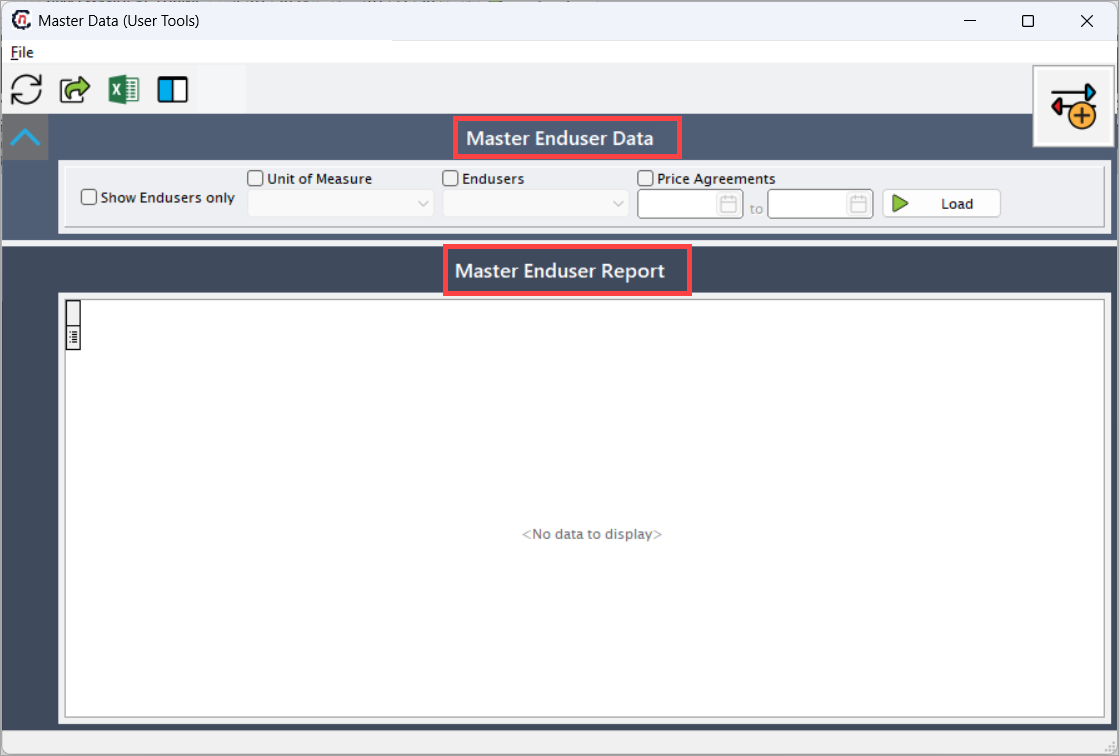
The next screen is divided into two sections:
- Master Enduser Data: This section controls what end user data is retrieved.
- Master Enduser Report: This section displays the retrieved master and pricing data in a grid format.
Step 2: Define master data query criteria
Use the top section of the screen to control what end user data is retrieved.
| Fields | Description |
|---|---|
| Show Endusers Only | When selected, limits the output strictly to end user master records without related transactional data. |
| Unit of Measure | Specifies the unit of measure (for example, THERM-BT) used when displaying quantities and agreements. |
| Endusers | Select one or more end users whose master data needs to be reviewed. |
| Price Agreements | When enabled, includes price agreement information associated with the selected end users. |
| Date Range | Defines the start and end dates for which end user master and agreement data is retrieved. |
| Load | Executes the query and loads the master data into the report section. |
This section allows users to narrow the data scope and focus only on relevant records.
Step 3: Review master end user report
The Master Enduser Report section displays the retrieved master and pricing data in a grid format. Each row represents an end user and an associated pricing or contract configuration for the selected date range.
| Fields | Description |
|---|---|
| LDC Name | Identifies the Local Distribution Company under which the end user is registered. This is critical for understanding tariff and regulatory context. |
| Enduser ID | System-generated unique identifier for the end user. Used internally for tracking and integration. |
| Enduser Name | Legal or business name of the end user as configured in the system. |
| Quote ID | Identifier of the pricing quote associated with the contract, if applicable. |
| Quote Accepted Date | Date on which the pricing quote was accepted by the end user. This often marks the transition from quote to active contract. |
| Contract | Indicates whether a formal contract exists for the pricing record. |
| Contract Type | Describes the pricing structure applied, such as Fixed Price, Floating Index, Defined Quantity, or Unlimited Volume. This directly impacts billing behavior. |
| Offered Terms | Quantity or pricing terms originally offered during the quoting phase. |
| Accepted Terms | Quantity or pricing terms accepted by the end user and enforced during billing. |
| Quote Start Date | Effective start date of the pricing or contract agreement. |
| Quote End Date | Effective end date of the pricing or contract agreement. |
| Price | Displays the applicable price or rate used for billing during the effective period (based on unit of measure). |
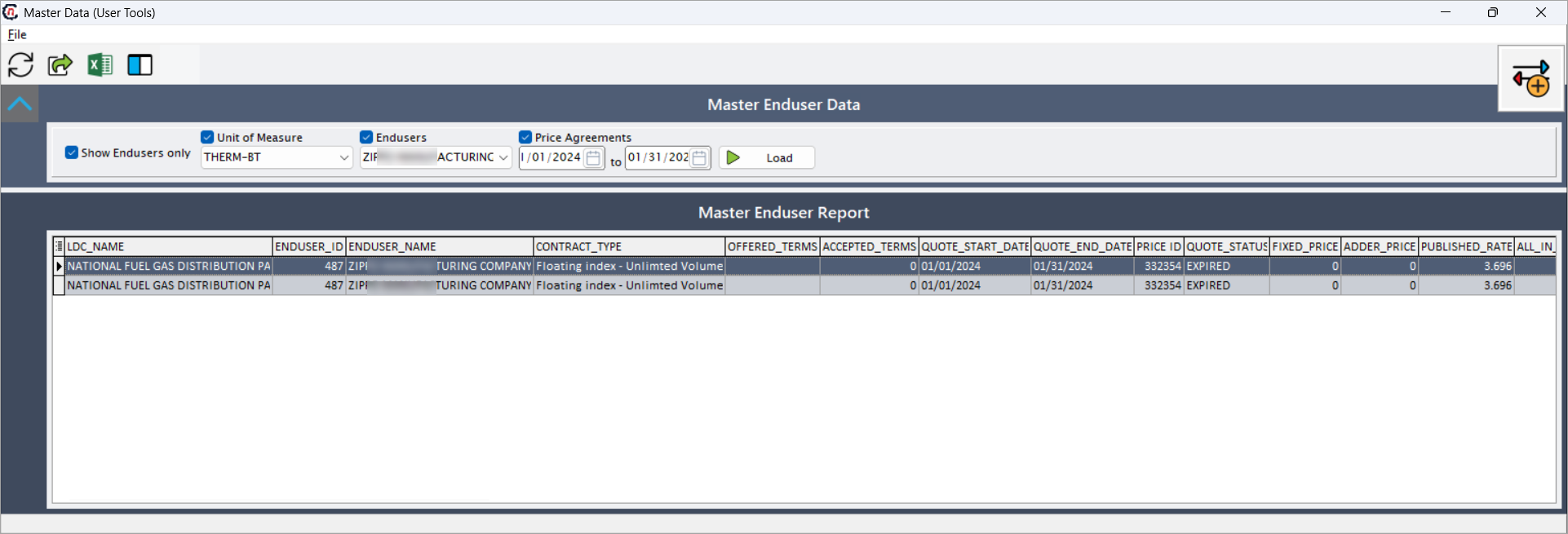
This grid enables users to quickly correlate pricing behavior with billing results, especially during investigations or audits.
Key points
- This screen provides a centralized view of end user master data.
- Unit of measure settings influence downstream pricing and billing calculations.
- Price agreements are displayed within the selected effective date range.
- The report is read-only and intended for validation and audit purposes.
- Export functionality supports regulatory and operational review.
Summary
The Master Data – End User screen offers a clear and reliable way to review end user master data within nGenue. By combining flexible query options with effective-dated visibility into pricing and configuration details, this screen helps teams validate data accuracy, troubleshoot issues, and maintain confidence in downstream billing and settlement processes.