Billing detail activity
A Billing detail activity report provides a detailed breakdown of billing-related transactions for a selected period. It displays transactional billing information such as charges, credits, and related billing activities associated with customers, pipelines, and receipt points.
This report is used to review, verify, and reconcile billing transactions before or after invoice generation. It helps billing teams identify discrepancies, validate transaction accuracy, support audits, and respond to customer inquiries by providing transparency into how billing amounts were calculated.
The report includes transaction-level billing data filtered by date range, pipeline, and receipt point. It can be previewed or printed directly from the nGenue application to support operational review, financial reconciliation, and reporting needs.
Prerequisites
Before working on the Billing detail activity (Reports) screen, ensure the following prerequisites are met:
- Ensure the nGenue application is installed and use valid login credentials to log into the application.
- Configure the user permissions including User type, Security user, Security group, Security assign user, and Security assign permissions in their respective screens to enable access to the Billing detail activity (Reports) screen.
Procedure to Billing detail activity report
- Log in to the nGenue application.
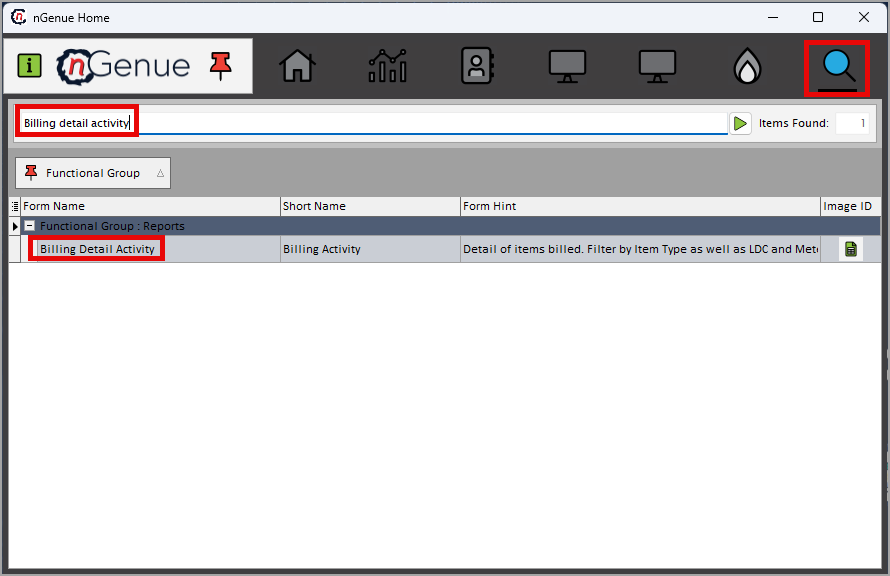
- Click the Search icon and enter Billing detail activity in the search bar.
-
Double-click the Billing detail activity from the search results to open respective screen.
-
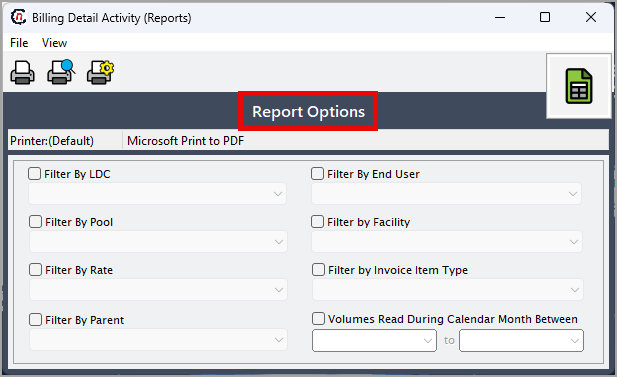
In Billing detail activity (Reports), the Report options section allows to specify report filters, delivery period, and output preferences.
-
Complete the required fields available in the Report options section as listed in the table below:
Fields Description Transactions dated between (to) Select the date range for which the billing detail activity report is to be generated. The system retrieves billing transactions only for the selected period. Pipeline Select the pipeline associated with the billing transactions to be included in the report. Receipt point Select the Local Distribution Company (LDC) or receipt point to limit the report to billing activity associated with that specific location. 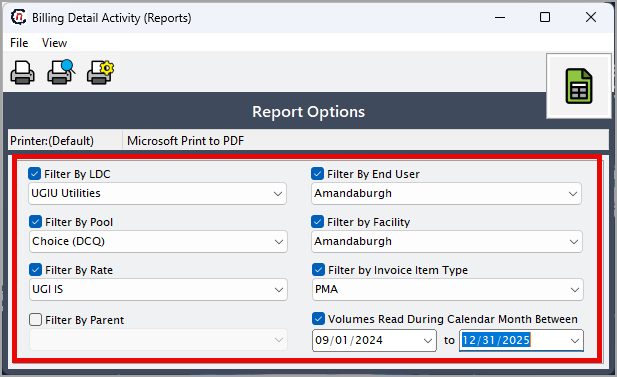
-
Select any of the printing options available in the top header as described in the table below:
Icons Icon name Description 
Print Click Print icon to print the aging detail report. 
Print preview Click Print preview icon to view the aging detail report. 
Printer setup Click Printer setup icon to configure printing settings. -
Click Printer setup to configure print settingssuch as printer name, paper size, orientation, properties, and network.
- Click Ok to save the configuration.
- Click Cancel to discard changes.
-
Click Print preview to review the report and make any necessary adjustments.
- Click Print to generate the billing detail activity report based on the selected criteria.
Summary
The billing detail activity report provides a comprehensive view of billing transactions within a specified period. It supports accurate billing validation, transaction reconciliation, and audit readiness by offering clear visibility into detailed billing activity across pipelines and receipt points. This report is essential for ensuring billing accuracy, resolving discrepancies, and maintaining reliable financial records.