Print facility volumes - wide version
A Facility volumes – wide version report provides a consolidated, matrix-style view of gas volumes across multiple days for each facility or end user within a selected date range. Unlike standard or daily volume reports that list one day per row, the wide version displays volumes horizontally across columns, making it easier to compare daily activity over time at a glance.
This report is commonly used by operations, scheduling, and analytics teams to review trends, identify volume fluctuations, and compare nominations versus actual usage across multiple days. It is especially useful when analyzing patterns, preparing operational summaries, or exporting data for further analysis in spreadsheets.
The report includes volume data filtered by LDC, pool, rate, end user, or facility, and allows users to select which volume field to display (net usage, original nomination, or current nomination). It can be previewed or printed from the nGenue application for operational analysis and reporting.
Prerequisites
Before working on the Print facility volumes - wide version (Reports) screen, ensure the following prerequisites are met:
- Ensure the nGenue application is installed and use valid login credentials to log into the application.
- Configure the user permissions including User type, Security user, Security group, Security assign user, and Security assign permissions in their respective screens to enable access to the Print facility volumes - wide version (Reports) screen.
Procedure to print facility volumes - wide version report
- Log in to the nGenue application.
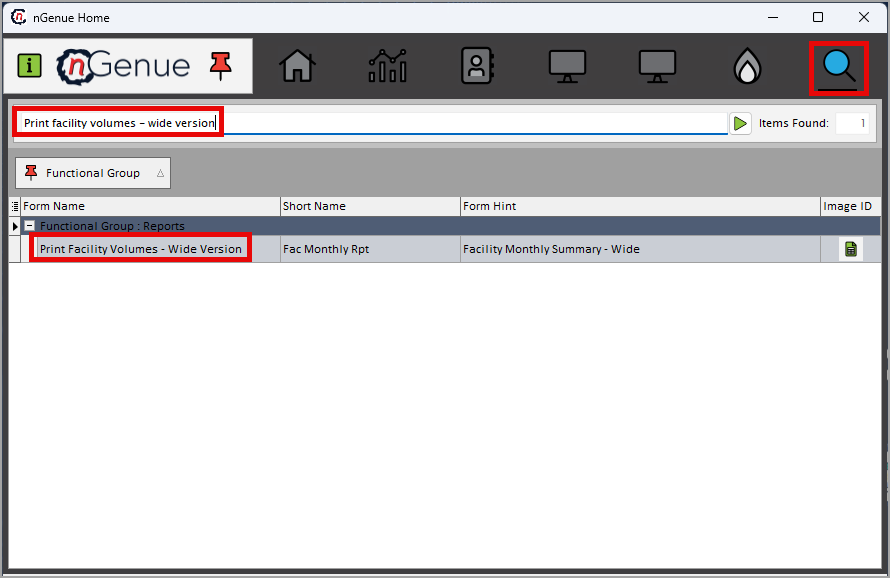
- Click the Search icon and enter Print facility volumes - wide version in the search bar.
-
Double-click the Print facility volumes - wide version from the search results to open respective screen.
-
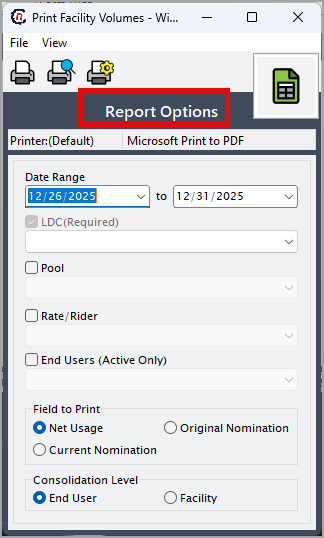
In Print facility volumes - wide version (Reports), the Report options section allows to specify report filters, delivery period, and output preferences.
-
Complete the required fields available in the Report options section as listed in the table below:
Fields Description Date range (to) Specify the start and end dates for which facility volume data should be displayed. LDC required Select the Local Distribution Company to include only facilities associated with the selected LDC. Pool Select the pool to filter facilities and volume data included in the report. Rate/rider Select the applicable rate or rider to limit the report to facilities billed under that rate End users (Active only) Select this option to include only active end users during the selected date range. Field to print Choose which volume field to display in the report: Net usage, Original nomination, or Current nomination. Consolidation level Select how data should be grouped in the report: End user or Facility. 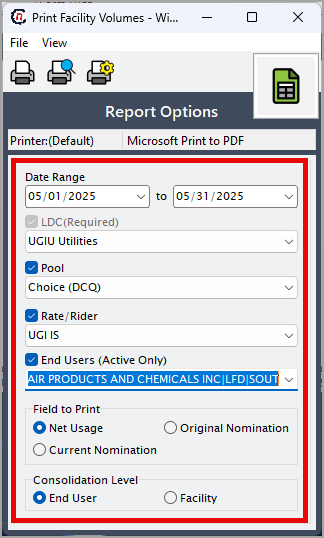
-
Select any of the printing options available in the top header as described in the table below:
Icons Icon name Description 
Print Click Print icon to print the aging detail report. 
Print preview Click Print preview icon to view the aging detail report. 
Printer setup Click Printer setup icon to configure printing settings. -
Click Printer setup to configure print settings such as printer name, paper size, orientation, properties, and network.
- Click Ok to save the configuration.
- Click Cancel to discard changes.
-
Click Print preview to review the report and make any necessary adjustments.
- Click Print to generate the facility volumes – wide version report based on the selected criteria.
Summary
The facility volumes – wide version report provides a clear, comparative view of gas volumes across multiple days in a single, wide-format layout. It is ideal for identifying trends, analyzing nomination versus usage patterns, and supporting operational decision-making. This report enhances efficiency by presenting high-volume daily data in a format that is easy to review, compare, and export for further analysis.