Review pipeline charges
The Pipeline Charge Review screen provides a consolidated view of all pipeline-related charges calculated within nGenue. It allows users to query, review, and validate transportation, storage, fuel, and other pipeline charges that are generated based on configured charge definitions, contracts, nominations, and volumes.
This screen is primarily used by pipeline operations, settlements, and finance teams to verify charge calculations before downstream processes such as accruals, invoicing, and settlement finalization.
The Pipeline Charge Review screen is designed to:
- Review calculated pipeline charges across contracts and locations.
- Validate charge amounts derived from nomination and actual volumes.
- Analyze rate application, multipliers, and fixed monthly charges.
- Trace charges back to receipt, delivery, and storage points.
- Support reconciliation, audit, and settlement validation activities.
Prerequisites
Before reviewing the pipeline charges, ensure the following prerequisites are met:
- The user has the add or modify permissions for the Pipeline Charge Review screen.
- Pipelines are configured and active in nGenue.
- Pipeline charge definitions are created and effective.
- Pipeline transport and/or storage contracts exist for the selected period.
- Nominations and/or actual volumes are available for charge calculation.
- Charge calculation jobs or processes have been executed.
Procedure to review pipeline charges
Step 1: Navigate to the Pipeline Charge Review screen
- Log in to the nGenue application.
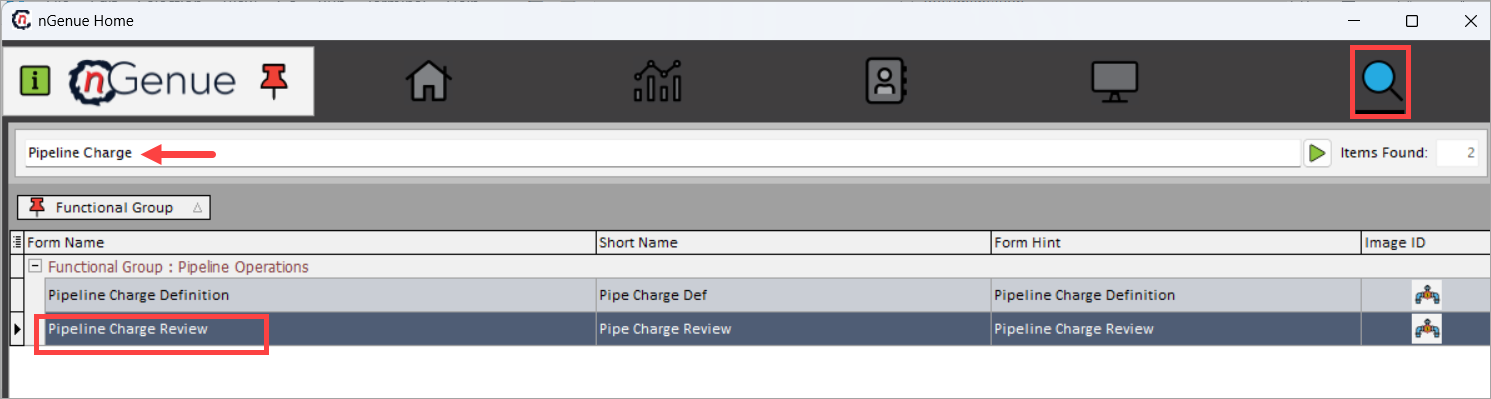
- Click the Search icon and enter Pipeline Charge in the search bar.
- Double-click Pipeline Charge Review to open the Pipeline Charge Review (Pipeline Operations) screen.
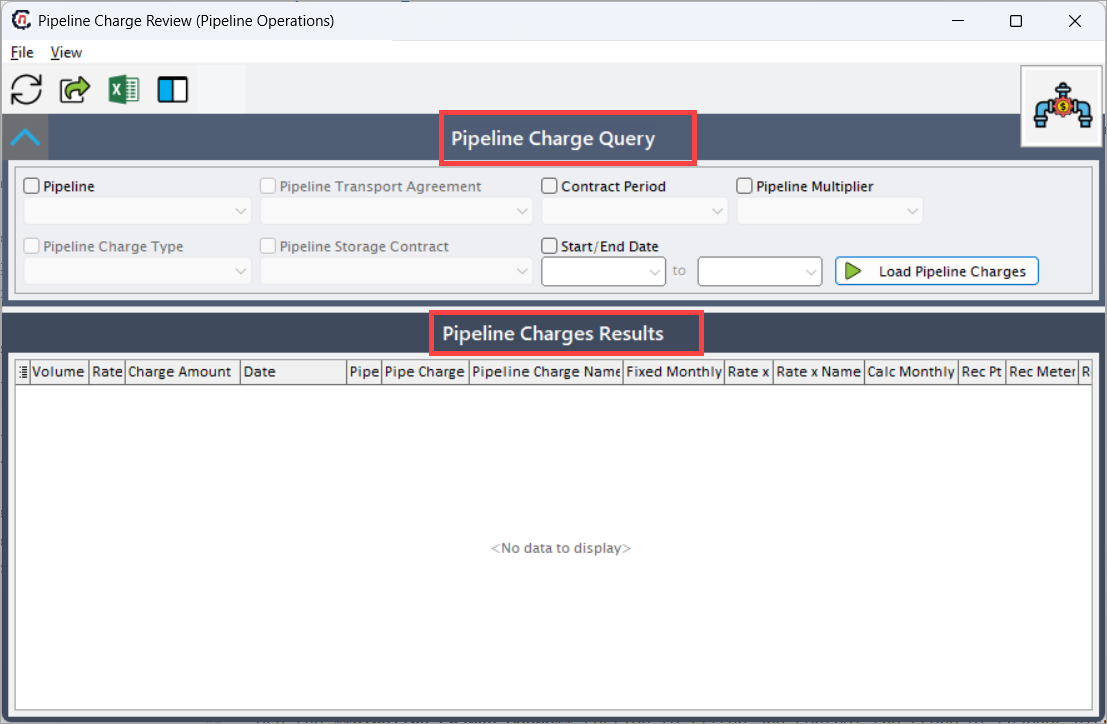
- The screen is divided into two sections:
- Pipeline Charge Query section: This section is used to filter nominations for review.
- Pipeline Charges Results: This section displays nominations in a hierarchical and expandable grid format, enabling users to analyze data at multiple levels.
Step 2: Define Pipeline Charge Query criteria
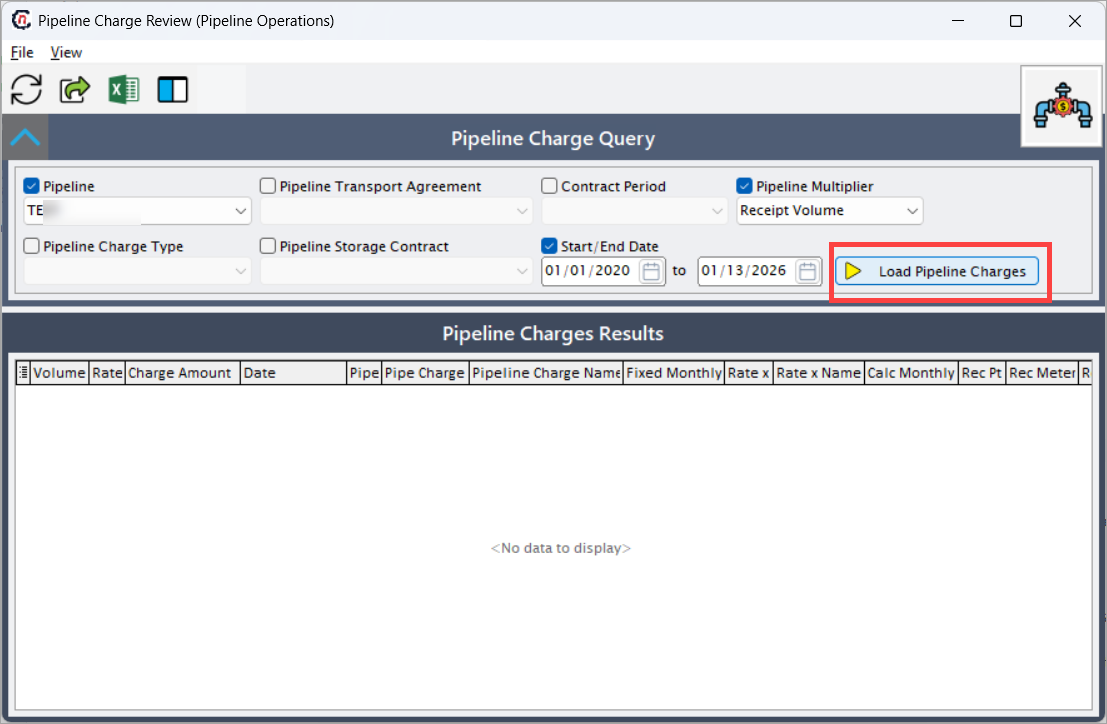
Use the Pipeline Charge Query section to filter and control the scope of charges displayed.
| Fields | Description |
|---|---|
| Pipeline | Select a pipeline from the dropdown. This will filter the charges for a specific pipeline. |
| Pipeline Transport Agreement | Limits charges to a selected transport agreement. This filter is enabled when the Pipeline checkbox is selected. |
| Contract Period | Filters charges by contract period. |
| Pipeline Multiplier | Filters charges associated with a specific multiplier. |
| Pipeline Charge Type | Filters by charge category (transport, fuel, storage, etc.). This filter is enabled when the Pipeline checkbox is selected. |
| Pipeline Storage Contract | Filters charges linked to a storage contract. This filter is enabled when the Pipeline checkbox is selected. |
| Start/End Date | Restricts charges to a specific calculation or gas-day range. |
After selecting the required criteria, click Load Pipeline Charges to retrieve results.
Step 3: Verifying the result
The Pipeline Charges Results section displays detailed charge records in a tabular format. Each row represents a calculated pipeline charge instance.
| Fields | Description |
|---|---|
| Volume | Volume used to calculate the charge. |
| Rate | Rate applied to the volume or fixed amount. |
| Charge Amount | Final calculated monetary charge. |
| Date | Gas day or effective date of the charge. |
| Pipe | Pipeline code associated with the charge. |
| Pipe Charge | Indicates whether the charge is pipeline-specific. |
| Pipeline Charge Name | Name of the configured pipeline charge. |
| Fixed Monthly | Indicates if the charge is a fixed monthly charge. |
| Rate x | Multiplier value applied during calculation. |
| Rate x Name | Name of the multiplier used. |
| Calc Monthly | Indicates if the charge is calculated monthly. |
| Rec Pt | Receipt point associated with the charge. |
| Rec Meter | Receipt meter used in volume calculation. |
| Receipt Point | Receipt location name. |
| Del Pt | Delivery point associated with the charge. |
| Del Meter | Delivery meter used in volume calculation. |
| Delivery Point | Delivery location name. |
| Stg Pt | Storage point associated with the charge. |
| Stg Meter | Storage meter used in calculation. |
| Storage Point | Storage location name. |
| Transport Agreement | Transport agreement driving the charge. |
| Trans Contract # | Contract number associated with the charge. |
| Storage Contract | Storage contract associated with the charge (if applicable). |
How charge data is derived
Charges displayed in this screen are calculated using data from multiple nGenue components:
- Pipeline Charge Definition – Defines rate logic, charge type, and applicability.
- Pipeline Contracts – Determines eligibility and contract scope.
- Nominations / Actuals – Provide volume data.
- Rate Schedules and Multipliers – Influence charge amounts.
- Receipt, Delivery, and Storage Points – Identify charge location context.
This ensures full traceability from configuration to financial impact.
Summary
The Pipeline Charge Review screen is a critical validation screen for pipeline operations and settlement workflows. It provides complete transparency into how pipeline charges are calculated, applied, and associated with contracts and physical locations.
By offering detailed charge breakdowns and traceability, this screen ensures accuracy, compliance, and confidence before financial settlement and invoicing activities are completed.