Configure remit and wire instruction
A remit and wire instruction defines how payments are sent and received between nGenue and external parties such as customers, suppliers, brokers, or counterparties. These instructions specify where funds are wired or where checks are mailed, ensuring accurate settlement of invoices, broker fees, and other financial obligations.
Configuring remit and wire instructions ensures that payment processing is consistent, auditable, and aligned with accounting and settlement workflows. Once configured, these instructions are referenced during invoice generation, settlement processing, accounts payable, and accounts receivable activities.
Prerequisites
Before working on the Remit and wire instruction screen, ensure the following prerequisites are met:
- Ensure the nGenue application is installed and use valid login credentials to log into the application.
- Configure the user permissions including User type, Security user, Security group, Security assign user, and Security assign permissions in their respective screens to enable access to the Remit and wire instruction screen.
- Ensure that required banking or mailing details are available and accounting and settlement processes are defined.
Procedure to configure remit and wire instruction
Step 1: Navigate to Remit and wire instruction screen
- Log in to the nGenue application.
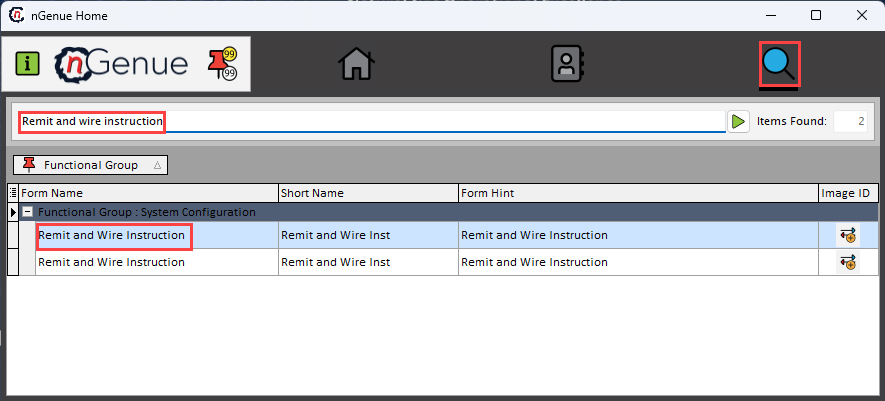
- Click the Search icon and enter Remit and wire instruction in the search bar.
-
Double-click the Remit and wire instruction from the search results to open respective screen.
-
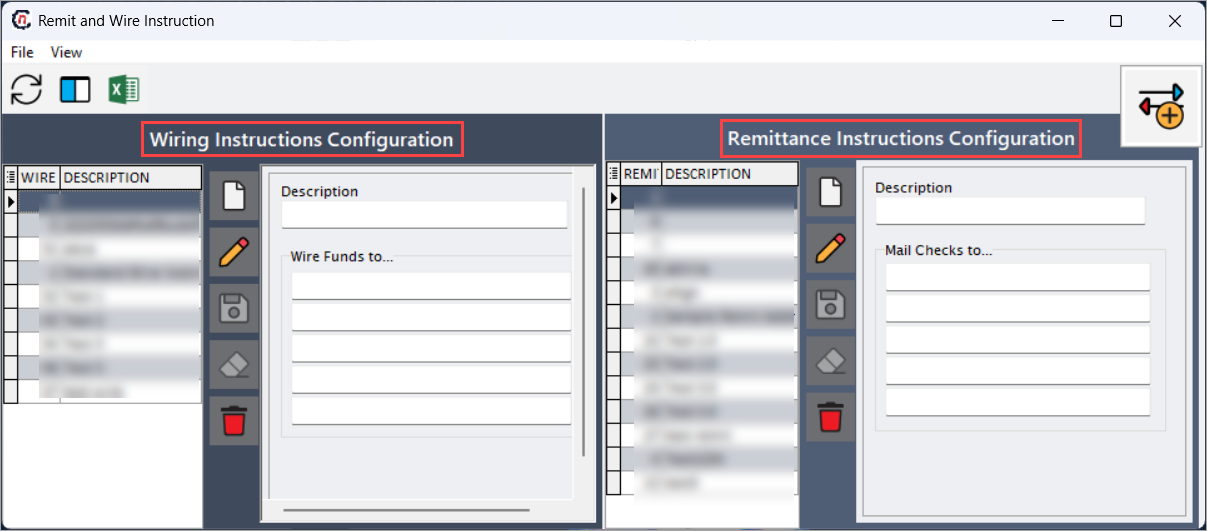
Remit and wire instruction screen has two sections:
- Wiring instructions configuration:
-
Remittance instructions configuration:
Step 2: Configure remit and wire instruction
The following table lists the icons available on the Wiring instructions configuration section and their respective functions:
| Icons | Icon name | Description |
|---|---|---|
 |
Add a new record | Opens a new record form to create a wiring or remittance instruction. |
 |
Edit current record | Opens the selected instruction for modification. |
 |
Save changes to current record | Saves the modifications made to the instruction details. |
 |
Cancel changes to current record | Discards unsaved changes made to the record. |
 |
Delete current record | Permanently removes the selected instruction. |
Step 2.1 : Add a wiring instructions record
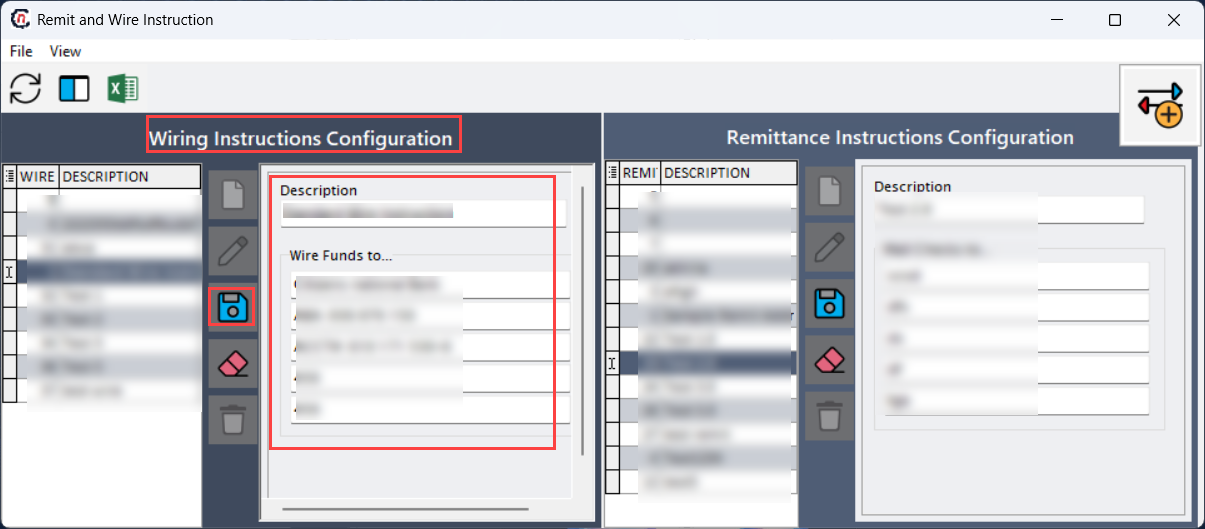
- In the Wiring instructions configuration, click the Add a new record icon to create a new contract language record.
-
Complete required fields available in the Wiring instructions configuration section that are listed in the table below:
- Description: Identifies the wiring instruction for selection during settlement
- Wire funds to: Specifies the banking details and beneficiary information used when funds are transferred electronically.
-
Click Save changes to current record to store the configuration.
Edit a current record
- Select the wiring record and click the Edit a current record icon to modify the selected wire record.
- Update necessary details and click Save changes to current record to apply changes.
Delete a current record
Select the record from listings and click the Delete current record icon to permanently remove the selected record and confirm the deletion. Deleted wiring instructions will no longer be available for future settlements.
Step 2.2 : Add a remittance instructions record
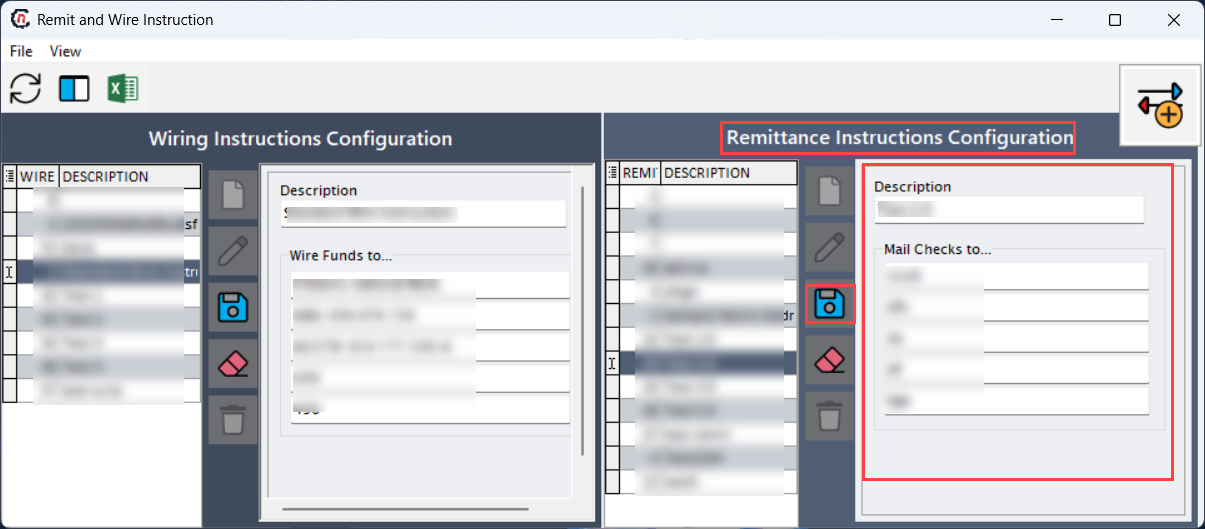
- In the Remittance instructions configuration section, click the Add a new record icon to create a new remittance instruction.
-
Complete required fields available in the Remittance instructions configuration section that are listed in the table below:
- Description: Identifies the remittance instruction for payment reference.
- Mail checks to: Specifies the mailing address where physical checks are sent.
-
Click Save changes to current record to store the configuration.
Edit a record
- Select the remittance record from the selection list and click the Edit a current record icon to modify the selected record.
- Update necessary details and click Save changes to current record to apply changes.
Delete a record
- Select the record from the listings section.
- Click the Delete current record icon to permanently remove the selected record and confirm the deletion. Remittance instructions are used when payments are processed via check instead of wire transfer.
Summary
Remit and wire instructions define how and where payments are issued in nGenue. By configuring wiring and remittance details centrally, the system ensures accurate settlement processing, supports multiple payment methods, and maintains consistency across accounting and operational workflows. Proper configuration helps prevent payment delays, misrouting, and reconciliation issues.