Viewing EDI session history
EDI session history screen provides complete history of all inbound (import) and outbound (export) EDI transactions processed in the system. It allows to review file processing results, view logged events, verify text rows, and troubleshoot issues related to EDI communication with LDC.
Prerequisites
Before working on the EDI session history (EDI) screen, ensure the following prerequisites are met:
- Ensure the nGenue application is installed and use valid login credentials to log into the application.
- Configure the user permissions including User type, Security user, Security group, Security assign user, and Security assign permissions in their respective screens to enable access to the EDI session history (EDI) screen.
- Ensure LDC, Facilities, End user accounts are properly configured and active.
Procedure to view EDI session history
Step 1: Navigate to the EDI session history screen
- Log in to the nGenue application.
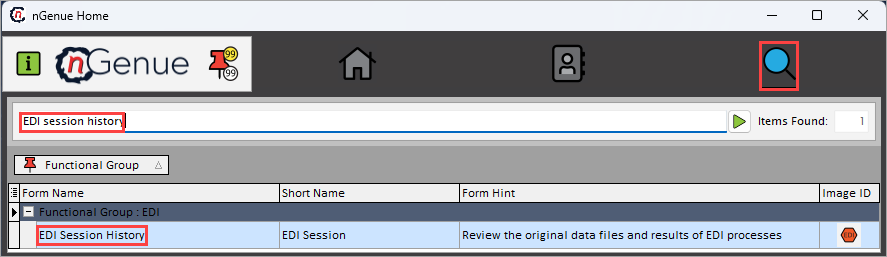
- Click the Search icon and enter EDI session history in the search bar.
-
Double-click the EDI session history from the search results to open respective screen.
-
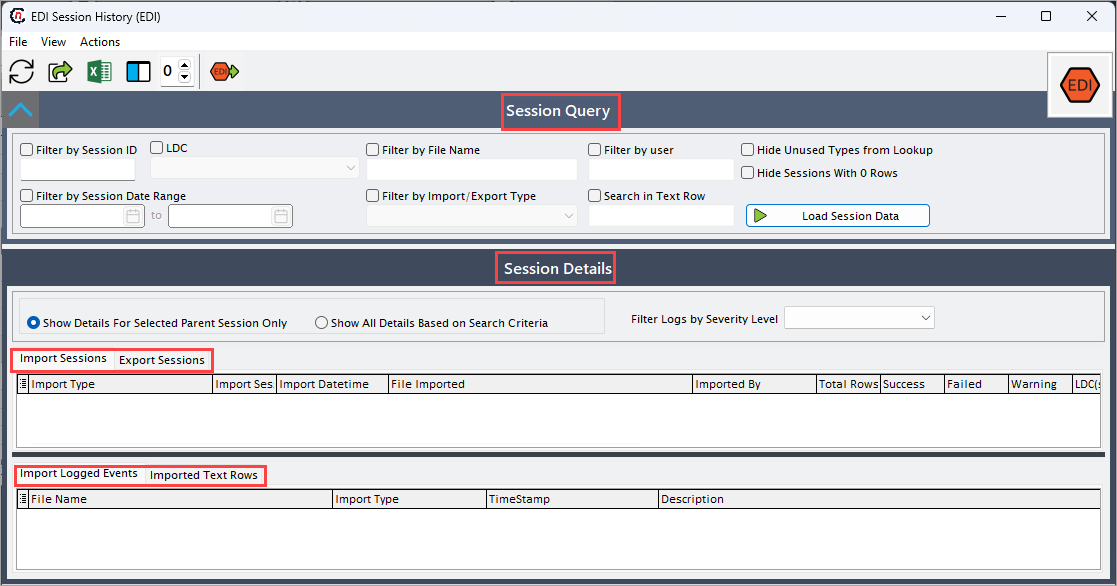
EDI session history (EDI) screen has two sections:
- Session query: This section allows to filter and retrieve sessions.
-
Session details: This section displays the list of import and export sessions based on selected criteria.
-
Import sessions
- Imported logged events
- Imported text rows
-
Export sessions
- Exported logged events
-
Exported text rows
-
Step 2: Load session data
-
Enable and select the required fields available in the Session query section to retrieve session history.
Fields Description Filter by session ID Provide the session ID to retrieve a specific import or export session. Filter by session date range Specify the start and end date to load sessions processed within the selected date range. LDC Select the LDC to view sessions associated with that utility. Filter by file name Provide the file na,e to locate session related to a specific file. Filter by import/export type Select the type of session either import or export from the dropdown options. Filter by user Provide the end user ID to view sessions processed by that specific user. Search in text row Enter search text to filter sessions that contain matching text within the imported or exported text rows. Hide unused types from lookup Select this checkbox to limit dropdown menus to active import/export types only. Hide sessions with 0 rows Select this checkbox to exclude sessions that contain no processed rows. -
Click Load session data to retrieve matching session history.
Step 3: Review session history
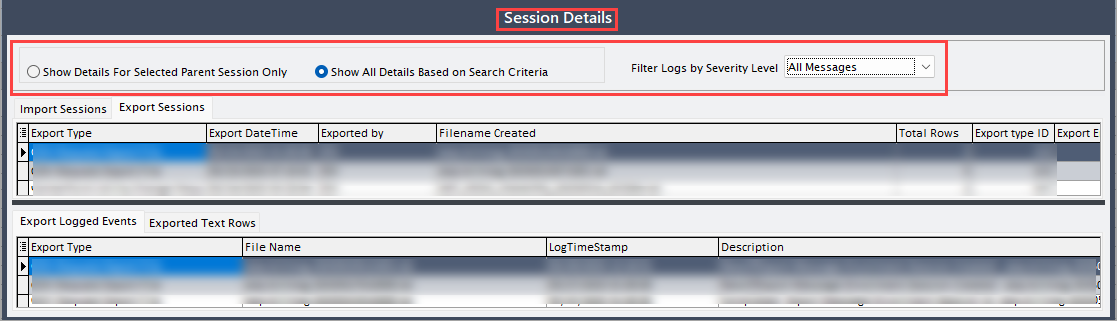
- In the Session details section, select either Show details for selected parent session only or Show all details based on search criteria to retrieve the relevant session details.
-
Select the Filter logs by severity level as needed. Severity level options include All messages, Informational, Warnings, Errors, Error and warnings, Success.
3.1: Import sessions
Following are the column fields that provides detailed information related to the imported session history in Import sessions tab.
| Fields | Description |
|---|---|
| Import type | Indicates the type of EDI file imported. |
| Import session ID | It is a unique identifier assigned to the import session. |
| Import datetime | Specifies the timestamp when the file was imported. |
| File imported | Specifies the name of the file that was processed. |
| Imported by | Specifies the user or system process that executed the import. |
| Total rows | Indicates the number of rows contained in the imported file. |
| Success | Indicates the number of rows successfully processed. |
| Failed | Indicates the number of rows that failed during processing. |
| Warning | Indicates the number of rows processed with warnings. |
| LDC (s) | Specifies the LDC associated with the imported file content. |
| Dollars imported | Specifies the total dollar value successfully imported (if applicable). |
| Dollars skipped | Specifies the dollar value of rows not processed. |
| Dollars total | Indicates total dollar amount present in the file. |
| Marketer ID | It is a unique identifier for the marketer associated with the file. |
| UOM (Native) | Specifies the original unit of measure used in the imported file. |
| UOM (Import as) | Specifies the unit of measure converted to during processing. |
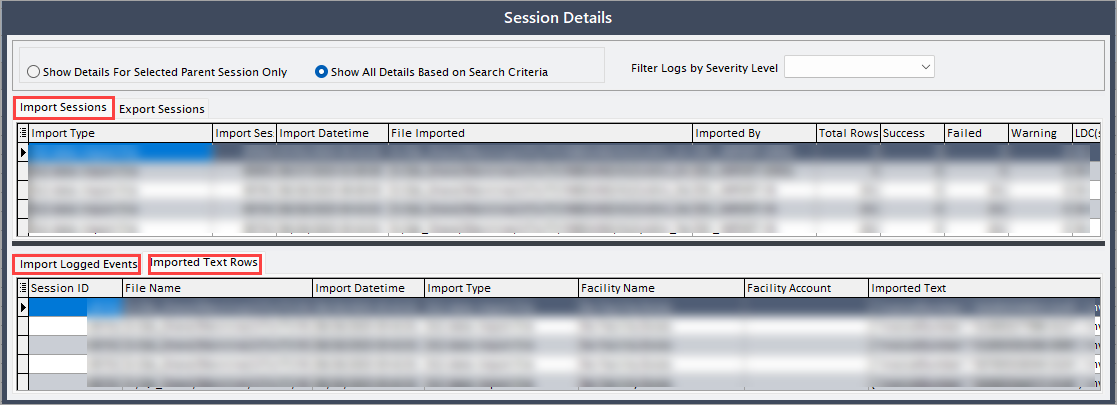
Imported logged events
Following are the column fields that provides detailed information related to the imported session history in Import logged events tab (Session details section)
| Fields | Description |
|---|---|
| File name | Specifies the name of the file from which the event originated. |
| Import type | Specifies the type of EDI import that generated the event. |
| Timestamp | Specifies the time at which the log event occurred. |
| Description | Provides the detailed explanation of the logged event. |
| Severity level | Indicates whether the event is informational, all messages, success, warnings, errors and warnings, or errors. |
| Target ID | It is a unique identifier of the record impacted by the event. |
| Target table | Specifies the database table where the impacted record is stored. |
| Facility name | Specifies the name of the facility associated with the event (if applicable). |
| Facility account | Specifies the account number tied to the facility event. |
Imported text rows
Following are the column fields that provides detailed information related to the imported session history in Import text rows tab (Session details section)
| Fields | Description |
|---|---|
| Session ID | Specifies the identifier of the import session. |
| File name | Specifies the name of the imported file. |
| Import datetime | Specifies the timestamp of file import. |
| Import type | Specifies the type of import performed. |
| Facility name | Specifies the facility name referenced in the text row. |
| Facility account | Specifies the facility account number referenced in the text row. |
| Imported text | Describes the text extracted from the imported EDI file. |
| Import line ID | Indicates the identifier for the specific line in the import. |
| Result codes | Specifies the processing results. |
| Target ID | It is a unique identifier for the record impacted by this text row. |
| Target table | Specifies the database table where the affected record resides. |
3.2: Export sessions
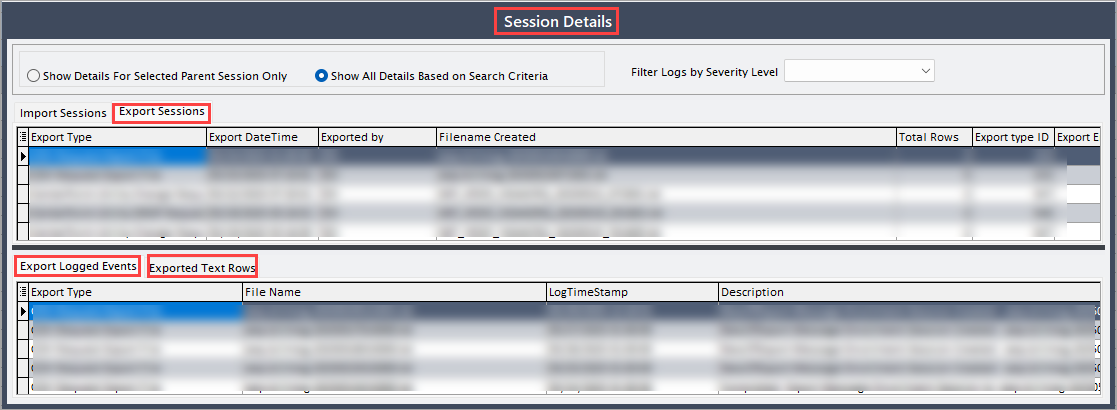
Following are the column fields that provides detailed information related to the exported session history in Export sessions tab (Session details tab)
| Fields | Description |
|---|---|
| Export type | Specifies the type of EDI file generated. |
| Export datetime | Specifies the date and timestamp when the file was created. |
| Export by | Specifies the user or system that executed the export. |
| File name created | Specifies the file name that was generated during export. |
| Total rows | Indicates the number of rows included in the exported file. |
| Export type ID | Specifies the identifier for the export type. |
| Export enrollment session ID | Provides the session ID related to the enrollment file (if applicable) |
| UOM (Native) | Specifies the original unit of measure used in the system. |
| UOM (Import as) | Specifies the unit of measure used in the exported file. |
| LDC string | Specifies the LDC identifiers included in the exported file. |
| Marketer | Specifies the marketer associated with the exported file. |
Exported logged events
Following are the column fields that provides detailed information related to the exported logged events history in Export logged events tab (Session details tab)
| Fields | Description |
|---|---|
| File name | Specifies the file name associated with the logged event. |
| Export type | Specifies the type of export that triggered the log. |
| Log timestamp | Specifies the time when the log record was created. |
| Description | Provides detailed description of the logged export event. |
| Severity level | Indicates whether the event is informational, warning, or error. |
| Target ID | Indicates the identifier for the system record impacted by the logged event. |
| Target table | Indicates the table where the impacted record is stored. |
| Export datetime | Specifies the timestamp of the export session. |
Exported text rows
Following are the column fields that provides detailed information related to the exported session history in Export session tab (Session details tab)
| Fields | Description |
|---|---|
| Export type | Specifies the type of export performed. |
| Export datetime | Specifies the timestamp the file was exported. |
| Export row | Specifies the row of the exported text. |
| Export row ID | It is identifier assigned to the exported row. |
| Session ID | Specifies the identifier for the export session. |
| File name | Specifies the name of the file created. |
| Table destination | Indicates the table to which the export was targeted (if applicable). |
| Target ID | It is a unique identifier of the record referenced in the text row. |
Summary
EDI session history provides complete visibility into all imported and exported EDI files, allowing to review processing results, troubleshoot errors, and confirm transactions with LDC. Additionally validates the data that is being logged with the utility.