View daily pool management
The Daily Pool Management screen provides a centralized, day-level operational view for managing and balancing natural gas pools for a selected Local Distribution Company (LDC). It consolidates member usage, balancing services, banking limits, MDQ exposure, storage impact, and demand forecasts to support accurate daily pool balancing.
This screen is primarily used by LDC operations, pool managers, schedulers, and balancing teams to:
- Monitor daily pool balances and member usage
- Identify pool-level imbalances and tolerance breaches
- Validate balancing service usage and costs
- Track allowable bank limits and MDQ exposure
- Review near-term and forecasted pool demand
The Daily Pool Management screen focuses on operational and balancing data, not financial settlement, and serves as a critical day-to-day execution and compliance screen for LDC pool operations.
Prerequisites
Before working on the Daily Pool Management screen, ensure the following prerequisites are met:
- The user has the add or modify permissions for the Daily Pool Management screen.
- An LDC is configured with associated pools and pool members.
- Pool attributes such as nomination source, tolerance rules, MDQ, and banking limits are defined.
- Member usage data (actual meter reads or estimates) is available for the selected date range.
- Pool balancing services and storage configurations are active (if applicable).
Procedure to view daily pool management
Step 1: Navigate to the Daily Pool Management screen
- Log in to the nGenue application.
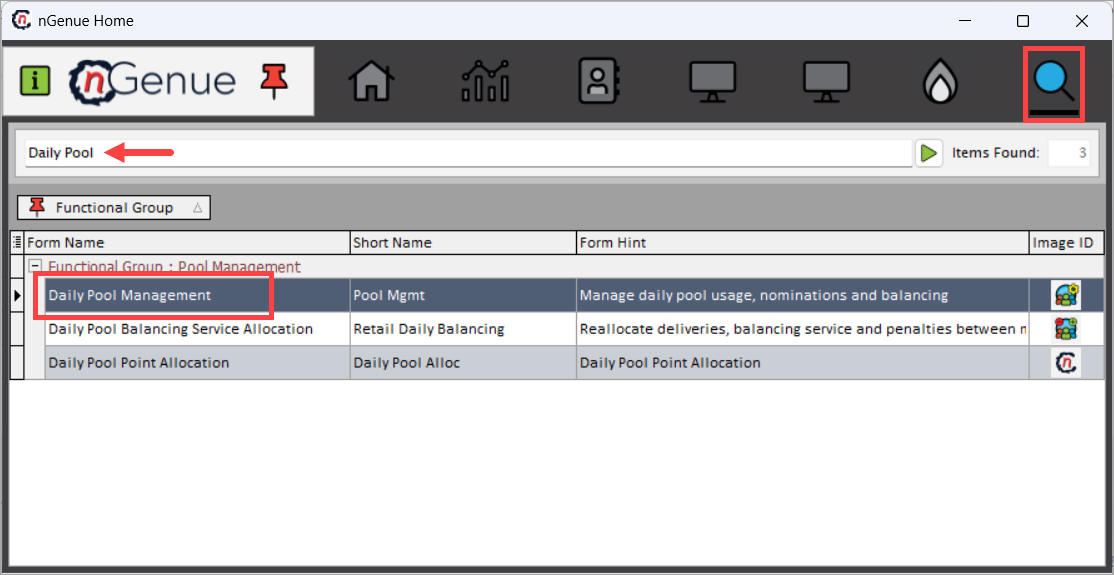
- Click the Search icon and enter Daily Pool Management in the search bar.
- Double-click Daily Pool Management to open the Daily Pool Management (Pool Management) screen.
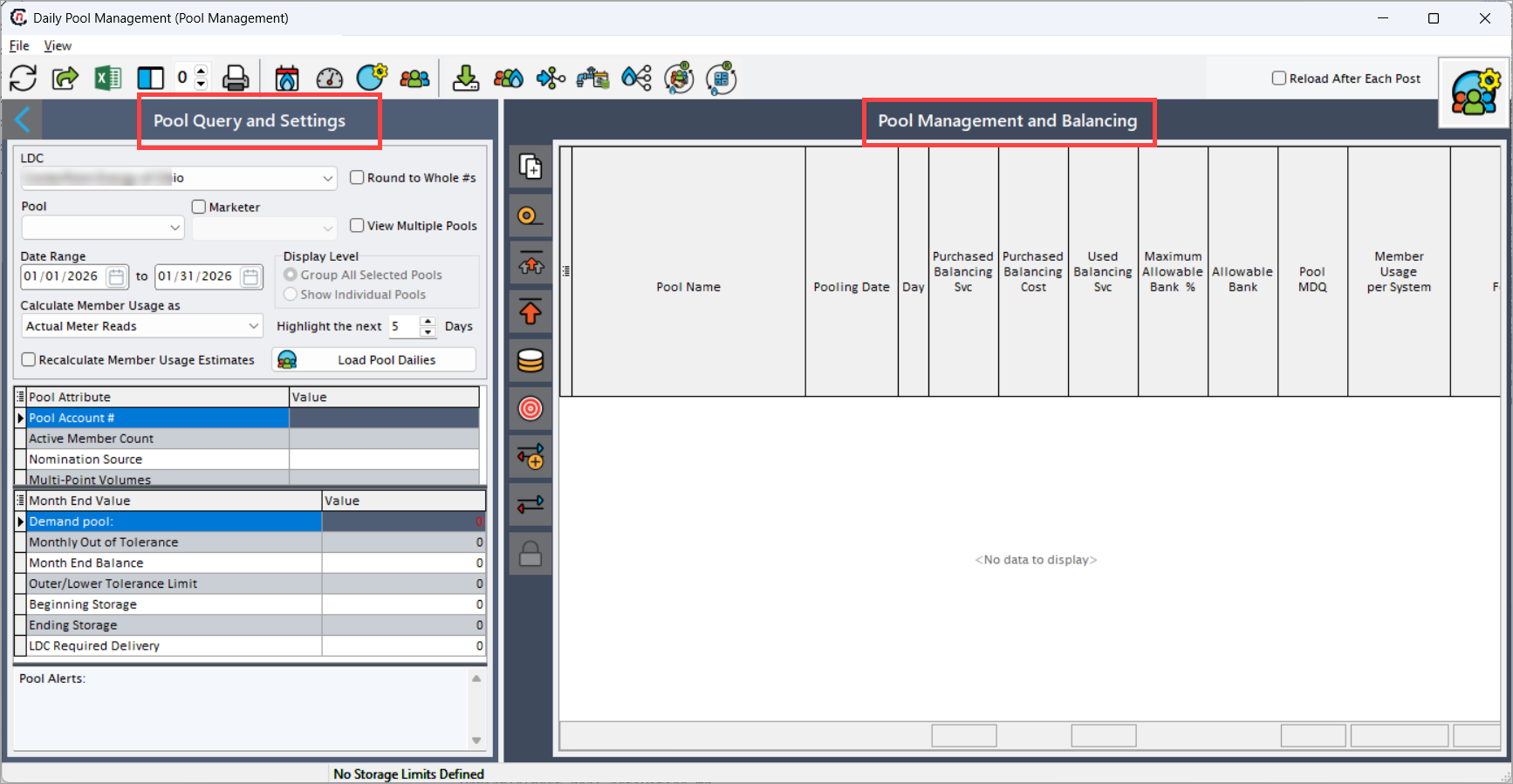
- The screen is divided into two main sections:
- Pool Query and Settings: Used to define the LDC, pools, date range, and calculation behavior.
- Pool Management and Balancing: Displays daily pool balances, usage, limits, and forecasts in a tabular view.
Step 2: Define pool query and settings
The Pool Query and Settings section controls which pool data is loaded, how member usage is calculated, and how pool balances are evaluated.
Entity and pool selection filters
| Fields | Description |
|---|---|
| LDC | Selects the Local Distribution Company for which pool data is displayed. All pools and members are scoped to the selected LDC. |
| Pool | Filters results to a specific pool. When left blank, all eligible pools for the selected LDC are included. |
| Marketer | Filters pool data by marketer associated with pool members. |
| View Multiple Pools | Allows multiple pools to be loaded and reviewed simultaneously. |
| Date Range | Defines the gas day range for which daily pool balances and usage are calculated. |
| Display Level | Controls whether data is grouped across selected pools or displayed for individual pools. |
| Calculate Member Usage as | Determines whether member usage is calculated using Actual Meter Reads or Estimated Usage. |
| Highlight the next n Days | Highlights upcoming gas days to help focus on near-term balancing risks. |
| Recalculate Member Usage Estimates | When enabled, recalculates estimated usage based on the latest available inputs. |
| Round to Whole #s | Rounds displayed volumes to whole numbers for simplified operational review. |
After selecting the required criteria, click Load Pool Dailies.
Pool attributes
The Pool Attribute section displays configuration details that govern how the selected pool operates and balances.
| Fields | Description |
|---|---|
| Pool Account # | Unique identifier assigned to the pool by the LDC. |
| Active Member Count | Number of currently active members participating in the pool. |
| Nomination Source | Indicates whether nominations are managed at the pool level or member level. |
| Multi-Point Volumes | Indicates whether the pool supports volumes across multiple receipt or delivery points. |
| Location Count | Number of pipeline locations associated with the pool. |
| Unit of Measure | Unit in which pool volumes are managed (for example, Dth or MMBtu). |
| LDC Required Noms Enabled | Indicates whether LDC-mandated nominations are enforced for this pool. |
| Month End Tolerance Method | Defines how month-end tolerance is calculated and applied. |
| Pool Peak Months | Identifies peak months used for tolerance and MDQ calculations. |
| Daily Storage Enabled | Indicates whether daily storage balancing is enabled. |
| Imbalance Ownership | Specifies whether imbalances are owned by the pool or individual members. |
| Pool Storage Target Category | Storage target classification used for pool balancing. |
| MDN Effective Months | Months during which MDN rules apply. |
| MDQ Effective Months | Months during which MDQ rules apply. |
Month-end values
The Month End Value section summarizes cumulative pool-level performance and compliance metrics.
| Fields | Description |
|---|---|
| Demand Pool | Total aggregated pool demand for the selected month. |
| Monthly Out of Tolerance | Indicates whether the pool has exceeded defined tolerance thresholds. |
| Month End Balance | Net imbalance position of the pool at month end. |
| Outer/Lower Tolerance Limit | Defined tolerance limits used to evaluate imbalance exposure. |
| Beginning Storage | Storage balance at the beginning of the month. |
| Ending Storage | Storage balance at the end of the month. |
| LDC Required Delivery | Delivery obligation imposed by the LDC for the pool. |
Step 3: Verifying daily pool balances
The Pool Management and Balancing section displays daily pool-level operational data in a tabular format. Each row represents a pool-day combination, enabling users to analyze daily balancing status and forecast alignment.
Daily balance fields
| Fields | Description |
|---|---|
| Pool Name | Name of the pool being managed. |
| Pooling Date | Gas day for which balances are calculated. |
| Day | Day of the week for operational reference. |
| Purchased Balancing Svc | Volumes procured through balancing services. |
| Purchased Balancing Cost | Cost associated with purchased balancing services. |
| Used Balancing Svc | Actual balancing service volumes utilized. |
| Maximum Allowable Bank % | Maximum percentage of imbalance allowed to be banked. |
| Allowable Bank | Calculated allowable bank volume. |
| Pool MDQ | Maximum Daily Quantity limit applicable to the pool. |
| Member Usage per System | Aggregated member usage across all systems. |
| AI Pool Forecast | AI-generated forecast of expected pool demand. |
| Latest AI Forecast | Most recent forecast value reflecting updated inputs. |
Transaction-level context
Although pool data is displayed at an aggregated level, values are derived from underlying sources such as:
- Member usage and meter reads
- Pool nominations and balancing service usage
- Storage injections and withdrawals
- LDC-defined rules and tolerance configurations
This ensures transparency and traceability of pool-level balances.
Screen icons and operational controls
Top toolbar icons
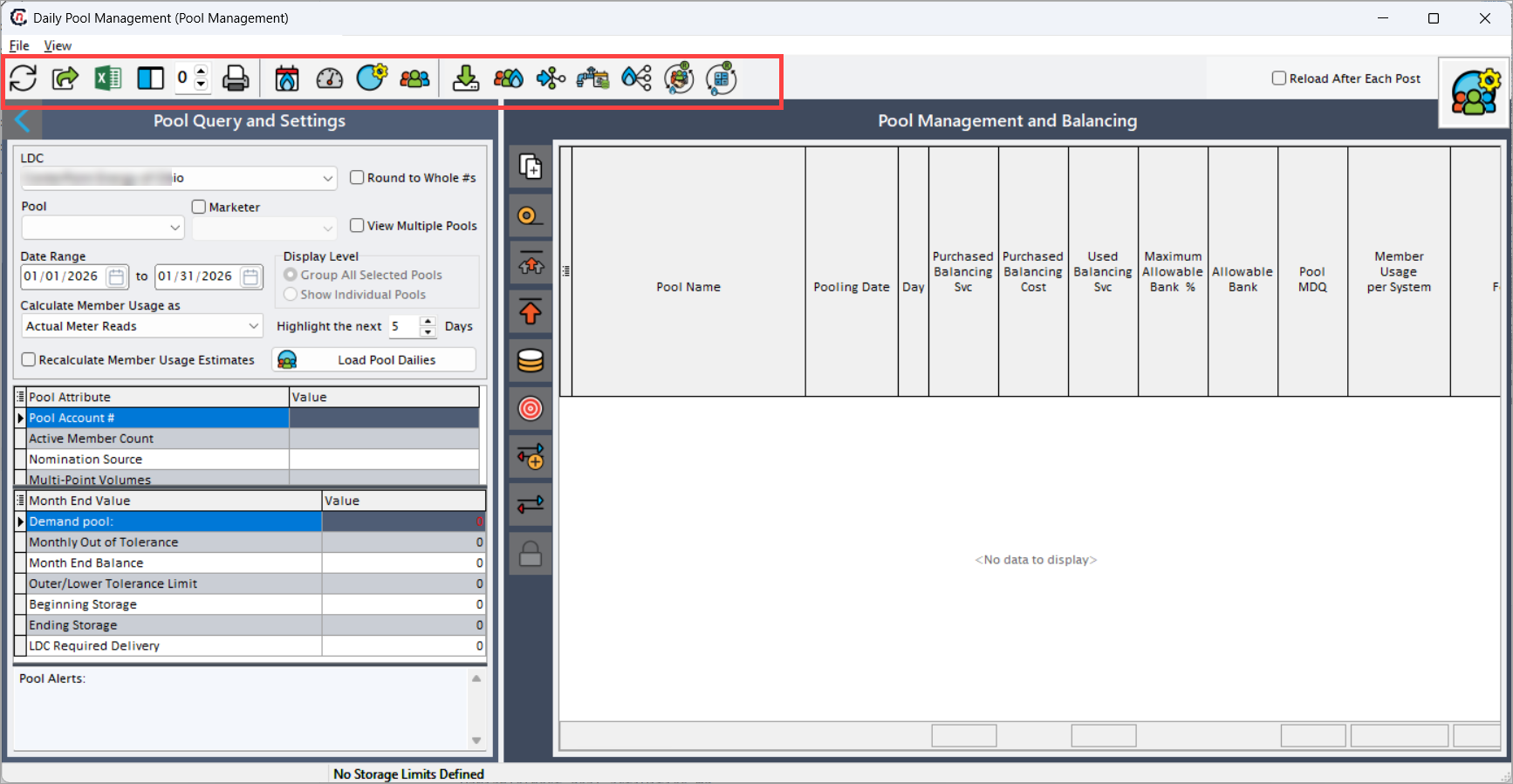
The top toolbar contains global actions that control data refresh, configuration, calculations, imports, exports, and pool-level operations.
| Icons | Icons name | Description |
|---|---|---|
 |
Refresh | Reloads the screen data based on the current Pool Query and Settings without modifying any selections. Typically used after data updates or recalculations. |
 |
Save to Excel File | Saves the currently loaded pool management data into an Excel file for offline analysis, reconciliation, or audit purposes. |
 |
Open Grid Data in Excel | Opens the pool management grid directly in Excel, preserving the current layout and visible columns for interactive analysis. |
 |
Configure grid columns | Allows users to configure grid layout by showing, hiding, reordering, or resizing columns in the Pool Management and Balancing grid. |
 |
Freeze Columns | Freezes selected grid columns so they remain visible while horizontally scrolling through pool daily data. |
 |
Pool Imbalance Reports | Generates and opens pool imbalance reports for the selected LDC, pool(s), and date range, supporting compliance and audit review. |
 |
Input Manual Facility Volumes | Allows users to manually enter or adjust facility-level volumes (such as storage or balancing facilities) that impact pool calculations. |
 |
Input Manual Meter Reads | Enables manual entry or override of meter reads used in member usage and pool balance calculations. |
 |
View Pool Definition | Opens the pool definition screen in read-only mode, displaying configuration details such as tolerance rules, MDQ, nomination source, and imbalance ownership. |
 |
View Member Details | Displays detailed information for pool members, including usage, nominations, marketer association, and allocation behavior. |
 |
Import Daily Pool Values | Imports externally prepared daily pool values (such as usage or balancing data) into the system for the selected period. |
 |
Re-sum Member Nominations | Recalculates and aggregates member-level nominations to refresh pool-level totals and balances. |
 |
Set MDQs and/or Daily Volume Allocations to Delivery Points | Allows users to define or adjust MDQs and allocate daily pool volumes across delivery points based on operational requirements. |
 |
View Daily Delivery Points Allocations | Displays daily allocation of pool volumes across delivery points, including quantities assigned to each point. |
 |
Re-Allocate to Delivery Points | Reallocates pool volumes across delivery points based on updated rules, targets, or operational adjustments. |
 |
Force Recalculation of Demand Pool Allocations into Demand Deals | Forces recalculation of demand pool allocations and pushes updated volumes into downstream demand deals. |
 |
Do a full recalculation from start to finish for retail demands and push to supply deals | Performs a full end-to-end recalculation of retail demand, pool balances, and allocations, and propagates the results into associated supply deals. |
Vertical action toolbar icons
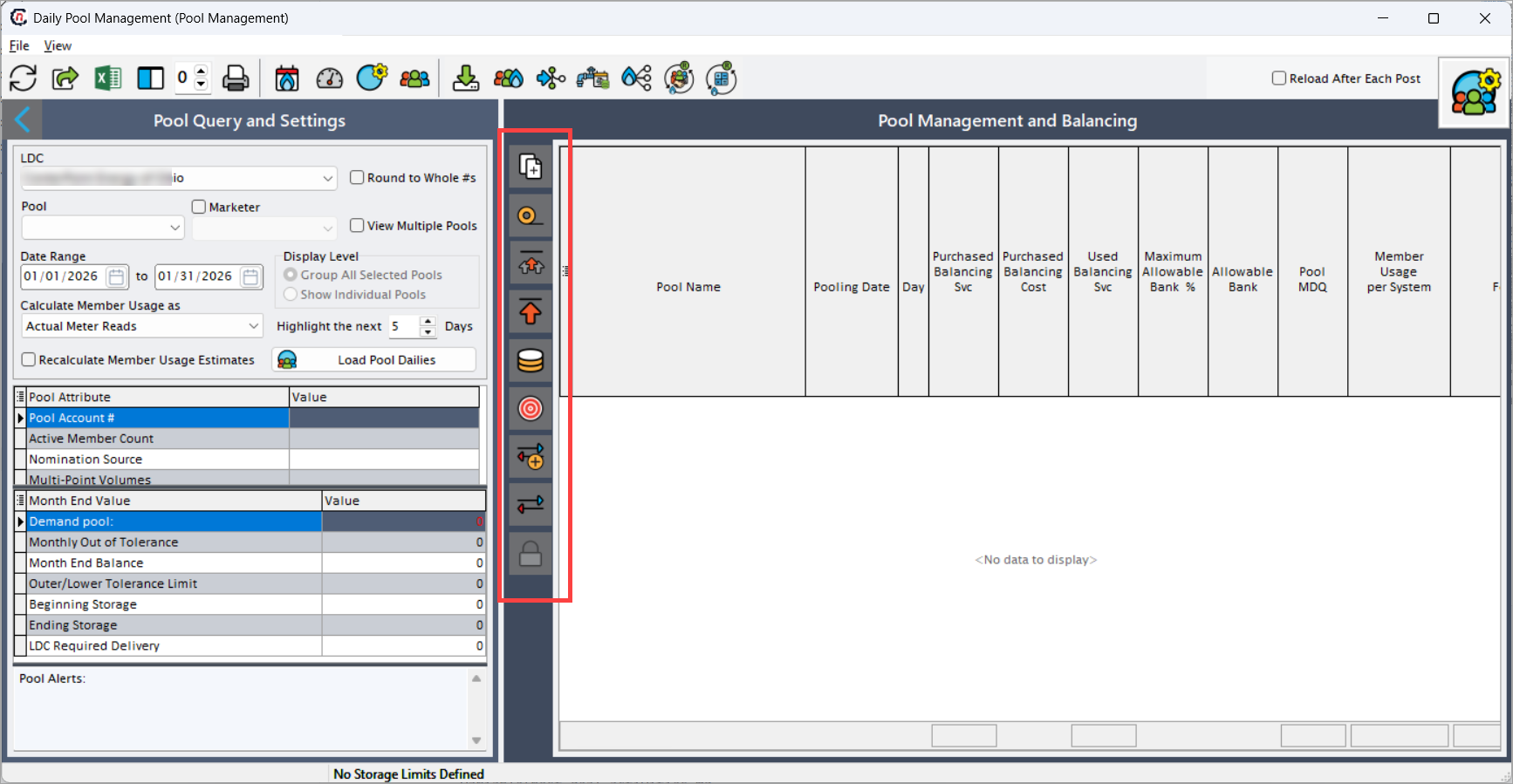
The vertical toolbar provides day-level and period-level operational controls, commonly used during daily balancing and compliance activities.
| Icons | Icons name | Description |
|---|---|---|
 |
Create daily pool records for period | Generates daily pool records for the selected date range based on pool configuration and available usage data. |
 |
Force recalculation of cumulative balance | Recalculates cumulative pool balances across the selected period, incorporating usage, storage, and balancing services. |
 |
Calculated MDQ for period | Calculates MDQ values for the entire selected period based on pool rules and effective months. |
 |
Calculate MDQ for single day | Calculates MDQ for a specific gas day, allowing focused validation or correction. |
 |
Calculate Maximum Bank Allowances | Calculates allowable bank limits for the pool based on configured percentage thresholds and daily balances. |
 |
Create nominations based on balancing targets | Generates pool-level or member-level nominations based on defined balancing targets and operational rules. |
 |
Create trades | Creates imbalance or balancing trades resulting from pool imbalances or operational adjustments. |
 |
View trades | Displays trades that were created from pool balancing activities for review and validation. |
 |
Lock down daily records through selected date | Locks pool daily records up to the selected date, preventing further edits, recalculations, or adjustments. |
Note
Locking daily pool records is typically performed after balancing is finalized and should only be reversed under controlled operational approval.
Key points
- This screen focuses on daily operational pool balancing, not financial settlement.
- Pool attributes and tolerance rules directly impact imbalance calculations.
- Member usage accuracy is critical for reliable pool balances.
- Near-term highlighting supports proactive imbalance management.
- Forecast values help anticipate upcoming balancing risks.
Summary
The Daily Pool Management screen is a core operational tool for managing and balancing LDC gas pools on a daily basis. By consolidating pool attributes, member usage, balancing services, banking limits, and AI-driven forecasts into a single operational view, it enables pool managers and schedulers to proactively manage imbalances, maintain regulatory compliance, and ensure reliable pool performance throughout the gas day lifecycle.