Lock original nomination
The Lock original nomination screen secures finalized daily nominations, prevents any further changes or modifications once approved or submitted. This ensures data integrity, compliance, and operational consistency by restricting changes after the nomination process is complete.
Nominations are typically locked:
- After nominations are approved or submitted to the Local Distribution Company (LDC) or pipeline.
- When the gas day has starts or passes, and changes are no longer permitted.
- Once billing, allocation, or balancing processes have begun.
- After credit or volume limits have been validated and finalized.
Locking ensures that finalized nominations remain accurate, traceable, and aligned with operational and contractual requirements.
Prerequisites
Before working on the Lock original nomination screen, ensure the following prerequisites are met:
- User permissions: Configure the user permissions including User type, Security user, Security group, Security assign user, and Security assign permissions in their respective screens to enable access to the Lock original nomination screen.
- LDC set up: Ensure the LDC and LDC pool, are properly configured.
- End user and Facility set up: Ensure the End user and Facility are fully configured.
- Contract setup: Ensure end user MDQ and contract quantities are defined and configured.
- Daily nominations generated: Ensure daily nominations have already been created and reviewed before applying a lock.
Procedure to lock original nominations
- Log in to nGenue application.
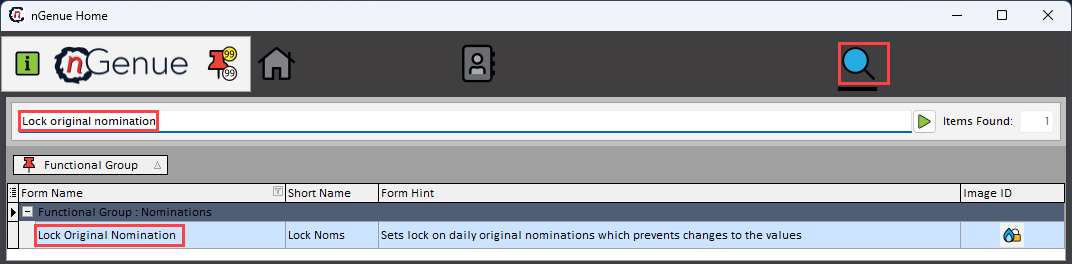
- Click Search icon and enter Lock original nomination in the search bar.
-
Double-click Lock original nomination to open the respective screen.
-
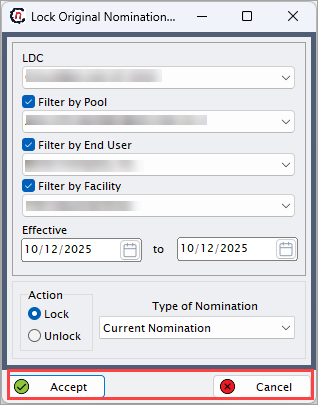
In Lock original nomination screen, complete the required fields mentioned in the following table along with brief description.
Fields Description LDC Select the LDC for which nominations will be locked. Filter by pool Select the pool associated with the LDC to limit nominations to a specific group. Filter by end user Select the end user whose nominations should be locked. Filter by facility Choose the specific facility linked to the nomination. Effective (to) Specify the date range during which the nominations should be locked. Action Select the type of action to perform, either lock or unlock. Type of nomination Select the nomination type such as First of Month/original, current nomination, or both. -
Click Accept to lock the selected nomination, or click Cancel to discard changes.
Summary
Locking nominations ensures nomination data remains fixed once operational or billing processes begin, preventing any post-confirmation changes or discrepancies between operational records and officially submitted schedules.