Creating a pipeline contract
The Pipeline Contracts screen is used to create, configure, and manage transportation and storage contracts with interstate and intrastate pipelines. It serves as the central configuration point where contractual terms such as MDQ, rate schedules, valuation rules, nomination behavior, capacity release, cashouts, and accounting defaults are defined.
The primary purpose of the Pipeline Contracts screen is to:
- Define Firm or IT transportation agreements
- Configure MDQ limits and enforcement behavior
- Assign rate schedules and valuation logic
- Control nomination paths and constraints
- Enable capacity release and AMA functionality
- Set accounting defaults for settlement and GL posting
- Establish receipt and delivery valuation points
This screen acts as the authoritative source for how gas flows, costs, and obligations are handled under each pipeline agreement.
Prerequisites
Before configuring a pipeline contract, ensure the following prerequisites are met:
- The user has the add or modify permissions for the Pipeline Contracts screen.
- Pipeline, Pipeline Zones, Locations, Receipt Points, and Delivery Points are set up.
- Pipeline Rate Schedules are defined.
- Legal Entity, Business Unit, Portfolio, and Strategy master data are configured.
Procedure to create a new pipeline contract
Step 1: Navigate to the Pipeline Contracts Screen
- Log in to the nGenue application.
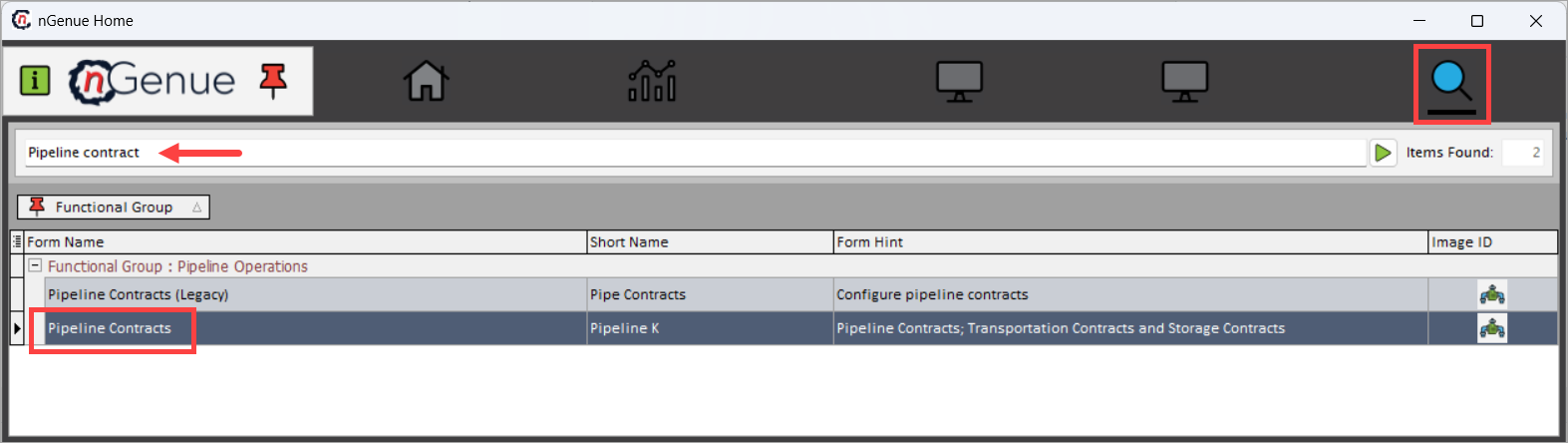
- Click the Search icon and enter Pipeline contracts.
- Double-click Pipeline Contracts to open the Pipeline Contracts (Pipeline Operations) screen.
Step 2: Load existing pipeline contract
-
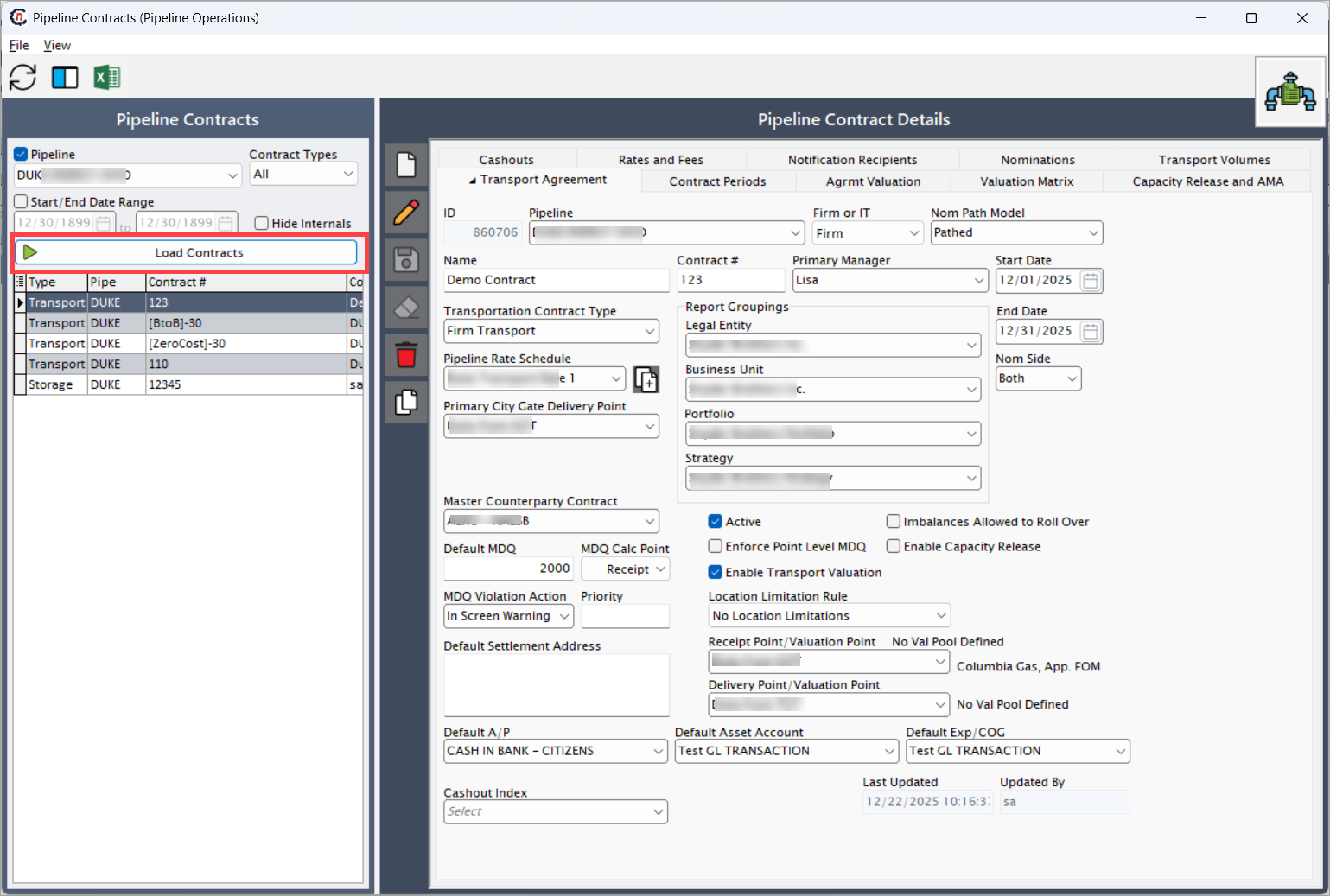
In the Pipeline Contracts panel to the left;
- Select Pipeline. This filters contracts based on the selected pipeline. Only contracts associated with this pipeline are displayed.
- Select Contract Types. This allows filtering contracts by type such as Transport or Storage. Selecting All loads all available contract types.
- Optionally specify Start/End Date Range. This restricts the contract list to contracts active within the specified date range.
- When the Hide Internals checkbox is enabled, it hides internally used or system-generated contracts from the list.
-
Click Load Contracts. This executes the query and the existing contracts for the selected criteria are displayed in the list.
Step 3: Create a new pipeline contract
-
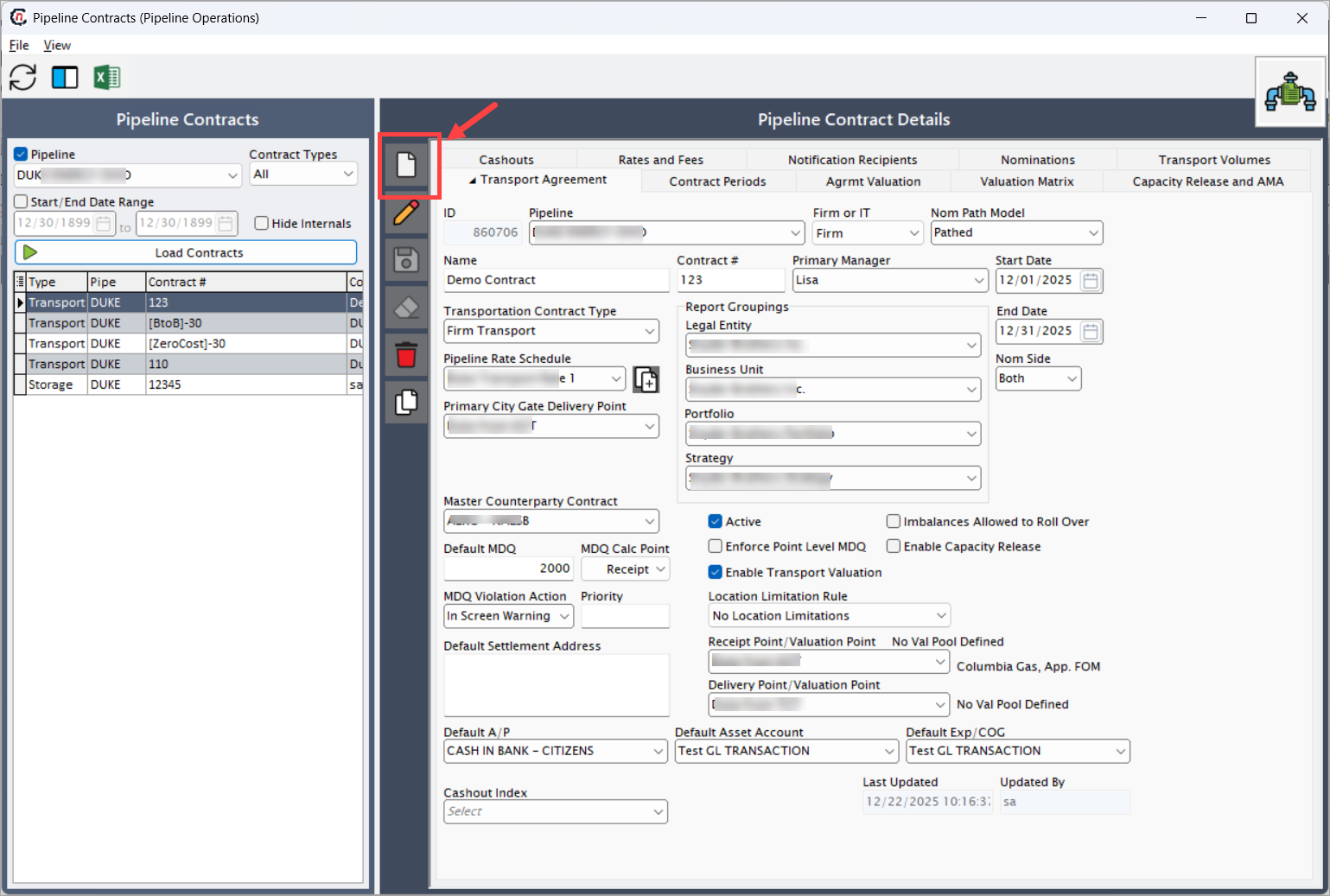
Click New to create a contract or select an existing contract to edit.
-
The Pipeline Contract Details section is divided into multiple tabs. Fill in the fields available for each tab as mentioned in the table below:
Transport Agreement tab
Fields Description ID The ID field is an unique identifier for each transport contract. This is auto-generated once the pipeline is saved. Pipeline Displays the pipeline to which the contract belongs. This value is inherited from the selected pipeline. Firm or IT Specifies whether the contract is Firm or Interruptible. This setting drives MDQ enforcement, nomination priority, and scheduling behavior. Nom Path Model The following fields define how transport contracts manage capacity and scheduling in pipeline systems:
1. Pathed: Follows a fixed route from the receipt point to the delivery point. Capacity is allocated along the entire path, and constraints along the route may impact scheduling.
2. Non-pathed: Does not require a predefined route. Receipt and delivery points can be selected independently, providing greater flexibility in capacity management.
3. Pathed non-threaded: Uses a defined path but offers more scheduling flexibility. Unlike pathed contracts, it does not strictly bind receipt and delivery points in a fixed sequence.Name User-defined contract name used for identification and reporting. Contract # A reference number assigned to the contract for tracking purposes. Primary Manager The internal owner responsible for planning and managing the transportation contract. Start Date Effective start date of the contract. No nominations or usage is allowed before this date. End Date Contract expiration date. After this date, the contract becomes inactive. Transportation Contract Type Defines the transportation service type, such as Firm Transport or other pipeline-defined services. Pipeline Rate Schedule Assigns the applicable rate schedule used for transportation charges and valuation. Primary City Gate Delivery Point Default delivery point used for valuation and reporting when city gate logic applies. Legal Entity Legal entity responsible for the contract. Used for accounting and settlement. Business Unit Business unit under which the contract is managed. Portfolio Portfolio grouping for commercial and risk reporting. Strategy Strategy classification used for analytics and reporting. Master Counterparty Contract Links the pipeline contract to a master counterparty agreement. Default MDQ Default Maximum Daily Quantity assigned to the contract if not overridden at point level. MDQ Calc Point Defines whether MDQ is calculated at Receipt or Delivery point. MDQ Violation Action Determines system behavior when MDQ is exceeded (e.g., In Screen Warning). Priority Used to prioritize contracts during scheduling and allocation. Active Indicates whether the contract is currently active and eligible for use. Enforce Point Level MDQ When enabled, MDQ is enforced at individual receipt or delivery points. Enable Transport Valuation Enables valuation calculations for transportation costs. Imbalances Allowed to Roll Over Allows imbalances to roll over instead of being cashed out immediately. Enable Capacity Release Enables capacity release functionality for this contract. Location Limitation Rule Defines whether usage is restricted to specific locations or zones. Receipt Point / Valuation Point Default receipt valuation point used for pricing and settlement. Delivery Point / Valuation Point Default delivery valuation point used for pricing and settlement. Default Settlement Address Default address used for settlement documentation. Default A/P Default accounts payable account for settlement. Default Asset Account GL account used for asset postings related to this contract. Default Exp/COG GL account used for expense or cost-of-goods postings. Cashout Index Index used when performing imbalance cashouts. Last Updated Timestamp of the most recent update to the contract. Updated By User who last modified the contract. 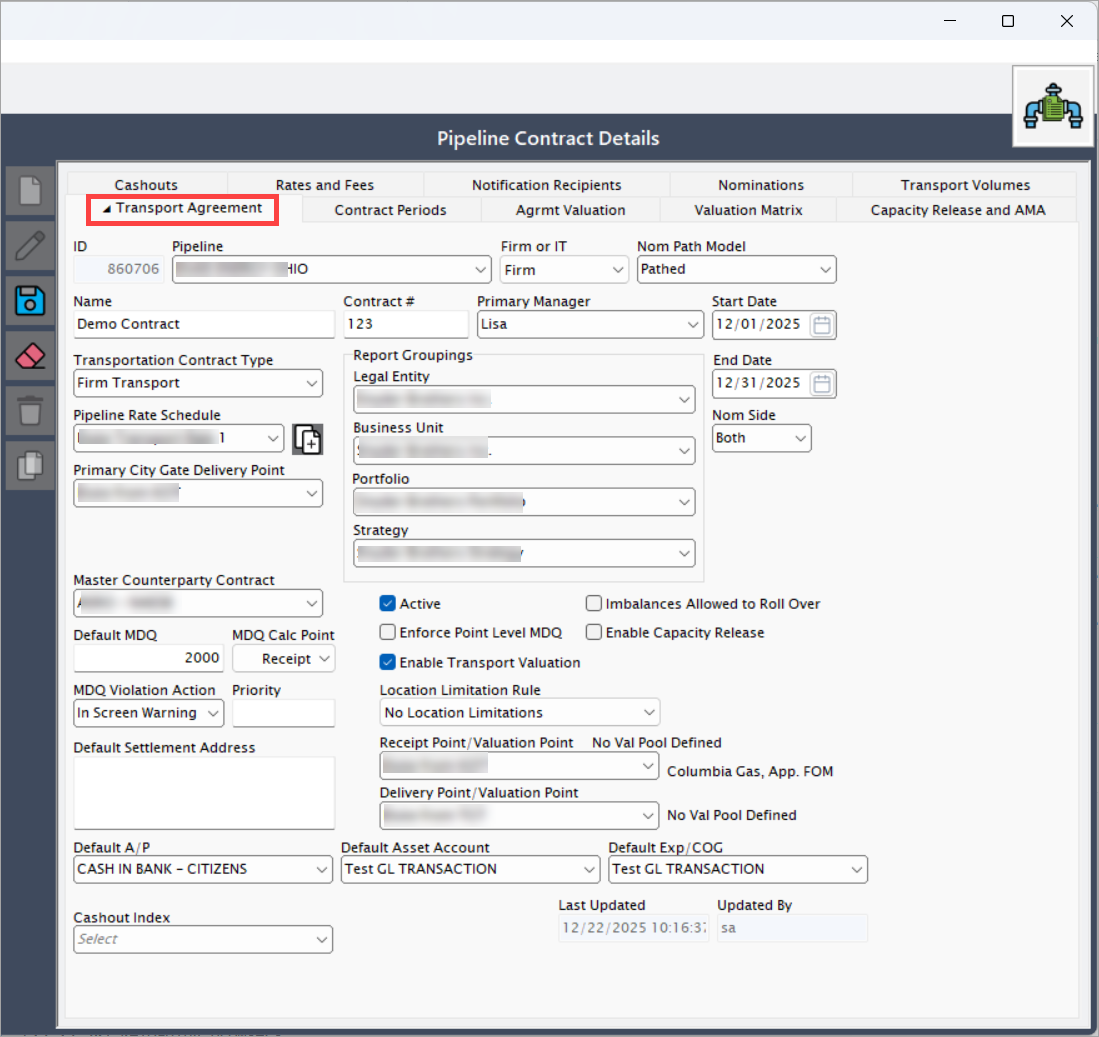
Contract Periods tab
This tab defines contract duration and MDQ details to align terms with operational and billing requirements.
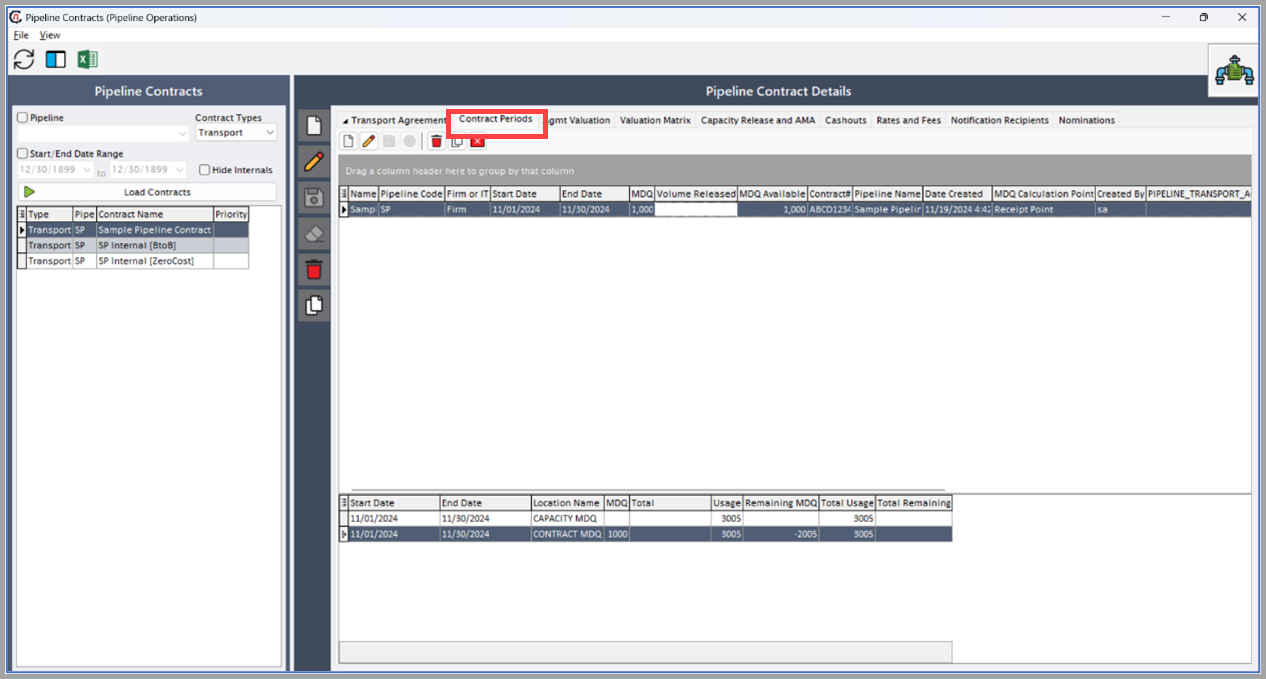
The Contract periods tab automatically populates contract details in the upper grid, while the lower grids display nominations and capacity release data.
Agrmt Valuation
The Agrmt Valuation tab provides a contract-level valuation summary for pipeline transport agreements. It displays the monthly valuation context used to calculate fixed charges, maximum quantities, and fee applicability for a contract.
Valuation Matrix
The Valuation Matrix tab defines how receipt and delivery points are paired and valued for a pipeline transport contract. It acts as the bridge between physical gas movement and financial valuation, determining which receipt points are evaluated against which delivery points and how costs are calculated.
This tab is especially critical when:
- A contract has multiple receipt and delivery points
- Valuation differs by point combinations
- Pipeline costs must be allocated accurately across paths
- Common valuation logic needs to be reused across contracts
The valuation matrix ensures consistent, transparent, and auditable pricing behavior across pipeline operations.
Fields Description As Of Specifies the effective date for loading the valuation matrix. The system evaluates contract terms, rate schedules, and valuation logic as of this date. This is critical when historical or forward-dated changes exist. Pipeline Rate Schedule Displays the rate schedule associated with the transport contract. The valuation matrix uses this schedule to determine applicable transportation charges. Show All Common Points When enabled, displays receipt and delivery points that are marked as common points across pipelines or contracts. This simplifies valuation setup when the same points are reused across multiple agreements. Locations to Value Displays the list of receipt and delivery location IDs included for valuation. These locations determine which paths are considered during cost calculations. Calculate 3 Month Comparison When enabled, allows the system to calculate and compare valuation results across a three-month window. This is typically used for analytical and validation purposes. Load Matrix Loads the valuation matrix based on the selected As Of date, rate schedule, and locations to value. This action populates the grid below with receipt and delivery valuation mappings. The valuation matrix supports two views to accommodate different analysis needs:
Consolidated ViewThe Consolidated View presents a high-level mapping of receipt and delivery valuation relationships. This view is useful for:
- Quickly validating configured valuation paths
- Reviewing common valuation logic
- Ensuring receipt and delivery points are correctly paired
Fields Description Receipt Point Displays the receipt point included in the valuation matrix. This is the physical entry point where gas enters the pipeline system. Rec/Del COG Indicates the cost-of-gas logic applied between the receipt and delivery point. This determines how transportation costs are assigned and calculated. Deliveries Displays the delivery points associated with the selected receipt point for valuation purposes. These represent exit points where gas leaves the pipeline.
Detail ViewThe Detail View provides a granular breakdown of valuation relationships, allowing users to:
- Review individual receipt-to-delivery combinations
- Validate cost-of-gas (COG) logic
- Confirm valuation applicability at the point level
Each row in the grid represents a valid valuation relationship used during settlement and accounting.
3 Month Matrix
The 3 Month Matrix tab provides a comparative valuation view across three consecutive months. It is designed to help users analyze valuation consistency, trends, and optimization opportunities across receipt and delivery paths.
Note
This tab is displayed only when the Calculate 3 Month Comparison checkbox is selected in the Valuation Matrix tab.
The 3 Month Matrix tab is used to:
- Compare valuation logic across three months
- Identify best profit receipt-delivery paths
- Validate valuation stability across time
- Support analytical and audit use cases
Each monthly panel contains the following structure:
Fields Description Receipt Displays receipt points considered for valuation in the selected month. Delivery Displays delivery points paired with the receipt points. Receipt Point Displays the physical receipt location. Rec/Del COG Displays the cost-of-gas relationship used between receipt and delivery points. The header Best Profit for
through indicates the valuation window used for optimization.Capacity release and AMA tab
This tab manages capacity release transactions and AMA (Asset management arrangements) to optimize pipeline and storage capacity usage.
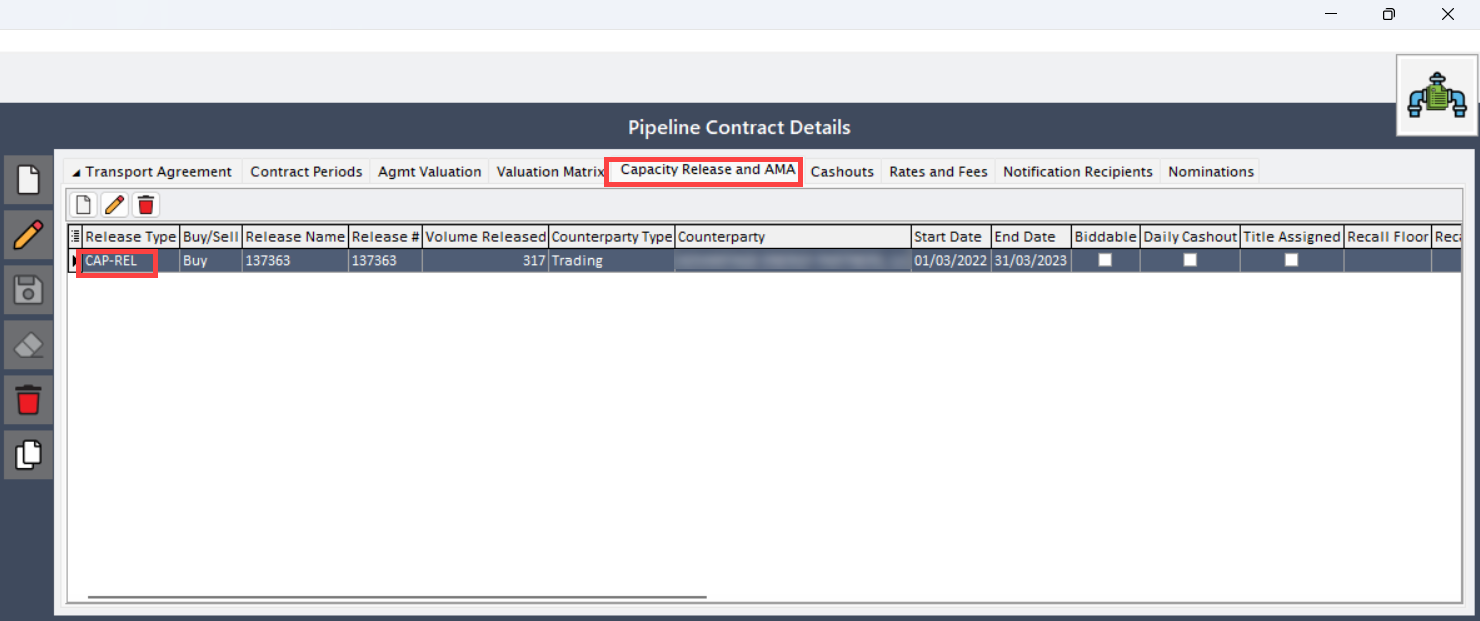
- Double click on the CAP-REl to open Capacity release and AMA screen.
-
The next screen has two main sections: Capacity release/AMA and Contract details
- Capacity release/AMA: Capacity Release refers to the process where a primary capacity holder (shipper) releases all or part of their contracted capacity to another shipper (replacement shipper) in the pipeline transportation system.
- Contract details: This screen provides a comprehensive view of transport contract information.
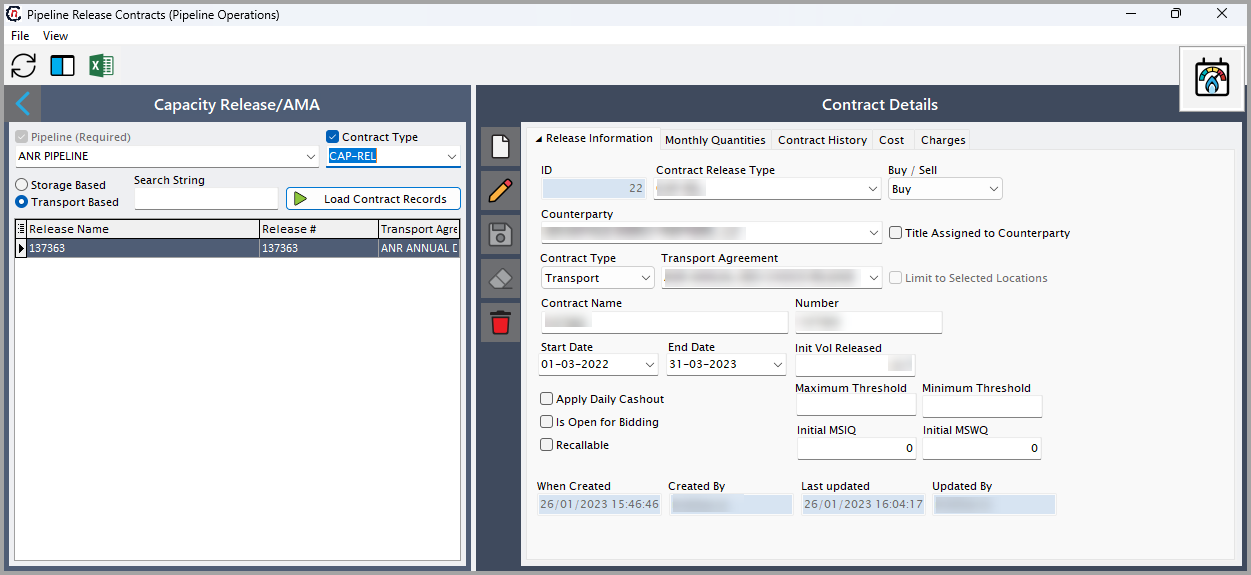
Below are the key fields and their descriptions:
Fields Description Id Unique identifier for the contract. Counterparty Party involved in the transaction. Start and end date Duration of the release. Int volume released Capacity released for external use. Is open for bidding Specifies if the release is open to bidding. Note
Ensure that the data is configured in the Pipeline release contracts screen before populating this tab.
Rates and fees tab
This tab lists applicable transportation costs, surcharges, and other expenses.
Lower grid: It shows data from the PZL configuration > Fuel and Rate tab, listing predefined rates. Users can select a record and use the button to create a new rate or fee in the Upper Grid, linking it to the contract.
Upper grid: In this grid users can add, edit, or delete records, but changes apply only to the contract and do not affect the original PZL records. Both grids have the same columns.
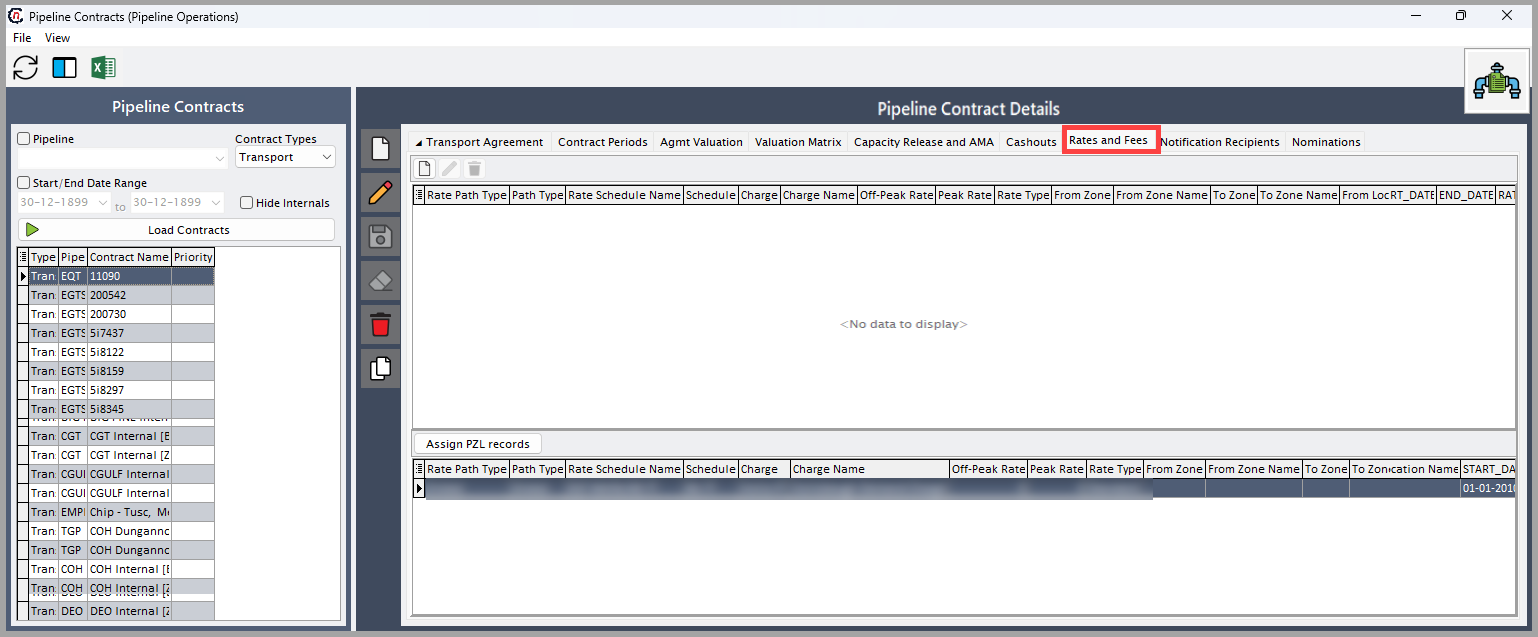
Below are the key fields and their descriptions:
Fields Description Rate path type The fields in this tab are dropdown menus, allowing you to select the appropriate options.
1.Global: Provides a comprehensive list of all available options across different categories, ensuring flexibility in selection.
2. Point-to-Point: Offers specific choices based on predefined start and end points, typically used for targeted selections within a defined range.Rate type Type of fee applied. Peak/Off-peak rates Rates based on demand. Default is set to 0. Start/End date Rate validity period. Note
Configure rates in the PZL screen before using this tab.
Notification recipients tab
This tab allows users to configure notification recipients for transport contract updates.
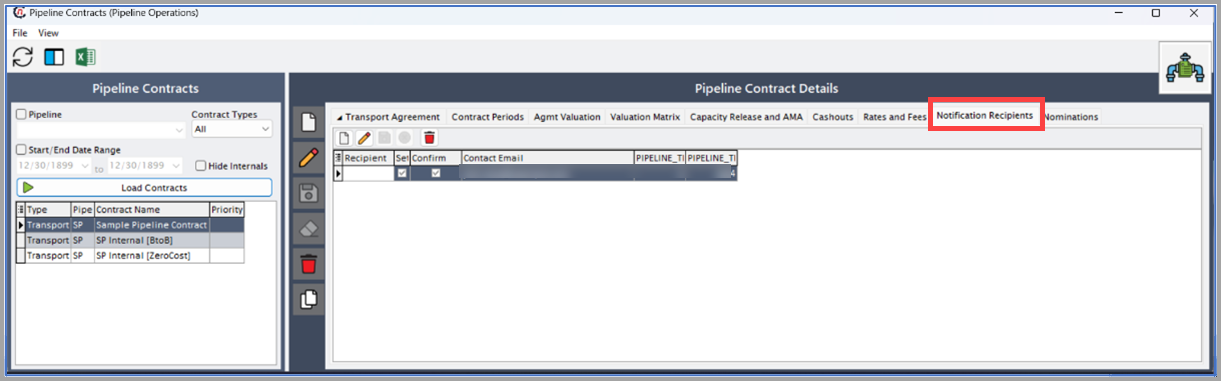
Below are the key fields and their descriptions:
Fields Description Recipient Person receiving notifications. Settle/Confirm Checkbox options for notification type. Contact email The email address where the notifications will be sent. Pipeline transport contract recipient ID Unique identifier Pipeline Transport AGMT Unique identifier Note
Configure contacts in the Retail contacts screen before adding recipients.
Nominations tab
This tab displays and manages the nominations linked to the transport contract, ensuring accurate scheduling and utilization.
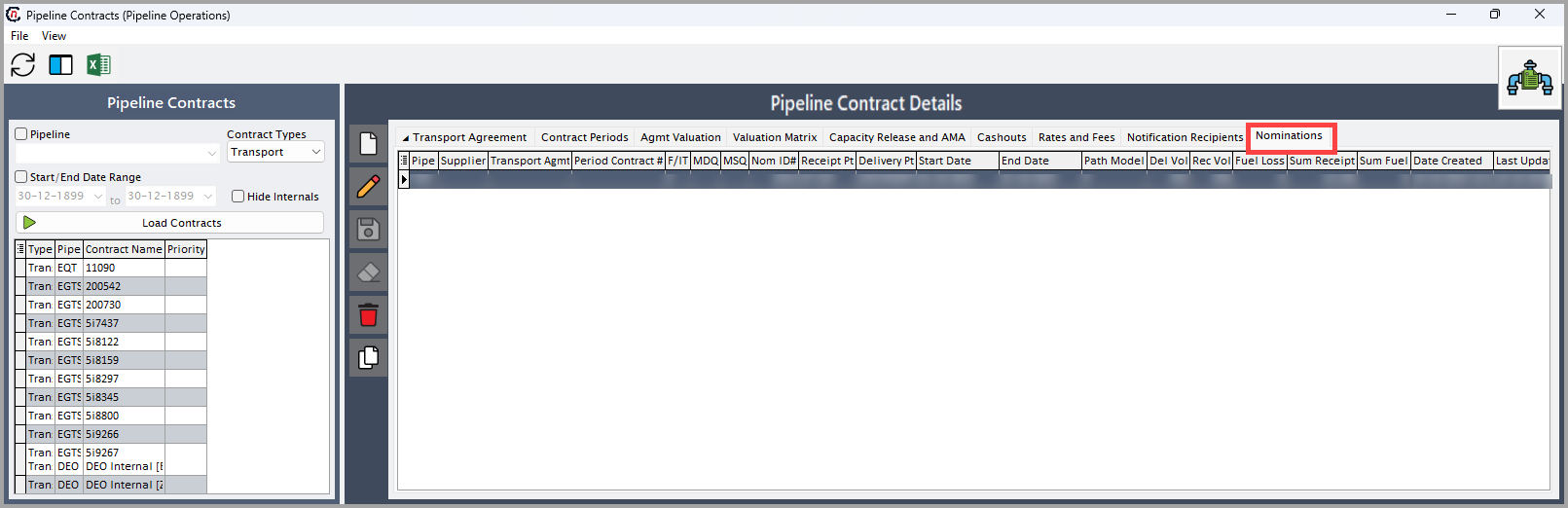 Below are the key fields and their descriptions:
Fields Description Pipeline Pipeline associated with the nomination. Supplier GName of the supplier linked to the nomination. Transport agmt Linked transport agreement. Start/End date Nomination duration. Nom type Type of nomination. Delivery/Receipt volume Amount of gas delivered or received. Note
The system auto-populates this tab based on nominations in the Pipeline scheduling screen.
Transport Volumes
The Transport Volumes tab displays actual and derived volume metrics used for contract valuation. It connects nominations, MDQ limits, usage, and imbalances into a single operational view. This tab is critical for validating whether contract usage aligns with contractual limits.
The Transport Volumes tab is used to:
- Review monthly transport usage
- Compare usage against MDQ limits
- Identify imbalances and cashout exposure
- Support settlement and reconciliation activities.
Step 4: Save the changes
The Pipeline Contracts results grid on the left displays all loaded contracts matching the query criteria. Selecting a contract populates the Pipeline Contract Details panel with its full configuration.
This allows users to:
- Compare multiple contracts
- Quickly validate contract setup
- Ensure consistency across pipelines and services
Key Points
- Pipeline contracts control both operational flow and financial outcomes.
- Incorrect MDQ or rate setup can lead to scheduling errors or financial discrepancies.
- Capacity release must be explicitly enabled to allow secondary capacity trading.
- Valuation settings directly impact pipeline settlement and accounting postings.
- Contract Start Date and End Date strictly govern usability.
- Field consistency across Legal Entity, Business Unit, and Portfolio is critical for reporting.
Summary
The Pipeline Contracts (Pipeline Operations) screen is a foundational configuration component that governs how gas is transported, valued, settled, and reported within the system. By accurately defining contract parameters, MDQ rules, valuation points, and accounting defaults, organizations ensure:
- Contractual compliance
- Accurate scheduling and nominations
- Correct pipeline charges and settlements
- Reliable financial and operational reporting
A well-configured pipeline contract is essential for stable and compliant pipeline operations.