LDC forecast review
The Forecast Review screen is used to review, analyze, and adjust forecasted gas volumes for Local Distribution Company (LDC) across pools, marketers, and months within a selected pipeline context. It provides a consolidated, month-by-month forecast view that supports planning, scheduling, capacity analysis, and downstream operational decisions.
This screen allows users to visualize forecast trends, apply percentage-based adjustments, and validate total forecasted demand at various aggregation levels such as LDC, Pool, and Marketer.
The primary purpose of the Forecast Review screen is to:
- Review monthly forecast volumes for LDC.
- Analyze forecast distribution across pools and marketers.
- Apply uniform percentage-based forecast adjustments.
- Compare seasonal and monthly demand patterns.
- Validate annual and monthly forecast totals.
- Support upstream pipeline planning and capacity alignment.
Prerequisites
Before using the Forecast Review screen, ensure the following prerequisites are met:
- The user has add or modify permissions for the Forecast Review screen.
- LDC are configured in the system.
- Forecast data is generated or imported for the selected LDC.
- Pools and marketers are mapped to the LDC.
- Forecast periods (monthly buckets) exist for the relevant year.
Procedure to review LDC forecast
Step 1: Navigate to the Forecast Review screen
- Log in to the nGenue application.
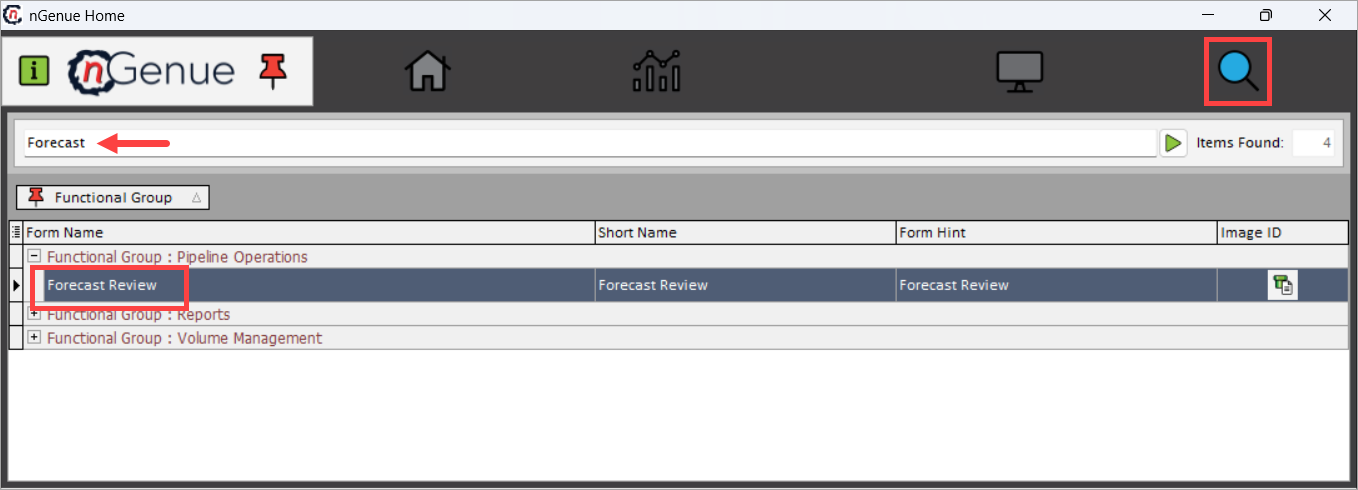
- Click Search and enter Forecast in the search bar.
-
Double-click Forecast Review to open the Forecast Review (Pipeline Operations) screen.
-
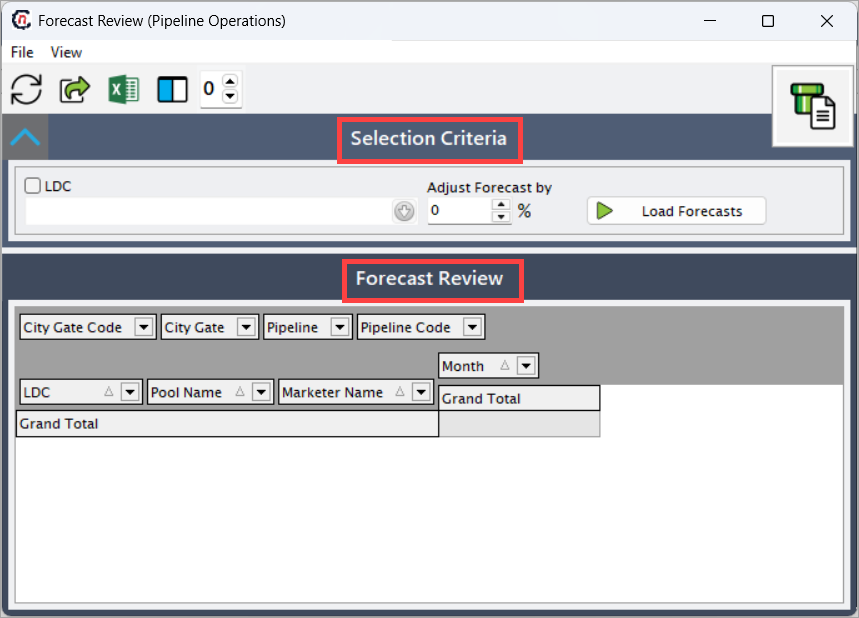
The screen is divided into two sections:
- Selection Criteria section
- Forecast Review section
Step 2: Load forecast data
The Selection Criteria section is used to define which forecast data is loaded.
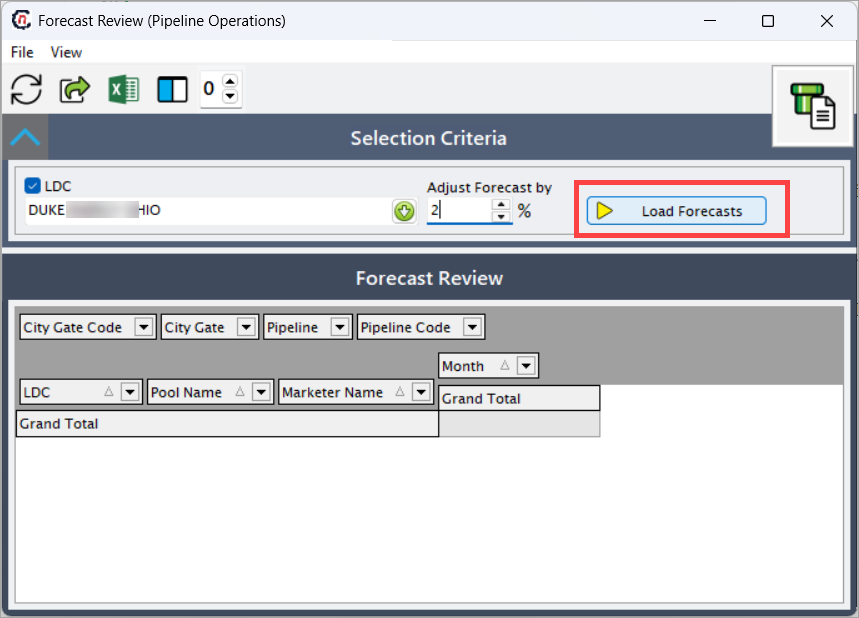
- Select the LDC for which forecast data should be reviewed. This is a required field.
- In the Adjust Forecast by field, apply a percentage-based adjustment to the loaded forecast volumes. Positive values increase the forecast, while negative values reduce it.
-
Click Load Forecasts. This loads the forecast data based on the selected LDC and adjustment percentage into the Forecast Review grid.
Note
The adjustment is applied uniformly across all displayed forecast values.
Step 3: Verify forecast data
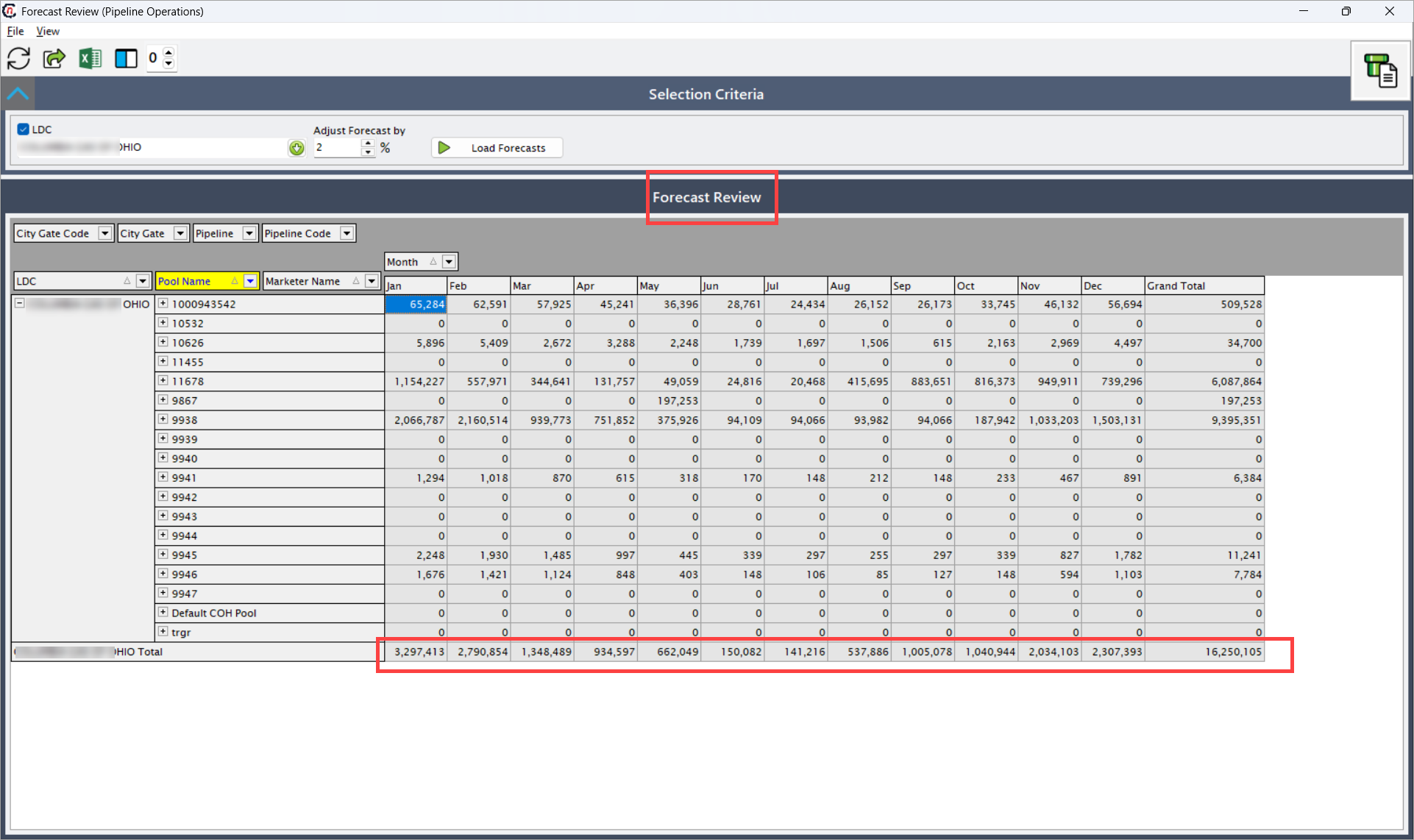
The Forecast Review section displays forecast data in a pivot-style grid, organized by LDC, Pool, and Marketer, with monthly forecast volumes and totals.
This section supports expansion and collapse at multiple hierarchy levels for detailed or summarized analysis.
Hierarchy and grouping fields
| Fields | Description |
|---|---|
| LDC | Displays the selected Local Distribution Company. Acts as the top-level grouping. |
| Pool Name | Displays the pool associated with the forecasted volumes under the LDC. |
| Marketer Name | Displays the marketer contributing forecast volumes within the pool. |
| Month | Indicates the monthly forecast period (Jan through Dec). |
Monthly forecast fields
| Fields | Description |
|---|---|
| Jan – Dec | Displays forecasted gas volumes for each respective month. Values typically represent forecasted demand in Dth or MMBtu, based on system configuration. |
| Grand Total | Displays the total forecast volume aggregated across all months for the selected hierarchy level (Marketer, Pool, or LDC). |
Supporting filter and pivot fields
| Fields | Description |
|---|---|
| City Gate Code | Filters or groups forecast data by city gate code. |
| City Gate | Displays the city gate associated with the forecasted volumes. |
| Pipeline | Displays the pipeline through which forecasted volumes are expected to flow. |
| Pipeline Code | Displays the pipeline identifier used for internal or regulatory reference. |
Once forecast data is loaded:
- Monthly forecast volumes are displayed across all configured months.
- Data can be expanded or collapsed by Pool Name and Marketer Name.
- Totals are automatically calculated at each hierarchy level.
- Adjusted values reflect the applied percentage change (if any).
- The Grand Total column provides an annual forecast snapshot.
This allows users to quickly identify demand concentration, seasonal peaks, and overall forecast accuracy.
Key points
- LDC selection is mandatory to load forecast data.
- The Adjust Forecast by field applies a uniform adjustment across all records.
- Monthly values represent forecasted demand, not actual usage.
- The grid supports hierarchical expansion for detailed analysis.
- Grand Total reflects the sum of all monthly forecasts.
- This screen is analytical and review-focused; it does not directly modify source forecast records.
Summary
The Forecast Review screen provides a comprehensive, month-by-month view of forecasted gas demand for an LDC, enabling operational and planning teams to:
- Analyze forecast distribution across pools and marketers.
- Apply high-level forecast adjustments.
- Validate annual and seasonal demand trends.
- Support pipeline scheduling and capacity planning decisions.
It serves as a critical planning screen bridging forecast generation and downstream operational execution.