Configure limit type
A limit type defines the rules and thresholds used to manage credit and risk exposure for transactions, facilities, or accounts. It determines how much credit or exposure is allowed and categorizes different risk levels for operational and financial control. This screen allows configuration of limit types and assignment of entities to enforce these limits consistently and ensure compliance.
Prerequisites
Before working on the Limit type screen, ensure the following prerequisites are met:
- Ensure the nGenue application is installed and use valid login credentials to log into the application.
- User permissions: Configure the user permissions including User type, Security user, Security group, Security assign user, and Security assign permissions in their respective screens to enable access to the Limit type screen.
Procedure to configure limit type
Step 1: Navigate to Limit type screen
- Log in to the nGenue application.
- Click the Search icon and enter Limit type in the search bar.
-
Double-click Limit type to open the respective screen.

-
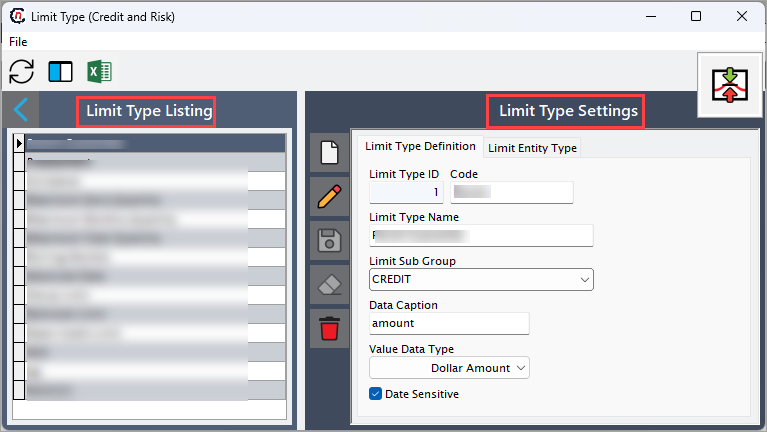
In the Limit type (credit and risk) screen has two sections:
- Limit type listing: This section displays existing limit types.
-
Limit type settings: This section allows you to create or modify limit types and assign entities. This section has two tabs:
- Limit type definition: This tab defines core properties of the limit type.
-
Limit entity type: This tab allows you to assign entities to the selected limit type.
Step 2: Adding a limit type
-
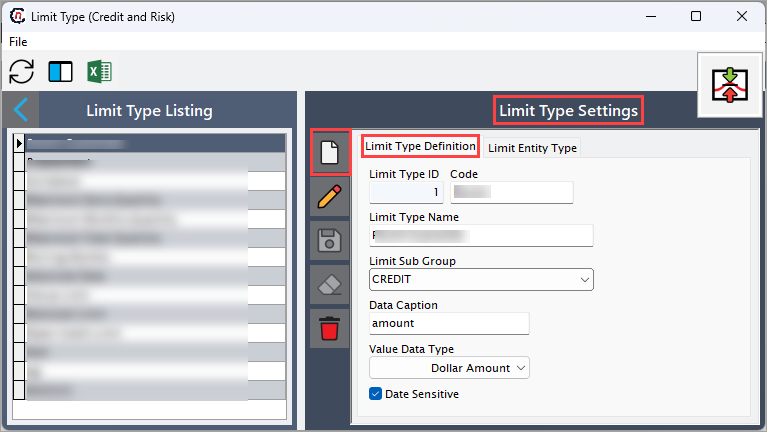
In the Limit type settings, click Add a limit type record icon to add the new limit type.
-
Complete the required fields available in the Limit type definition tab as listed in the following table:
Fields Description Limit type ID Specifies the unique identifier automatically assigned for the limit type upon creation. Code Specify the reference code for the limit type. Limit type name Specify the name of the limit type. Limit sub group Specify the group classification for the limit type. Data caption Specify the label used in reports or screens. Value data type Specify the type of value allowed. Data sensitive Select this checkbox to indicate whether the limit type contains sensitive data. -
Click the Save changes to current limit type icon to save the record or click Cancel changes to limit type record icon to discard the changes.
Step 3: Adding limit entity type
- Select the limit type from limit type listing section.
-
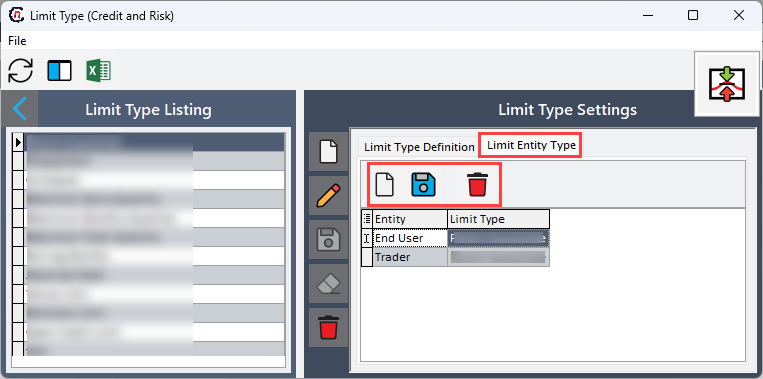
Go to the Limit entity type tab and click Add new limit entity icon to assign entity to the limit type.
-
Double-click on the entry field of entity to display dropdown and select the entity from the dropdown.
- Click the Save icon to confirm the changes.
Summary
This process defines and assigns limit types to control credit and risk exposure. Proper configuration ensures limits are enforced consistently, supports operational reliability, and maintains compliance with financial and regulatory requirements.