Parent retail consultants
A Parent retail consultant serves as the central point of coordination between corporate operations and retail-level consultants. Acting as a parent entity in a hierarchical consultant structure, the Parent retail consultant ensures that retail consultants are properly managed, financial transactions are accurately recorded, and organizational policies are consistently enforced.
The Parent retail consultants screen provides the following action icons for managing Parent retail consultant records:
| Icons | Description |
|---|---|
 |
Add a Parent retail consultant record. |
 |
Edit current Parent retail consultant. |
 |
Save changes to current Parent retail consultant. |
 |
Cancel changes to Parent retail consultant record. |
 |
Delete current Parent retail consultant record. |
Prerequisites
Before working on the Parent retail consultants screen, ensure the following prerequisites are met:
- Ensure the nGenue application is installed and use valid login credentials to log into the application.
- User permissions: Must configure the security settings including User type, Security user, Security group, Security assign user, and Security assign permissions in their respective screens to ensure the required access and permissions for Parent retail consultants screen actions.
Procedure to Parent retail consultant
Step 1: Navigate to Parent retail consultant screen
- Log in to the nGenue application.
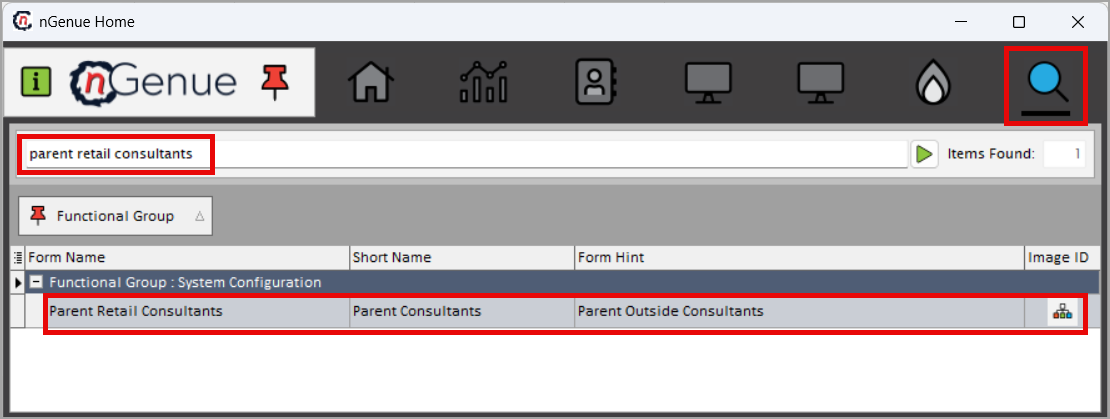
- Click the Search icon and enter parent retail consultants in the search bar.
-
Double-click the Parent retail consultants from the search results to open respective screen.
-
selct the screen from the search results
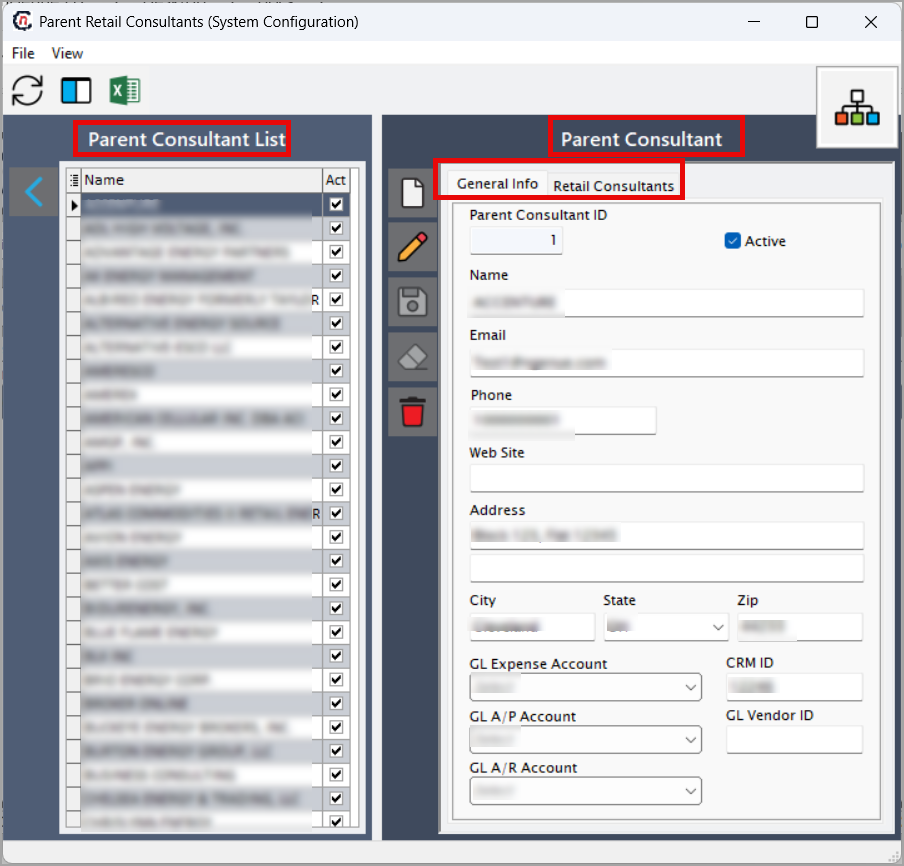
- Parent consultant list: Displays a list of existing parent retail consultants.
-
Parent consultant: Contains two tabs:
- General info: Create, edit, save, or delete the parent retail consultant.
-
retail constaltant: Add or manage retail consultants under the selected parent.
Step 2: Create Parent retail consultant
-
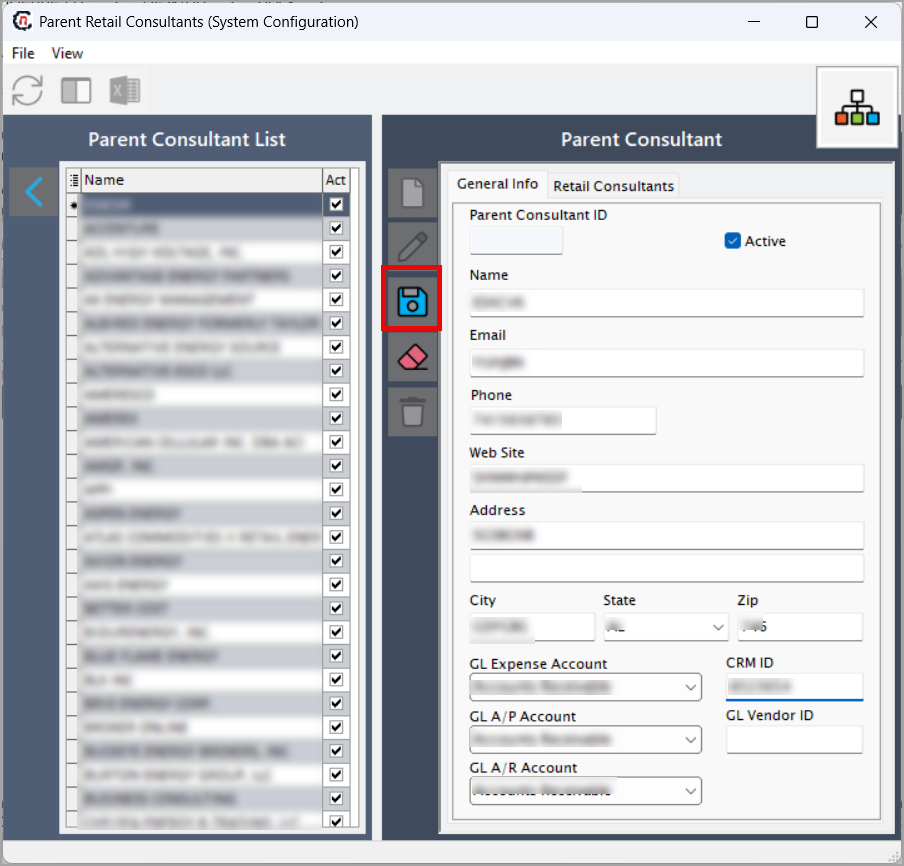
In the Parent retail consultant section, click Add a Parent retail consultant icon.
-
Fill in the fields as described below:
Field Description Parent Consultant ID A system-generated unique identifier assigned automatically when a Parent Retail Consultant record is created. This ID is used internally for linking retail consultants, commissions, invoice mappings, and GL account associations. Users cannot edit this field. Active Enables or disables the Parent Retail Consultant. When checked, the consultant is active and available for selection in downstream processes such as retail consultant assignment, invoice approval, and commission calculations. When unchecked, the consultant remains in the system but cannot be assigned to new records. Name The legal or operational name of the consulting organization or individual serving as the parent consultant. This name may appear in some reporting outputs, consultant hierarchy dashboards, or internal audit logs. Email The primary email address of the parent consultant. Useful for communication, notifications, CRM integration, and audit trail consistency. Phone The main contact phone number for the consultant or consulting firm. Included for customer service, CRM alignment, and internal correspondence. Website URL to the consultant’s official business website. Helps with validation, branding, or external reference in CRM and marketing records. Address The parent consultant’s full mailing address. This may serve as the primary business location for reporting, verification, and corporate documentation. City The city portion of the consultant’s address. Used for geographic grouping, tax jurisdiction references, and reporting classification. State The state associated with the consultant’s physical address. Important for regulatory compliance, territory alignment, tax logic, and consultant categorization. Zip The ZIP or postal code for the consultant’s address. Supports accurate address representation and enables region-based reporting and CRM matching. GL Expense Account The General Ledger account used to post consultant-related expenses, such as commissions, consulting fees, or service charges. The selected GL account ensures that consultant-related financial transactions are properly recorded in accounting systems. CRM ID The unique identifier assigned to the consultant in the CRM system. Provides integration between CRM and billing processes, enabling consistent customer tracking, performance reporting, and commission calculation. GL A/P Account The General Ledger Accounts Payable account associated with the consultant. Used when posting payable transactions, such as consultant commissions or vendor-related expenses. Ensures financial transactions flow to the correct liability account. GL Vendor ID The identifier for the consultant as a vendor in the GL or accounting system. Required when payments or reimbursements are issued to the consultant. This links the consultant to vendor-based accounting workflows. GL A/R Account The General Ledger Accounts Receivable account associated with the consultant. Used in cases where the consultant is involved in revenue-sharing or receivable-related transactions. Ensures financial entries are attributed to the correct receivable account. -
Click Save changes to current Parent retail consultant to store the Parent Retail Consultant record.
Step 3: Create retail consultants under a parent consultant
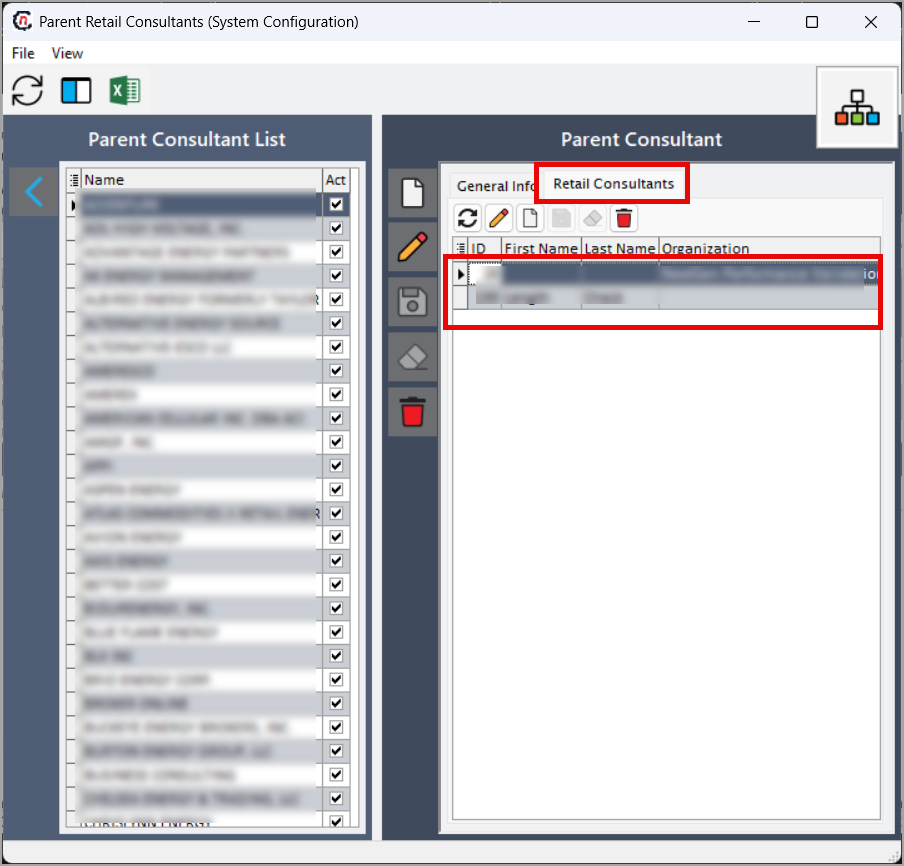
Click the Add New Retail Consultant icon. You will be redirected to the Retail Consultant screen. For the step-by-step process, refer to the Retail consultant.
Summary
The Parent retail consultant setup in nGenue is essential for managing consultant hierarchies, ensuring correct billing associations, and enabling accurate GL posting and commission processing. By properly configuring parent and child consultants, organizations maintain structured invoicing operations, avoid errors, and support clean, auditable financial reporting.