Run monthly initialization process
In the natural gas industry, many core system records, such as charges, indexes, weather data, pool balances, and daily usage placeholders, must exist before operational processing, billing, and settlement can occur. These records are created on a monthly basis and serve as the foundation for all downstream workflows. If monthly initialization is skipped or partially completed, it can result in missing daily usage records, failed calculations, billing delays, and incomplete reporting.
The Monthly Initialization Process screen is designed to prepare the system for upcoming operational months by creating all required baseline records in advance. This process ensures that the system is ready to support daily usage processing, pricing, balancing, forecasting, and billing activities, while maintaining a clear audit trail of what was initialized and when. The process also supports partial or restartable execution when corrections or reruns are required.
Prerequisites
Before working with the Monthly Initialization Process screen, ensure the following prerequisites are met:
- The user has add or modify permissions for the Monthly Initialization Process screen.
- Required master data such as LDC, LDC pools, rate charges, indexes, and weather zones is configured.
- No critical billing or settlement processes are actively running for the target period.
- Users understand the operational impact of initializing future months.
Procedure to run the monthly initialization process
Step 1: Navigate to the Monthly Initialization Process screen
- Log in to the nGenue application.
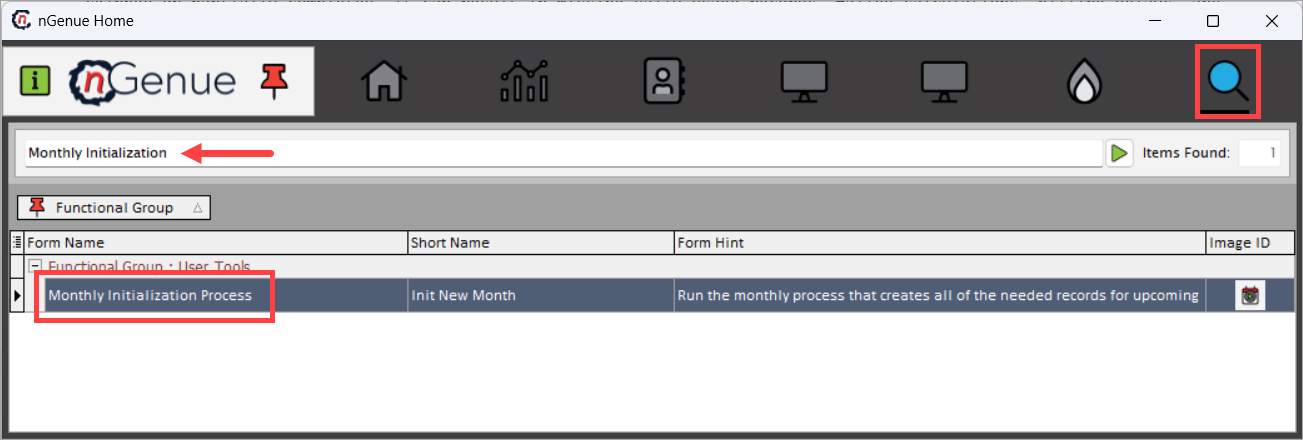
- Click the Search icon and enter Monthly Initialization in the search bar.
-
Double-click Monthly Initialization Process to open the Monthly Initialization Process (User Tools) screen.
-
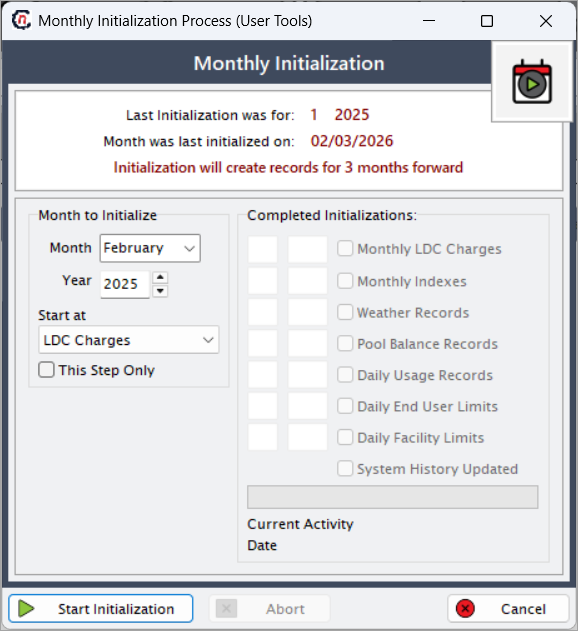
The Monthly Initialization screen is displayed.
Note
At the top of the screen, the system displays important reference information:
1. Last Initialization was for – Indicates the most recent month and year that were initialized.
2. Month was last initialized on – Displays the date on which the last initialization was completed.
3. Initialization will create records for 3 months forward – Indicates that running the process creates records for the selected month and the next two months.
This information helps prevent duplicate initialization and ensures correct sequencing.
Step 2: Define the month to initialize
Use the Month to Initialize section to specify when initialization should begin.
| Fields | Description |
|---|---|
| Month | Select the calendar month from which initialization should start. |
| Year | Select the year corresponding to the selected month. |
| Start at | Specifies the initialization step where the process should begin. This option is commonly used when restarting a partially completed initialization or when a specific downstream component needs to be reinitialized. The available options are described below: LDC Charges – Initializes monthly LDC-level charge records required for pricing and billing calculations. This step must be completed before any rate- or usage-dependent processes can run. Indexes – Initializes monthly index records used for floating or indexed pricing structures. This step is required for contracts and rate riders that depend on market or index-based pricing. Weather – Creates monthly weather records used for load profiling, forecasting, and weather-driven usage calculations. Group Balancing – Initializes group balancing records used to track pooled or grouped volume balancing across facilities or end users. This step supports imbalance management and settlement workflows. Daily Usage – Creates daily usage placeholder records required for daily volume processing, allocations, and reconciliation. No daily usage calculations can occur without this step. End User MDQ’s – Initializes daily Maximum Daily Quantity (MDQ) limits at the end user level. These limits are used for validation, balancing, and cashout calculations. Facility MDQ’s – Initializes daily MDQ limits at the facility level, supporting facility-specific balancing and constraint enforcement. System History – Updates system history and audit records to reflect the initialization activity. This step ensures traceability and compliance reporting. |
| This Step Only | When selected, runs only the chosen initialization step without executing subsequent steps. This option is typically used for targeted corrections or controlled reprocessing. |
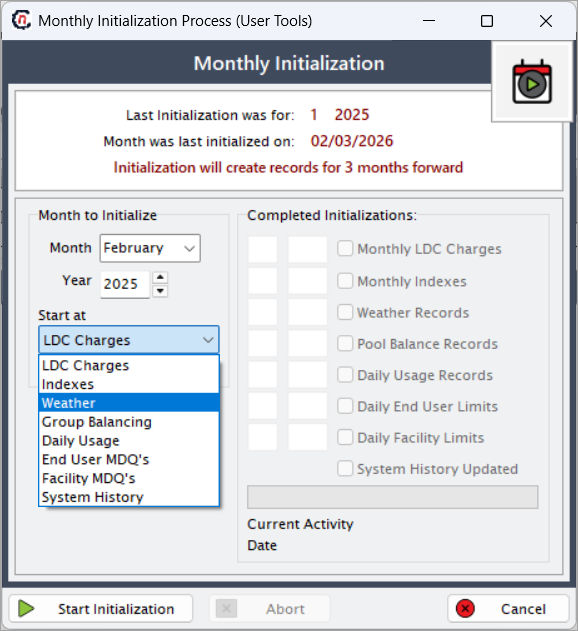
These settings control where the initialization begins and how much of the process is executed.
Step 3: Review completed and pending initialization steps
The Completed Initializations section provides visibility into which components have already been initialized for the selected month.
| Initialization step | Description |
|---|---|
| Monthly LDC Charges | Creates monthly charge records required for pricing and billing calculations. |
| Monthly Indexes | Initializes index records used for floating or indexed pricing structures. |
| Weather Records | Creates monthly weather records used for load profiling and forecasting. |
| Pool Balance Records | Initializes pool-level balance tracking for volume management. |
| Daily Usage Records | Creates daily usage placeholders required for daily volume processing. |
| Daily End User Limits | Initializes daily volume limits at the end user level. |
| Daily Facility Limits | Initializes daily volume limits at the facility level. |
| System History Updated | Indicates whether system audit and history tables were updated. |
Checked items indicate completed steps, while unchecked items represent steps that are pending or not yet executed.
Step 4: Start or manage initialization
- Review the selected month, year, and starting step.
- Confirm that downstream billing and operational processes are not actively running.
- Click Start Initialization to begin the process.
- If required, click Abort to stop the process while it is running.
- Click Cancel to exit the screen without starting initialization.
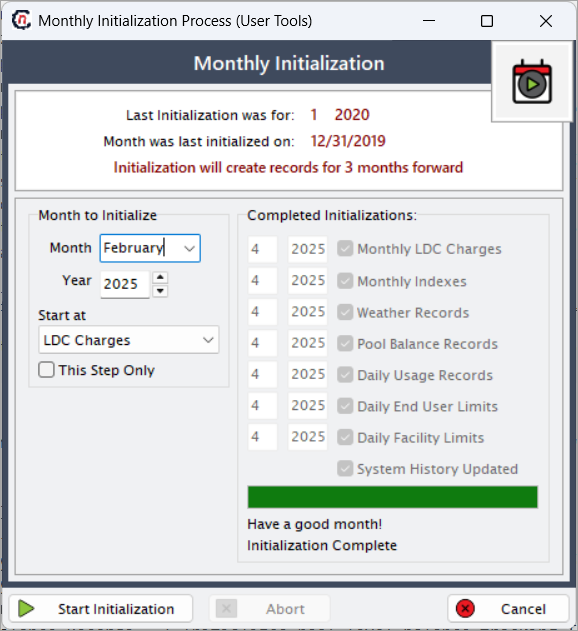
During execution, the screen displays progress information and system messages indicating the current step and processing context.
Key points
- Monthly initialization prepares the system for upcoming operational periods.
- The process creates records three months forward from the selected month.
- Initialization must be completed before daily usage, pricing, and billing can proceed.
- This process should be run during controlled operational windows to avoid conflicts.
Summary
The Monthly Initialization Process screen provides a structured and auditable way to prepare nGenue for future operational activity. By creating required monthly and daily records in advance and clearly tracking completed steps, this feature ensures that volume processing, pricing, billing, and settlement workflows operate smoothly and without interruption.