Configure settlement type
A settlement item type defines the specific category or nature of settlement transactions within the system such as physical, financial, brokerage, or transportation settlements. Configuring settlement item types ensures each transaction is correctly categorized, accounted for, and reflected in financial postings. Proper setup of these types directly impacts settlement processing, reporting, and integration with the General Ledger (GL).
Prerequisites
Before working on the Settlement item type screen, ensure the following prerequisites are met:
- Ensure the nGenue application is installed and use valid login credentials to log into the application.
- Configure the user permissions including User type, Security user, Security group, Security assign user, and Security assign permissions in their respective screens to enable access to the Settlement item type screen.
- Ensure the Deal management, Pipeline, Counterparty and Chart of accounts are properly configured and active.
- Ensure the rate schedules are defined and related billing and pricing data has been finalized.
Procedure to configure settlement item type
Step 1: Navigate to Settlement item type screen
- Log in to the nGenue application.
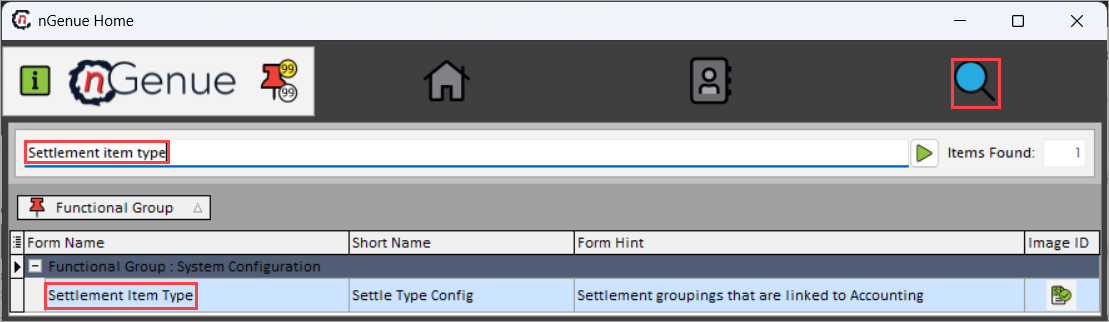
- Click the Search icon and enter Settlement item type in the search bar.
-
Double-click Settlement item type to open the respective screen.
-
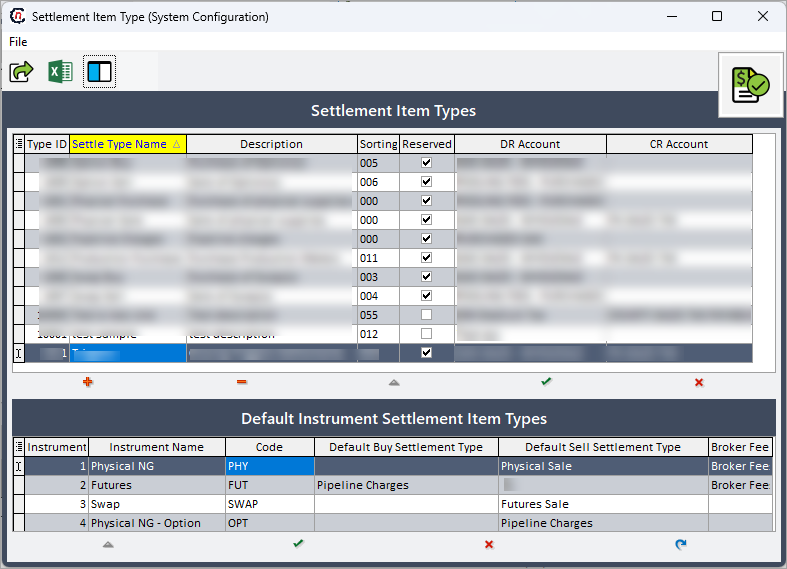
Settlement item type (System configuration) screen has two sections:
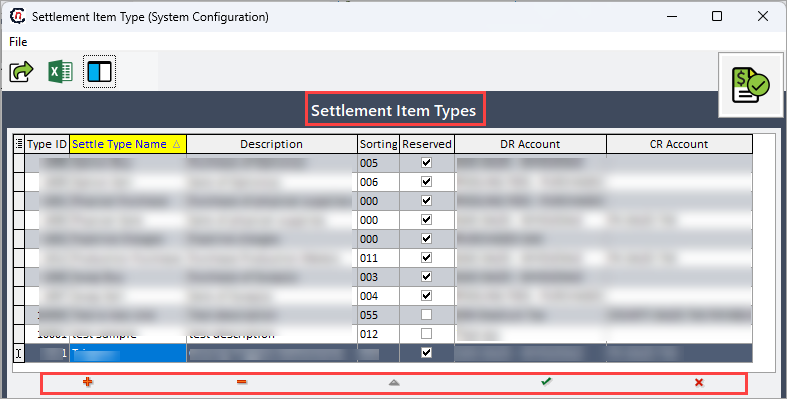
- Settlement item types: This section allows to define, edit, or delete settlement item type records and their accounting attributes.
-
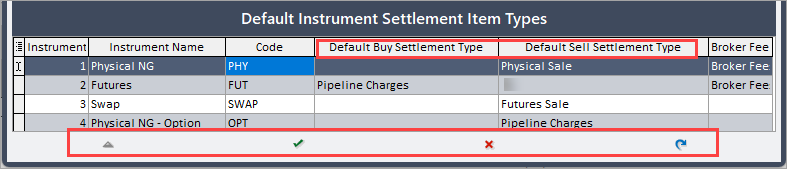
Default instrument settlement item types: This section allows to assign default buy or sell settlement types for each instrument to ensure consistent categorization in settlement processing.
Step 2: Configure Settlement item type
Add or edit settlement item type record
- Click Insert record (+) icon to add a new settlement item type or Edit record (⏶) icon to modify the existing settlement item type record.
-
Complete the required fields mentioned in the table below:
Fields Description Type ID It is a unique identifier automatically assigned to the settlement item type. Settlement type name Specify the name for the settlement type. This label appears in selection lists and reports to help identify the specific settlement category. Description Provide additional details about the settlement type’s purpose or usage for reference. Sorting Define the display order of settlement types in dropdowns or selection lists. Reserved Indicates whether the settlement type is system-reserved and cannot be modified or deleted. Reserved types are typically used for core settlement functions. DR account Specify the debit account where debit postings related to this settlement type will be recorded. CR account Specify the credit account used for posting settlement transactions in the GL. -
Click Post edit (✓) to save the record or Cancel edit (☓) to discard the changes.
Delete settlement item type record
Click Delete record (-) to remove the selected settlement item type from the records.
Step 3: Set default instrument settlement item type
- Click Edit record (⏶) to set default buy or sell settlement item type for given instrument.
-
The following fields are available for each line item in the Default instrument settlement item type section:
Fields Description Instrument The instrument code associated with the settlement type. It identifies the market instrument used for settlement calculations and reporting. Instrument name Descriptive name of the instrument. Code Internal system code identifying the instrument. This code is used for tracking, integration, and data mapping within the nGenue application. Default buy settlement type Specifies the default settlement type automatically applied to all buy-side transactions associated with the instrument which ensures consistency in settlement handling and reduces manual configuration. Default sell settlement type Specifies the default settlement type automatically applied to all sell-side transactions for the instrument which helps maintain alignment with counterparty and contractual settlement requirements. Broker fee Indicates whether the broker fee is applicable to the instrument during settlement processing. If enabled, the system includes broker-related charges in the final settlement calculation. -
Double-click the Default buy settlement type or Default sell settlement type field, and select the appropriate buy-side or sell-side settlement type from the dropdown list to set the default settlement type for buy-side or sell-side transactions.
-
Click Post edit (✓) to save the configuration or Cancel edit (☓) to discard the changes.
Summary
Configuring settlement item types ensures consistent and accurate categorization of settlement transactions within the wholesale and financial modules of nGenue. By linking each settlement item type to its corresponding debit and credit accounts and associating default types with instruments, the system supports automated accounting, accurate reporting, and streamlined settlement reconciliation.