Print retail price confirmation (Single month)
A Retail price confirmation (Single month) report provides a detailed summary of the retail prices applied to end-user accounts for a selected month. It consolidates rate, pool, and Local Distribution Company (LDC) details that form the basis for billing and pricing validation.
This report is needed to verify monthly retail pricing accuracy, confirm contracted or index-based rates, and ensure that all applied charges align with approved pricing structures. It also serves as a formal pricing confirmation document for internal review or operational use.
The report includes LDC, pool, and rate level details for selected end users, along with confirmed monthly pricing, tier information, calculation details, facility delivery volumes, and applied price methods. Optional letterhead and PDF outputs are available for formal distribution or record keeping.
It is typically used before monthly invoicing cycles to validate pricing and confirm that all rates and calculations are accurate prior to billing execution.
Prerequisites
Before working on the Print retail price confirmation (1 month) (Reports) screen, ensure the following prerequisites are met:
- Ensure the nGenue application is installed and use valid login credentials to log into the application.
- Configure the user permissions including User type, Security user, Security group, Security assign user, and Security assign permissions in their respective screens to enable access to the Print retail price confirmation (1 month) (Reports) screen.
- Ensure the retail rate schedules, Local Distribution Company (LDC), pools, and pricing data must be finalized for the selected month.
Procedure to print retail price confirmation (single month) report
- Log in to the nGenue application.
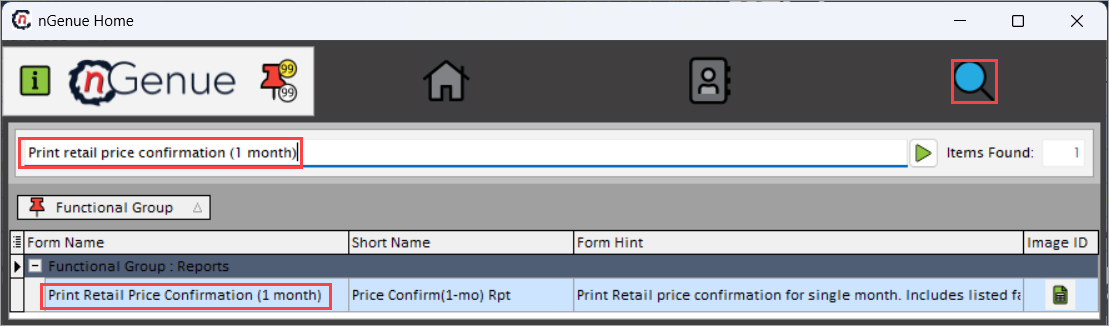
- Click the Search icon and enter Print retail price confirmation (1 month) in the search bar.
-
Double-click the Print retail price confirmation (1 month) from the search results to open respective screen.
-
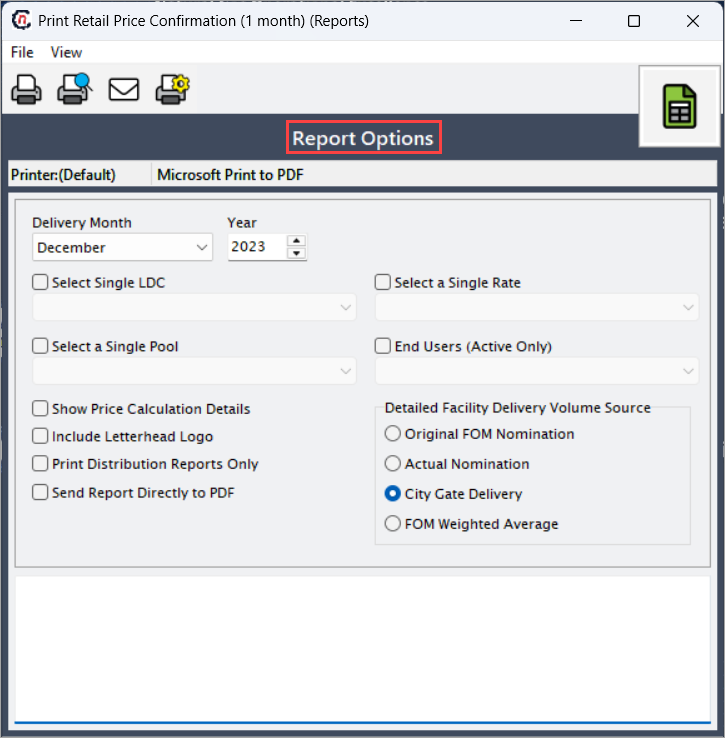
In Print retail price confirmation (1 month) (Reports), Report options section allows to specify report filters, delivery period, and output preferences.
-
Complete the required fields available in the Report options section as listed in the table below:
Fields Description Delivery month Select the month for which the retail price confirmation report is to be generated. The system retrieves pricing and customer data only for the selected month. Year Select the reporting year associated with the delivery month. Select single LDC Choose the LDC to limit the report to customers and pricing associated with that specific LDC. Select a single rate Specify the rate schedule or tariff to filter the report that are assigned only to this rate will be included. Select a single pool Select the gas pool that should be used for pricing calculations in the generated report. End users (Active only) Select this checkbox to include only end users who are active during the selected reporting period. Show price calculation details Select this to include a detailed breakdown of each pricing component in the generated output. Include letterhead logo Select this to print the organization’s letterhead logo on the report. Useful for official customer-facing documents. Print distribution reports only Select this to generate only distribution-related price confirmations, excluding other components. Send report directly to PDF Select this to bypass the preview screen and automatically generate the final report as a PDF. Detailed facility delivery volume source
Fields Description Original FOM nomination Select this option to base delivery volumes on the First-of-Month nominated quantities stored in the system. Actual nomination Select this to use confirmed actual nomination volumes for pricing calculations. City gate delivery Select this option to reference delivery quantities measured at the city gate, typically used for final settlement and cost validation. FOM weighted average Select this to calculate pricing using weighted average First-of-Month delivery volumes. 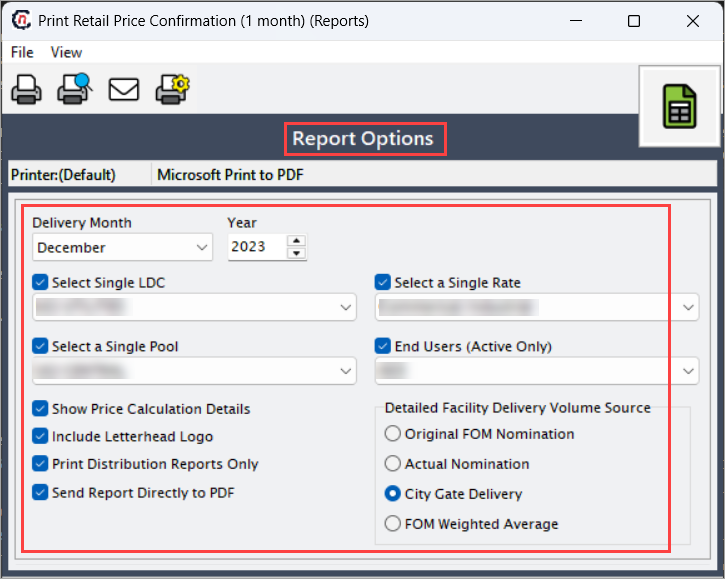
-
Select any of the printing options in the top header to configure printing, preview, print, as described in the table below:
Icons Icon name Description 
Print Click Print icon to print the aging detail report. 
Print preview Click Print preview icon to view the aging detail report. 
Distribute this report to defined recipients via fax or email Click Distribute this report to defined recipients via fax or email icon to send the report to designated recipients via fax or email. 
Printer setup Click Printer setup icon to configure printing settings. -
Click Printer setup to configure print settings, specify the name, size, orientation, properties and network.
- Click Ok to save the configuration.
- Click Cancel to discard changes.
-
Click Print preview to view the report before printing to make any required adjustments or changes.
- Click Distribute this report to defined recipients via fax or email icon to send the report to selected recipients via fax or email.
- Click Print to generate the retail price confirmation (single month) report for the selected delivery month, year, and pool.
Summary
The retail price confirmation (single month) report serves as a key validation and audit tool to ensure that retail rates are accurately applied for the selected billing period. It facilitates transparent pricing review, supports precise billing validation, and provides clear visibility into applied rate structures for internal analysis and reporting.