Nomination Listing
The Nomination Listing screen provides a centralized view to search, filter, review, and export pipeline nomination records across transportation and storage contracts. It is primarily used by schedulers, operations teams, and analysts to monitor gas flow requests, validate contract usage, and support day-to-day operational oversight.
This screen consolidates nomination information at both a summary level and a transaction-level detail, enabling users to quickly identify nomination volumes, paths, contract associations, and fuel impacts.
The primary purpose of the Nomination Listing screen is to:
- Search and filter nomination records across pipelines and contracts
- Review nomination volumes by receipt and delivery points
- Validate MDQ, MSQ, and Firm/IT usage
- Analyze fuel loss and delivered quantities
- Export nomination data for reporting and reconciliation
- Support scheduling, compliance, and operational decision-making
Prerequisites
Before using the Nomination Listing screen, ensure the following prerequisites are met:
- The user has the add or modify permissions for the Nomination Listing screen.
- Pipelines, receipt points, delivery points, and contracts are configured.
- Nominations have been created and saved in the system.
Procedure to list down nominations
Step 1: Navigate to the Nomination Listing screen
- Log in to the nGenue application.
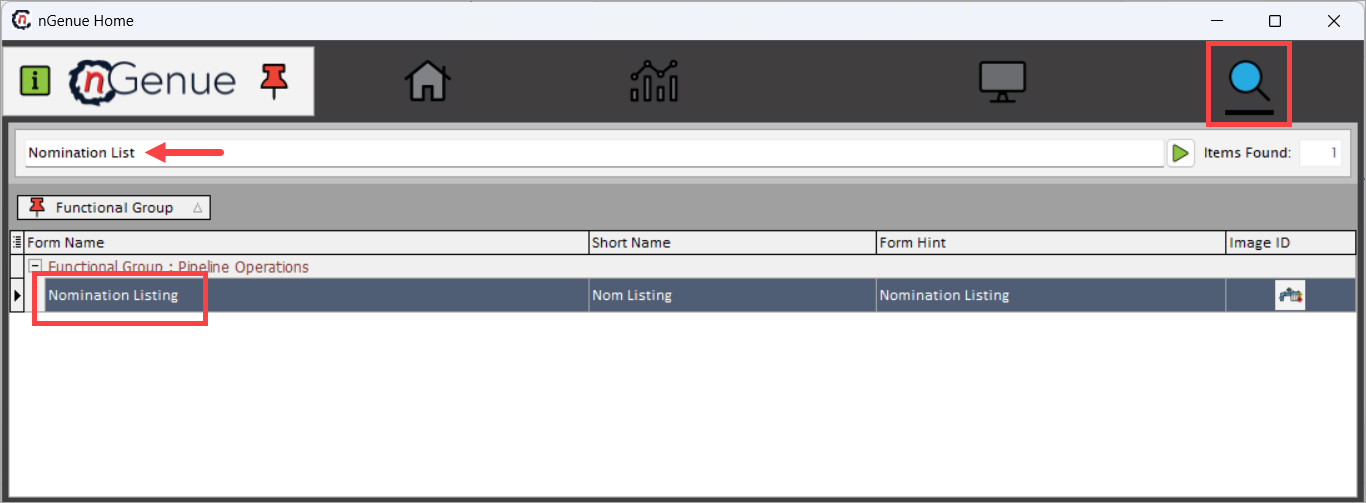
- Click the Search icon and enter Nomination listing.
-
Double-click Nomination Listing to open the Nomination Listing (Pipeline Operations) screen.
-
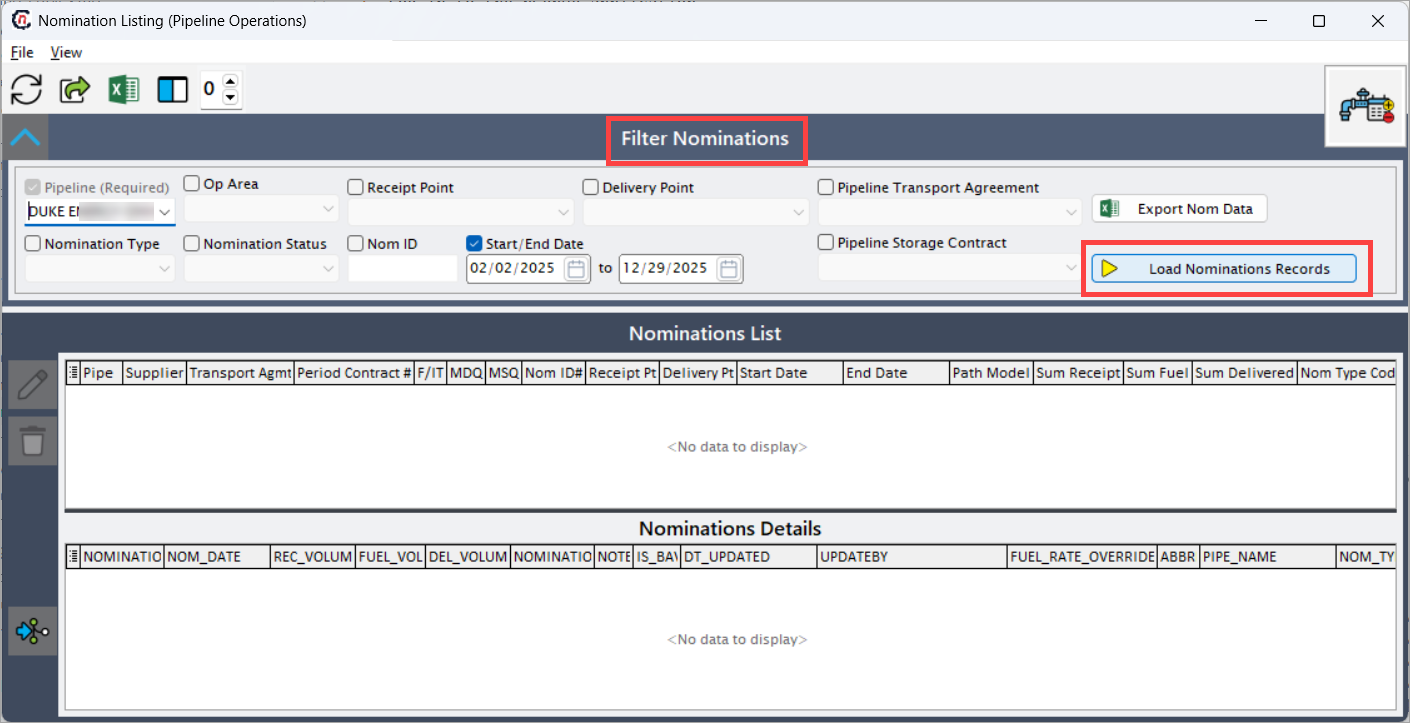
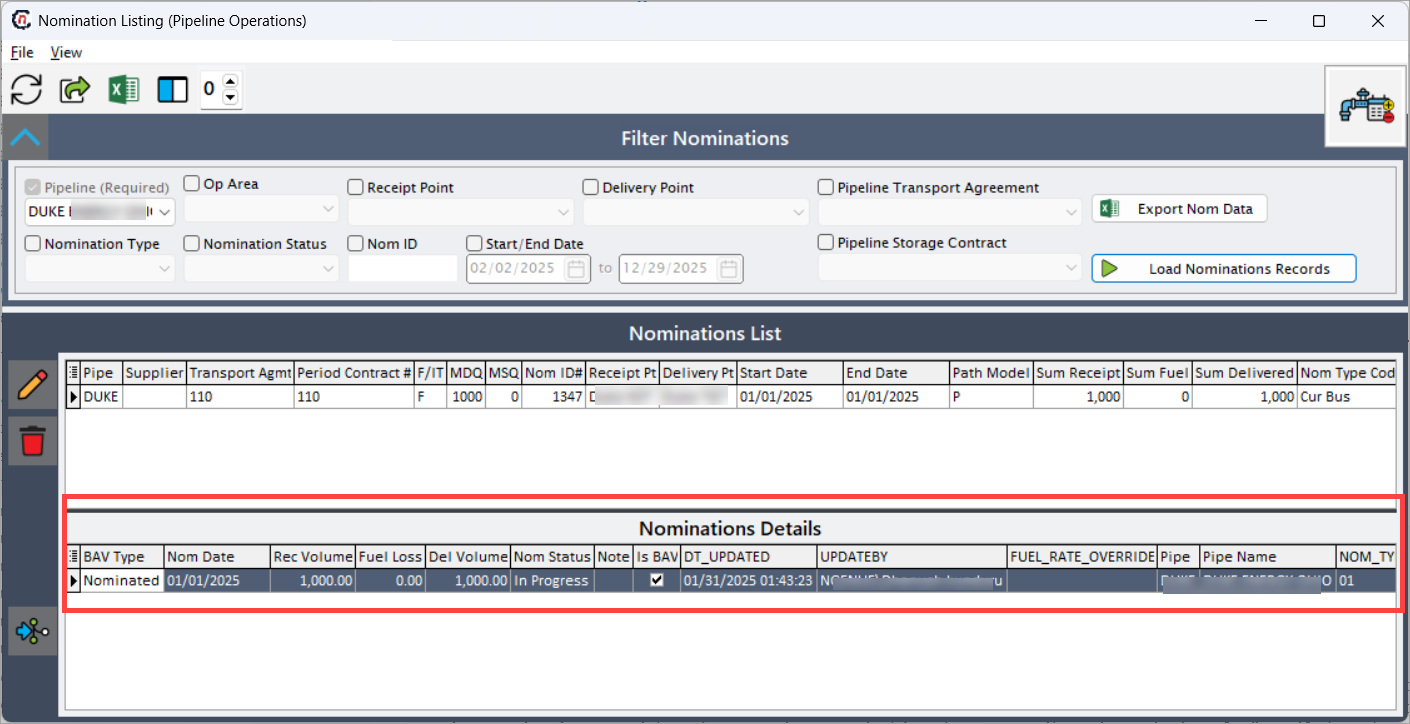
The screen is divided into three sections:
- Filter Nominations section at the top
- Nominations List (summary grid) in the middle
- Nominations Details (transaction grid) at the bottom.
Step 2: Apply filters in the Filter Nominations section
The Filter Nominations section allows users to control which nomination records are retrieved. Use the available filters to narrow down nomination records before loading data. Filters can be applied individually or in combination.
| Fields | Description |
|---|---|
| Pipeline (Required) | Mandatory field used to select the pipeline for which nominations should be retrieved. Only nominations associated with the selected pipeline are loaded. |
| Op Area | Filters nominations by operational area within the pipeline. Useful for region-based operational analysis. |
| Receipt Point | Filters nominations by the receipt point where gas enters the pipeline. |
| Delivery Point | Filters nominations by the delivery point where gas exits the pipeline. |
| Pipeline Transport Agreement | Filters nominations associated with a specific transportation agreement. |
| Nomination Type | Filters nominations based on type (for example, Timely, Evening, Intraday). |
| Nomination Status | Filters nominations based on status such as Draft, Submitted, Confirmed, or Scheduled. |
| Nom ID | Allows direct lookup of a specific nomination using its unique identifier. |
| Start / End Date | Filters nominations based on the nomination effective date range. |
| Pipeline Storage Contract | Filters nominations linked to a storage contract instead of a transportation contract. |
| Export Nom Data | Exports the filtered nomination data into an Excel file for offline analysis or reporting. |
| Load Nominations Records | Executes the query and loads nomination records into the Nominations List grid. |
Step 3: Nominations List results/ Edit nominations
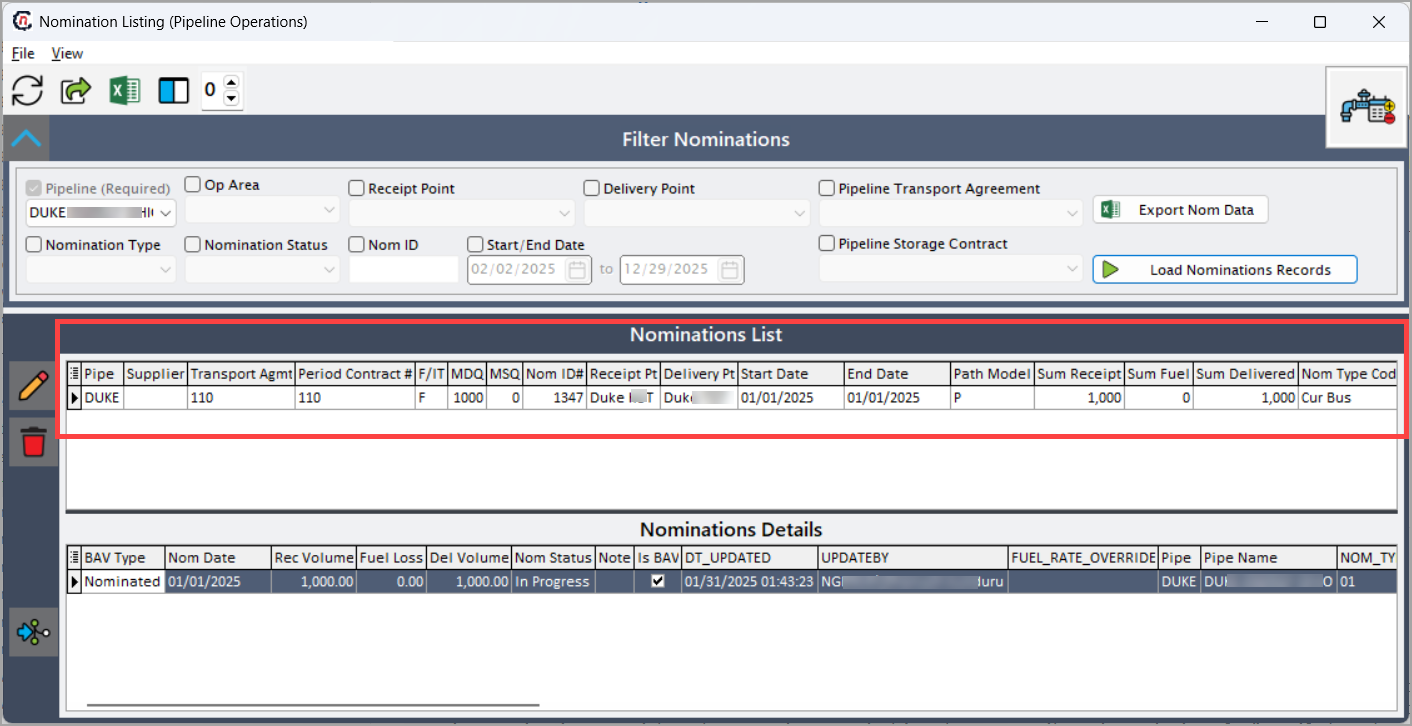
The Nominations List grid displays high-level nomination summaries based on the applied filters. These details are fetched from the Add/Edit Nominations screen.
| Fields | Description |
|---|---|
| Pipe | Displays the pipeline code associated with the nomination. |
| Supplier | Displays the supplier responsible for the nominated gas. |
| Transport Agmt | Displays the transportation agreement linked to the nomination. |
| Period Contract # | Displays the contract period identifier associated with the nomination. |
| F/IT | Indicates whether the nomination is Firm or Interruptible. |
| MDQ | Displays the Maximum Daily Quantity allowed under the contract. |
| MSQ | Displays the Maximum Scheduled Quantity for the nomination period. |
| Nom ID# | Displays the unique system-generated nomination identifier. |
| Receipt Pt | Displays the receipt point where gas is nominated into the pipeline. |
| Delivery Pt | Displays the delivery point where gas is nominated out of the pipeline. |
| Start Date | Displays the effective start date of the nomination. |
| End Date | Displays the effective end date of the nomination. |
| Path Mode | Indicates whether the nomination follows a Pathed or Unpathed flow model. |
| Sum Receipts | Displays the total receipt volume nominated across all days. |
| Sum Fuel | Displays the total fuel volume associated with the nomination. |
| Sum Deliveries | Displays the total delivery volume after fuel deduction. |
| Nom Type | Displays the nomination cycle type (for example, Timely, Evening). |
| Plan | Displays whether the nomination is planned or actual. |
| NOTES | Displays any notes entered during nomination creation. |
| Date Created | Displays the date on which the nomination record was created. |
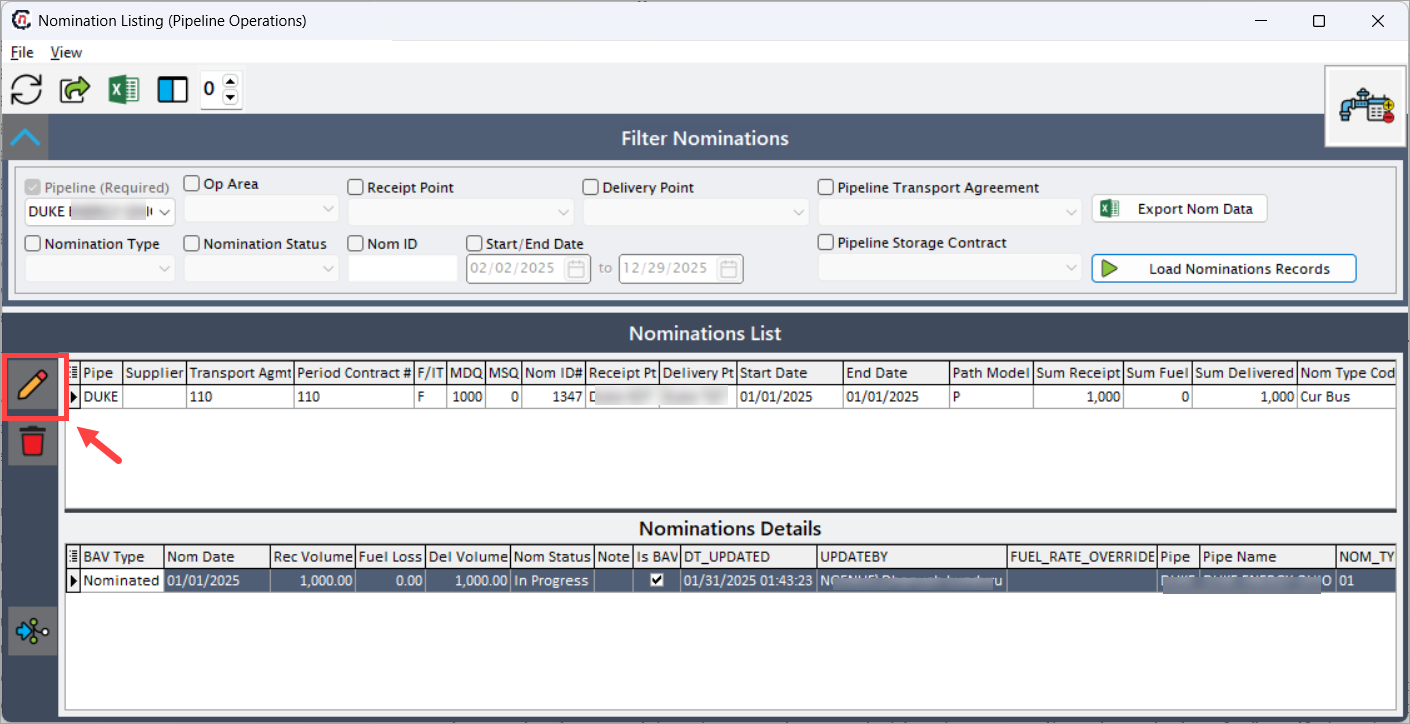
To edit a nomination, click on the Edit button. This will redirect you to the Add/Edit Nominations screen where you can edit the details.
Step 4: Nominations Details results
The Nominations Details grid provides transaction-level nomination data, broken down by gas day.
This section allows users to reconcile summary totals against daily nomination activity.
| Fields | Description |
|---|---|
| NOMINATION | Displays the nomination identifier linked to the transaction record. |
| NOM_DATE | Displays the gas day for which the nomination applies. |
| REC_VOLUME | Displays the receipt volume nominated for the gas day. |
| FUEL_VOLUME | Displays the fuel volume calculated for the nominated gas. |
| DEL_VOLUME | Displays the delivery volume after fuel deduction. |
| NOTES | Displays any transaction-level notes. |
| IS_BAV | Indicates whether the transaction is associated with a BAV (Best Available Volume). |
| DT_UPDATED | Displays the date and time when the transaction was last updated. |
| UPDATEDBY | Displays the user who last updated the transaction. |
| FUEL_RATE | Displays the fuel rate applied for the nomination. |
| ABBREVIAT | Displays the abbreviated contract or point reference. |
| PIPE_NAME | Displays the full pipeline name. |
| NOM_TYPE | Displays the nomination cycle type for the transaction. |
| CONTRACT | Displays the contract associated with the transaction. |
| TRANSP_AG | Displays the transportation agreement reference. |
| FIRM_OR_IT | Indicates whether the transaction is Firm or Interruptible. |
| MDQ_CALC | Displays the MDQ calculation reference point used for validation. |
About Push Notifications to Scheduled feature
- The Push Nominations to Scheduled button is available in the Nominations Details section and is used to move eligible nomination records from a non-scheduled state into a Scheduled state.
- When the Push Nominations to Scheduled button is clicked, the system validates the selected nomination records to ensure they meet scheduling criteria. Eligible nomination records are updated to Scheduled status.
Summary
The Nomination Listing screen serves as a comprehensive operational feature for reviewing and managing pipeline nominations. By combining flexible filtering, summarized views, and detailed transaction records, it enables users to:
- Quickly locate and analyze nominations
- Validate contract usage and MDQ compliance
- Review fuel impacts and delivered volumes
- Export data for reporting and reconciliation
This screen plays a vital role in day-to-day pipeline operations, ensuring transparency, accuracy, and operational control across nomination workflows.