Managing deal activity logs
The Deal Activity Log screen in nGenue provides a complete audit trail of all changes made to deal records in the system. The screen is designed to track every modification, including updates to deal parameters such as volume, contract type, pipeline location, or trader details, to ensure transparency, accountability, and compliance with audit and control requirements.
Each entry in the activity log records who made the change, when it was made, and what data was changed, allowing users to easily verify deal integrity and troubleshoot discrepancies during reconciliation or review.
The Deal Activity Log screen enables organizations to:
- Track every edit or update performed on deal records.
- Identify unauthorized or unintended changes in deal data.
- Maintain a historical log of modifications for audit and compliance reporting.
- Support reconciliation between internal and external systems (e.g., between trading and accounting systems).
- Enhance traceability for operational accountability and governance.
At a business level, this log provides complete visibility into all deal changes, while at a technical level, it records the field-level deltas between the old and new values stored in the deal master database.
Prerequisites
Before working on Deal Activity Log screen, ensure the following prerequisites are met:
- The user have the add or modify permissions for the Deal Activity Log screen.
- The deals are created and maintained in the Deal Management screen.
- Deal data already exists and has undergone one or more modifications.
- The appropriate date range is selected to retrieve historical activity data.
Procedure to manage deal activity logs
Step 1: Navigate to the Deal Activity Log screen
- Log in to the nGenue application.
-
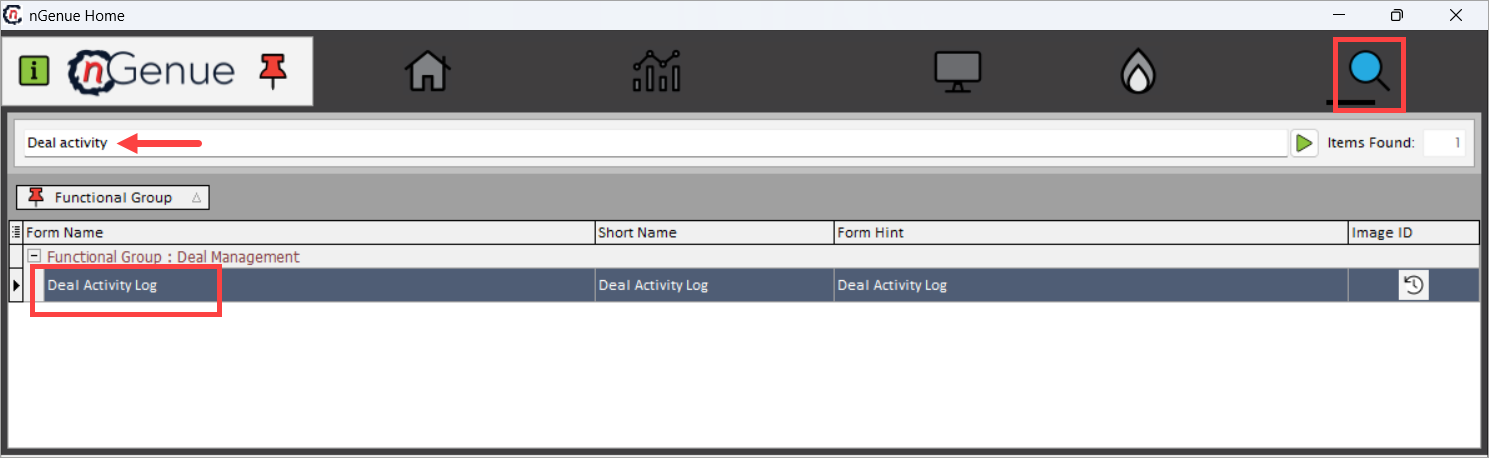
Click Search and enter Deal activity in the search bar.
-
Double-click Deal Activity Log to open the Deal Activity Log (Deal Management) screen.
-
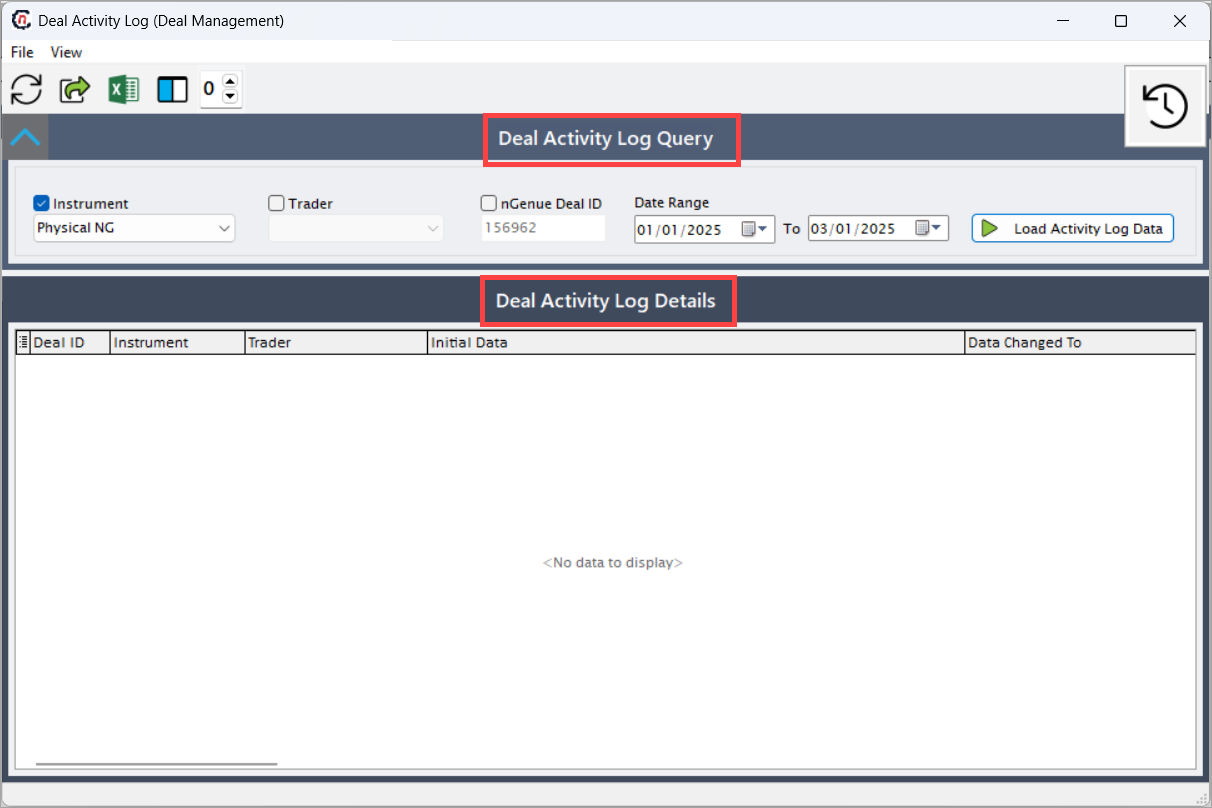
The screen is divided into two main sections:
- Deal Activity Log Query: Used to filter and load deal activities based on specific criteria.
- Deal Activity Log Details: Displays the filtered log entries showing what was changed, when, and by whom.
Deal Activity Log Query section
Field Description Instrument Allows selection of the deal instrument type, such as Physical NG (Natural Gas), Financial Swap, Option, or Forward. Functionally, it filters logs specific to the selected trading instrument. Technically, it queries the deal type column in the deal master or audit table. Trader Filters log entries by the trader assigned to the deal. This helps isolate modifications associated with a particular trader’s portfolio. nGenue Deal ID A unique internal identifier for a specific deal record. Entering a deal ID filters logs only for that particular deal. Technically, this is linked to the DealIDin the database.Date Range (From/To) Defines the time window for which the activity log should be displayed. The system retrieves all modifications performed within the specified period. Load Activity Log Data Executes the query and loads all matching deal modification records in the Deal Activity Log Details section. 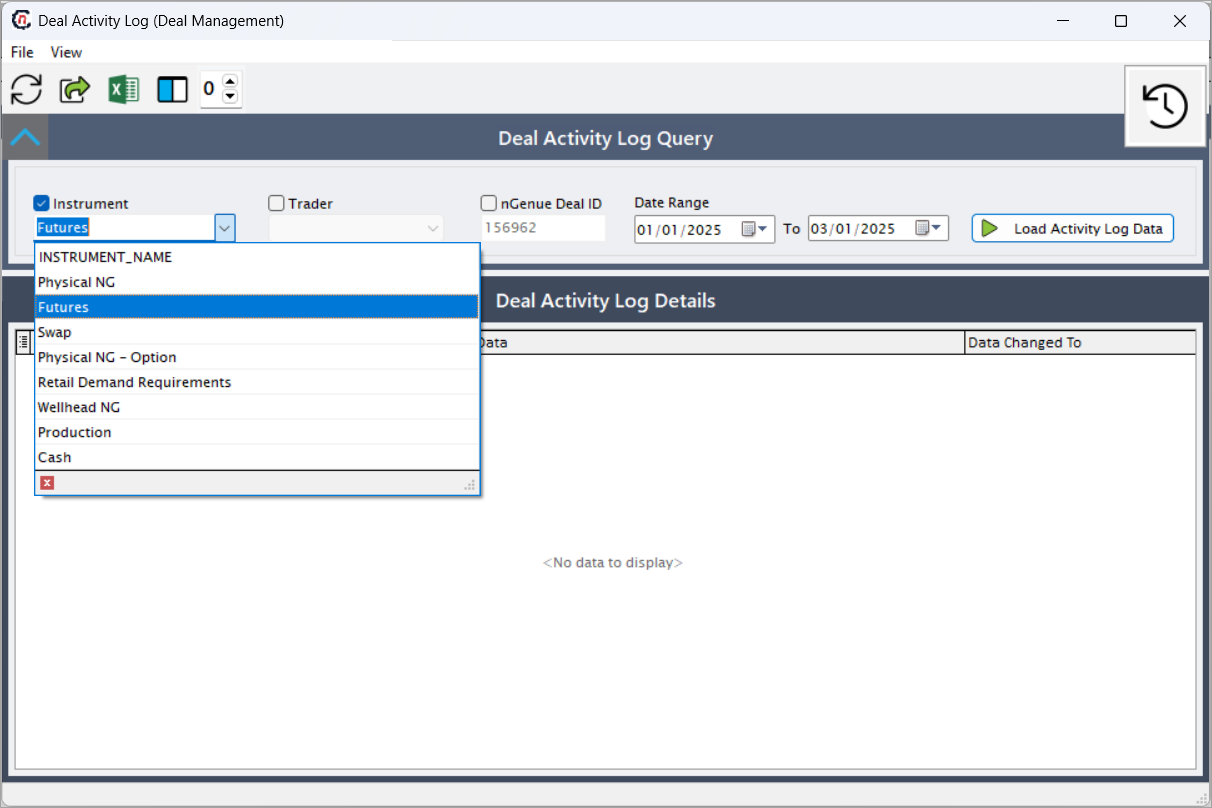
Deal Activity Log Details section
Field Description Deal ID Displays the internal system-generated identifier of the deal whose data was modified. Functionally, it ensures that users can trace changes to a specific deal. Instrument Indicates the type of instrument (e.g., Physical NG, Financial Swap) to which the deal belongs. This helps categorize the nature of the deal being audited. Trader Displays the name of the trader associated with the deal. Useful for identifying which portfolio or individual was responsible for the transaction. Initial Data Shows the original field name and value before modification. For example: “The ‘Volume’ field data was initially set to ‘176.00’”. This allows users to verify the data’s previous state before the change occurred. Data Changed To Displays the new field value after modification. For example: “The ‘Volume’ field data is changed to ‘1954.00’”. Technically, this captures the new value written to the database following an update transaction. Changed By Identifies the system or user who made the change. In most cases, this includes both the user name and their nGenue account identifier. This field ensures accountability by linking changes to specific individuals or automated processes. Time Stamp Records the exact date and time when the modification occurred. This timestamp supports chronological tracking and audit analysis. Comments Displays any comments or contextual notes related to the modification. These comments can be system-generated (e.g., “Updated via confirmation process”) or manually entered by users explaining the reason for the change. 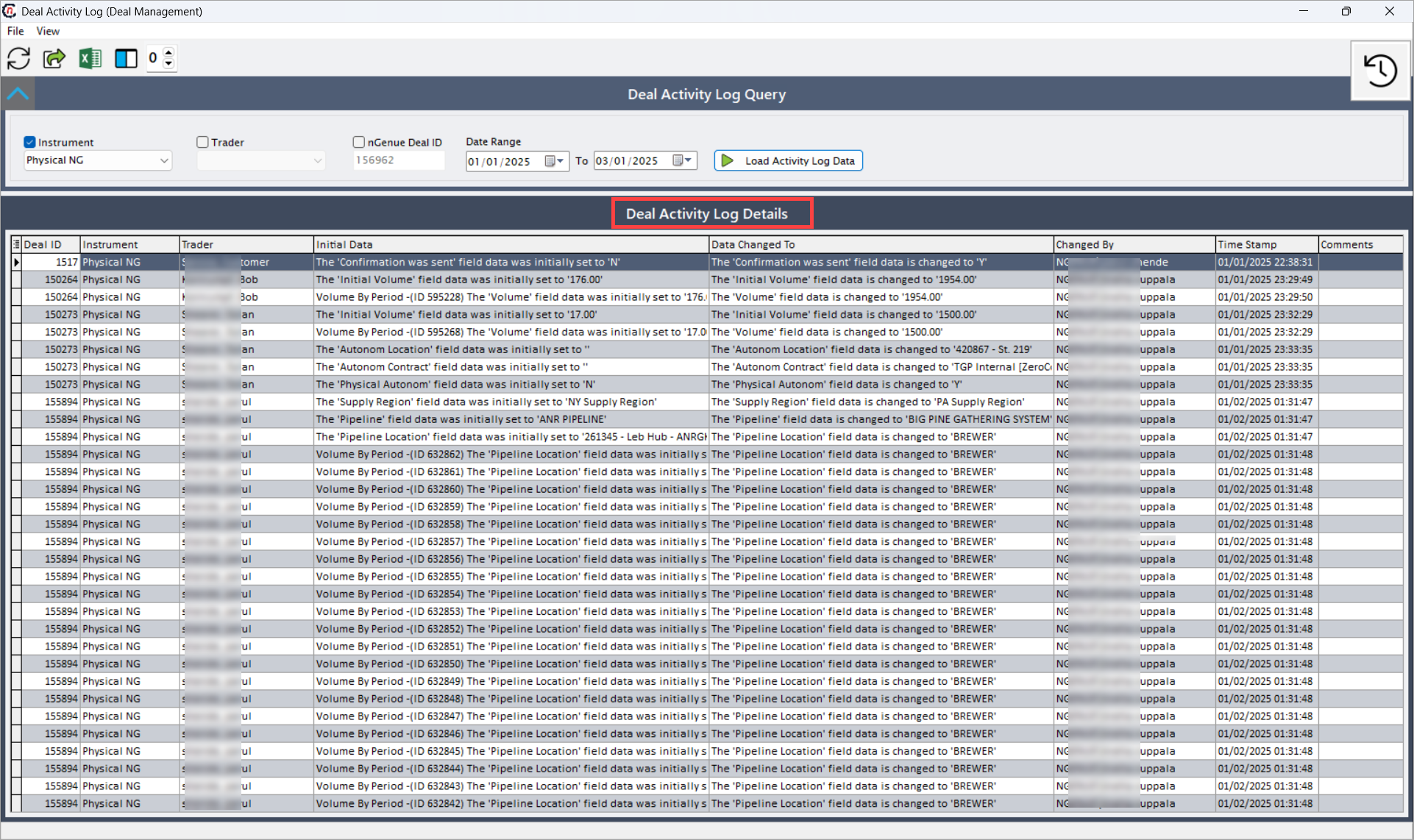
Functional workflow
From a functional standpoint:
- Any change made to a deal (e.g., modification of start/end dates, price, volume, or counterparty) is automatically logged.
- The log entry captures both the before and after states of the field.
- Users can view and verify these changes from the Deal Activity Log screen by applying filters for specific deals, traders, or date ranges.
Example scenario
A deal administrator suspects discrepancies in deal volumes for several physical gas transactions handled by different traders.
To investigate:
- They navigate to the Deal Activity Log screen.
- Under Instrument, select Physical NG.
- Enter the Date Range (e.g., 01/01/2025 to 03/01/2025).
- Click Load Activity Log Data.
The results show that for Deal ID 150264, the Volume field was modified from 176.00 to 1954.00 by Sarah Jones on 01/01/2025 at 23:29:49.
This confirms the exact change, its timing, and the responsible user — enabling accurate follow-up actions and preventing future discrepancies.
What’s next
After reviewing the deal activity logs:
- Deal administrators can revert incorrect changes by editing the deal (if allowed) and re-confirming it.
- Data can be exported to Excel or CSV for offline analysis or reporting.
- The Quick Deal Process screen can be used to review or correct active deal statuses.
Summary
The Deal Activity Log screen provides a robust and transparent audit mechanism that records all modifications made to deals within nGenue. It tracks field-level changes, timestamps, and user details, ensuring data accuracy, governance, and compliance with internal controls.
By using the Deal Activity Log, teams gain visibility into every update, enabling better accountability, faster issue resolution, and enhanced operational integrity across the entire deal management process.