Reviewing cycle billing daily averages
The Cycle Billing Daily Averages screen provides a detailed and auditable view of daily average gas consumption values used during cycle billing when complete meter reads are not available for every gas day. These daily averages are critical inputs to ensure accurate billing, volume estimation, and settlement continuity.
This screen enables users to review how daily averages are calculated, identify whether values are derived from actual meter reads or estimation logic, and understand how those values are applied across facilities, end users, pools, and LDCs.
This screen is primarily used by billing, and settlements teams to ensure that cycle billing volumes are accurate, traceable, and compliant with billing rules.
Prerequisites
Before working with the Cycle Billing Daily Averages screen, ensure the following prerequisites are met:
- The user has the add or modify permissions for the Cycle Billing Daily Averages screen.
- The LDC is configured and active in nGenue.
- Facilities and end users are created and mapped to the LDC and pools.
- Cycle billing configuration is completed for the billing period.
- Actual meter reads and/or estimation data exist for the selected dates.
Procedure to review cycle billing daily averages
Step 1: Navigate to the Cycle Billing Daily Averages screen
- Log in to the nGenue application.
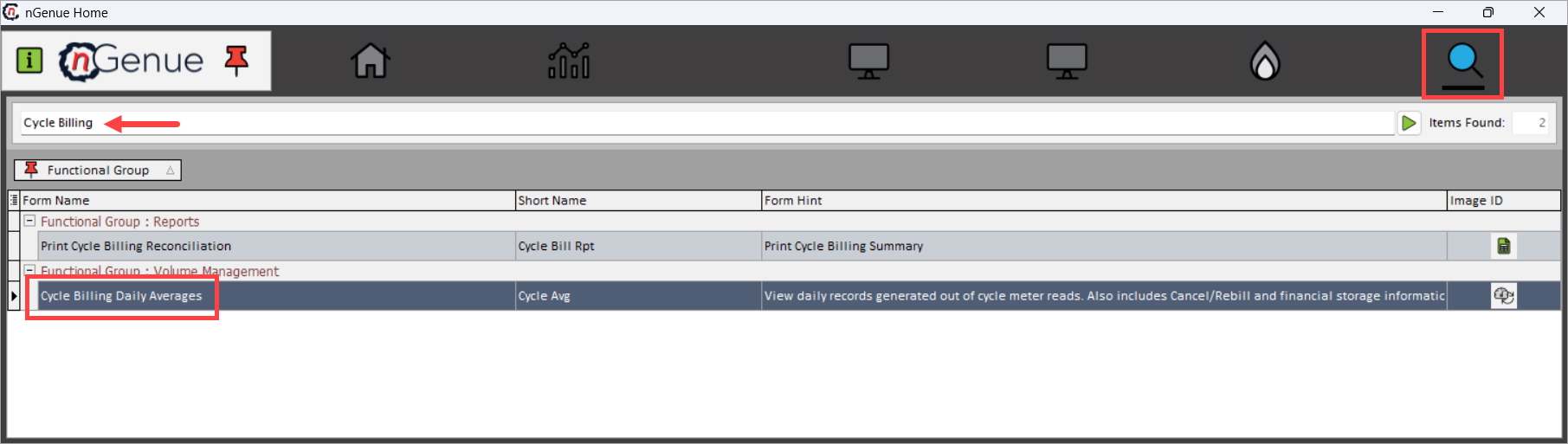
- Click the Search icon and enter Cycle Billing in the search bar.
- Double-click Cycle Billing Daily Averages to open the Cycle Billing Daily Averages (Volume Management) screen.
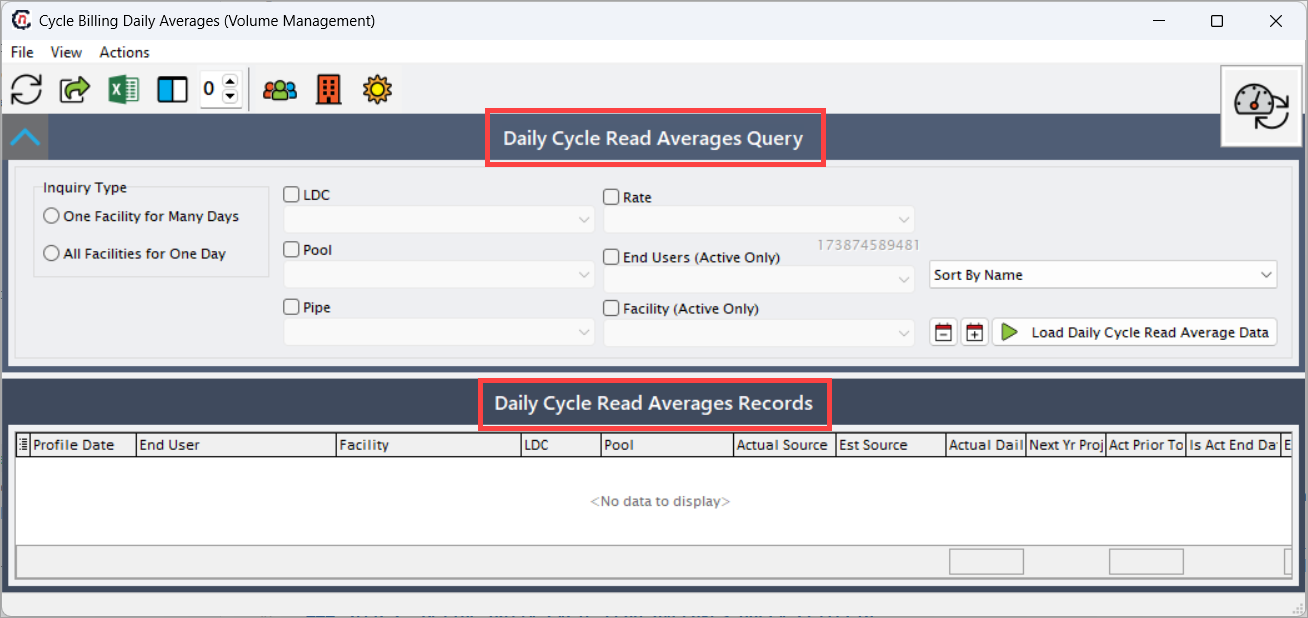
- The screen is divided into:
- Daily Cycle Read Averages Query: This section controls which daily average records are retrieved for review.
- Daily Cycle Read Averages Records: This section displays detailed daily average records used during cycle billing.
Step 2: Define daily cycle read averages query criteria
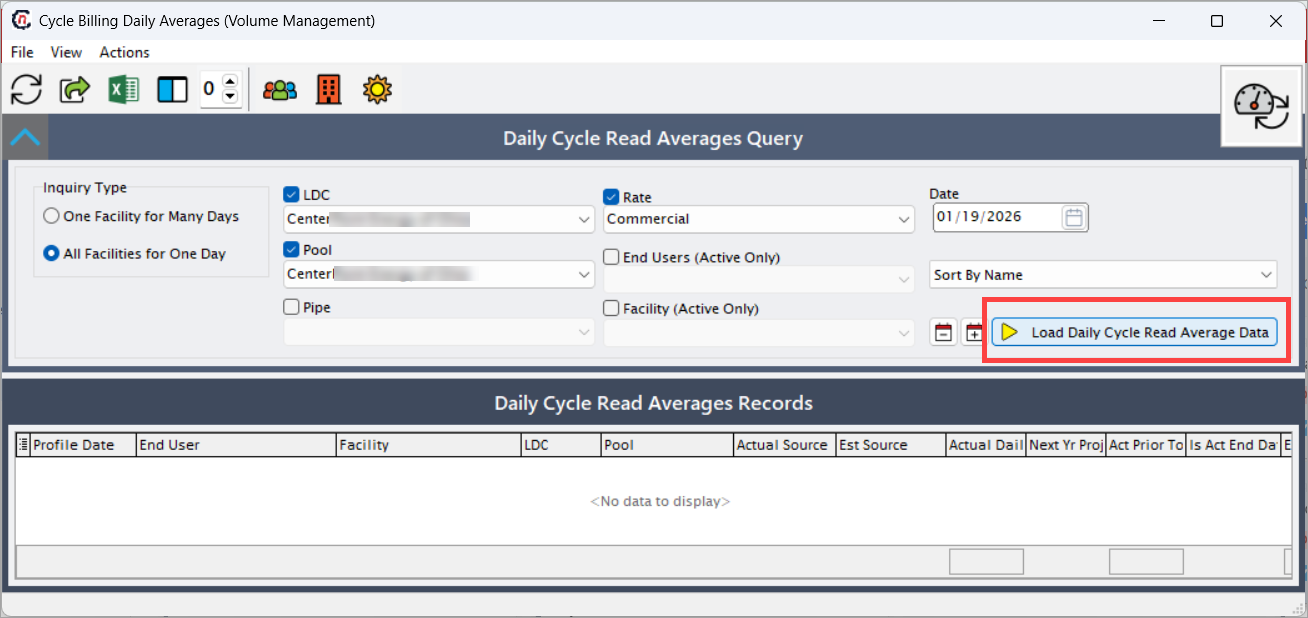
The Daily Cycle Read Averages Query section controls which daily average records are retrieved for review.
| Fields | Description |
|---|---|
| One Facility for Many Days | Retrieves daily average values for a single facility across multiple gas days. This option is typically used to analyze consumption trends, validate estimation logic over time, or troubleshoot billing issues for a specific facility. |
| All Facilities for One Day | Retrieves daily average values for all facilities for a single gas day. This option is commonly used during billing validation to confirm daily averages applied system-wide for a specific billing date. |
| LDC | Select the Local Distribution Company for which daily average billing values should be reviewed. Only facilities, pools, and end users associated with the selected LDC are included in the results. |
| Pool | Filters daily average records to a specific pool within the selected LDC. This helps isolate pool-level billing behavior and validate pool allocation impacts. |
| Pipe | Filters records by pipeline associated with the facility. This is useful when billing logic or volume behavior differs by pipeline. |
| Rate | Filters records based on the billing rate or rate category applied during cycle billing. This allows users to review daily averages relevant to a specific rate structure. The options are: Commercial, Residential, Small Business |
| End Users (Active Only) | When selected, limits results to end users that are currently active. Inactive or terminated end users are excluded to avoid historical or obsolete data. |
| Facility (Active Only) | When selected, limits results to facilities that are currently active. This ensures that billing review focuses only on operational facilities. |
| Sort By Name | Controls the display order of results, typically sorting records alphabetically by facility or end user name for easier analysis. The dropdown options are: Sort By Name, Sort By Account Number, Sort By Optional ID, Sort By Optional ID, Cust Num. |
After setting the required criteria, click Load Daily Cycle Read Average Data to retrieve the records.
Step 3: Review daily cycle read average records
The Daily Cycle Read Averages Records section displays detailed daily average records used during cycle billing. Each row represents a single daily average calculation applied to a facility and end user for a specific gas day.
| Fields | Description |
|---|---|
| Profile Date | The gas day for which the daily average value is calculated and applied. This date represents the billing day being evaluated. |
| End User | Identifies the end user associated with the daily average calculation. This ensures that daily averages can be traced to the correct customer or consumer. |
| Facility | Identifies the facility where gas consumption occurred. Daily averages are calculated and applied at the facility level for billing accuracy. |
| LDC | Displays the Local Distribution Company under which the facility and end user are managed. This field supports regulatory and organizational reporting. |
| Pool | Displays the pool to which the facility and end user belong. Pool membership influences allocation and balancing during billing. |
| Actual Source | Indicates the source of actual usage data used in the calculation (for example, meter reads). When populated, this confirms that the daily average is based on real consumption data. |
| Est Source | Indicates the estimation method or source used when actual meter reads are unavailable. This may include historical averages, projections, or system-defined estimation logic. |
| Actual Daily Avg | Displays the calculated daily average derived from actual meter reads. This value represents the most accurate daily consumption figure available. |
| Next Yr Proj | Displays the projected daily average value used for forward-looking estimation or fallback scenarios. This supports continuity when historical data is limited. |
| Act Prior To | Indicates whether actual usage data prior to the profile date was used in calculating the daily average. This helps validate estimation windows. |
| Is Act End Date | Indicates whether the record represents a confirmed actual end-date value rather than an estimated or interim value. This is critical for billing finalization. |
How daily cycle read averages are derived
Daily cycle read averages displayed in this screen are derived from the following nGenue components:
- Meter Reads – Provide actual usage data whenever available.
- Estimation Rules – Apply system-defined logic when meter reads are missing.
- Cycle Billing Configuration – Determines how averages are distributed across billing cycles.
- Facility and End User Mapping – Ensures averages are applied to the correct billing entities.
- Historical and Projected Usage – Supports estimation accuracy and continuity across billing periods.
This multi-source approach ensures daily averages are consistent, defensible, and audit-ready.
Key points
- Daily averages are used when actual meter reads are incomplete or unavailable.
- Inquiry type controls whether analysis is facility-focused or date-focused.
- Actual and estimated sources are clearly identified for transparency.
- Records support billing validation, reconciliation, and audit review.
- This screen is informational only and does not modify billing data.
Summary
The Cycle Billing Daily Averages screen provides essential visibility into how daily average gas volumes are calculated and applied during cycle billing. By offering detailed insight into data sources, estimation logic, and facility-level application, this screen ensures billing accuracy, operational transparency, and audit confidence across volume management and settlement workflows.