View end user daily metered volume
The End User Daily Metered Volume screen is used to view, analyze, and validate daily metered volume data for end users across a selected date range. This screen provides a day-level breakdown of usage, deliveries, imbalances, adjustments, and related attributes, enabling accurate operational review and billing validation.
It is commonly used for daily volume analysis, imbalance review, rate validation, and audit purposes.
Prerequisites
Before working with the End User Daily Metered Volume screen, ensure the following prerequisites are met:
- The user has add or modify permissions for the End User Daily Metered Volume screen.
- The LDC is configured and active.
- End users and related accounts are configured.
- Daily volume data exists for the selected date range.
- Rate, rider, and weather zone configurations are available.
Procedure to view end user daily metered volumes
Step 1: Navigate to the End User Daily Metered Volume screen
- Log in to the nGenue application.
- Use the Search icon and enter End User Daily Metered Volume in the search bar.
-
Double-click End User Daily Metered Volume to open the End User Daily Metered Volume (Volume Management) screen.

-
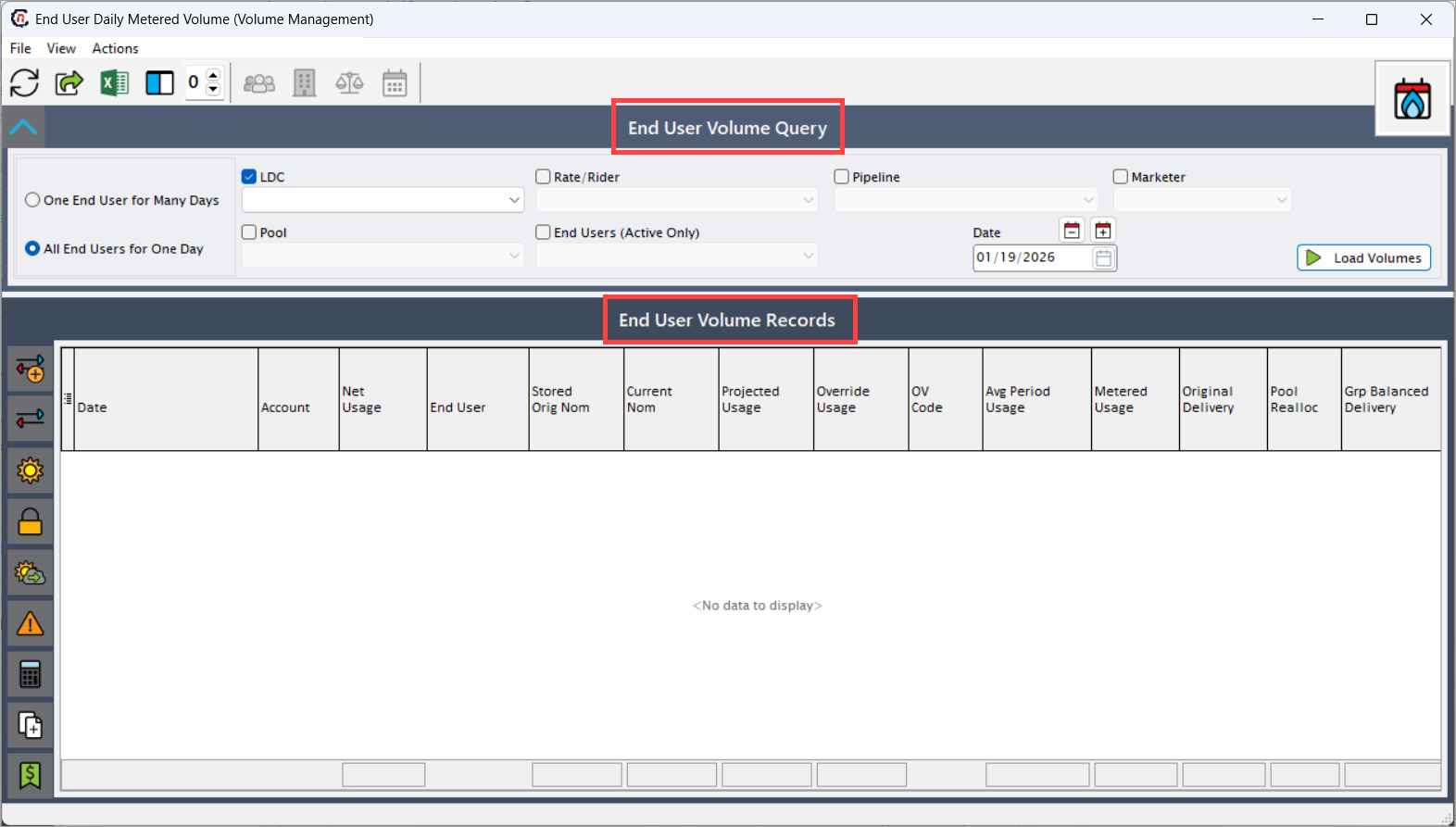
The screen is divided into two main sections:
- End User Volume Query – Used to define search criteria.
- End User Volume Records – Displays daily volume results.
Step 2: Define end user volume query criteria
-
Use the End User Volume Query section to control how daily volume data is retrieved.
Fields Description One End User for Many Days Retrieves daily volume records for a selected end user across a date range. All End Users for One Day Retrieves daily volume records for all end users for a specific gas day. LDC Select the Local Distribution Company from the dropdown. Pool Filter volumes by pool, if applicable. Rate / Rider Filter volumes based on rate or rider configuration. Pipeline Filter volumes by pipeline. Marketer Filter volumes by marketer. End Users (Active Only) Select the end user whose daily volumes are displayed. Date Range Defines the start and end dates for which daily volume data is retrieved. -
Click Load Volumes to retrieve the matching records.
Step 3: Review end user volume records
-
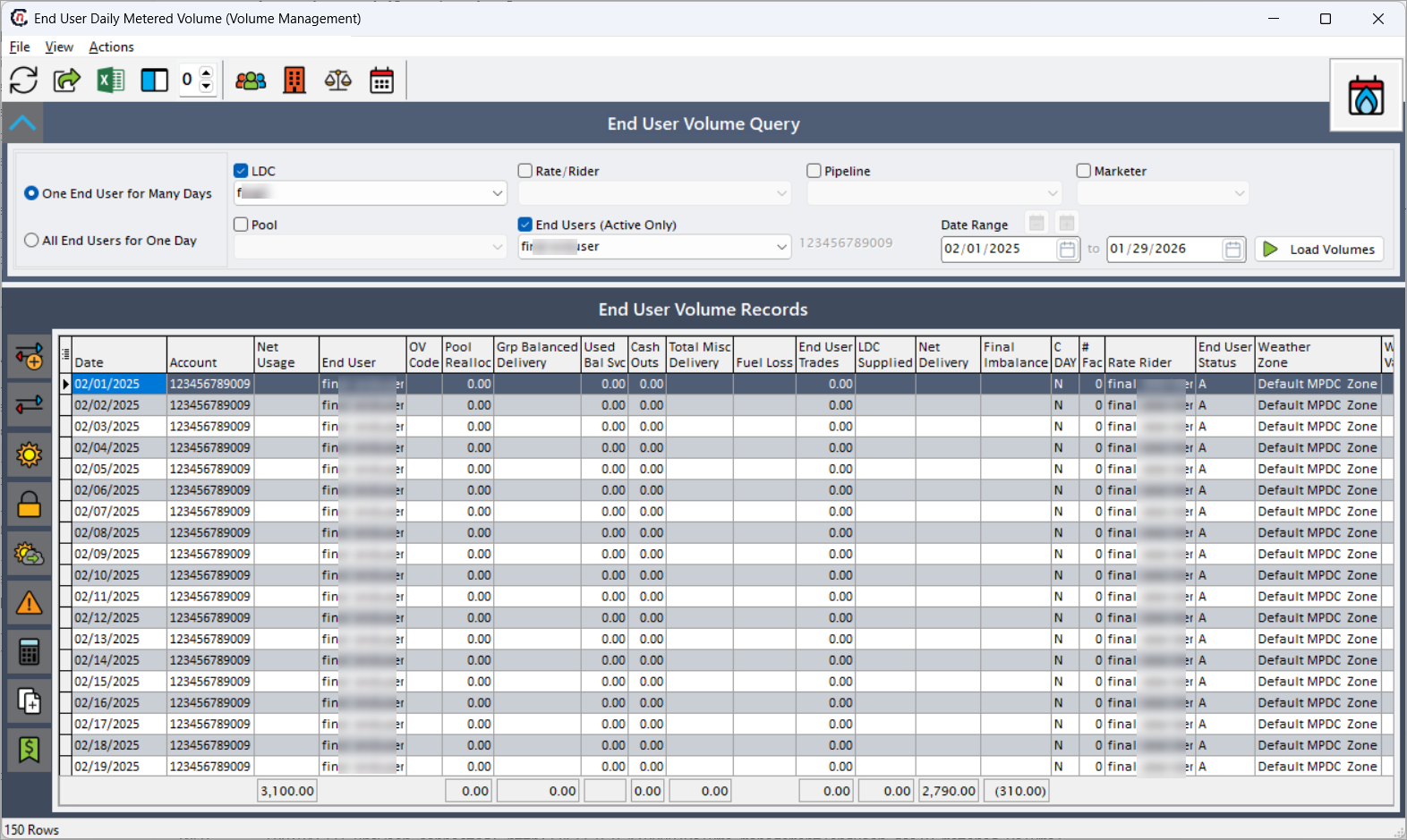
The End User Volume Records section displays daily volume data in a grid format. Each row represents a single gas day for an end user.
Fields Description Date Gas day for which volume data is displayed. Account Account number associated with the end user. Net Usage Net usage calculated for the gas day. End User Name of the end user. OV Code Override code applied to the volume, if any. Pool Realloc Pool reallocation volume applied to the day. Grp Balanced Delivery Group-balanced delivery volume. Used Bal Svc Indicates usage of balancing services. Cash Outs Cashout volumes applied for the day. Total Misc Delivery Miscellaneous delivery adjustments. Fuel Loss Fuel loss volume applied. End User Trades Trade volumes associated with the end user. LDC Supplied Volume supplied by the LDC. Net Delivery Net delivered volume for the day. Final Imbalance Final imbalance after all adjustments. Day Fac Day factor used in calculations. Rate Rider Rate or rider applied for the gas day. End User Status Status of the end user on the gas day. Weather Zone Weather zone applied to the end user for the day. -
The grid supports sorting, filtering, and aggregation to assist with volume validation and analysis.
Icons available on this screen
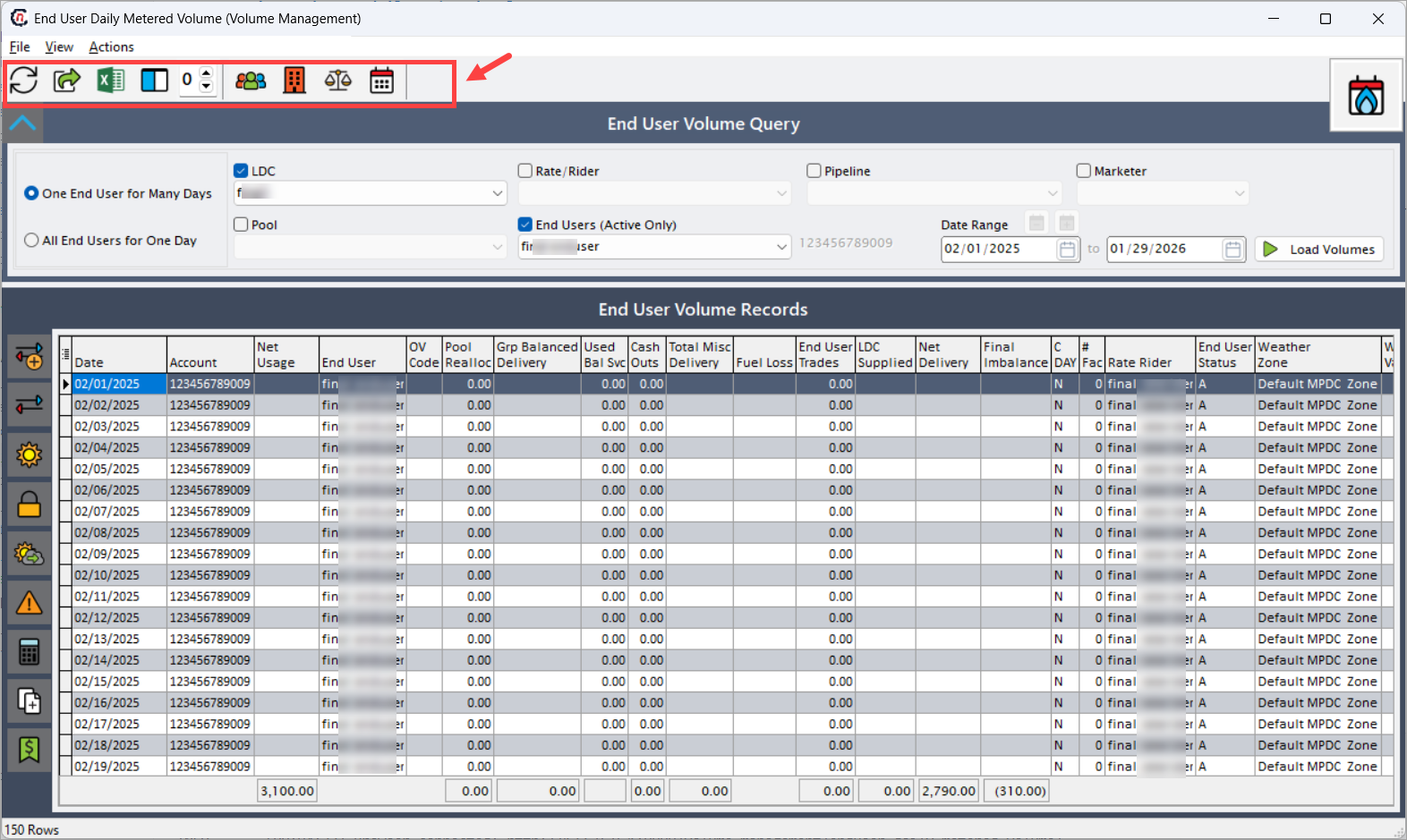
Toolbar icons
| Icons | Icons name | Description |
|---|---|---|
 |
Refresh Data | Reloads the daily metered volume records based on the currently selected query criteria. This is commonly used after recalculations, adjustments, or configuration changes to ensure the latest volume data is displayed. |
 |
Save to Excel File | Exports the currently displayed end user daily volume data into an Excel file. This option is typically used for offline analysis, reconciliation, internal reviews, or audit documentation. |
 |
Open Grid Data in Excel | Opens the end user daily metered volume grid directly in Microsoft Excel while preserving the visible columns, applied filters, and current grid layout. This allows users to perform interactive analysis using Excel features such as formulas and pivot tables. |
 |
Configure grid columns | Allows users to customize the grid view by selecting which columns to display, hiding unnecessary fields, reordering columns, and adjusting column widths to match analysis or reporting needs. |
 |
Freeze Columns | Freezes one or more selected columns so they remain visible while horizontally scrolling through the grid. This is especially useful when reviewing large datasets with many volume-related fields. |
 |
View End User Information | Navigates to the End User Configuration screen, where users can review detailed information such as end user setup, status, associated accounts, and configuration attributes. |
 |
View Facility Information | Navigates to the Facility screen associated with the selected end user, allowing users to review facility-level details, configurations, and related operational data. |
 |
View Reallocations, Cash Outs, and Other Deliveries | Navigates to the Manual Balancing Adjustment screen, where users can review and manage pool reallocations, cash outs, miscellaneous deliveries, and other balancing-related volume adjustments applied to the selected gas day. |
 |
View Daily Facility Details | Opens the Facility Daily Volume screen for the selected date, providing a facility-level breakdown of daily volumes that contribute to the end user’s calculated usage and deliveries. |
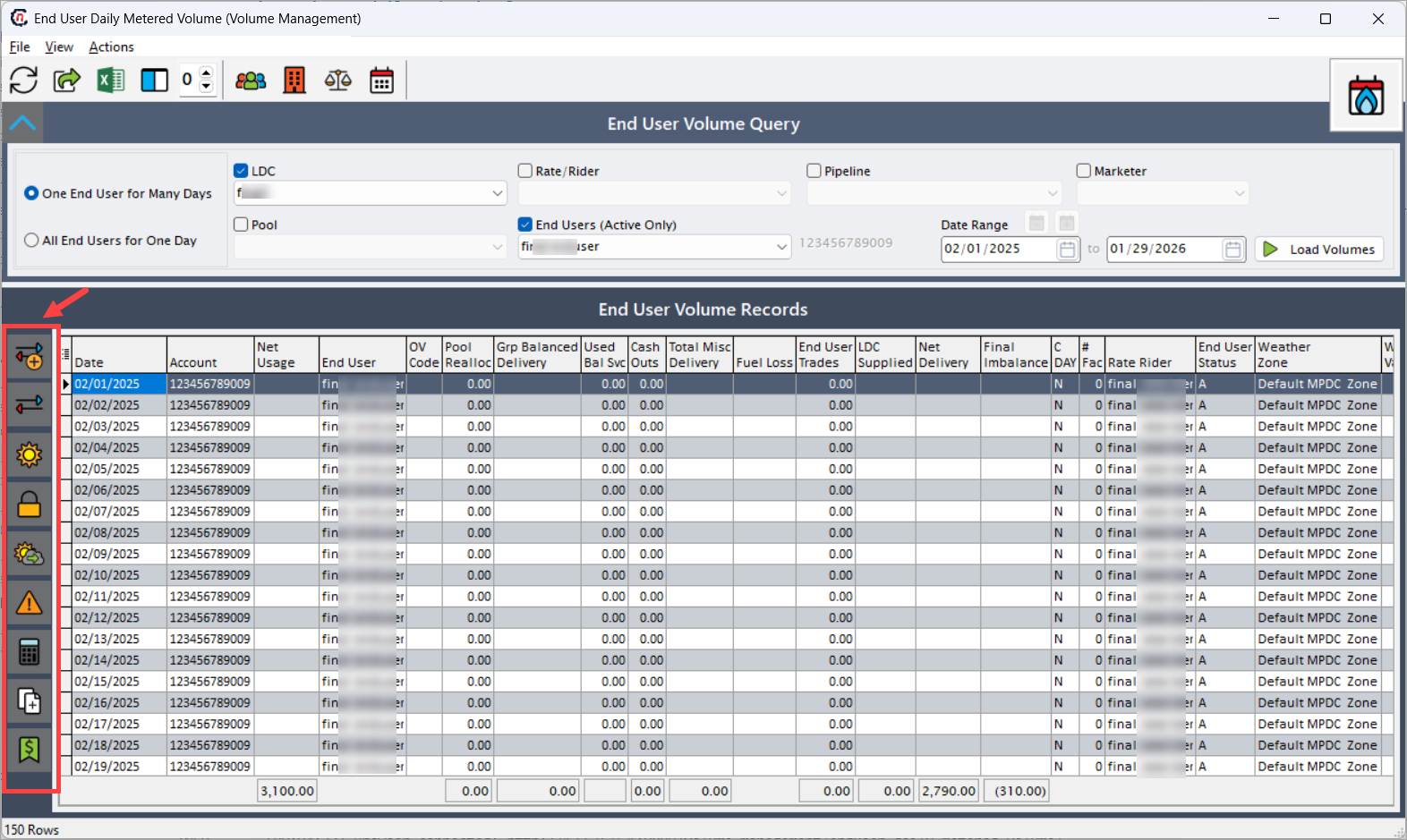
Left-side action icons
| Icons | Icons name | Description |
|---|---|---|
 |
Create an End User Trade | Opens the end user trade creation workflow, allowing users to record buy or sell trade volumes for the selected end user and gas day. These trades directly impact net delivery and imbalance calculations. |
 |
View End User Trades | Displays all trade transactions associated with the selected end user and gas day, including buy/sell volumes, counterparties, and trade impacts on daily balances. |
 |
View Weather Detail | Opens detailed weather information for the selected gas day, including weather zone data and temperature metrics that influence usage calculations and load profiling. |
 |
Lock or Unlock First of Month Nominations | Locks or unlocks first-of-month (FOM) nominations for the selected end user. Locking prevents further recalculation or modification of nomination-driven volumes, ensuring billing and settlement stability. |
 |
Recalculate Usage Projections | Recalculates usage projections and nomination-driven volumes for the selected end user and date range based on updated inputs such as weather data, load profiles, or configuration changes. |
 |
View Penalty Adjustments | Displays penalty-related volume adjustments applied to the selected end user and gas day, enabling users to review penalties that impact final imbalance and billing outcomes. |
 |
Convert Volumes | Converts displayed volume values between supported units of measure, allowing users to analyze volumes in the unit required for operational review, reporting, or billing validation. |
 |
Insert Daily Records for Date Range | Inserts daily volume records for the selected end user across a specified date range, typically used when initializing missing days or preparing data for recalculation and validation. |
 |
Update Tier 1 Fixed Volumes with FOM Noms | Updates Tier 1 fixed volumes using first-of-month nominations, ensuring that fixed volume commitments align with approved nomination values for accurate billing and settlement. |
Key points
- This screen provides day-level visibility into end user volume data.
- Daily volumes directly impact billing, cashouts, and imbalance calculations.
- Query modes allow flexible retrieval across days or end users.
- Weather zones and rate riders influence volume calculations.
- Export and grid tools support audit, validation, and reporting needs.
Summary
The End User Daily Metered Volume screen delivers a comprehensive and auditable view of daily end user volume activity. By combining flexible query options, detailed daily metrics, and powerful grid tools, this screen supports accurate usage analysis, billing validation, imbalance review, and operational decision-making within nGenue.