Configuring a supply region
Configuring a supply region in nGenue impacts multiple screens. Users see a dropdown menu displaying the configured supply regions, which allows them to select a specific region from the dropdown.
In some cases, like creating deal, configuring a new pipeline, creating LDC or price agreement, a supply region is required. Therefore, at least one supply region should exist. The configuration process for the supply region captures key information about the defined supply region when used for accounting, reporting, or Weighted Average Cost of Gas (WACOG) purposes.
Prerequisites
To configure a supply region in nGenue, ensure the following prerequisites are met:
- You must have the appropriate user role or permission that allows you to add or modify entries on the Supply region screen.
- If you want to link the supply region to a business unit, make sure the business unit is already created from the Internal book structure screen. You can proceed without linking a business unit immediately and choose to link one later when needed.
- You can also link a WACOG pool to the supply region for weighted average cost calculations. To do this, create a new WACOG pool from the Supply WACOG pool configuration screen.
Procedure to configure a supply region
Step 1: Navigate to the Supply region configuration screen
- Log in to the nGenue application.
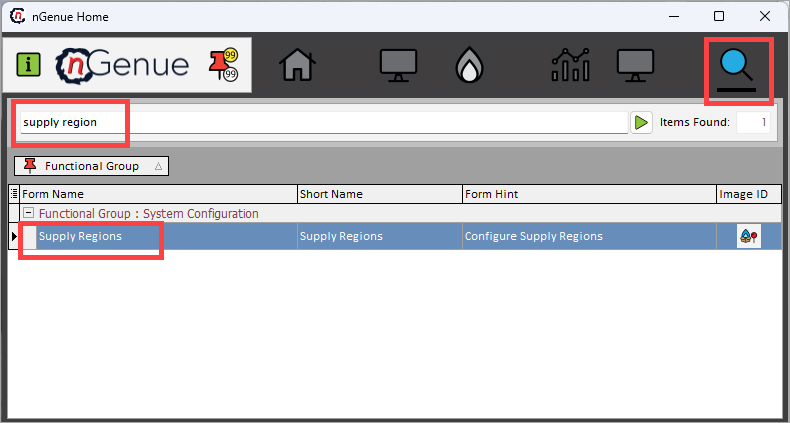
- Click the Search icon and enter supply region in the search bar.
- Double-click Supply regions to open the respective screen.
- The next screen is divided into two sections: Supply region selection and Supply region configurations.
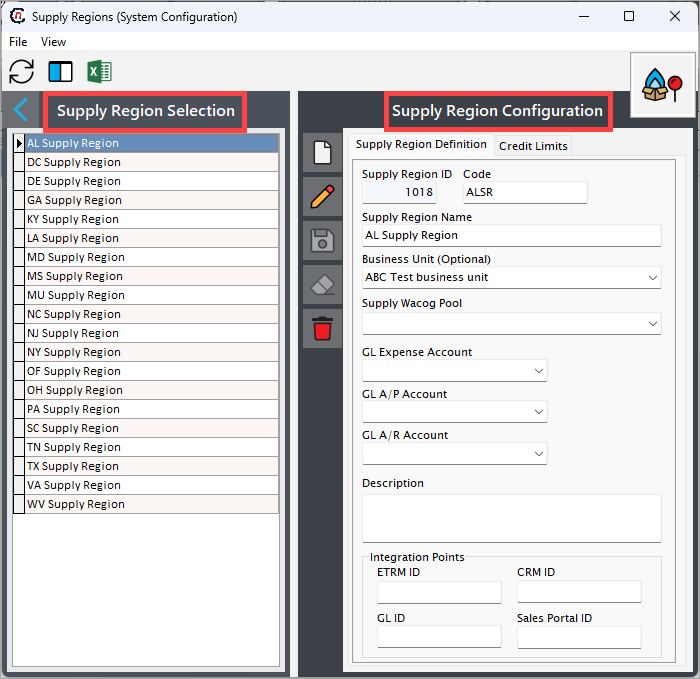
- The Supply region selection section lists existing supply region configurations.
-
The Supply region configurations section allows you to create, edit, or delete supply region records. The table below describes the available icons and their functions:
Icons Description 
Add a supply region record 
Edit the supply region record detail. 
Save the supply region record. 
Cancel the updates being made to the supply region record. 
Delete a supply region record.
Step 2: Create a new supply region
- In the Supply region configurations screen, click the Add a supply region record button.
-
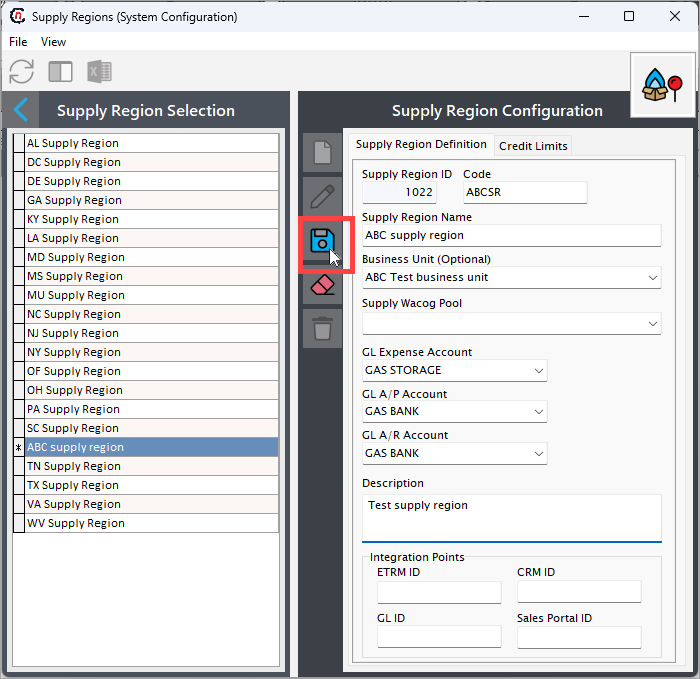
Fill in the details as mentioned in the table below:
Fields Description Data type Mandatory (Y/N) Fetched from (UI screen) Displayed on (UI screen) Supply region Id This field is auto-generated by the system and is created automatically when a new configuration is made Auto-generated Y Auto-generated N/A Code A unique identifier that you can use for your supply region name.
For example: If the supply name name is "ABC supply region", the code could be "ABSR".Integer Y User input Pipeline location Supply region name Enter the name of the supply region that you wish to add during the configuration process. Integer Y User input Pipeline, Pipeline location, Deal management screen Business unit Select the business unit that you want to link to your supply region. Dropdown N Internal book structure screen N/A Supply WACOG pool Link a WACOG pool to the supply region for calculation.
If a supply region sources gas from multiple contracts, the WACOG pool calculates a blended rate, which becomes the reference for billing or further cost management.Dropdown N Supply WACOG pool configuration screen N/A GL Expense Account Link the supply region’s operational expenses (e.g., transportation, storage) to the correct General Ledger (GL) account. Dropdown N Chart of Accounts list screen N/A GL A/P account and GL A/R account Select the required account details for GL A/P account and GL A/R account respectively. These accounts are used either to track revenue generated or track payments owed to suppliers or vendors associated with the supply region. Dropdown N Chart of Accounts list screen N/A Description Provide additional details if any. String N User input Pipeline, and Deal management screen Integration points
The fields in the Integration points section are automatically populated when third-party tools are integrated with nGenue. If you are entering data manually, these fields can be skipped.
Integration points Purpose How nGenue uses it CRM (Customer system) Stores customer names, contact details, and enrollment information. Retrieves customer records to identify the correct customer. ETRM (Trading system) Records gas purchase quantities and costs. Uses this data to calculate the supply cost. GL ID (Finance system) Manages invoices, payments, and financial reporting. Sends billing and payment details for financial processing. Sales portal Captures new deals created by the sales team. Converts deals into active contracts for billing. -
Once all mandatory fields are filled, click the Save button to configure the supply region.
Step 3: Configure Credit limits for the supply region
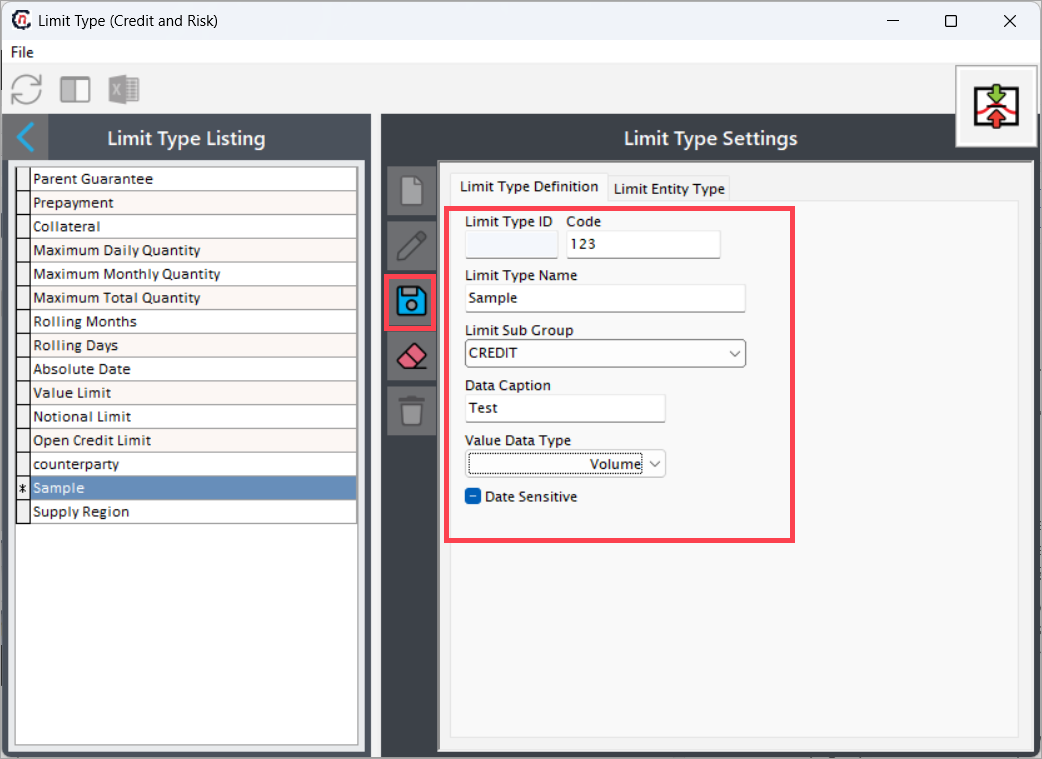
- Navigate to the Limit type screen.
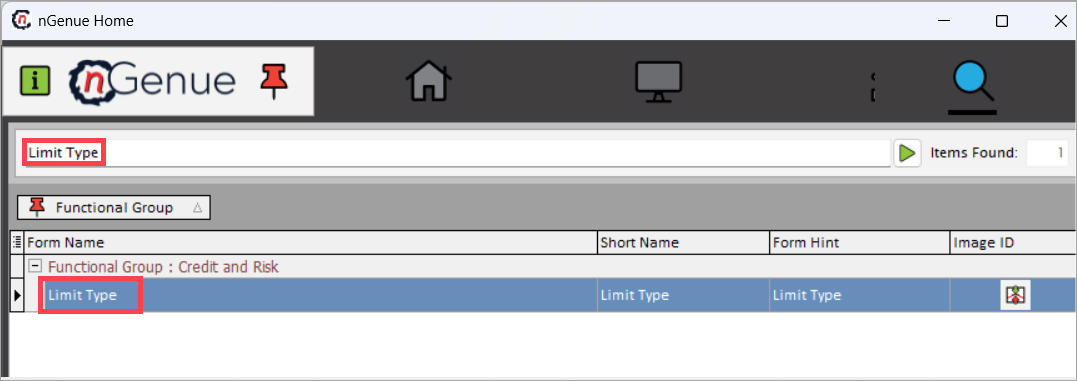
- Click the Add a limit type icon.
-
Fill in the following details:
- Limit type ID: Auto-generated by the system.
- Code: Enter a unique code for the limit type.
- Limit type name: Enter a descriptive name for the limit type.
- Limit sub group: Select the appropriate subgroup from the dropdown.
- Data caption: Enter the data caption.
- Value data type: Select the data type from the dropdown.
-
Click Save to create the limit type.
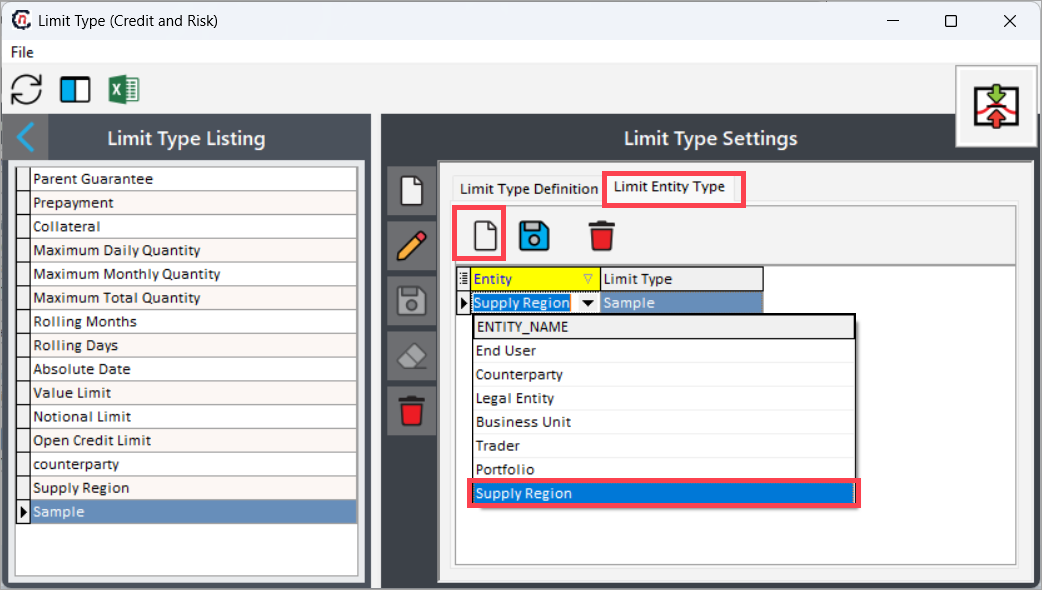
- Navigate to Limit entity type tab and click the Add new limit entity icon.
- Select Supply region from the entity dropdown.
- Return to the Supply region screen and select the Credit limits tab.
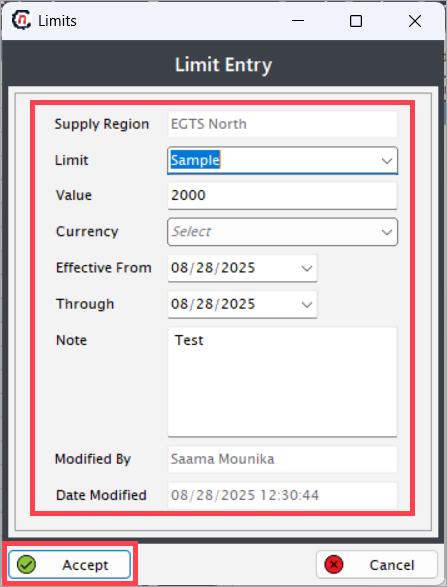
- Right-click and select Add credit type to open the Limit entry window.
-
Fill in the credit limit details:
- Supply region: Auto-populated with the supply region name.
- Limit: Select the limit type from the dropdown.
- Value: Enter the credit limit amount.
- Currency: Select the currency from the dropdown.
- Effective from: Select the start date.
- Through: Select the end date.
- Note: Enter any additional notes.
-
Click Accept to save the credit limit configuration.
Summary
Supply regions are fundamental to the functioning of the natural gas industry, influencing production, pricing, and market dynamics. Understanding these regions helps stakeholders navigate the complexities of the natural gas market and make informed decisions regarding investments, infrastructure development, and energy policy. As the demand for natural gas continues to grow, the significance of supply regions will only increase, shaping the future of energy consumption worldwide.