Configure sales area
A sales area in nGenue defines the internal organizational region used for tracking sales activity, assigning brokers, and allocating financial entries such as paid broker fees on wholesale and financial deals. Sales areas help segment sales operations by region or business unit, ensuring the correct accounting, reporting, and integration mappings are applied. They are used whenever deals, commissions, fees, or sales assignments must be categorized under a specific region for operational or financial processing.
Prerequisites
Before working on the Sales area screen, ensure the following prerequisites are met:
- Ensure the nGenue application is installed and use valid login credentials to log into the application.
- Configure the user permissions including User type, Security user, Security group, Security assign user, and Security assign permissions in their respective screens to enable access to the Sales area screen.
- Ensure that GL accounts are configured in the Chart of accounts.
- Ensure the business unit is configured in the Internal book structure.
- Ensure the integration points are configured properly.
Procedure to configure sales area
Step 1: Navigate to Sales area screen
- Log in to the nGenue application.
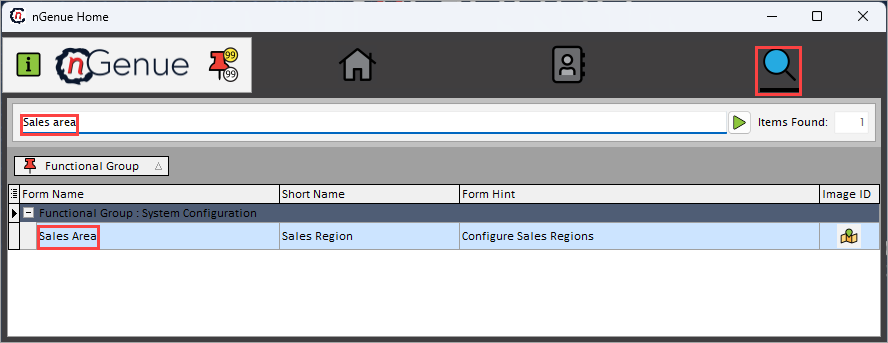
- Click the Search icon and enter Sales area in the search bar.
-
Double-click the Sales area from the search results to open respective screen.
-
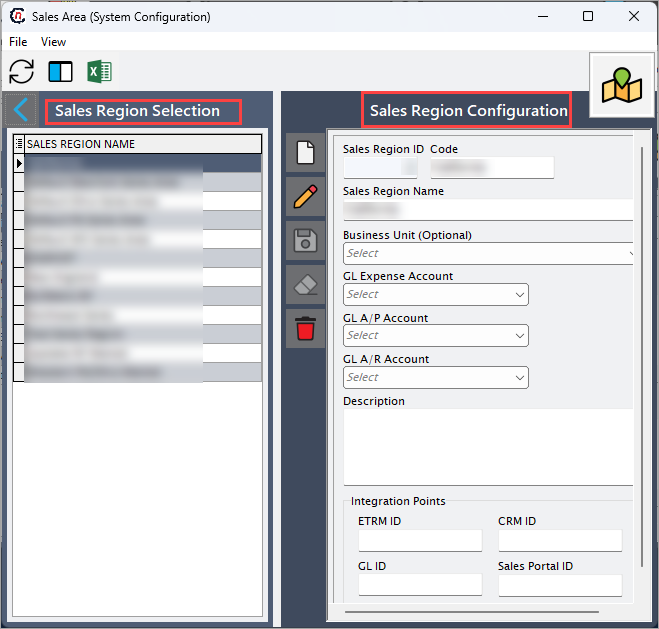
Sales area (System configuration) screen has two sections:
- Sales area selection: This section provides list of configured sales area to select to either modify or remove the chosen sales area.
- Sales area configuration: This section allows to define the parameters of the sales area.
Step 2: Configure sales area
The following table lists the icons available on the Sales area configuration section and their respective functions:
| Icons | Icon name | Description |
|---|---|---|
 |
Add a sales area record | Opens a new record form to create a sales area entry. |
 |
Edit current sales area | Opens the selected record for editing. |
 |
Save changes to current sales area | Saves the modifications made to the current record. |
 |
Cancel changes to current sales area record | Discards unsaved changes made to the record. |
 |
Delete current sales area record | Permanently removes the selected sales area record. |
Step 2.1 : Add a sales area
- In the Sales area configuration, click the Add a sales area record icon to create a new sales area record.
-
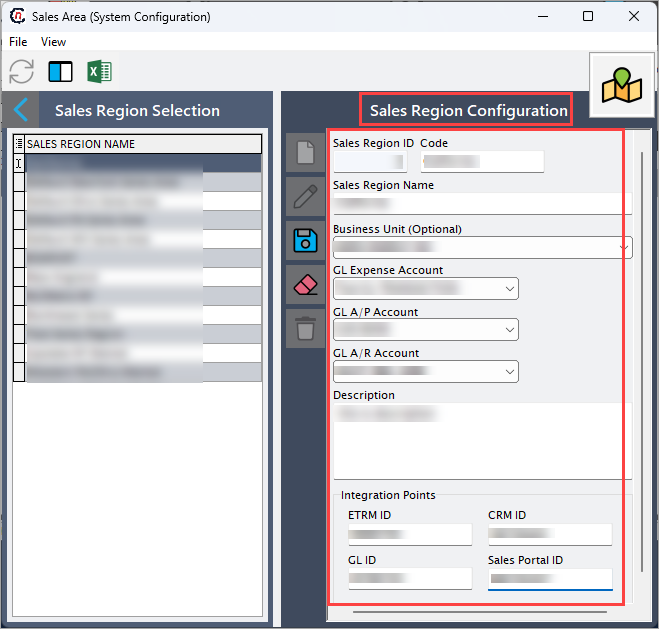
Complete required fields available in the Sales area configuration section that are listed in the table below:
Fields Description Sales region ID It is a unique identifier assigned to specific sales region. Code Specify the internal reference code for the sales area. Sales region name Specify a descriptive name for the sales area. Business unit Specify the assigned business unit to the sales area for accounting and reporting. GL expense account Specify the account used for recording broker or sales expense. GL A/P account Specify the payable account associated with the broker or sales payables. GL A/R account Specify the receivable account for sales activities tied to this region. Description Provide additional notes or details for internal reference. Integration points
Fields Description ETRM ID Specify the identifier for sales area in the ETRM system for external deal processing. CRM ID Specify the identifier that maps sales area to the CRM system for customer synchronization. GL ID Specify the identifier for the sales area in GL system for financial posting. Sales portal ID Specify the identifier that connects the sales area with the external sales portal for the deal intake. -
Click Save changes to current sales area to store the configuration.
Step 2.2 : Edit a sales area
- Click the Edit a sales area record icon to modify the selected sales area.
- Update necessary details and click Save changes to current sales area to apply changes.
Step 2.3 : Delete a sales area
Click the Delete current sales area record icon to permanently remove the sales area record
Summary
Sales areas define the organizational structure for sales activity within nGenue. They enable accurate sales tracking, broker fee allocation, financial mapping, and integration with external systems. Configuring sales areas ensures that wholesale and financial deals correctly apply broker payments, accounting entries, and regional reporting identifiers.