Printing unapplied cash receipts
Unapplied cash receipts are customer payments that have not yet been applied to specific invoices. The report helps identify these unallocated payments, support proper reconciliation, track outstanding receivables, and resolve discrepancies. It is typically printed when reviewing unapplied payments, reconciling accounts, or investigating cash receipt exceptions.
Prerequisites
Before working on Unapplied cash (reports) screen, ensure the following prerequisites are met:
- User permissions: Configure the user permissions including User type, Security user, Security group, Security assign user, and Security assign permissions in their respective screens to enable access to the Cash receipts home page screen.
- LDC set up: Ensure the Local Distribution Company (LDC) is properly configured, to support invoice processing and cash receipt generation.
- End user and Facility set up: Ensure the End user is fully configured and their Facility is properly set up before generating an invoice or cash receipt.
- Legal entity setup: Additionally, ensure legal entity is configured in the Internal book structure screen to enable proper accounting and cash receipt creation.
- Invoice generation: Ensure that Invoices and corresponding Cash receipts are generated for the selected end user.
Procedure to print unapplied cash receipts
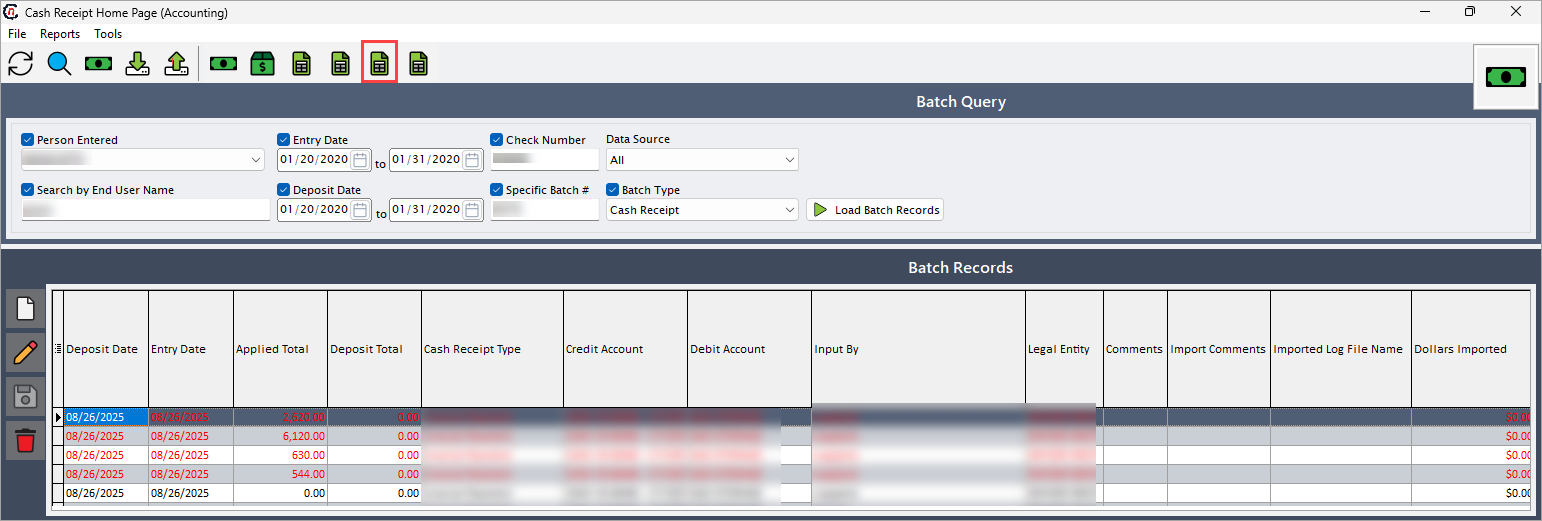
- Navigate to the Cash receipts home page screen.
-
Click Print unapplied receipts icon in the top header to open respective screen.
-
In the Unapplied cash (reports) screen, first enable the checkbox to include corresponding field's information. The selected options will filter to produce related aging summary report accordingly.
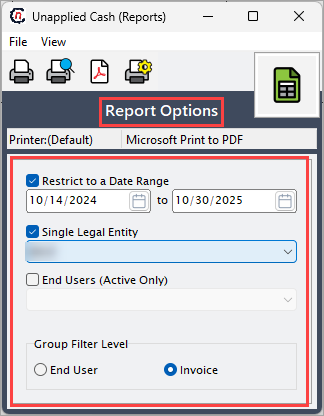
The table below provides lists the fields in the Report options section:
Fields Description Restrict to a date range Select the date range to report payments within the specified date range. Single legal entity Select the associated legal entity to track the outstanding receivables under that chosen legal entity. End user (active only) Select the end user to specify the invoices that hasn't been applied yet. Group filter level Select this option to group the report based on the selected filter such as end user or invoice. For example, if end user is selected then all the unapplied receipts under that end user will be included. -
On the Unapplied cash (reports) screen, select any of the printing options in the top header to configure printing, preview, print, or export the report as a PDF, as described in the table below:
Icons Icon name Description 
Printer set up Click Printer set up icon to configure printing settings. 
Print preview Click Print preview icon to view the cash receipt detail. 
Print Click Print icon to print the cash receipt detail report. 
Show report in pdf format Click Show report in pdf format icon to export it as a pdf.
Summary
The unapplied cash receipts report identifies payments not yet applied to invoices, providing visibility into outstanding amounts. It supports reconciliation, helps track unapplied funds, and ensures accurate management of receivables.