Configure nomination
A Nomination represents a scheduled request to move a defined quantity of gas through a pipeline system for a specific gas day or date range. Nominations define receipt points, delivery points, contractual pathing, volumes, fuel, and priority, and are the foundational input for pipeline scheduling, capacity allocation, and downstream settlement.
In nGenue, nominations are created and managed as part of Pipeline Scheduling operations and are structured to support:
- Multi-segment pipeline paths
- Contract-based transportation and storage movements
- Pipeline charge determination
- Balancing and allocation variance (BAV) processing
- Fuel and loss calculations
- EDI-based confirmations and reporting
Prerequisites
Before working on the Adit/edit nominations (Pipeline operations) screen, ensure the following prerequisites are met:
- Ensure the nGenue application is installed and use valid login credentials to log into the application.
- Configure the user permissions including User type, Security user, Security group, Security assign user, and Security assign permissions in their respective screens to enable access to the Adit/edit nominations (Pipeline operations) screen.
- Ensure that Pipeline scheduling is configured, as nominations can only be created and edited through scheduling workflows.
Procedure to configure nomination
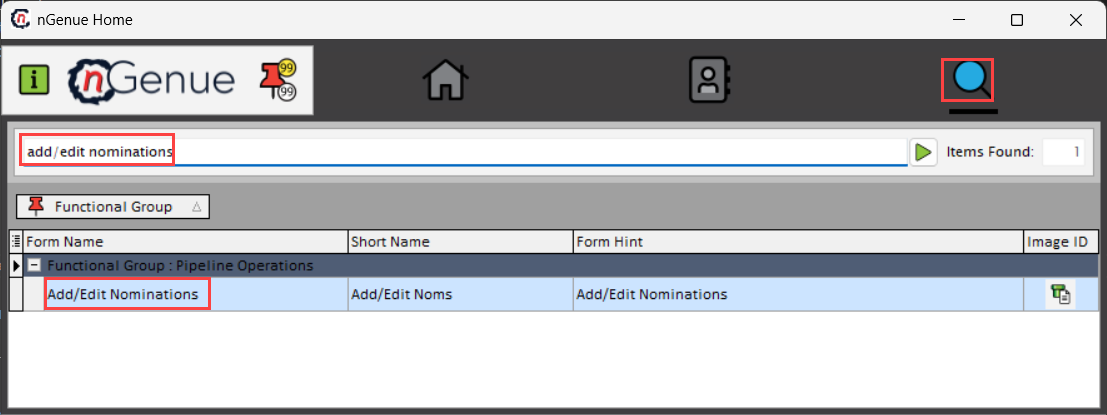
Step 1: Navigate to Adit/edit nominations (Pipeline operations) screen
- Log in to the nGenue application.
- Navigate to the Pipeline Scheduling screen, where nomination creation and modification are enabled and governed as part of the scheduling process.
- In the Nomination Settings section, create nominations within the pipeline scheduling workflow.
- From the scheduling grid, double-click a nomination record to open it in the Add/Edit Nominations (Pipeline Operations) screen for review or modification.
-
The Add/Edit Nominations (Pipeline Operations) screen is accessible from the Home page, while nomination creation and management remain governed by the pipeline scheduling workflow.
-
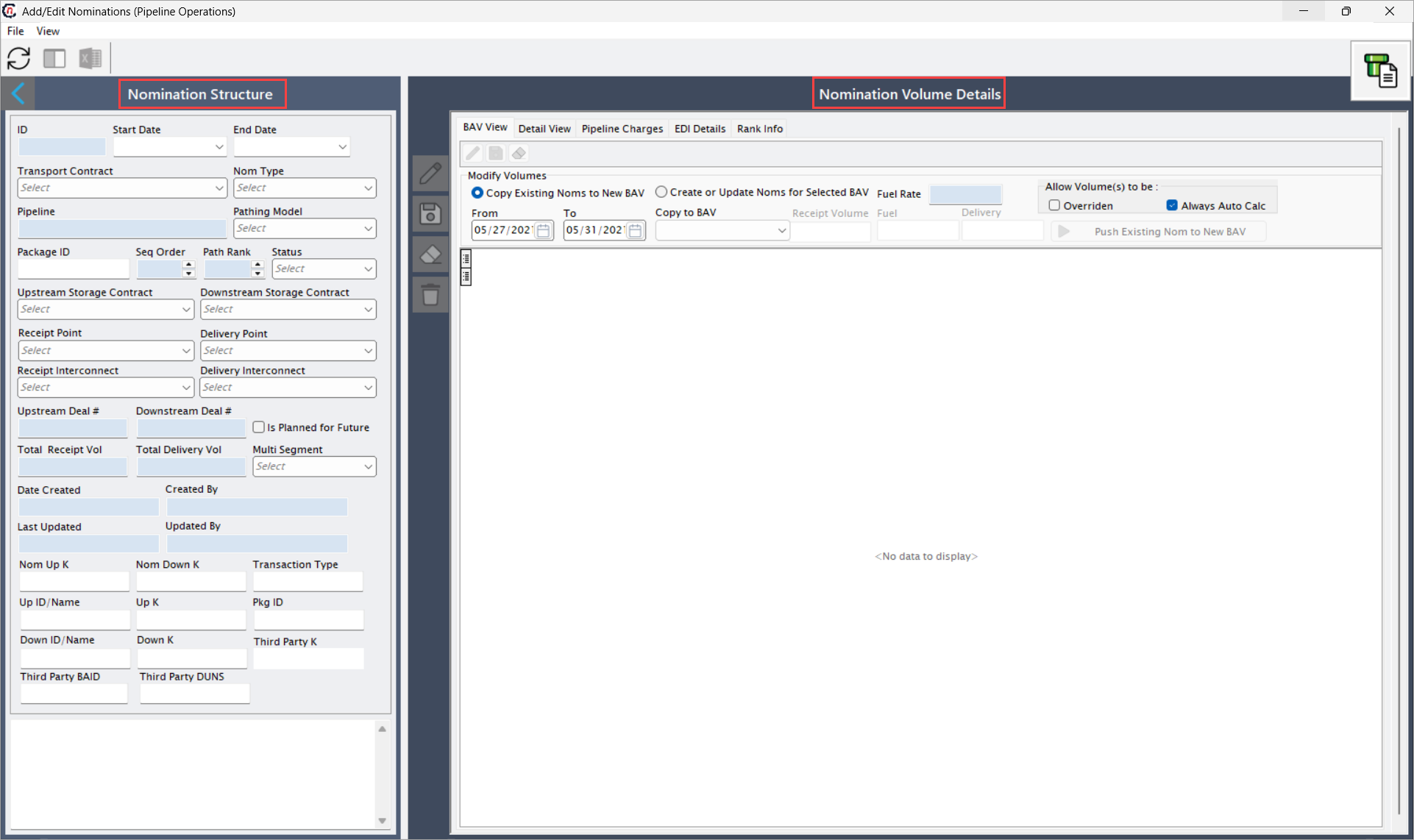
Adit/edit nominations (Pipeline operations) screen has two sections:
- Nomination structure
-
Nomination volume details
- BAV view
- Detail view
- Pipeline charges
- EDI details
-
Rank info
Step 2: Configure nominations
The Add/Edit Nominations (Pipeline Operations) screen is used to review and modify nominations that have already been created as part of the Pipeline Scheduling process. This screen does not support direct creation of new nominations.
Nominations are initially created within the Pipeline Scheduling screen, where scheduling intent is defined by selecting applicable contracts, receipt and delivery locations, storage activity, and gas days.
Once a nomination exists in the scheduling grid, it can be accessed for review or modification. By double-clicking a nomination record in the Pipeline scheduling grid, the system opens the selected nomination in the Add/Edit Nominations (Pipeline Operations) screen.
All changes made in the Add/Edit Nominations (Pipeline Operations) screen are saved back to the Pipeline Scheduling context and are reflected in the scheduling grid after completion of the update.
For detailed guidance on creating nominations during scheduling, refer to Pipeline Scheduling (Create and View Nominations).
Step 2.1 : Nomination structure
The following table lists the icons available on the Nomination volume details section of the Add/Edit Nominations (Pipeline Operations) screen and their respective functions:
| Icons | Icon name | Description |
|---|---|---|
 |
Edit | Enables modification of the selected nomination. |
 |
Save changes to current nomination detail | Saves the modifications made to the current record. |
 |
Cancel changes to current record | Discards unsaved changes made to the record. |
 |
Delete record | Removes the selected nomination, subject to system controls. |
-
In the Nomination structure, complete fields available in this section that are listed in the table below:
Fields Description ID It is a system generated identifier for the nomination path. Start date Specify the effective start date of the nomination based on the gas day. End date Specify the effective end date of the nomination. Transport contract Select the transportation contract governing the nomination. Nom type Select the nomination category. Pipeline Select the pipeline on which the gas is scheduled. Pathing model Specify whether the movement follows a specific route. Package ID Provide the ID assigned to groups related nomination segments into a logical package. Seq order Specify the execution sequence for segments within a multi-segment path. Path rank Specify the priority order of path when alternate routing options. Status Specifies the current processing state of the nomination. Upstream storage contract Specifies the storage contract used as the receipt point. Downstream storage contract Specifies the storage contract used as the delivery point. Receipt point Specifies the physical or virtual point where gas enters the pipeline. Delivery point Specifies the physical or virtual point where gas exits the pipeline. Receipt interconnect It is a interconnecting facility or pipeline at the receipt location. Delivery interconnect It is a interconnecting facility or pipeline at the delivery location. Upstream deal # It is a unique identifier for the deal associated with receipt volumes. Downstream deal # Specifies the deal reference associated with delivery volumes. Total receipt vol Specifies the scheduled receipt quantity across the pipeline. Total delivery vol Specifies the net delivery quantity after fuel and losses. Is planned for future Indicates whether the nomination applies to future gas days. Multi segment Identifies nominations spanning multiple pipeline segments. Date created Specifies the timestamp when the nomination was created. Created by Specifies the user who created the nomination. Last updated Specifies the date and timestamp of the most recent update. Updated by Specifies the user who last modified the nomination. Nom up k Describes the action or event. Nom down k It is a unique identifier for the activity record. Transaction type Specifies the business transaction category for reporting and settlement. Up ID/name Identifier and name of the upstream counterparty. Up k Specifies the upstream counterparty key used for confirmations and allocations. Pkg ID Specifies the logical package identifier for grouped nominations. Down ID/name Specifies the identifier and name of the downstream counterparty. Down k Downstream counterparty key used for confirmations and allocations. Third party k It is a unique identifier for third-party service providers. Third party BAID It is a Business Associate ID used for EDI processing. Third party DUNS It is a DUNS number used for external confirmations and compliance. 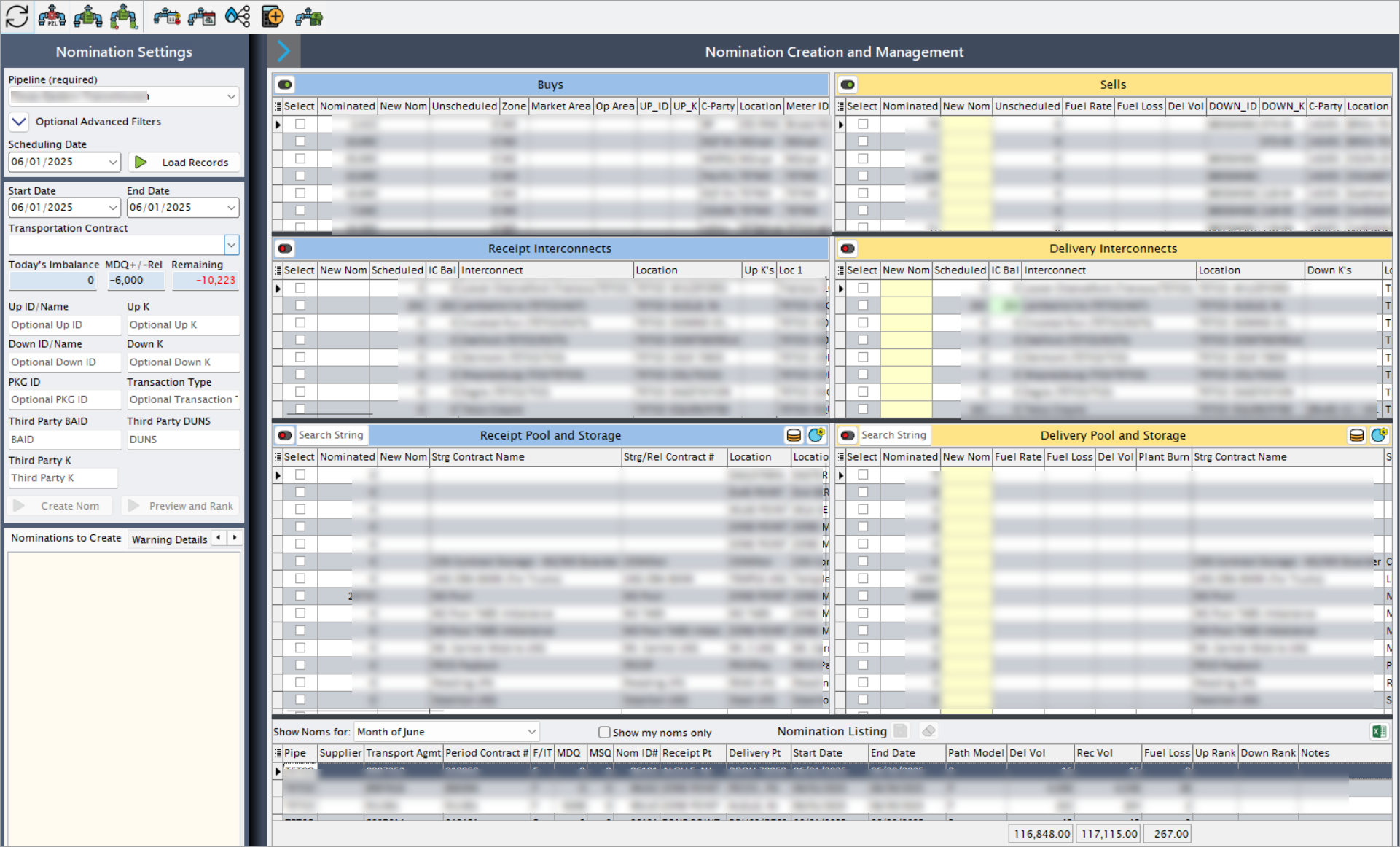
Step 2.2: Nomination volume details
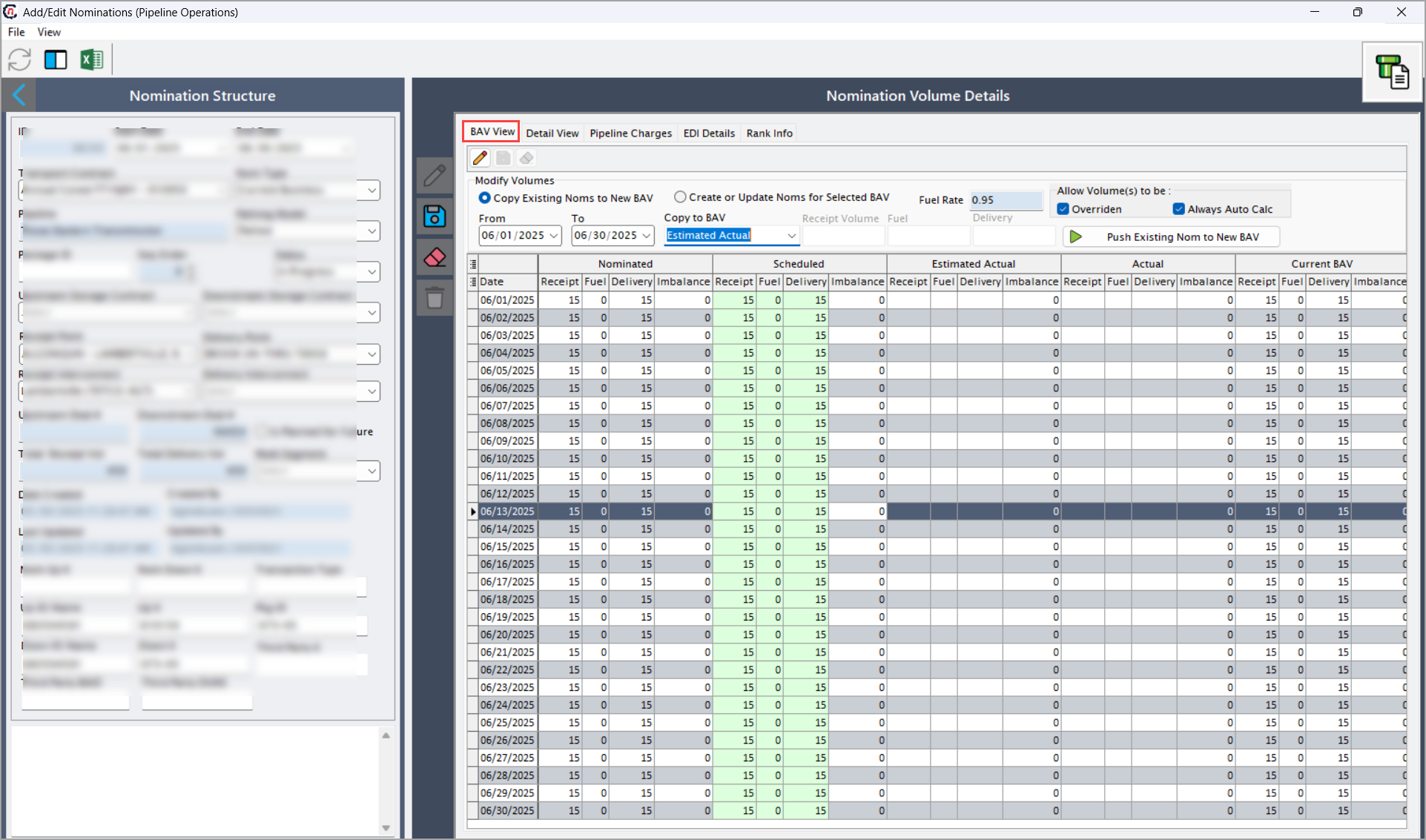
BAV view tab
This tab allows to edit nomination details and save and cancel the changes. Modify volumes grid consists of following fields
| Fields | Description |
|---|---|
| Copy existing Noms to new BAV | Select this checkbox to replicate existing nominations into new BAV cycle. |
| Create or update noms for the selected BAV | Select this checkbox to generate or update nominations for the chosen BAV type. |
| From (To) | Specify the date range for BAV creation. |
| Receipt volume | Specifies the scheduled receipt quantity before fuel deduction. |
| Fuel rate | Specifies the applicable fuel percentage or factor. |
| Fuel | Specifies the calculated fuel quantity. |
| Delivery | Specifies the net delivery volume after fuel deduction. |
| Allow volume(s) to be | Specifies the volumes are either overridden or auto-calculated. |
| Path existing Nom to new BAV | Retains nomination pathing while applying it to a new BAV. |
Detail view tab
This tab displays daily nomination quantities, balances, and contractual validations.
| Fields | Description |
|---|---|
| NOM_date | Specifies the gas day for the nomination record. |
| Is_BAV | Indicates whether the record belongs to a BAV cycle. |
| BAV_type_code | Specifies the reference for the BAV type. |
| Rec_volume | Specifies the receipt volume for the gas day. |
| Fuel_volume | Specifies the fuel deducted for the gas day. |
| Del_volume | Specifies the delivery volume for the gas day. |
| Imbalance | Indicates the difference between receipt and delivery quantities. |
| Contract_period_MDQ | Indicates Maximum Daily Quantity defined by the contract. |
| Contract_period_MDSQ | Indicates Maximum Daily Storage Quantity. |
| Receipt_point_name | Specifies the name of the receipt location. |
| Delivery_point_name | Specifies the name of the delivery location. |
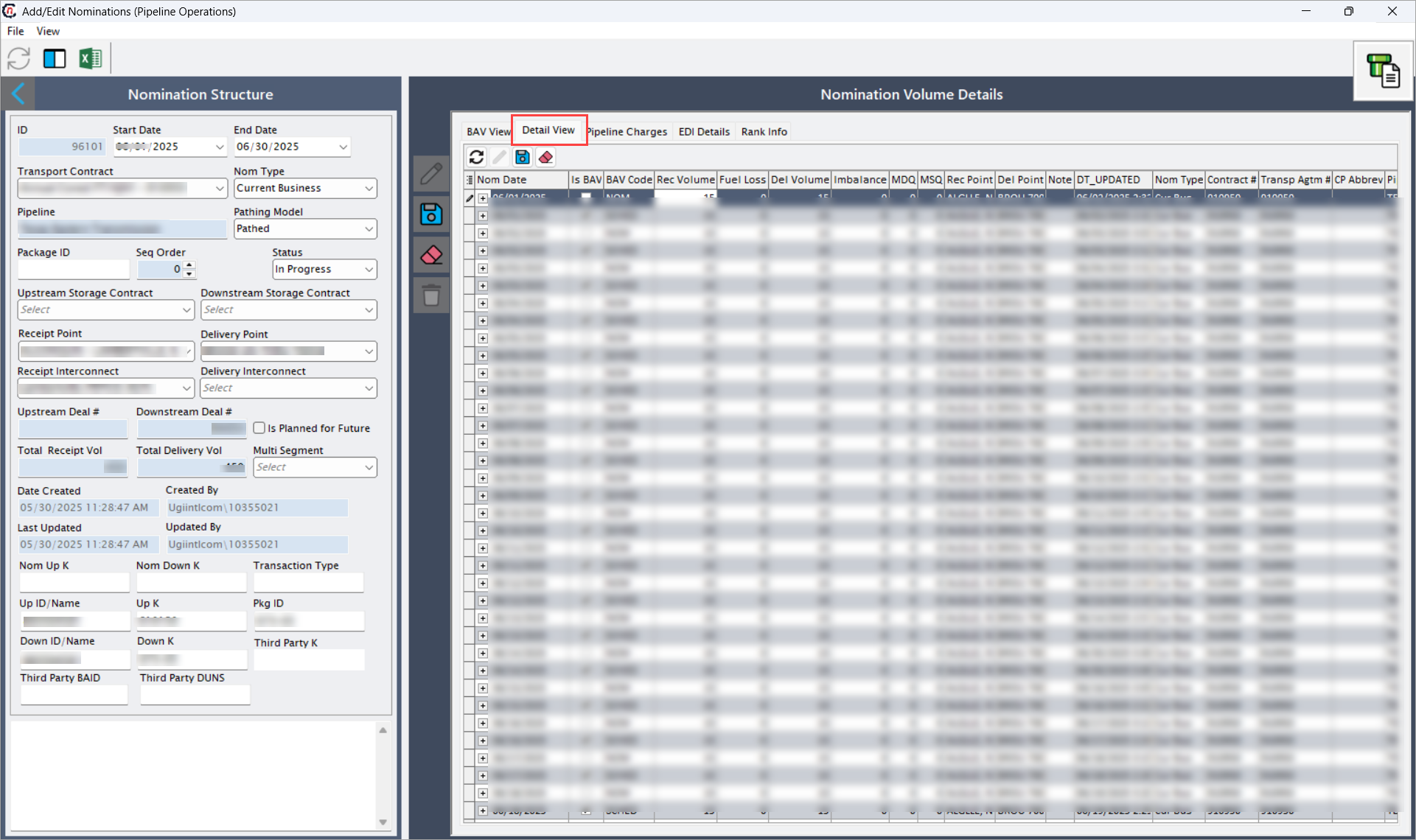
Pipeline charges tab
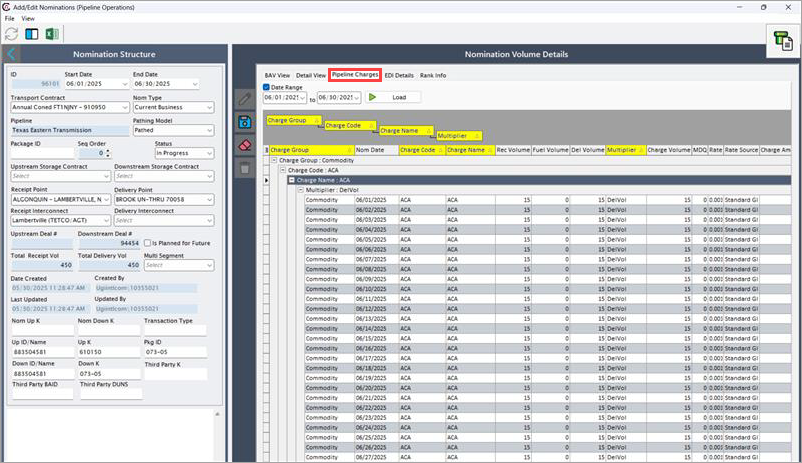
This tab is used to review and validate pipeline calculated transportation and fuel charges. Select date range and click Load and the data will be displayed and darg drop the column fields that are needed to be displayed.
| Fields | Description |
|---|---|
| Charge group | Specifies the logical grouping of related pipeline charges. |
| Charge code | Specifies the reference code for tariff defined charge. |
| Nom date | Specifies the gas day to which the charge applies. |
| Charge name | Specifies the descriptive name of the charge. |
| Rec volume | Indicates receipt volume used in charge calculations. |
| Fuel volume | Indicates fuel quantity used in charge calculations. |
| Del volume | Indicates delivery volume used in charge calculations. |
| Multiplier | Specifies the charge multiplier factor. |
| Charge volume | Specifies the volume basis for the charge. |
| MDQ | Specifies MDQ used for charge validation. |
| Rate | Specifies applicable tariff rate. |
| Rate source | Specifies the source of the applied rate. |
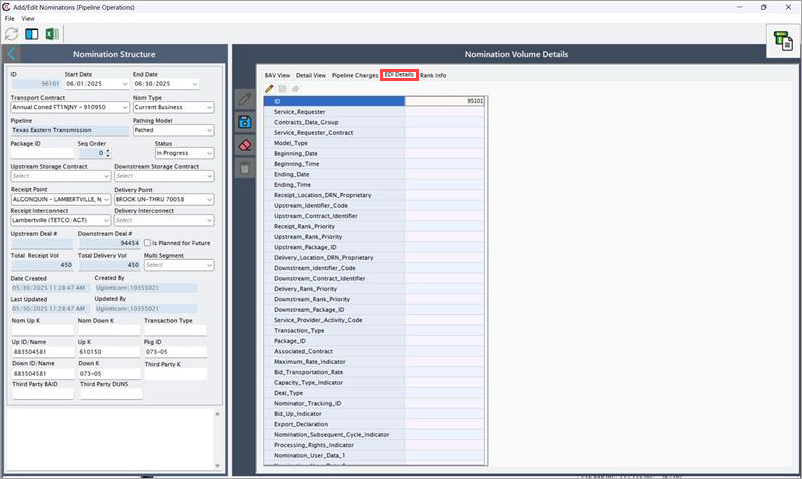
EDI details tab
This tab displays EDI-related attributes required for confirmations, scheduling messages, and regulatory reporting with connected pipeline and counterparty systems.
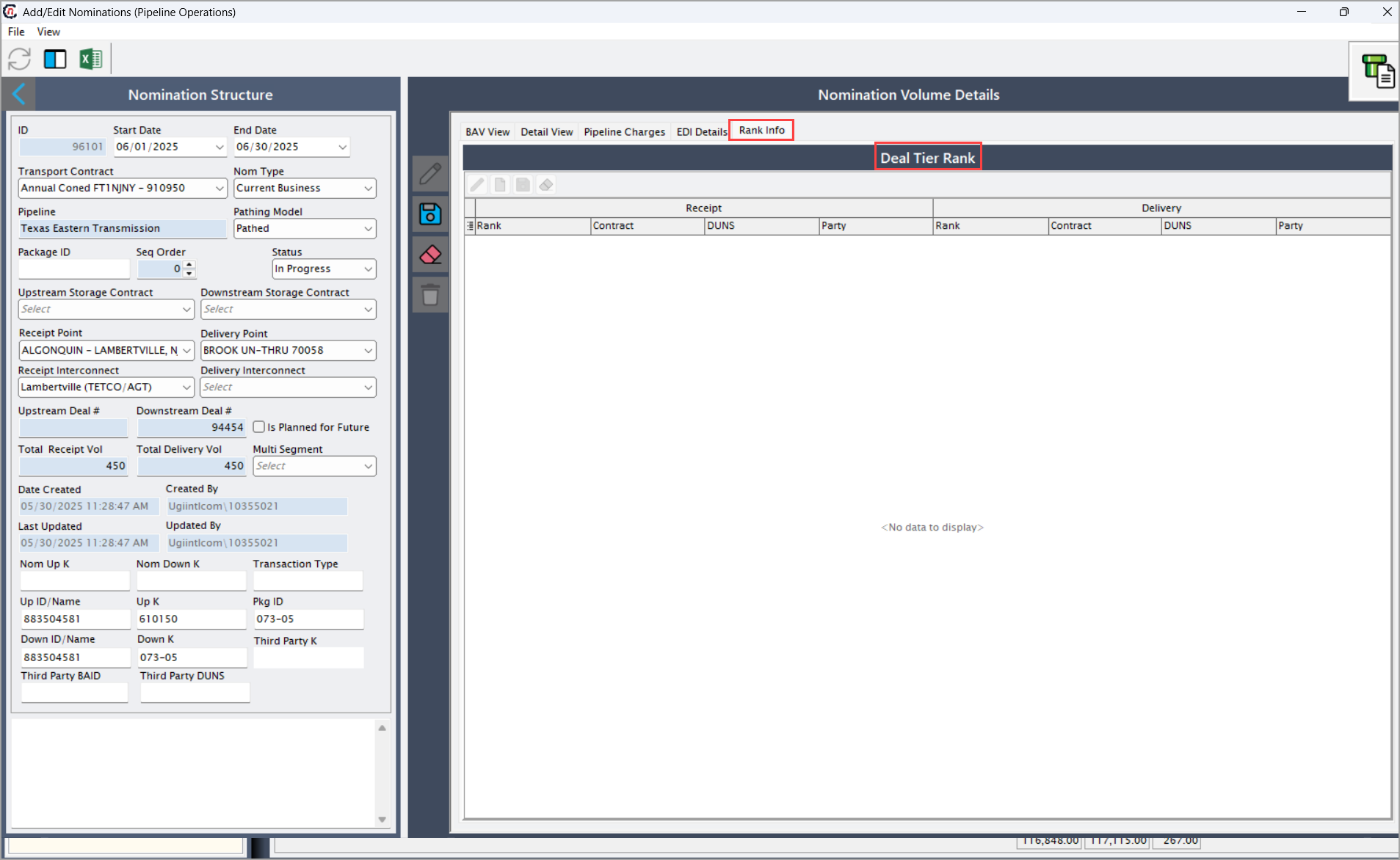
Rank info tab
This tab is used to manage priority and tier ranking applied during capacity constraints.
Deal tier rank
| Fields | Description |
|---|---|
| Copy existing Noms to new BAV | Select this checkbox to replicate existing nominations into new BAV cycle. |
| Create or update noms for the selected BAV | Select this checkbox to generate or update nominations for the chosen BAV type. |
| From (To) | Specify the date range for BAV creation. |
| Receipt volume | Specifies the scheduled receipt quantity before fuel deduction. |
| Fuel rate | Specifies the applicable fuel percentage or factor. |
| Fuel | Specifies the calculated fuel quantity. |
Nomination tier rank
Receipt
| Fields | Description |
|---|---|
| Copy existing Noms to new BAV | Select this checkbox to replicate existing nominations into new BAV cycle. |
| Create or update noms for the selected BAV | Select this checkbox to generate or update nominations for the chosen BAV type. |
| From (To) | Specify the date range for BAV creation. |
| Receipt volume | Specifies the scheduled receipt quantity before fuel deduction. |
| Fuel rate | Specifies the applicable fuel percentage or factor. |
| Fuel | Specifies the calculated fuel quantity. |
Delivery
| Fields | Description |
|---|---|
| Copy existing Noms to new BAV | Select this checkbox to replicate existing nominations into new BAV cycle. |
| Create or update noms for the selected BAV | Select this checkbox to generate or update nominations for the chosen BAV type. |
| From (To) | Specify the date range for BAV creation. |
| Receipt volume | Specifies the scheduled receipt quantity before fuel deduction. |
| Fuel rate | Specifies the applicable fuel percentage or factor. |
| Fuel | Specifies the calculated fuel quantity. |
Summary
The Add/Edit nominations (Pipeline operations) screen in nGenue provides a comprehensive view of nomination structure, volumes, charges, and ranking logic for natural gas pipeline operations. All nominations originate in the Pipeline scheduling screen and are accessed here strictly for review and modification.
This controlled workflow ensures alignment with pipeline scheduling practices, contractual compliance, accurate volume and charge calculations, and reliable downstream confirmation and settlement processes.