Importing cash receipts
Importing cash receipts means recording payment transactions into the system for tracking and reconciliation. Cash receipt import options screen provides an interface to import bath files such as bill payments from Local Distribution Company (LDC) directly into the system to record customer payment data. It ensures payments are applied accurately, reconciles them with outstanding invoices, automates batch processing, reduces manual errors, and is especially useful for handling large volumes of payments, correcting or updating batch records, and preparing accurate balances before closing accounting periods.
Prerequisites
Before working on Cash receipt import options screen, ensure the following prerequisites are met:
- User permissions: Configure the user permissions including User type, Security user, Security group, Security assign user, and Security assign permissions in their respective screens to enable access to the Cash receipts home page screen.
- LDC set up: Ensure the LDC is properly configured, to support invoice processing and cash receipt generation.
- Invoice and cash receipt generation: Ensure that Invoices and corresponding Cash receipts are generated for the selected end user. The relevant cash receipt batch records must be selected to perform A/R utility clean up process.
Procedure to import cash receipts
Step 1 : Navigate to the Cash receipt import options screen
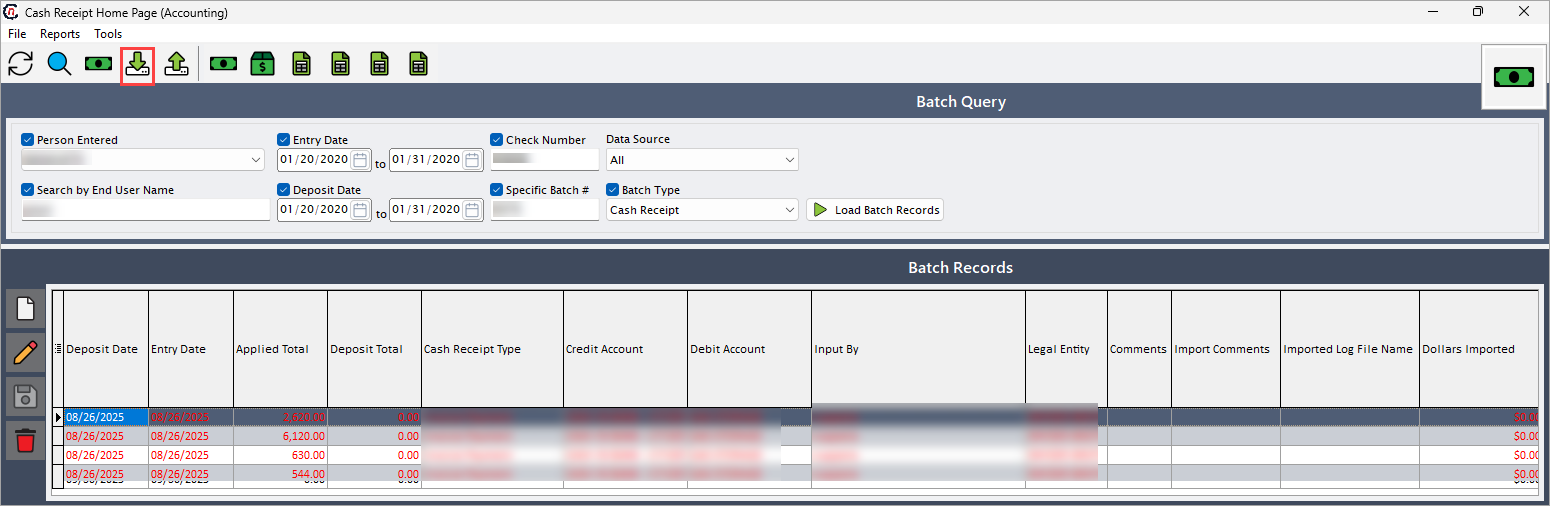
- Navigate to the Cash receipt home page screen.
-
Click Import preliminary LDC bill payments icon in the top header to open respective pop-up screen.
-
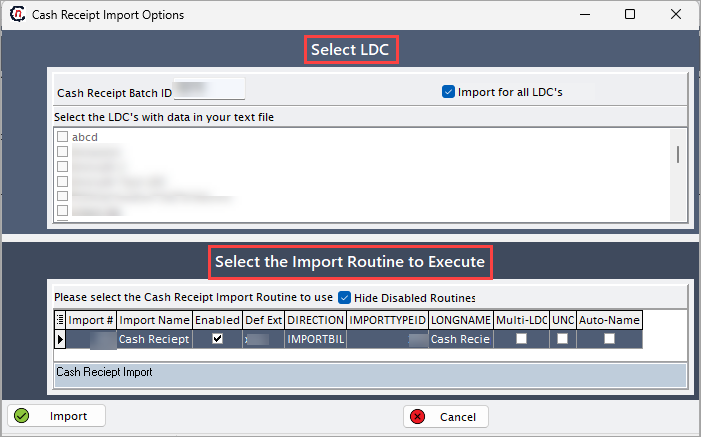
In Cash receipt import options screen, there are two sections:
- Select LDC: This section allows you to select the one or more LDC from given list of LDC to import cash receipts.
-
Select the import routine to execute: This section allows you to execute the selected import routine.
Step 2: Import cash receipt
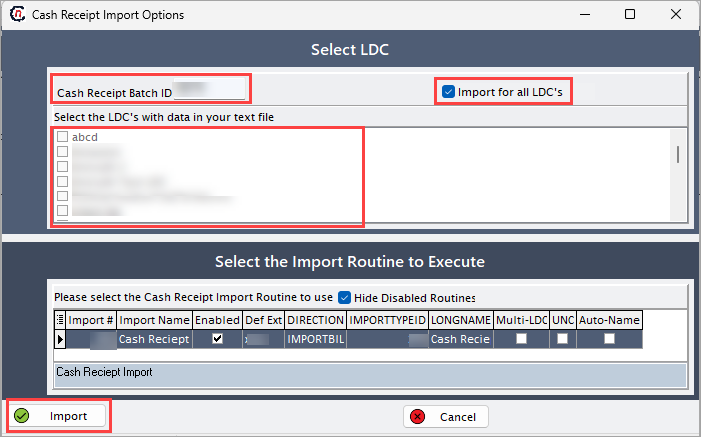
- In Select LDC section, enter Cash receipt batch ID.
-
To import cash receipts, either:
- Select the Import for all LDC's checkbox to upload cash receipts for every LDC.
-
Keep the checkbox unselected and choose one or more LDC from the list to upload receipts only for the selected LDC.
-
Click Import and select the file.
- Follow the system prompts to finalize the import process, verify that the cash receipts have been successfully uploaded and applied to the appropriate invoices, and review any errors or exceptions reported by the system and take necessary actions.
Summary
Batch payment files from LDC can be imported to ensure payments accurately recorded and reconciled with invoices. This process supports importing for either selected or all LDC at once. This ensures that imported payments are correctly applied, discrepancies are flagged, and financial records are updated precisely.