Reviewing pipeline storage position
The Pipeline Storage Position screen is used to review and monitor storage activity across pipeline storage contracts for a selected date range. This functionality consolidates storage injections, withdrawals, transfers, burn, fuel loss, and imbalances into a unified, multi-year view, allowing schedulers and analysts to validate storage balances and monthly or yearly changes.
The primary purpose of this screen is to:
- Track net storage volume changes for each storage contract.
- Review cumulative balances by year and identify variances.
- Analyze injections, withdrawals, burns, transfers, and fuel loss factors.
- Support monthly and annual reconciliation activities.
- Provide transparency into how contract-level storage balances evolve over time.
Prerequisites
Before using the Pipeline Storage Position screen, ensure the following prerequisites are met:
- The user have the add or modify permissions for the Pipeline Storage Position screen.
- Pipeline storage contracts are configured in the system with valid effective dates.
- Storage injection, withdrawal, burn, transfer, imbalance, and fuel loss transactions exist for the selected time frame.
- Pipelines and storage services are configured under their respective setup screens.
- All upstream and downstream scheduling data has been finalized for accurate reporting.
Procedure to review pipeline storage position
Step 1: Navigate to the Pipeline Storage Position screen
- Log in to nGenue.
- Click the Search icon and enter Pipeline storage in the search bar.
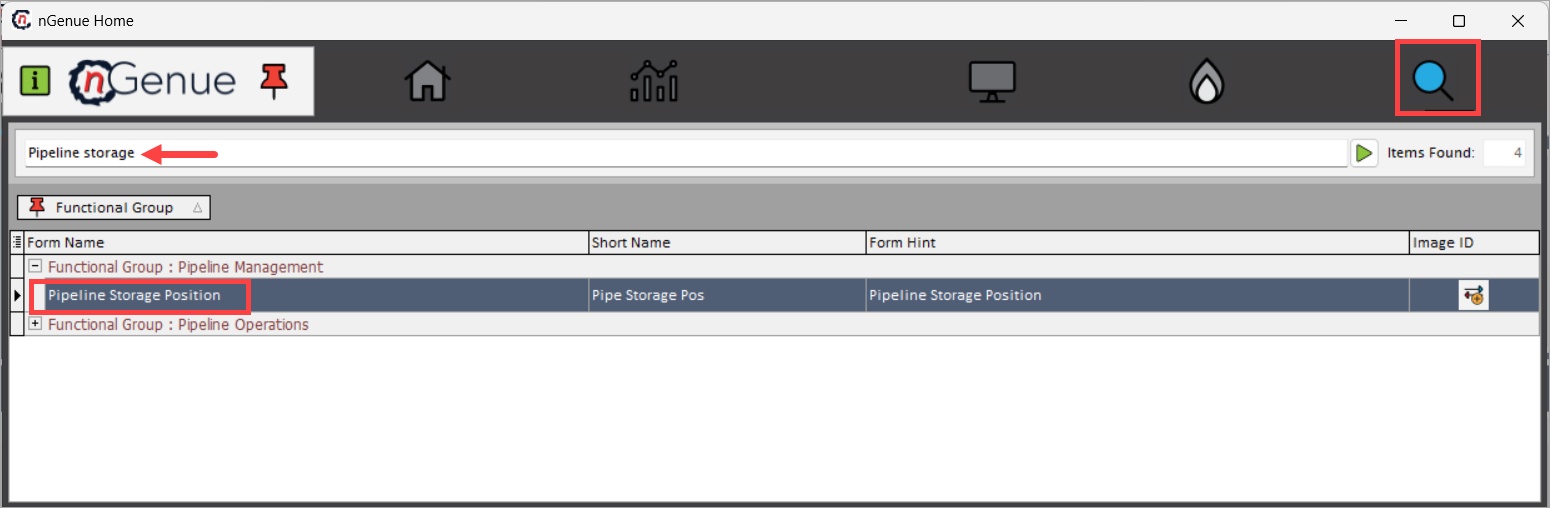
- Double-click Pipeline Storage Position to open the Pipeline Storage Position (Pipeline Management) screen.
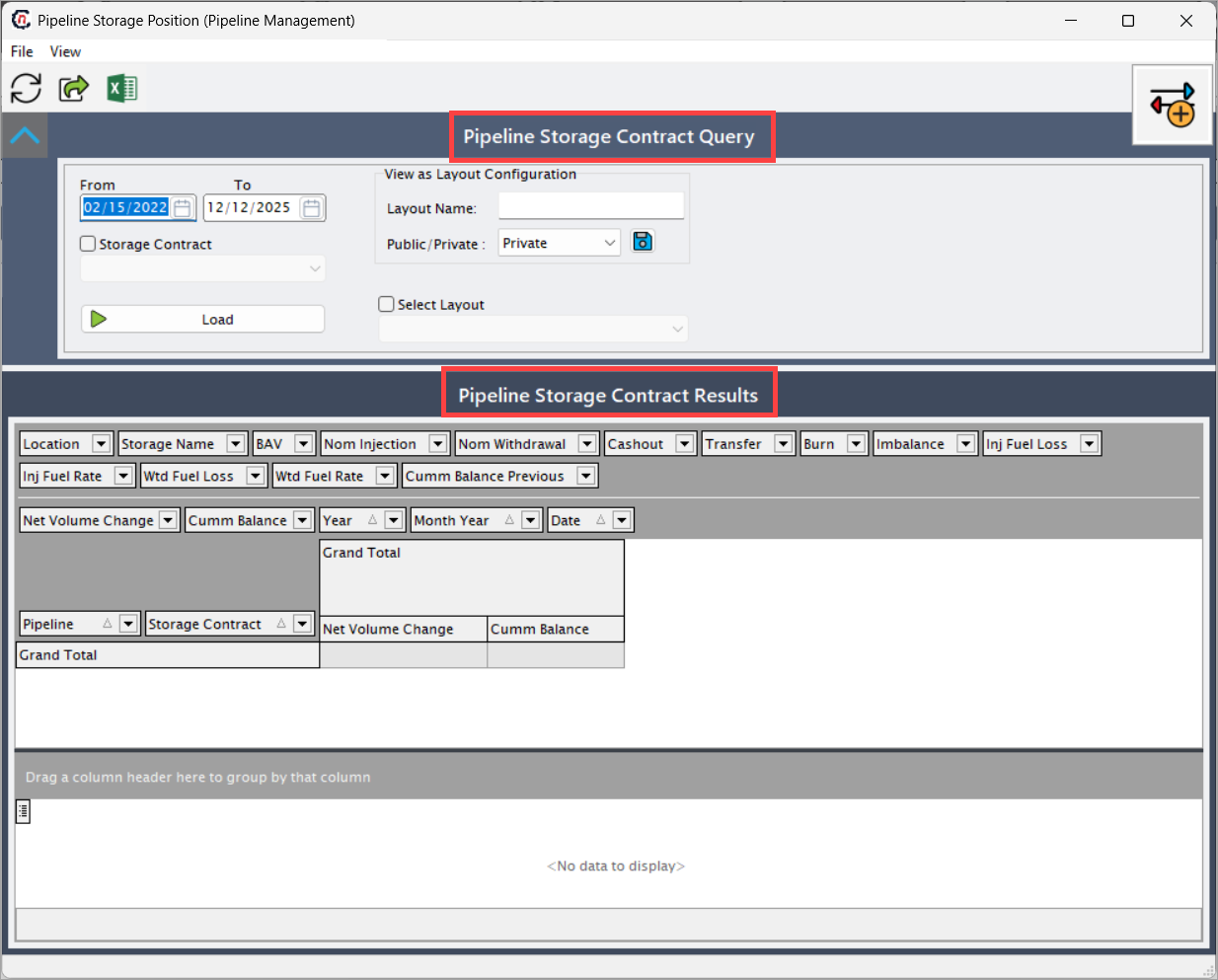
- The Pipeline Storage Position (Pipeline Management) screen is divided into two sections:
- Pipeline Storage Contract Query: This section determines what storage activity will be retrieved and how it will be displayed.
- Pipeline Storage Contract Results: Data loads in a structured, multi-year format where each row corresponds to a pipeline + storage contract pair.
Step 2: Define search criteria in the Pipeline Storage Contract Query section
-
Enter a From date to define the start of the data retrieval window. All injections, withdrawals, transfers, burn, fuel, and imbalances from this date onward will be included. This ensures roll-forward of prior balances is accurately performed.
-
Enter a To date to set the end of the reporting window. All activity up to and including this date is summarized. Selecting a date far into the future enables multi-year forecasting analysis.
-
(Optional) Select Storage Contract to filter results to a single contract. Useful when reviewing a single contract’s performance, validating discrepancies, or preparing contract-level analysis.
-
Under View as Layout Configuration, optionally:
- Enter a Layout Name if saving a custom layout.
- Choose Public (visible to all users) or Private. Private layouts remain user-specific. This supports standardized reporting across teams.
Point to Note:
The View as Layout Configuration option allows users to save custom display settings such as column order, grouping, visible/hidden fields, and sorting.
-
(Optional) Select a saved layout under Select Layout.
- Click Load to populate the results.
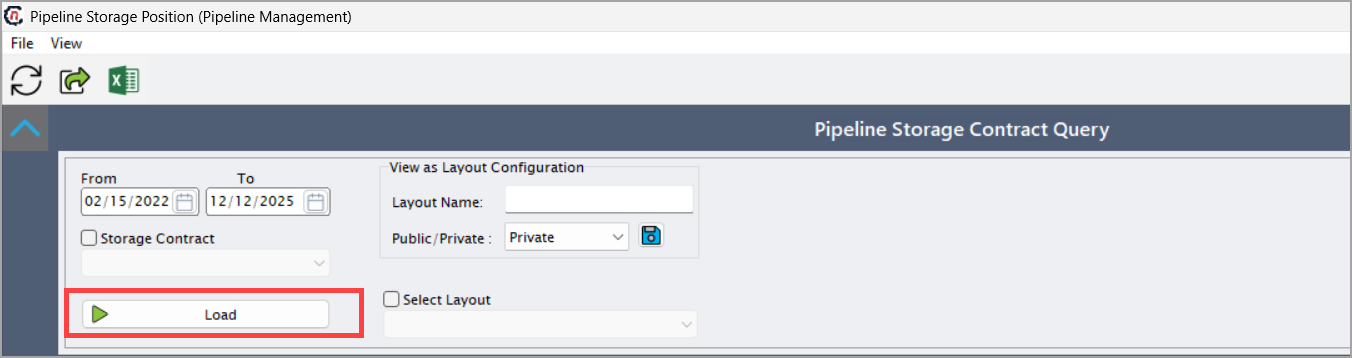
This action populates the Pipeline Storage Contract Results grid with detailed yearly storage contract data.
Step 3: Review the Pipeline Storage Contract Results
Once data is loaded, the Pipeline Storage Contract Results grid displays contract-level values broken down by year.
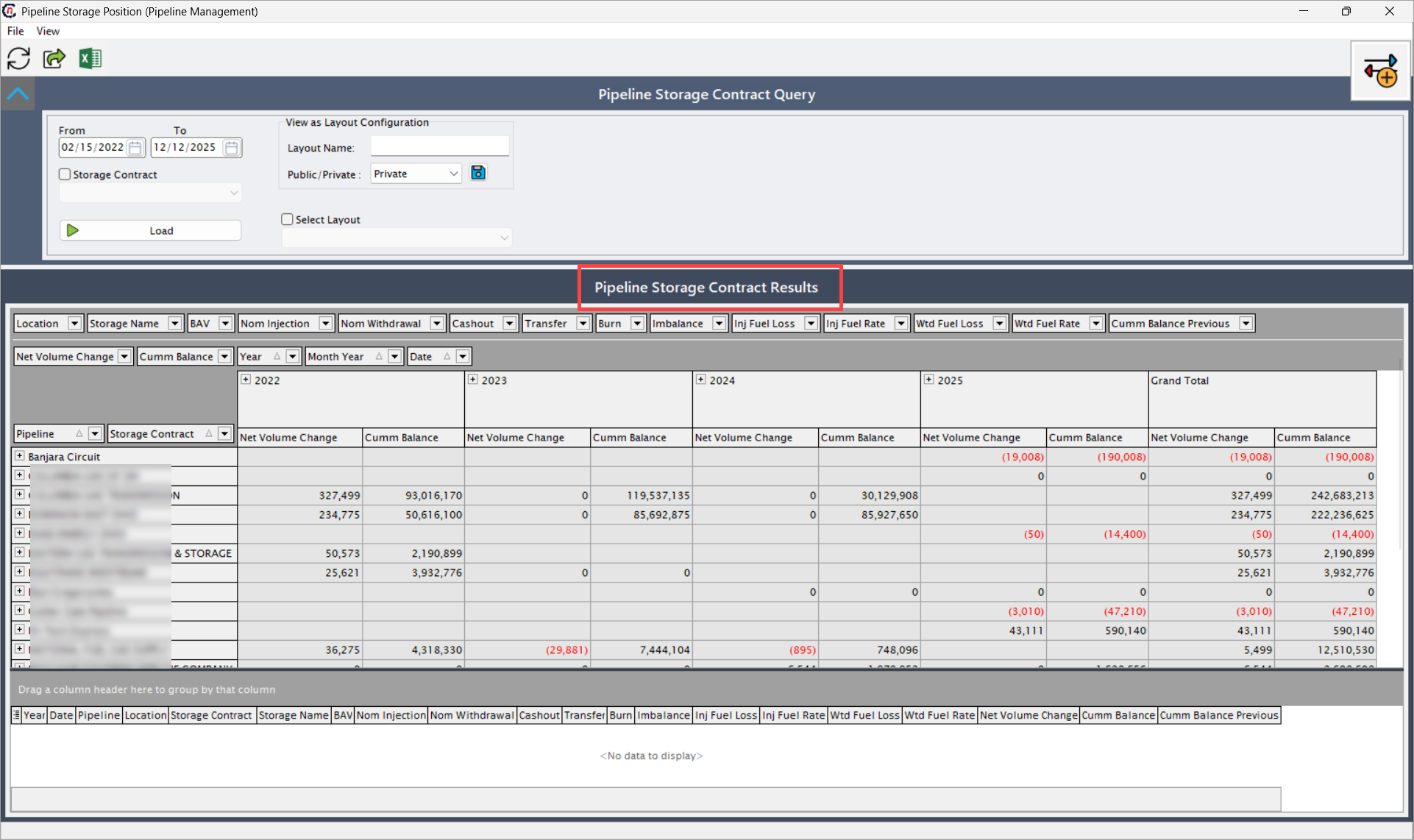
Each row represents a pipeline and storage contract pair.
The results are grouped year-over-year and include cumulative and net storage balance metrics.
Below is the detailed explanation of the major fields:
Contract identification
| Fields | Description |
|---|---|
| Pipeline | The pipeline offering the storage service. Storage behavior may differ by pipeline due to fuel rules, injection/withdrawal limits, and tariff schedules. |
| Storage Contract | The contractual storage arrangement governing capacity, operational rules, and billing. Each contract may have different rates, fuel percentages, and allowable movements. |
Yearly storage metrics
Each year (e.g., 2022, 2023, 2024, 2025) includes the same set of storage calculation fields.
| Fields | Description |
|---|---|
| Net Volume Change | Net change in storage volume for the year after injections, withdrawals, fuel loss, burn, and transfers are combined. |
| Cumm Balance | The cumulative storage balance at the end of the selected year after applying net volume change. This includes roll-forward values from previous years. |
| Nom Injection | Total volumes injected into the storage reservoir. Injection increases the storage balance. Used for operational planning, seasonal builds, and index purchasing strategies. |
| Nom Withdrawal | Total volumes withdrawn from storage during the year. Withdrawal decreases balance and may require fuel loss adjustments depending on pipeline rules. |
| Cashout | Cashout-related adjustments tied to scheduling or imbalance settlement. This field often arises when nominations and actual flows do not match and a financial/volumetric true-up is required. |
| Transfer | Represents inter-contract or inter-pipeline transfers. Transfers are commonly used to rebalance books, shift gas between storage contracts, or support supply optimization. |
| Burn | Gas consumed as operational burn (e.g., compressor fuel). Burn directly reduces available inventory. Higher burn values may indicate pipeline compression inefficiency or heavy operational usage. |
| Inj Fuel Loss | Fuel lost during injection. Pipelines often charge fuel as a percentage of injected volumes. This reduces the net effective storage gain despite injected quantities. |
| Inj Fuel Rate | The percentage fuel factor applied to injections. Example: a 1.2% rate means 1.2% of injected gas is consumed as fuel. |
| Wtd Fuel Loss | Weighted fuel loss calculated across all transactions (injections, withdrawals, transfers). The weighted approach averages fuel consumption based on volume proportions. |
| Wtd Fuel Rate | The weighted average fuel percentage applied across the year's total storage movements. This metric helps validate whether applied fuel rates align with contract rules. |
| Cumm Balance Previous | The ending balance from the previous reporting year. This acts as the starting balance for the current year before new activity is applied. Ensures continuity between multi-year periods. |
Step 4: Review transaction-level details
The grid at the bottom of the screen displays individual transaction records contributing to summary totals.
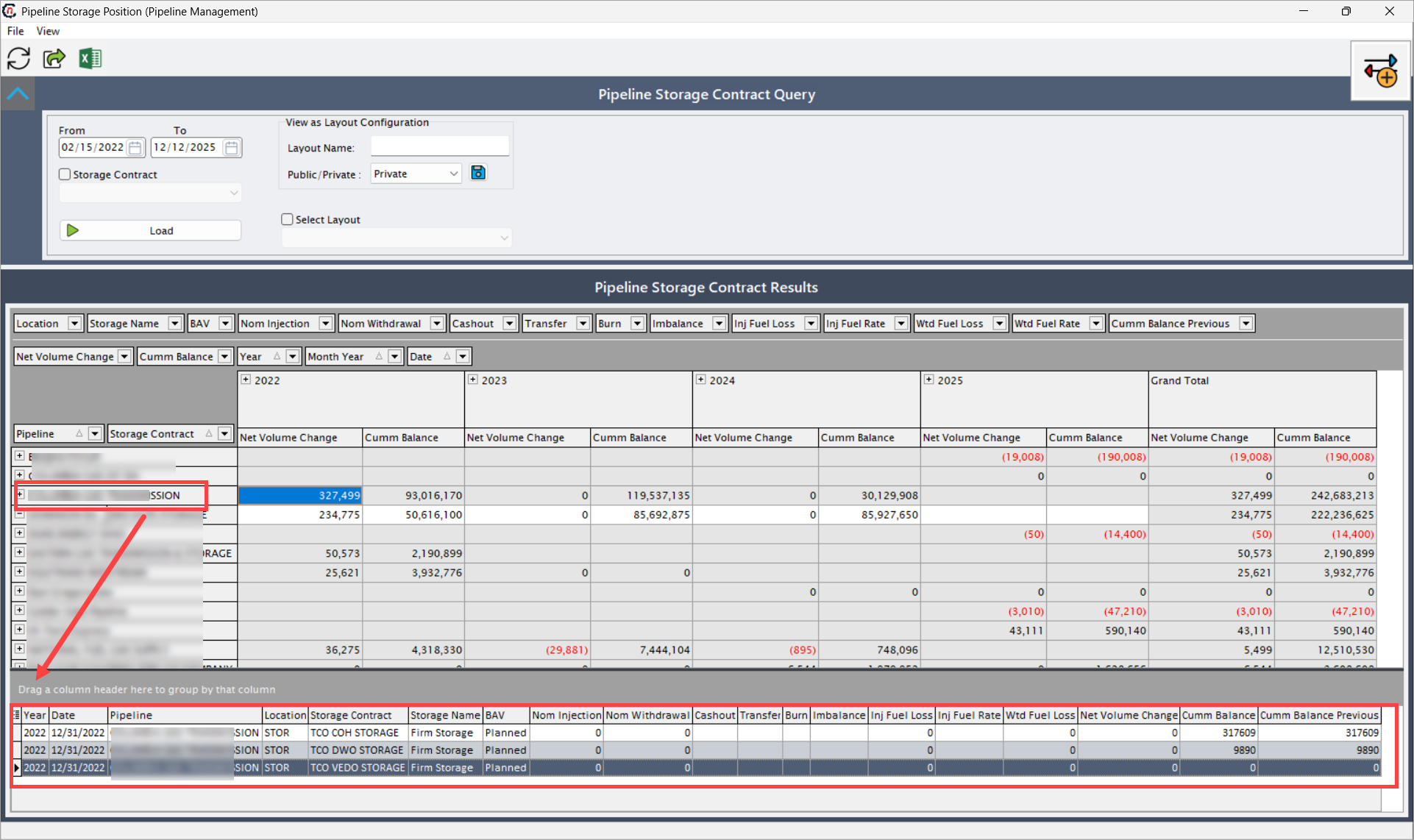
These fields include:
| Fields | Description |
|---|---|
| Year | Displays the calendar year in which the transaction occurred. This is important in multi-year reporting windows where injections, withdrawals, and fuel activity may span multiple periods. The system groups annual totals based on this attribute. |
| Date | Shows the exact date of the transaction. This helps users trace specific operational events such as daily injections, month-end withdrawals, correction entries, or cashout adjustments. Date-level reporting is essential for audit trails and reconciliation with pipeline statements. |
| Pipeline | Indicates the pipeline associated with the storage activity. Different pipelines apply different fuel factors, tariff rules, and operational procedures, making this field essential for validating contract behavior. |
| Storage Contract** | Displays the unique pipeline storage contract under which the transaction was executed. This ties the activity to a specific contractual arrangement, capacity entitlement, and billing relationship. |
| Storage Name | Identifies the storage service type or name (e.g., Firm Storage, No-Notice Storage). The storage name often determines injection/withdrawal limits, fuel rules, and rate schedules. |
| BAV | Represents the Base Available Volume or contract-defined maximum storage entitlement. This value may remain constant or vary depending on contract structure. It is used to validate whether end-of-year balances remain within allowable limits. |
| Nom Injection | Shows the transaction-level injection volume added to storage on the specified date. These increases directly raise the storage balance, subject to fuel loss adjustments. Used to track seasonal builds, daily scheduling patterns, or optimization decisions. |
| Nom Withdrawal | Shows the withdrawal volume removed from storage on the specified date. Withdrawals reduce the storage balance and may trigger fuel consumption or burn adjustments depending on pipeline rules. |
| Burn | Displays gas consumed for operational purposes (e.g., compressor operations). Burn reduces the net available inventory and is often automatically calculated based on pipeline operational data. |
| Cashout | Represents volumetric adjustments resulting from pipeline cashout settlements. Cashout occurs when scheduled activity does not match actual flows and must be financially or volumetrically reconciled. These quantities may either increase or decrease inventory depending on the imbalance direction. |
| Fuel Loss | Shows the quantity of gas deducted as fuel for the transaction. Pipelines apply fuel percentages during injections, withdrawals, or both. Fuel loss directly reduces net inventory and is a critical reconciliation factor when validating storage balances. |
| Transfer | Identifies volumes moved between storage contracts or between different pipeline services. Transfers may be used to reallocate gas between commercial portfolios, correct scheduling errors, or rebalance supply positions. Transfers may increase or decrease inventory depending on direction. |
| Net Volume Change | Displays the net effect of the transaction on storage inventory. This is calculated as: Nom Injection − Nom Withdrawal − Burn − Fuel Loss ± Cashout ± Transfer. This value shows how each individual transaction contributes to the year’s summarized total. |
| Cumm Balance | Shows the updated cumulative balance after applying the transaction’s net volume change. This allows users to track inventory progression day-by-day. It is essential for verifying end-of-month and end-of-year balances and ensuring no discrepancies exist between operational and contractual records. |
This helps reconcile the summarized values against underlying transaction records.
Key points to remember
- From and To dates determine the full range of storage activity shown.
- The results grid is structured by year, and data may span multiple calendar years depending on the query range.
- Net Volume Change and Cumm Balance are the primary indicators of storage inventory movement.
- Fuel calculations (Inj Fuel Loss, Wtd Fuel Rate) directly affect the cumulative storage balances.
- The bottom transaction grid provides detail necessary for reconciliation.
- Layout configurations help users save preferred reporting views for repeat analysis.
Summary
The Pipeline Storage Position screen offers a detailed, multi-year reporting view of storage contract balances, enabling users to:
- Review net and cumulative balances across pipelines.
- Verify injections, withdrawals, fuel loss, burn, transfers, and imbalances.
- Track storage inventory progression year-by-year.
- Support operational and accounting reconciliation processes.
This screen serves as a critical placeholder for storage analysts, schedulers, and accounting teams responsible for verifying monthly and annual storage positions across gas pipelines.