Understanding cash receipts
The Cash receipts functionality in nGenue enables users to efficiently record and manage all incoming payments, including customer invoice settlements, deposits, and imported payment files. Each cash receipt transaction is accurately posted to Accounts Receivable (A/R) and the General Ledger (GL) to maintain financial integrity and transparency. Users can generate receipts whenever funds are received, either applied directly to customer invoices or temporarily held as unapplied cash for future allocation. Once a receipt is posted, it becomes part of the organization’s financial records and is automatically reflected across A/R reports, daily cash receipt journals, and GL balances. This ensures real-time visibility, and consistent tracking of all payment activities.
Navigating to the Cash receipts screen
After logging in to the nGenue application, click the Search icon and enter Cash receipts in the search bar. When the results appear, double-click Cash receipts to open the corresponding screen. On the Cash receipts home page (accounting) screen, you will see the following sections.
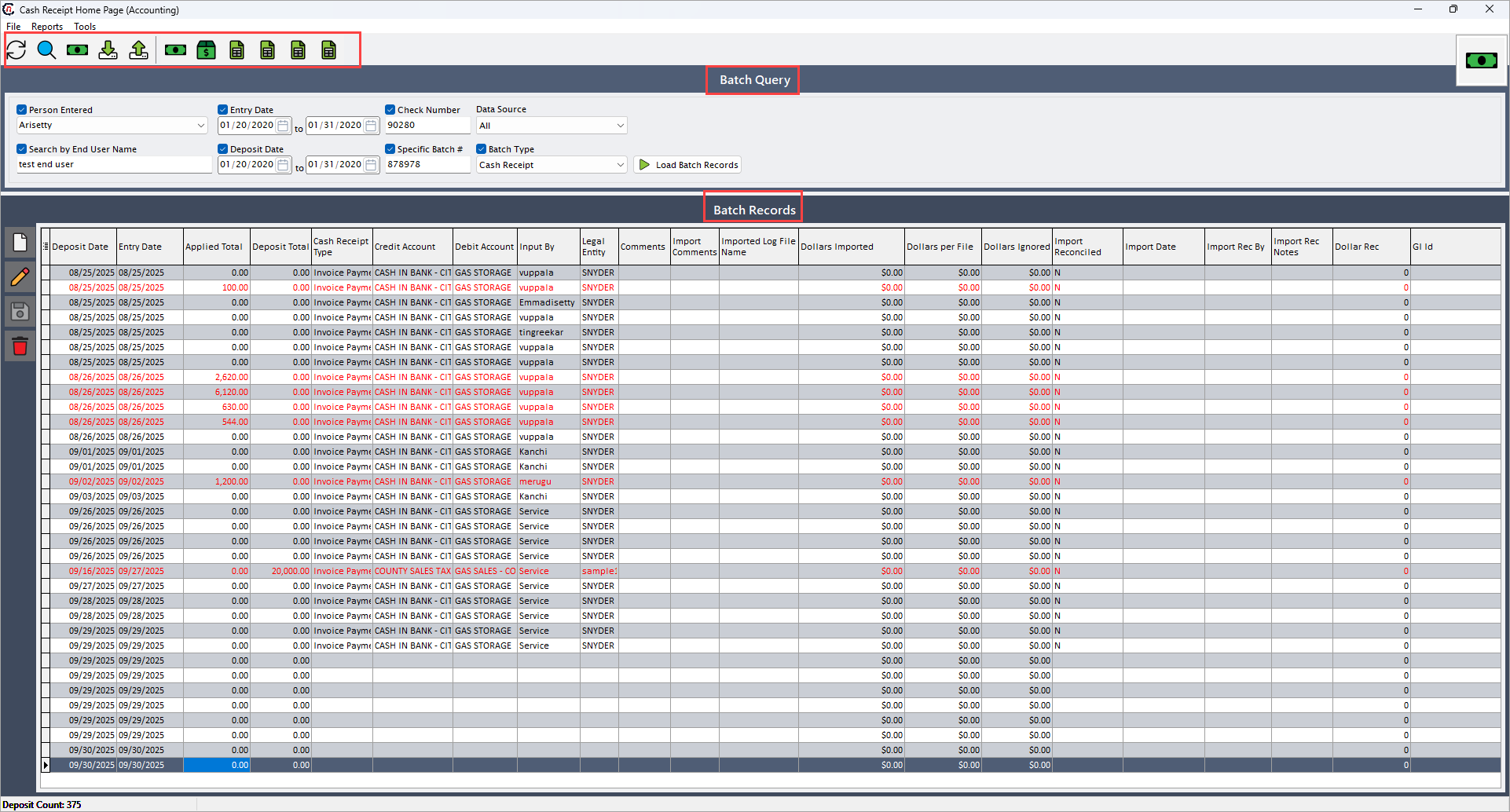
When you land for the first time, you will see the following icons available on the header of the page.
| Icon | Icon names | Description |
|---|---|---|
 |
A/R cleanup facility | Provides tools to identify and clear outstanding or misapplied accounts-receivable items. |
 |
Import preliminary LDC bill payments | Uploads or imports preliminary Local Distribution Company (LDC) payment files for review. |
 |
Reconcile LDC bill payments with invoices | Matches imported LDC bill payments to their corresponding invoices for reconciliation. |
 |
Daily cash receipts detail journal | Generates a detailed journal report of all cash receipts for the selected day or period. |
 |
Collections worksheet | Displays a worksheet to track, manage, and follow up on customer collections. |
 |
Print aging summary | Produces a summary report of receivables grouped by aging buckets. |
 |
Print aging detail | Produces a detailed report showing individual receivables with their specific aging status. |
 |
Print unapplied receipts | Generates a report listing all receipts that have not yet been applied to invoices. |
 |
Print A/R open and closing balances | Prints a report summarizing beginning and ending balances for accounts receivable. |
Batch query
This section provides the filters to load batch records. These filters must be enabled to apply these to query.
The following table provides the filterable fields along with brief description:
| Fields | Description |
|---|---|
| Person created | Specifies the name of the user who created the batch or cash receipt. |
| Search by end user name | Specifies the name of the end user associated with the batch or transaction. |
| Entry date | Specifies the date when the batch was entered into the system. |
| Deposit date | Specifies the date when the payment or deposit was received. |
| Check number | Reference number of the check or payment instrument associated with the. |
| Specific batch # | Unique identifier assigned to the batch for tracking purposes. |
| Select the data source | Source system or method from which the payment data originated. |
Batch records
This section allows you to add a new batch, modify or delete selected batch. Each batch record captures information such as batch details, credit and debit account details, employeeID, applied and deposit amount, cash receipt type, legal entity etc.
The following table provides the line item fields for each batch record along with brief description:
| Fields | Description |
|---|---|
| Deposit date | Specifies the actual date the deposit or cash receipt occurred. |
| Entry date | Specifies the date when the transaction details were originally entered into the system. |
| Applied total | Specifies the total amount from the receipt that has been successfully applied or allocated to invoices. |
| Deposit total | Specifies the total monetary amount of the deposit or cash receipt batch. |
| Cash receipt type | Specifies the category or type of payment (for example, cash, wire, ACH, credit card). |
| Credit account | Specifies the general ledger account that is credited for the transaction. |
| Debit account | Specifies the general ledger account that is debited for the transaction. |
| Input by | Provides the name or user ID of the person who entered the transaction. |
| Legal entity | Specifies the legal entity responsible for the record. |
| Dollars imported | Specifies the total dollar amount imported into the system from an external source. |
| Dollars per file | Specifies the dollar amount contained within each imported file. |
| Dollars ignored | Specifies the portion of imported dollars that were not processed or excluded. |
| Import reconciled | Indicates whether the imported transaction batch has been reconciled or posted. |
| Import date | Specifies the date when the transaction data was imported into the system. |
| Comments | Provides free-text notes or remarks for additional context or clarification. |
| Import comments | Provides additional notes or comments specific to the imported data. |
| Imported log file name | Specifies the name of the log file used during the import process. |
| Import rec by | Provides the user who reconciled or reviewed the imported data. |
| Import rec notes | Provides notes entered during the reconciliation of imported data. |
| Dollar rec | Specifies the total dollar amount reconciled during the import process. |
| GI ID | Specifies a system-generated unique identifier for the grouped set of transactions. |
| Employee ID | Specifies the ID of the employee associated with the transaction. |
| GL account ID | Specifies the identifier of the general ledger account used in the transaction. |
| Transferred to GL | Indicates whether the batch has been successfully transferred to the general ledger. |
| Batch type | Specifies the classification of the batch (for example, manual, imported, automated). |
| Accounting group ID | Specifies the identifier of the accounting group tied to the batch. |
| CRGL account ID | Specifies the cash receipt general ledger account identifier. |
| Batch # | Specifies the unique number assigned to the batch of transactions. |