Configure service job type
A Service job type defines the categories of service-related activities used across the nGenue application such as field service tasks, customer service actions, or LDC-specific processing jobs. Service job types determine how service jobs are classified, reported, and integrated with LDC requirements or EDI reporting. They are used whenever a service action is created, processed, or referenced in operational workflows, ensuring that each job follows the appropriate rules, EDI switches, and configuration settings.
Prerequisites
Before working on the Service job type screen, ensure the following prerequisites are met:
- Ensure the nGenue application is installed and use valid login credentials to log into the application.
- Configure the user permissions including User type, Security user, Security group, Security assign user, and Security assign permissions in their respective screens to enable access to the Service job type screen.
- Ensure LDC, LDC rate/rider and service workflows are properly configured and active.
Procedure to configure service job type
Step 1: Navigate to Service job type screen
- Log in to the nGenue application.
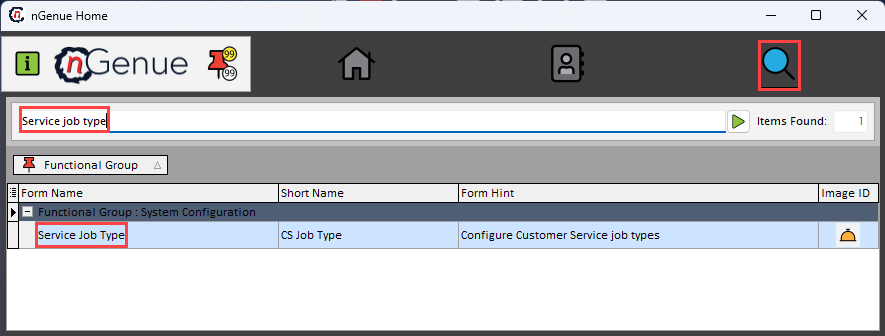
- Click the Search icon and enter Service job type in the search bar.
-
Double-click the Service job type from the search results to open respective screen.
-
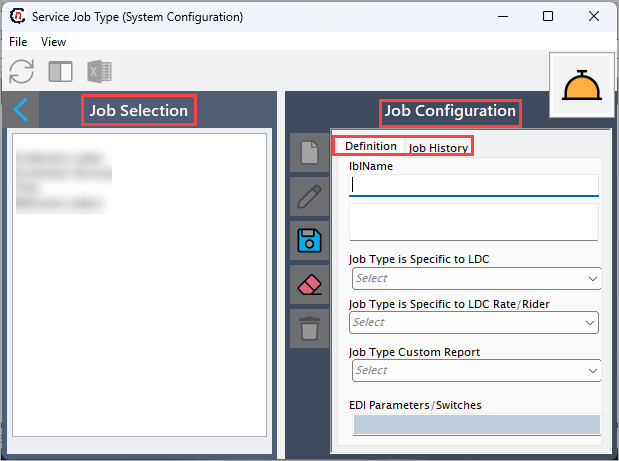
Service job type (System configuration) screen has two sections:
- Job selection: Allows filtering and retrieving existing service job types.
-
Job configuration: Allows adding, editing, and managing service job type details.
Step 2: Configure service job type
The following table lists the icons available on the Job configuration section and their respective functions:
| Icons | Icon name | Description |
|---|---|---|
 |
Add a service job type record | Opens a new record form to create a service job type entry. |
 |
Edit current service job type | Opens the selected record for editing. |
 |
Save changes to current service job type | Saves the modifications made to the current record. |
 |
Cancel changes to current service job type record | Discards unsaved changes made to the record. |
 |
Delete current service job type record | Permanently removes the selected service job type record. |
Step 2.1 : Add a service job type
- In the Job configuration, click the Add a service job type record icon to create a new service job type record.
-
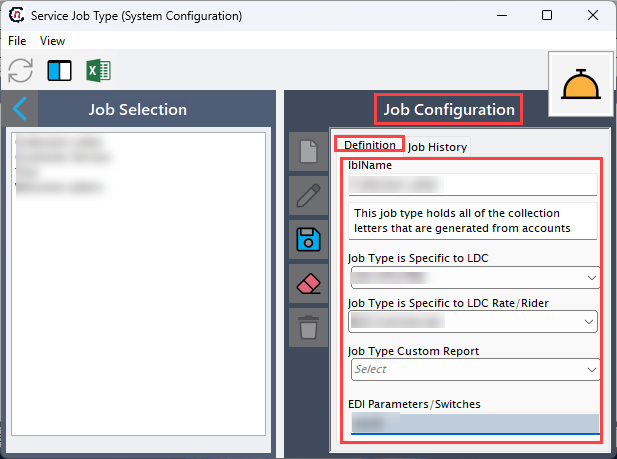
Complete required fields available in the Definition tab that are listed in the table below:
- Lblname: Defines the display name of the job type used across service workflows.
- Job type is specific to LDC: Select the job type that applies only to the selected LDCs, ensuring correct usage in service processes.
- Job type is specific to LDC rate/rider: Select the LDC rate/rider to restrict the job type to chosen LDC rate/rider.
- Job type custom report: Select a custom report associated with this job type.
- EDI parameters/switches: Provide EDI-related configuration that determines how the job type behaves in EDI messaging or regulatory reporting.
-
Click Save changes to current service job type to store the configuration.
-
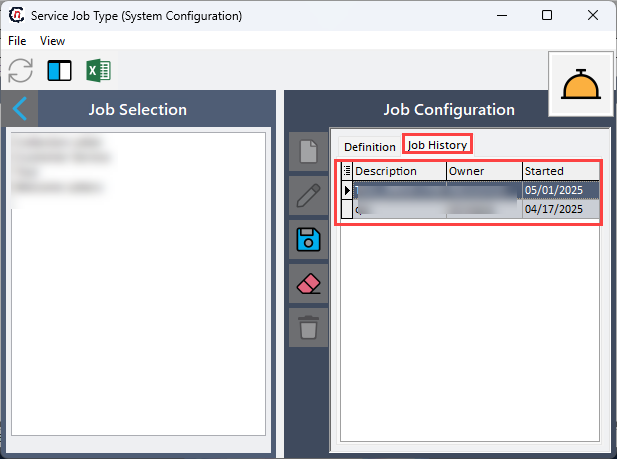
In Job history tab, review available information for the selected job type:
- Description
- Owner
- Started
Step 2.2 : Edit a service job type
- Click the Edit a service job type record icon to modify the selected service job type.
- Update necessary details and click Save changes to current service job type to apply and store the modifications.
Step 2.3 : Delete a service job type
- Click the Delete current service job type record icon to permanently remove the service job type record.
- Service job types that are referenced by existing service jobs may not be deletable.
Summary
Configuring a service job type allows organizations to define how service-related actions are categorized and processed within nGenue. Each job type can be tailored with LDC-specific rules, reporting preferences, and EDI requirements. The Service job type screen enables users to create, modify, and maintain these definitions, ensuring that service workflows operate with consistent structure and compliance.