Printing cash receipt
Cash receipt details provides the record of all cash payments received, including check numbers, date, associated entity information, and batch information. Print cash receipt details (reports) screen in the nGenue application allows users to setup printer, preview and print the cash receipts in desired format such as pdf.
Prerequisites
Before working on Print cash receipt details (reports) screen, ensure the following prerequisites are met:
- User permissions: Configure the user permissions including User type, Security user, Security group, Security assign user, and Security assign permissions in their respective screens to enable access to the Cash receipts home page screen.
- LDC set up: Ensure the Local Distribution Company (LDC) and LDC pool are properly configured, to support invoice processing and cash receipt generation.
- End user and Facility set up: Ensure the End user is fully configured and their Facility is properly set up before generating an invoice or cash receipt.
- Legal entity setup: Additionally, ensure legal entity is configured in the Internal book structure screen to enable proper accounting and cash receipt creation.
- Invoice generation: Ensure that Invoices and corresponding Cash receipts are generated for the selected end user.
Procedure to print a cash receipt
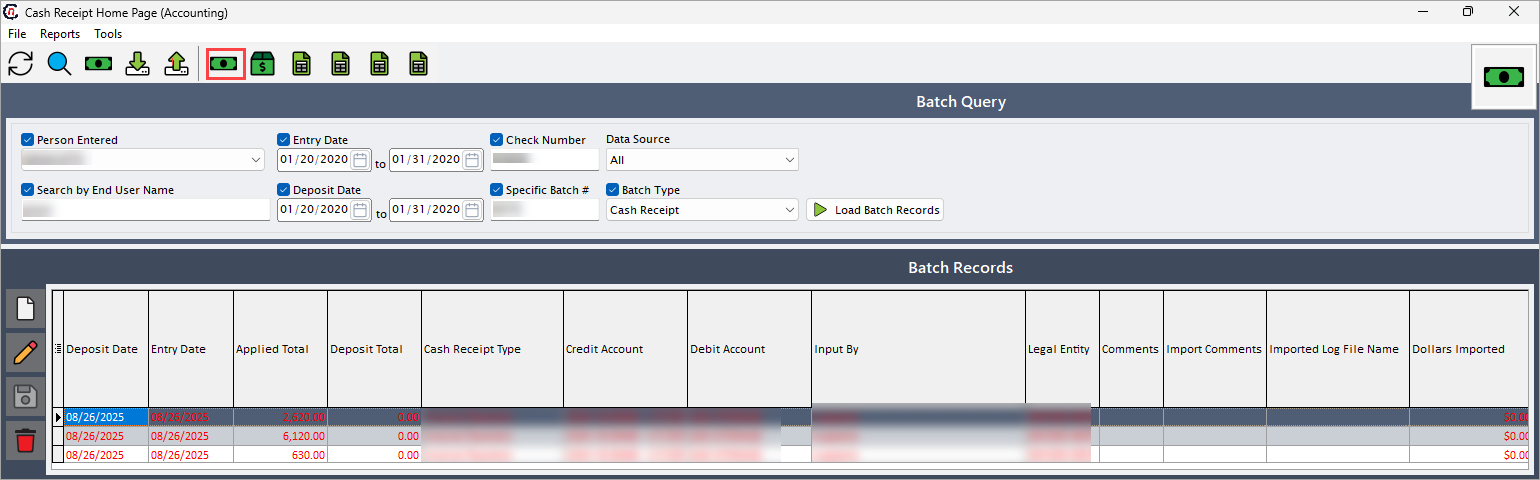
- Navigate to Cash receipt home page screen.
-
Click Daily cash receipts detail journal icon in the top header to open respective screen.
-
In Print cash receipt details (reports) pop-up screen, select or enable the checkbox, to include corresponding field's information in the cash receipt detail report. Complete all required fields before printing the cash receipts.
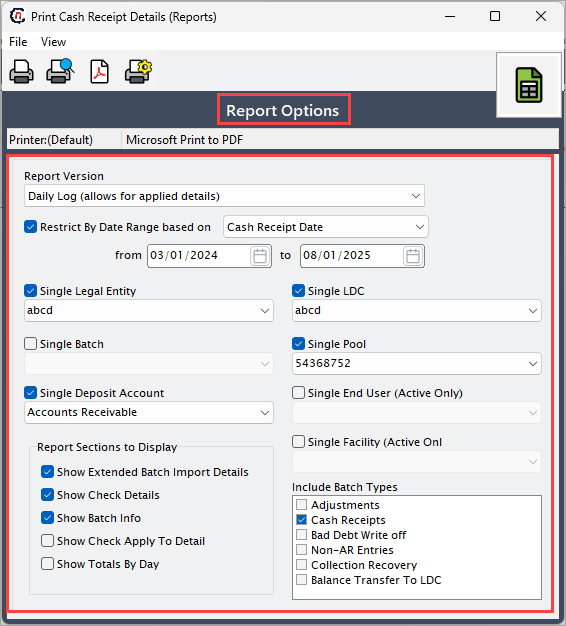
The following table lists the fields in the Report options section:
Fields Description Report version Select the version of the report to be printed. Restrict by date range based on Select the date range for the report. Single legal entity Choose a specific legal entity associated with cash details. Single batch Select a specific batch to include in the report. Single deposit amount Choose a specific deposit amount to filter the report. Single LDC Select the LDC associated with the cash receipt details. Single pool Select a pool, if applicable to group related. Single end user (Active only) Select the associated end user for which the cash receipt details apply. Single facility (Active only) Select the active facility connected to the cash receipt details. Report Sections to display
Fields Description Show extended batch import details Select this option to display detailed information about batch imports in the report. Show check details Select this option to include check numbers and related details in the cash receipt report, providing verification of received checks, their amounts, and how they were applied. Show batch info Select this option to display batch summary details in the report, providing an overview of batch totals, transaction counts, and identifiers. Show check apply to detail Select this option to show the accounts to which each check was applied in the report. Show totals by day Select this option to display daily totals of cash receipts in the report. Include batch types
Fields Description Adjustments Select this option to include adjustment entries in the cash receipt detail report, ensuring that all corrections or modifications to previous transactions are captured and visible. Cash receipts Select this option to include standard cash receipt entries in the cash receipt detail report, ensuring all regular payments are captured. Bad debt write off Select this option to include bad debt write-offs in the cash receipt detail report, ensuring that all write-off transactions are captured. Non-AR entries Select this option to include non-accounts-receivable entries in the cash receipt detail report, ensuring that all miscellaneous or non-standard transactions are captured. Collection recovery Select this option to include collection recovery entries in the cash receipt detail report, ensuring that all recovered amounts from prior transactions are captured. Balance transfer to LDC Select this option to include balance transfers to the LDC in the cash receipt detail report, ensuring that all LDC-related fund movements are captured. -
On the Print cash receipt details screen, select any of the printing options in the top header to configure printing, preview, print, or export the report as a PDF, as described in the table below:
Icons Icon name Description 
Printer set up Click Printer set up icon to configure printing settings. 
Print preview Click Print preview icon to view the cash receipt detail. 
Print Click Print icon to print the cash receipt detail report. 
Show report in pdf format Click Show report in pdf format icon to export it as a pdf.
Summary
The cash receipt details report provides a comprehensive record of all received payments, including checks, batch information, and associated entities. It enables detailed review, verification, and tracking of cash receipts, supporting accurate record keeping and reporting.