Retail invoice approval
A retail invoice approval in nGenue is a critical workflow that allows users to review, validate, and finalize invoices before sending them to customers or posting them to the General Ledger (GL). Accurate invoice approval ensures billing correctness, financial integrity, and compliance with contractual and accounting rules.
Prerequisites
Before working on the Retail invoice approval screen, ensure the following prerequisites are met:
- Ensure the nGenue application is installed and use valid login credentials to log into the application.
- User permissions: Must configure the security settings including User type, Security user, Security group, Security assign user, and Security assign permissions in their respective screens to ensure the required access and permissions for Retail invoice approval screen actions.
- LDC: Configure the Local Distribution Company associated with the agreement.
Procedure to review invoice approval
Step 1: Navigate to Retail invoice approval screen
- Log in to the nGenue application.
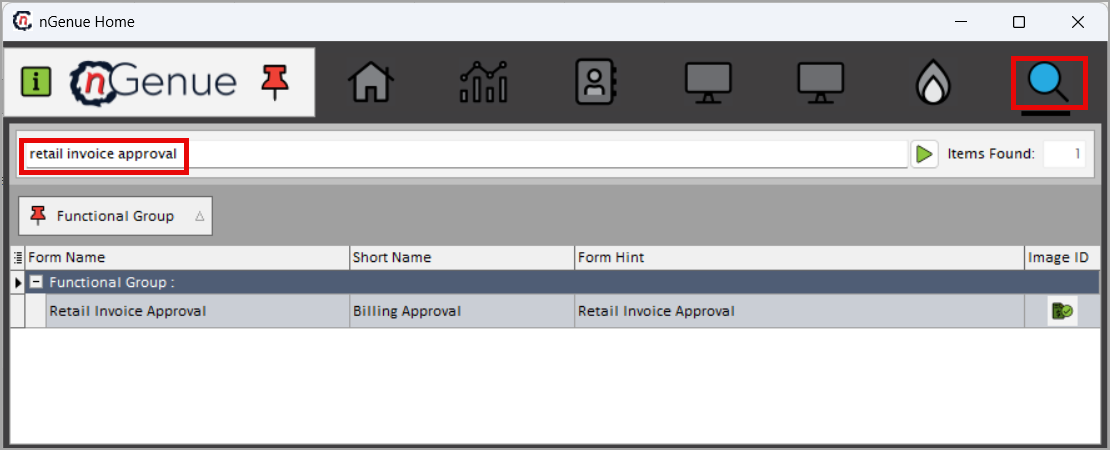
- Click the Search icon and enter retail invoice approval in the search bar.
-
Double-click the Retail invoice approval from the search results to open respective screen.
-
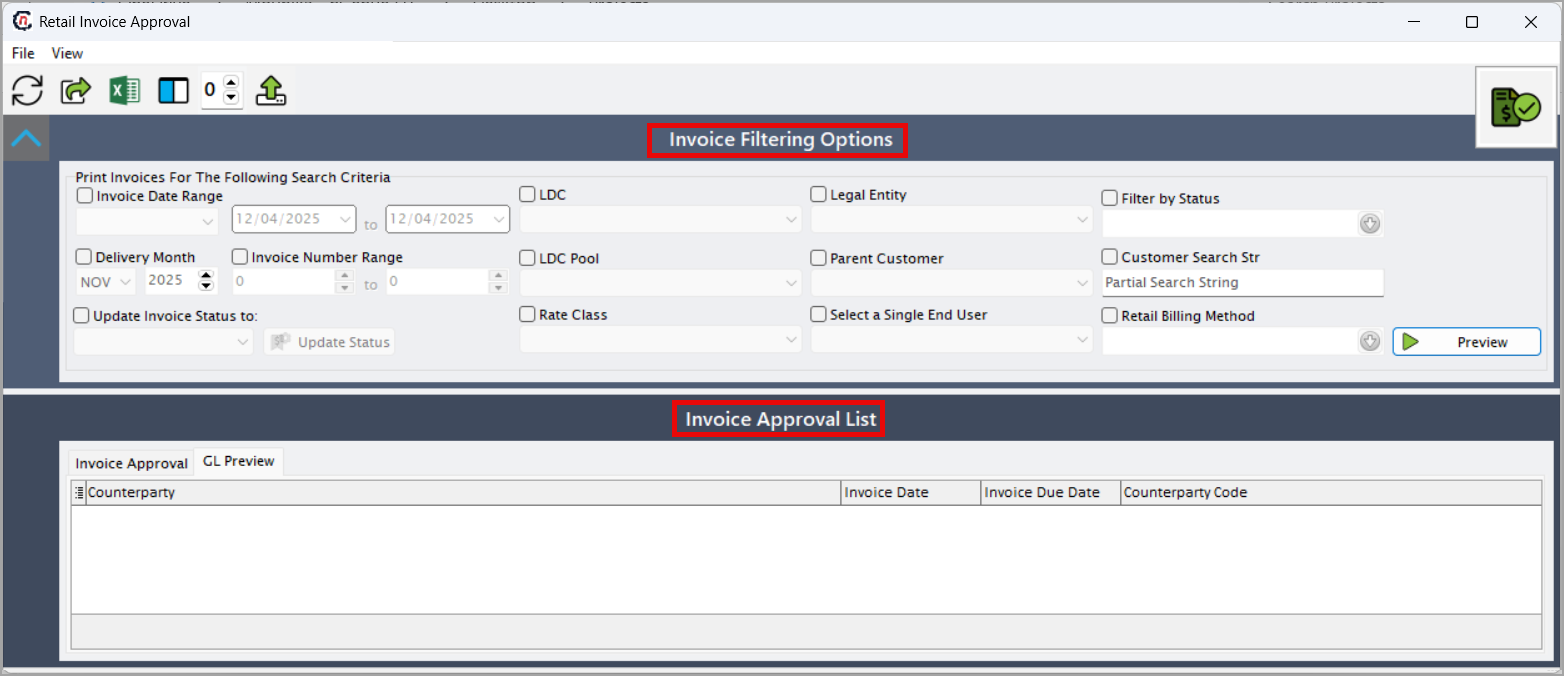
The screen has two main sections:
- Invoice filtering options: Provides a set of filters that allow users to load and narrow down invoices based on specific billing, customer, date, or LDC criteria.
-
Invoice approval list: Displays the loaded invoices and their detailed attributes, enabling users to review, validate, and update invoice statuses before approval.
Step 2: Load the invoice approval list
-
Enable and select the following required fields available in the Invoice filtering options section to print invoices for the following search criteria:
Fields Description Invoice date range Filters invoices by their issue date for a specific billing cycle or batch run. Delivery month Filters invoices by the gas delivery period billed. Invoice number range Loads invoices that fall within a specific invoice number sequence. Update invoice status to Sets the new status (Approved, Ready to Send, Posted) for selected invoices. LDC Filters by Local Distribution Company to view invoices tied to a specific utility region. LDC pool Filters invoices by the LDC’s designated pool or allocation category. Rate class Filters invoices by the assigned billing rate class. Legal entity Filters invoices based on the issuing legal entity. Parent customer Filters by the umbrella or corporate customer linked to end users. Select a single end user Restricts the query to one end user for focused review. Filter by status Filters invoices by their current processing status. Customer search str Searches invoices using a customer name, ID, or keyword. Retail billing method Filters based on the billing method such as actual, estimated, or budget billing. -
Click Preview to load invoices.
Step 3: View invoice approval list
-
After completing the query, the available column fields in the Invoice approval section are listed in table below:
Fields Description Invoice status Shows the invoice's processing state such as Pending, Approved, or Sent. Invoice # Unique invoice identifier used for reference and tracking. Invoice amount Total billed amount including charges, fees, and taxes. Invoice date Date the invoice was created. Due date Required payment due date for the customer. Created by User or system process that generated the invoice. Paid amount Amount the customer has already paid. End user The specific location or customer account receiving service. Parent customer The high-level customer associated with one or more end users. Facility name The facility tied to the delivered service. LDC Local Distribution Company responsible for delivery. LDC pool The LDC pool associated with the billing. Rate class Rate structure applied to determine charges. Legal entity The issuing business entity for the invoice. EU_ID Internal identifier for the end user. Facility_ID Identifier for the facility linked to the invoice. Customer_ID Identifier for the customer record. LDC_ID Internal system ID for the LDC. Retail_billing_status_ID Internal status code for billing workflow. Format_name The invoice template used for generating the document. Report_suffix Additional suffix used for file naming or report tracking. Budget billing setup ID Identifier linking the invoice to budget billing configuration. Is_block_delete Indicates whether invoice deletion is restricted. Is_block_edit Indicates whether invoice editing is restricted. Is_allow_send Indicates whether the invoice is eligible to be sent to the customer. 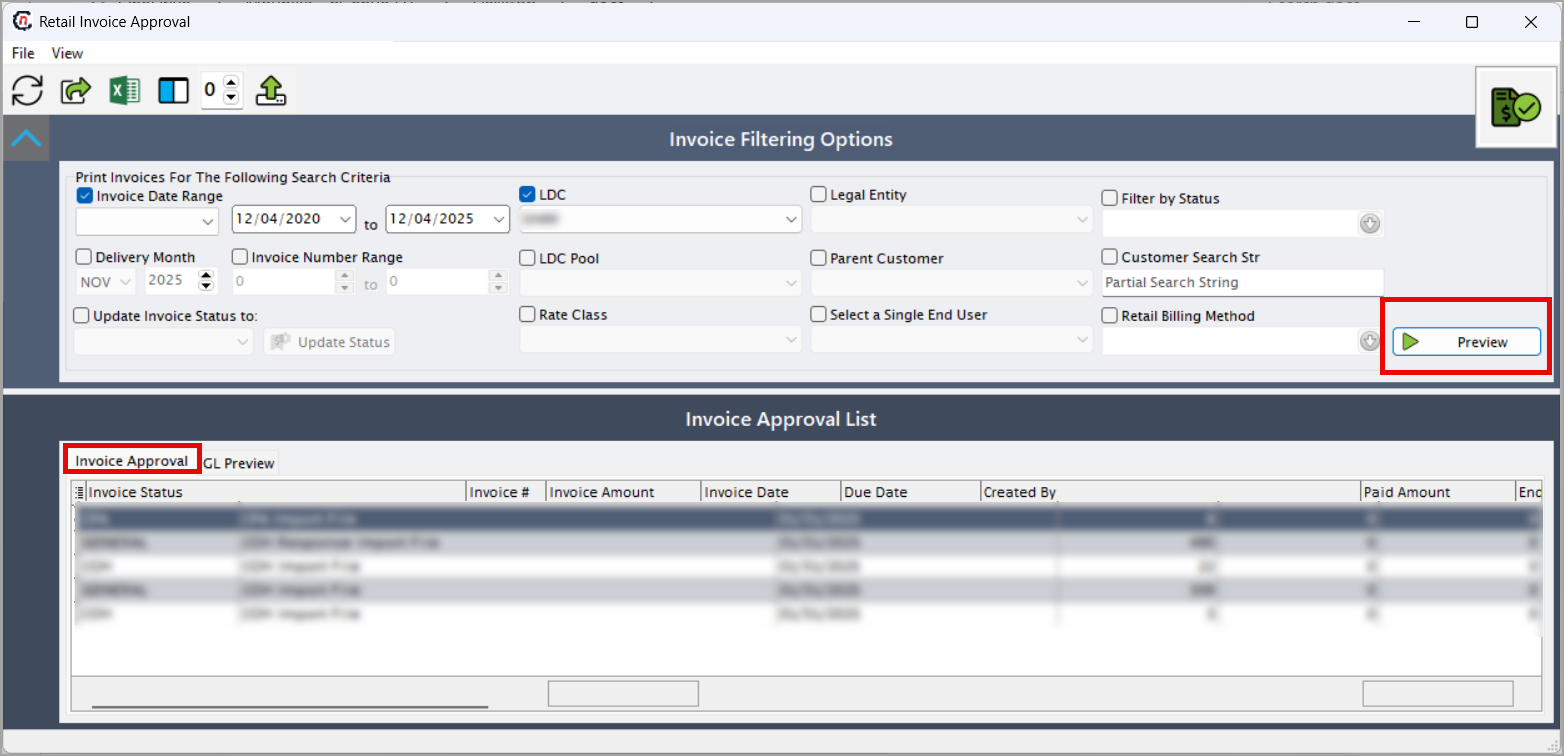
-
The GL Preview shows the accounting entries associated with each invoice:
Field Description Counterparty Entity linked to the GL transaction, usually the billed customer. Invoice date Billing date used for financial period classification. Invoice due date Date used for receivables aging calculations. Counterparty code Accounting reference code for the counterparty. Invoice number Associates the GL entry with its corresponding invoice. Delivery month Represents the period during which gas or service was delivered. Transaction type Indicates whether the GL entry represents a charge, credit, fee, or tax. Line description Narrative description used in accounting and audit reports. Invoice total Full amount represented by this invoice within the GL. Debit Debit amount posted to the GL account. Credit Credit amount posted to the GL account. Account GL account where the transaction is recorded. Customer_ID Accounting system identifier for the customer. EU_ID Identifies the end user tied to the transaction. Tax type ID Identifies the tax category applied to the transaction. Item type ID Defines the billing item or component type. GL acct ID Internal ID mapping to the accounting GL account. State ID Numeric code representing the state jurisdiction. State Full state name tied to tax and regulatory reporting. JE_imbalance Indicates whether the journal entry balances; non-zero values signal errors.
Summary
Retail invoice approval in nGenue allows users to load, review, validate, and finalize invoices before sending them to customers or posting them to the GL. Users apply filter criteria to load relevant invoices, review invoice and GL details, validate accuracy, and update invoice statuses to ensure complete and accurate financial processing. This workflow ensures billing accuracy, reduces errors, strengthens audit controls, and supports compliant financial operations.