Prorate volumes to pool members
The Prorate Volumes to Pool Members screen provides a controlled and auditable mechanism to allocate a pool-level gas volume across individual pool members (end users/accounts) based on a defined proration basis. It ensures that volumes such as usage, nominations, or deliveries are distributed proportionally and consistently across all members of an LDC pool.
This screen is primarily used by pool management, settlements, and billing teams to:
- Allocate pool-level volumes to individual pool members
- Apply consistent proration logic using standardized basis options
- Support accurate downstream billing and settlement
- Ensure transparency and auditability of pool volume distribution
The Prorate Volumes to Pool Members screen serves as a critical allocation step that bridges pool-level operational volumes and member-level financial settlement.
Prerequisites
Before using the Prorate Volumes to Pool Members screen, ensure the following prerequisites are met:
- The user has the add or modify permissions for the Prorate Volumes to Pool Members screen.
- The LDC is configured and active in nGenue.
- One or more LDC pools are defined for the selected LDC.
- Pool members (end users and accounts) are mapped to the pool.
- Source volumes (usage, nominations, deliveries, or projections) are available for the selected period.
- The user has permission to perform pool proration activities.
Procedure to prorate volumes to pool members
Step 1: Navigate to the Prorate Volumes to Pool Members screen
- Log in to the nGenue application.
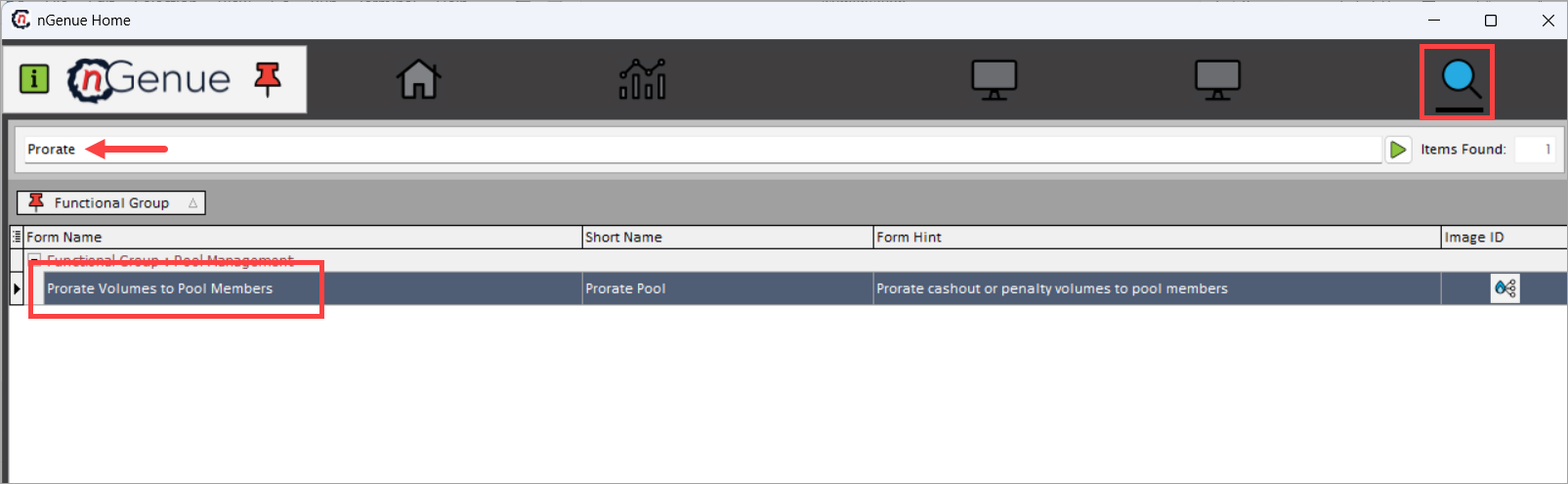
- Click the Search icon and enter Prorate in the search bar.
-
Double-click Prorate Volumes to Pool Members to open the Prorate Configuration (Pool Management) screen.
-
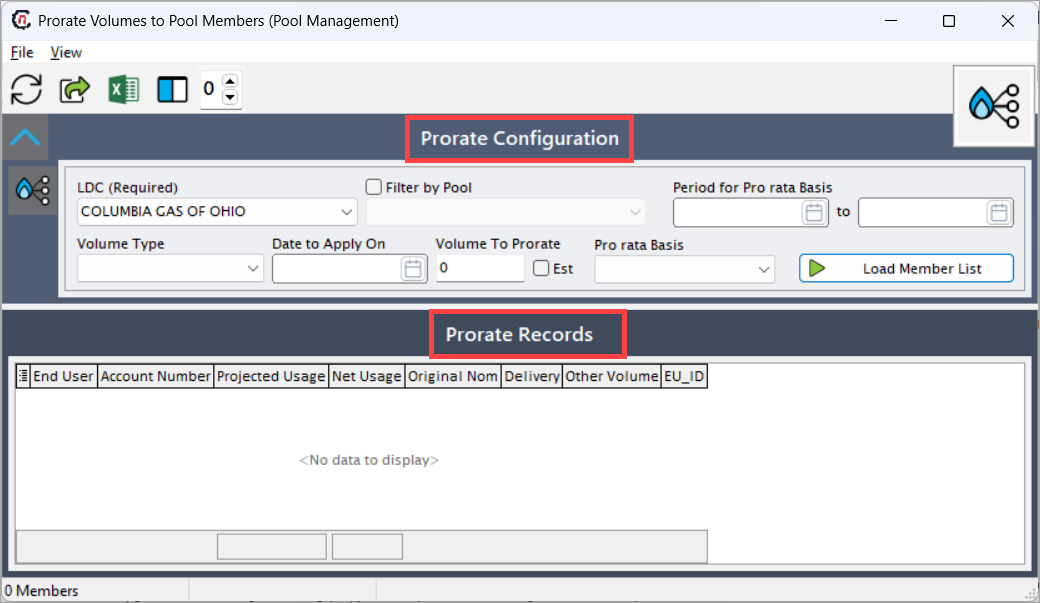
The screen is divided into two primary sections:
- Prorate Configuration: Used to define proration criteria and inputs.
- Prorate Records: Displays pool members and calculated prorated volumes.
Step 2: Define prorate configuration
The Prorate Configuration section controls how the pool-level volume is distributed.
| Fields | Description |
|---|---|
| LDC (Required) | Select the LDC for which pool member volumes will be prorated. Only pools associated with the selected LDC are available. |
| Filter by Pool | Enable this option to restrict proration to a specific pool. |
| Pool | Select the pool whose members will receive the prorated volumes. |
| Period for Pro rata Basis | Enter the start and end dates used to derive the proration basis values. |
| Volume Type | Select the type of volume being allocated (for example, usage or delivery). |
| Date to Apply On | Enter the gas day on which the prorated volumes should be applied. |
| Volume to Prorate | Enter the total pool-level volume that must be allocated across pool members. |
| Est | Select this checkbox if the entered volume represents an estimated value. |
| Pro rata Basis | Select the method used to proportionally distribute the volume across pool members. The options are: Projected Usage: Distributes the volume based on projected usage values for each pool member. Net Usage: Distributes the volume based on actual net usage recorded for pool members. Original Nomination: Distributes the volume based on original nomination quantities. Marketer Delivery: Distributes the volume based on marketer delivery volumes. |
After completing the configuration, click Load Member List to retrieve eligible pool members.
Step 3: Review prorated pool member records
The Prorate Records section displays pool members and their calculated share of the prorated volume.
| Fields | Description |
|---|---|
| End User | Displays the end user associated with the pool member. |
| Account Number | Displays the account number tied to the end user. |
| Projected Usage | Displays projected usage used as the proration basis (if applicable). |
| Net Usage | Displays actual net usage used for proration. |
| Original Nomination | Displays original nominated volumes. |
| Delivery | Displays delivery volumes associated with the pool member. |
| Other Volume | Displays any additional volume contributing to the proration calculation. |
| EU_ID | Displays the internal identifier for the end user. |
Once loaded:
- The system calculates each member’s proportional share automatically.
- The sum of all prorated values equals the Volume to Prorate.
- Prorated values are applied to the selected Date to Apply On.
How proration is calculated
Proration is calculated using the following methodology:
- The system determines the total basis volume across all eligible pool members.
- Each member’s allocation is calculated as:
- Calculated volumes are applied to the specified gas day.
- System rounding rules are applied to ensure consistency and balance.
This approach ensures fair, consistent, and auditable distribution of pool-level volumes.
Key points
- LDC selection is mandatory to perform proration.
- Pool filtering limits allocation to a specific pool.
- The selected pro rata basis directly determines allocation results.
- The Volume to Prorate represents the total pool-level volume being distributed.
- Prorated volumes flow into downstream billing, settlement, and reconciliation processes.
Summary
The Prorate Volumes to Pool Members screen is a critical allocation feature within Pool Management that enables accurate and transparent distribution of pool-level gas volumes to individual pool members. By applying standardized proration logic and providing detailed member-level visibility, this screen ensures consistency, auditability, and accuracy across pool settlement and billing workflows.