Print statement
A statement is a formal financial report generated in nGenue that summarizes billing activity for customers over a defined period. The Print Statement report is used by operations, billing, and finance teams to review charges, payments, balances, and transactional activity tied to retail customers and facilities.
This report is typically generated after pricing, pools, and rate schedules are finalized for a billing period. It supports customer invoicing, internal reconciliation, agency reporting requirements, and audit review. The filters selected in the Report options section directly control which customers, facilities, and transactions appear in the statement output.
Prerequisites
Before working on the Print statement (Reports) screen, ensure the following prerequisites are met:
- Ensure the nGenue application is installed and use valid login credentials to log into the application.
- Configure the user permissions including User type, Security user, Security group, Security assign user, and Security assign permissions in their respective screens to enable access to the Print statement (Reports) screen.
- Ensure the retail rate schedules, Local Distribution Company (LDC), pools, and
Procedure to print statement report
- Log in to the nGenue application.
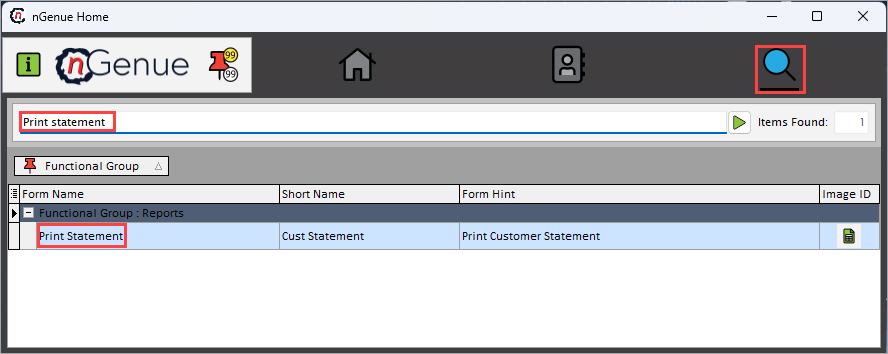
- Click the Search icon and enter Print statement in the search bar.
-
Double-click the Print statement from the search results to open respective screen.
-
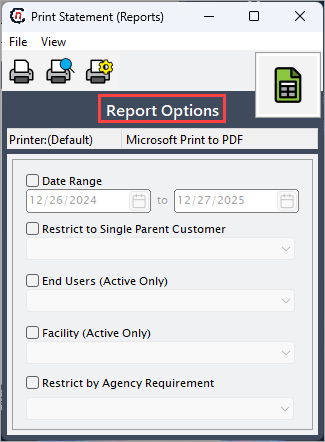
In Print statement (Reports), Report options section allows to specify report filters, delivery period, and output preferences.
-
Complete the required fields available in the Report options section as listed in the table below:
Fields Description Date range Select the billing period for which the statement is generated. The system retrieves all applicable charges, payments, and balances that fall within the selected date range. Restrict to single parent customer Select the parent customer to limit the statement output to one parent customer. When specified, only accounts and facilities associated with the selected parent customer are included in the report. End users (Active only) Select this checkbox to include only end users who are active during the selected reporting period. Facility (Active only) Select this to include a detailed breakdown of each pricing component in the generated output. Restrict by agency requirement Select this to print the organization’s letterhead logo on the report. Useful for official customer-facing documents. 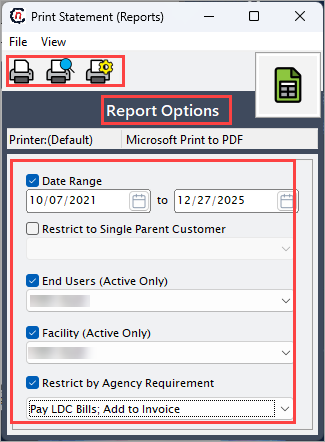
-
Select any of the printing options in the top header to configure printing, preview, print, as described in the table below:
Icons Icon name Description 
Print Click Print icon to print the statement report. 
Print preview Click Print preview icon to view the statement report. 
Printer setup Click Printer setup icon to configure printing settings. -
Click Printer setup to configure print settings, specify the name, size, orientation, properties and network.
- Click Ok to save the configuration.
- Click Cancel to discard changes.
-
Click Print preview to view the report before printing to make any required adjustments or changes.
- Click Print to generate the statement report for the selected date range and filters.
Summary
The Print statement report provides a consolidated financial view of customer billing activity within a defined period. By carefully selecting report options such as date range, customer scope, facility status, and agency requirements, users can generate accurate and compliant statements for billing, reconciliation, and customer communication. This report plays a critical role in the operational and financial workflows within nGenue.