Print sales contract list
A sales contract list is a reporting view that provides a consolidated list of sales contracts configured in the system based on selected business, customer, contract, and date criteria. This report is commonly used by sales, contract administration, and management teams to review active and inactive contracts, monitor contract coverage, track expirations, and support audits or operational reviews.
The Print sales contract list report helps users quickly identify contracts by LDC, pool, rate, contract type, status, and assigned representatives. It is especially useful for contract lifecycle management, renewal planning, and validating contract data across customers and facilities.
Prerequisites
Before working on the Print sales contract list (Reports) screen, ensure the following prerequisites are met:
- Ensure the nGenue application is installed and use valid login credentials to log into the application.
- Configure the user permissions including User type, Security user, Security group, Security assign user, and Security assign permissions in their respective screens to enable access to the Print sales contract list (Reports) screen.
Procedure to print sales contract list report
- Log in to the nGenue application.
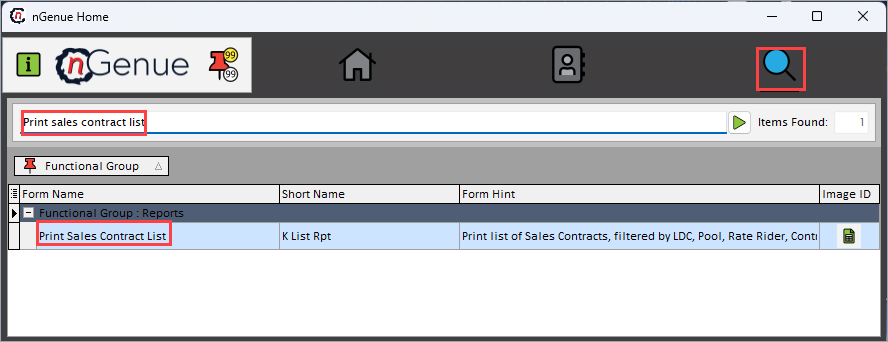
- Click the Search icon and enter Print sales contract list in the search bar.
-
Double-click the Print sales contract list from the search results to open respective screen.
-
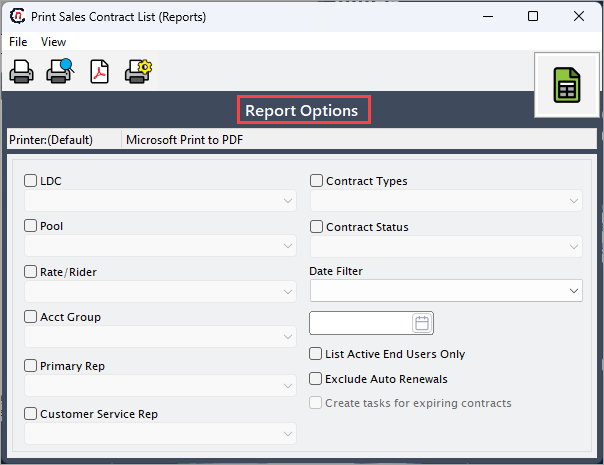
In Print sales contract list (Reports), Report options section allows to specify report filters, delivery period, and output preferences.
-
Enable and select the required fields available in the Report options section as listed in the table below:
Fields Description LDC Select the LDC to restrict the report to contracts associated with the chosen utility. Pool Select the pool to limit the report to contracts priced or delivered under the specified pool. Rate/rider Select the rate schedule or rider to include only contracts assigned to the selected rate structure. Acct group Specify the the account group to filter contracts associated with a specific customer. Primary rep Select the gas pool that should be used for pricing calculations in the generated report. Customer service rep Select the customer service representative to filter contracts supported by the specified user. Contract types Select the contract type to include in the report. Contract status Select the contract status to control whether active, expired, pending, or terminated contracts appear in the report. Date filters Choose the date filter to be applied either All dates, Contracts covering specific date, Contracts expiring between. List active end users only Select this checkbox to include only contracts linked to active end users. Exclude auto renewals Select this checkbox to exclude contracts that are set to automatically renew. Create tasks for expiring contracts Select this checkbox to automatically create follow-up tasks for contracts nearing expiration based on the report results. 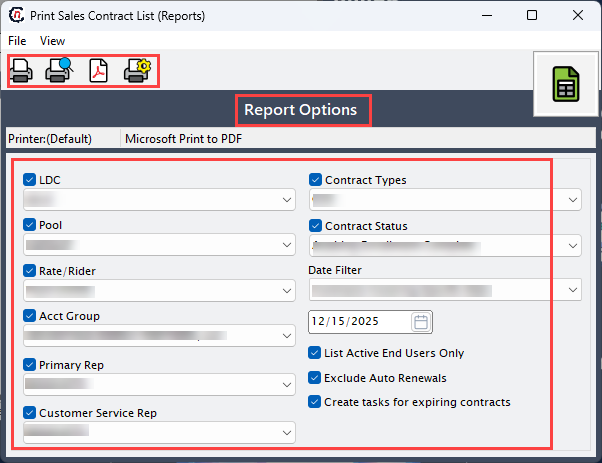
-
Select any of the printing options in the top header to configure printing, preview, print, as described in the table below:
Icons Icon name Description 
Print Click Print icon to print the sales contract list report. 
Print preview Click Print preview icon to view the sales contract list report. 
Show report in PDF format Click Show report in PDF format icon to display the report in PDF format. 
Printer setup Click Printer setup icon to configure printing settings. -
Click Printer setup to configure print settings, specify the name, size, orientation, properties and network.
- Click Ok to save the configuration.
- Click Cancel to discard changes.
-
Click Print preview to review the report and confirm that the selected filters and data are correct.
- Click Show report in PDF format icon to produce a PDF version of the sales contract list for email or electronic sharing.
- Click Print to generate and print the sales contract list based on the selected criteria.
Summary
The Print sales contract list report provides a structured and filtered view of sales contracts across LDCs, pools, customers, and contract types. By using the available filters and output options, users can efficiently review contract status, identify expiring agreements, support renewal planning, and ensure contract data accuracy across the organization.