Configure settlement status
Settlement status definition screen allows configuration of settlement statuses used to define the workflow and approval process for wholesale settlement activities. Each status represents a stage in the settlement lifecycle such as initiated, reviewed, approved, or distributed and determines how settlements progress through various operational and approval checkpoints. Proper configuration ensures accurate tracking, compliance with workflow rules, and streamlined settlement approvals.
Prerequisites
Before working on the Settlement status definition screen, ensure the following prerequisites are met:
- Ensure the nGenue application is installed and use valid login credentials to log into the application.
- Configure the user permissions including User type, Security user, Security group, Security assign user, and Security assign permissions in their respective screens to enable access to the Settlement status definition screen.
- Ensure the Deal management, Pipeline, Counterparty and Chart of accounts are properly configured and active.
- Ensure the rate schedules are defined and related billing and pricing data has been finalized.
Procedure to settlement status
Step 1: Navigate to Settlement status definition screen
- Log in to the nGenue application.
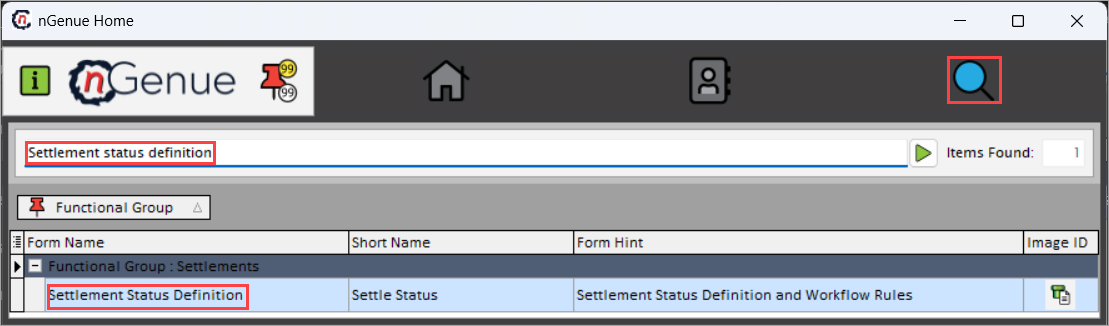
- Click the Search icon and enter Settlement status definition in the search bar.
-
Double-click Settlement status definition to open respective screen.
-
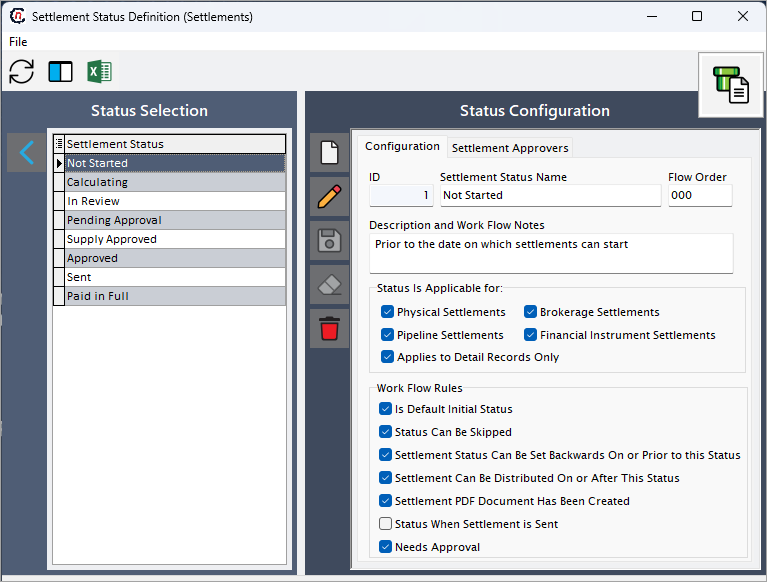
Settlement status definition (Settlements) screen has two sections:
- Status selection: Displays all existing settlement statuses configured in the system. Use this section to view, create and manage settlement status record.
-
Status configuration: Provides detailed setup and configuration options for each selected settlement status. This section includes the following tabs:
- Configuration: Defines general properties such as status name, flow order, description, and workflow rules.
-
Settlement approvers: Assigns users who are authorized to review and approve settlements at this particular status level.
Step 2: Configure settlement status
-
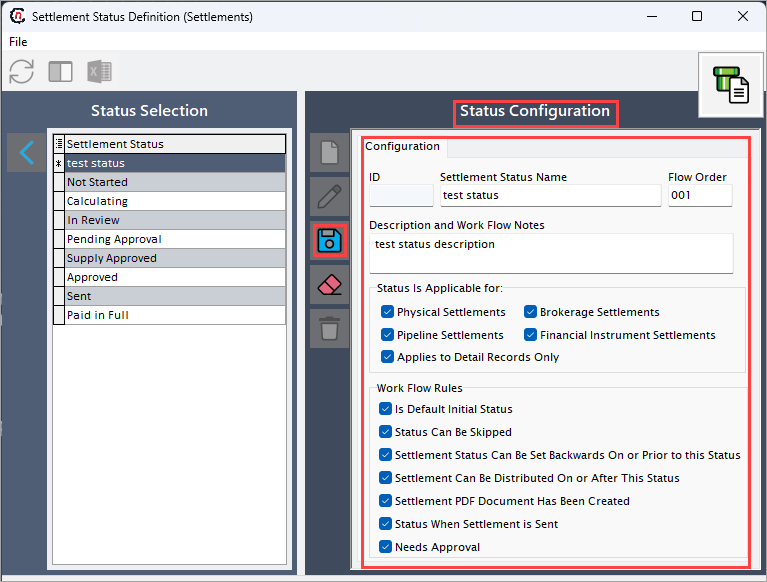
Click the Add a settlement status record icon to configure settlement status.
-
Complete the required fields mentioned in the table below:
Fields Description ID Unique identifier for the settlement status. Settlement status name Specifies the display name of the settlement status in workflows. Flow order Determines the sequence in which this status appears in the settlement process. Description and work flow notes Provides internal notes or detailed explanation about the purpose of this status. Status is applicable for
Fields Description Physical settlements Applies this status to physical settlement transactions. Pipeline settlements Enables use of this status for pipeline settlement workflows. Brokerage settlements Applies this status to brokerage-related settlements. Financial instrument settlements Enables this status for financial instrument settlements such as swaps or futures. Applies to detail records only Restricts the status to detailed line-level records within settlements. Work flow rules
Fields Description Is default initial status Defines this as the first status in the settlement workflow. Status can be skipped Allows the workflow to bypass this status if needed. Settlement status can be set backwards on or prior to this status Permits reverting settlements to this status when required. Settlement can be distributed on or after this status Enables settlement distribution once this status is reached. Settlement PDF document has been created Indicates that the settlement report or PDF has been generated. Status when settlement is sent Specifies the status automatically applied when the settlement is sent. Needs approval Marks whether this status requires approval from designated approvers. -
Click Save changes to current settlement status icon to apply the changes.
Step 3: Configure settlement approvers
-
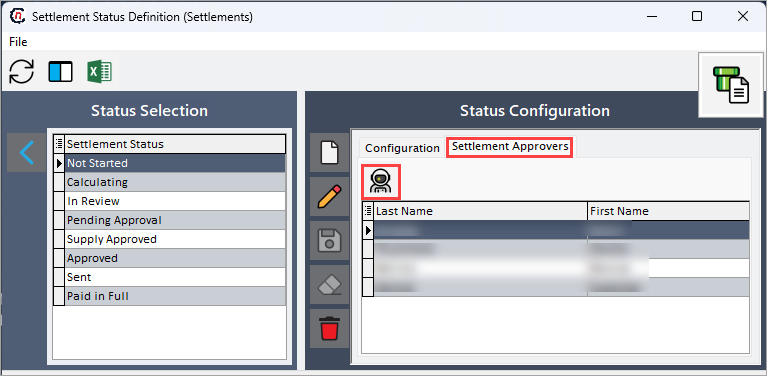
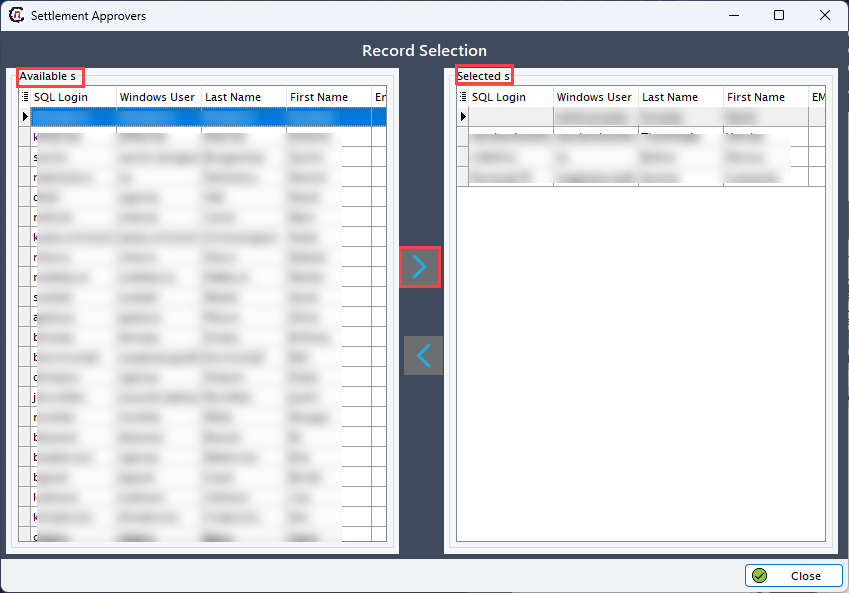
In the Settlement approvers section, click the Add user icon to assign approvers for the settlement status.
-
Select the user from the Available(s) users, then click the forward arrowhead (❯) icon to move them to Selected users section.
-
To remove an approver, click the backward arrowhead (❮) icon to move back selected user to Available user.
-
Only the users assigned in this section will have access to approve and review settlements at this specific status level.
Summary
The Settlement status definition screen allows configuration of settlement workflow stages, rules, and approval assignments essential for accurate and controlled wholesale settlement processing. By defining appropriate statuses and approvers, the organization ensures that all settlements move through a transparent, auditable, and compliant review process.