Configure sales contract type
Contract types define how transactions post to General Ledger accounts, how revenue and expenses are reported, and whether broker fees are included for wholesale and financial contracts. They provide the rules that govern how deals are processed, settled, reported, and accounted for.
Sales contract types are applied whenever deals are created, priced, invoiced, or settled. The selected contract type determines the accounting configuration, the associated business unit, and the integration mapping to systems such as ETRM, CRM, GL, or sales portals.
Prerequisites
Before working on the Sales contract type screen, ensure the following prerequisites are met:
- Ensure the nGenue application is installed and use valid login credentials to log into the application.
- Configure the user permissions including User type, Security user, Security group, Security assign user, and Security assign permissions in their respective screens to enable access to the Sales contract type screen.
- Ensure that GL accounts are configured in the Chart of accounts.
- Ensure the business unit is configured in the Internal book structure.
Procedure to configure contract type
Step 1: Navigate to Sales contract type screen
- Log in to the nGenue application.
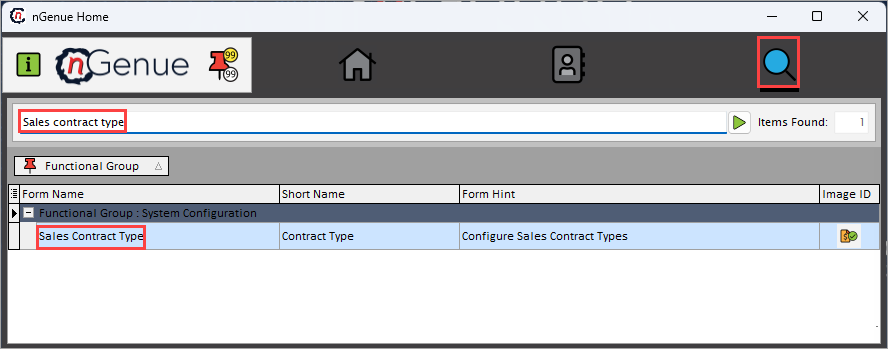
- Click the Search icon and enter Sales contract type in the search bar.
-
Double-click the Sales contract type from the search results to open respective screen.
-
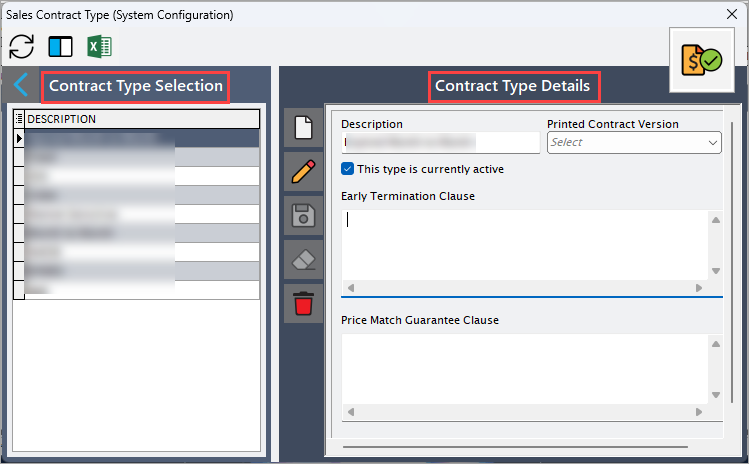
Sales contract type (System configuration) screen has two sections:
- Contract type selection: This section provides the list of existing contract types.
-
Contract type configuration: This section allows to define parameters to configure new contract types.
Step 2: Configure contract type
The following table lists the icons available on the Contract type details section and their respective functions:
| Icons | Icon name | Description |
|---|---|---|
 |
Add a contract type record | Opens a new record form to create a sales contract type entry. |
 |
Edit current contract type | Opens the selected record for editing. |
 |
Save changes to current contract type | Saves the modifications made to the current record. |
 |
Cancel changes to current contract type record | Discards unsaved changes made to the record. |
 |
Delete current contract type record | Permanently removes the selected sales contract type record. |
Step 2.1 : Add a sales contract type
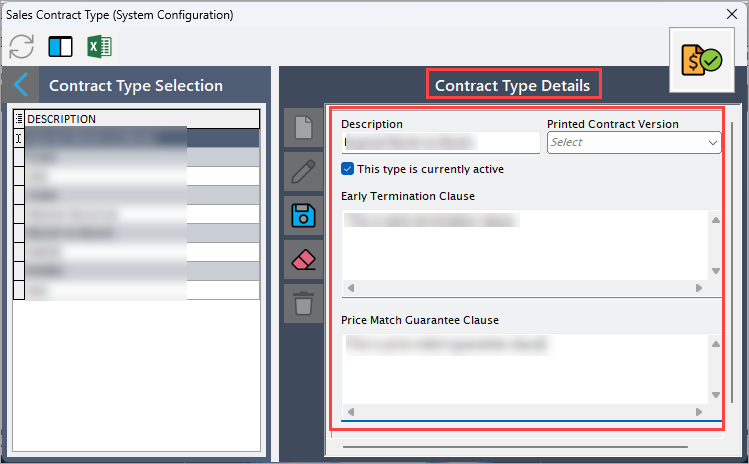
- In the Contract type details, click the Add a contract type record icon to create a new contract language record.
-
Complete required fields available in the Contract type details section that are listed in the table below:
Fields Description Sales region ID It is a unique identifier for the sales region associated with the contract type. Code Specify the internal reference code for the contract type. Sales region name Specify the descriptive name for the contract type. Business unit Specify the business unit that settles deals created with this contract type. GL expense account Specify the GL account that is used to post contract related expenses. GL A/P account Specify the accounts payable GL account used when the contract type results in payable transactions. GL A/R account Specify the accounts receivable GL account used for revenue postings associated with the contract type. Description Provide additional description regarding the contract type. Integration points
Fields Description ETRM ID Specify the ETRM ID to map deal types for trade and risk reporting. CRM ID Specify the CRM ID for sales contract mapping. GL ID Specify the identifier linking the contract type to external financial systems for accounting. Sales portal ID Specify the identifier assigned to the sales portal tied to the contract type. -
Click Save changes to current contract type to store the configuration.
Step 2.2 : Edit a contract type record
- Click the Edit current contract type icon to modify the selected sales area.
- Update necessary details and click Save changes to current contract type to apply changes.
Step 2.3 : Delete a contract type record
Click the Delete current contract type record icon to permanently remove the sales area record
Summary
Sales contract types define how deals are classified, accounted for, and integrated across nGenue and external systems. By properly configuring contract types especially GL accounts and broker fee related mappings organizations ensure accurate settlement, correct financial posting, and consistent reporting across all sales, wholesale, and financial transactions.